ADB Automation vs Accessibility Services: Technical Trade-offs
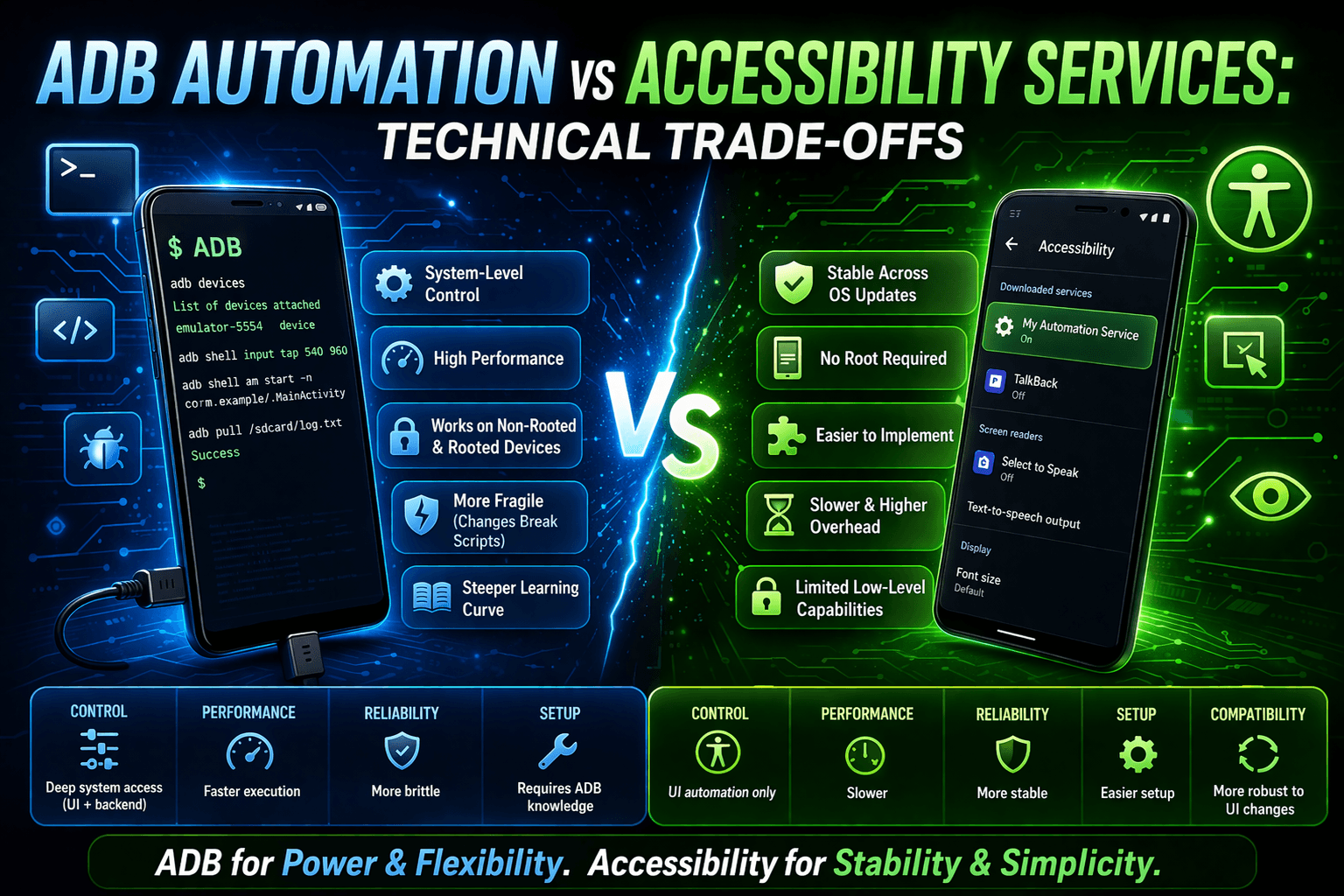
Android automation can be achieved in multiple ways, but two of the most commonly discussed techniques are ADB automation and Accessibility Services.
Both approaches are powerful, widely used, and operate at very different layers of the Android system.
People compare ADB automation and Accessibility Services because they solve similar problems by automating actions on Android devices, but they differ significantly in control depth, UI awareness, stability, speed, and scalability.
This guide explains how each approach works, where it performs best, and where it falls short.
What Is ADB Automation?
ADB, which stands for Android Debug Bridge, uses shell commands to control Android devices over USB or TCP/IP.
It communicates directly with the Android operating system and does not depend on the visible UI.
ADB automation is commonly used for installing and uninstalling applications, granting permissions, triggering intents, collecting logs, and running shell commands.
How ADB Works
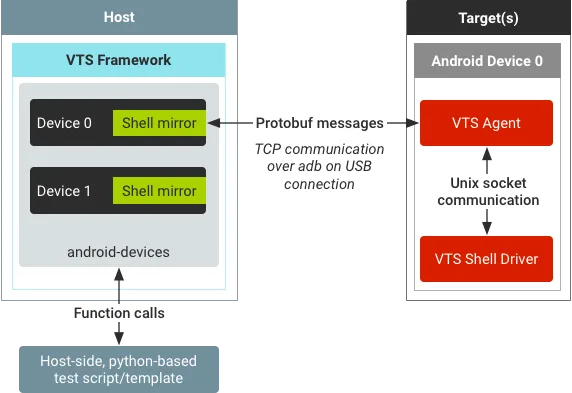
ADB operates through an ADB client, an ADB server, and an ADB daemon running on the device.
Commands are sent directly to the system layer.
Key Capabilities
ADB supports shell-command execution, tap, swipe, and key events through input commands, app lifecycle control, logcat monitoring, and system-level operations.
Pros
One of the biggest strengths of ADB automation is that it executes extremely fast.
It does not depend on UI structure, is ideal for setup and configuration tasks, and can continue working even when the UI is unstable.
Cons
The downside is that ADB has limited UI awareness.
Input commands can become fragile for more complex flows, debugging access is required, and the behaviour is less human-like.
ADB is powerful, but it does not understand the meaning of UI elements.
What Are Accessibility Services?
Accessibility Services are Android operating-system features originally designed to help users interact with devices through screen readers, voice control, and assistive tools.
Automation systems can use these services to observe the UI hierarchy, detect elements, and perform structured actions.
Accessibility-based automation is commonly used for social media workflows, form filling, navigation, and UI-driven automation.
How Accessibility Automation Works
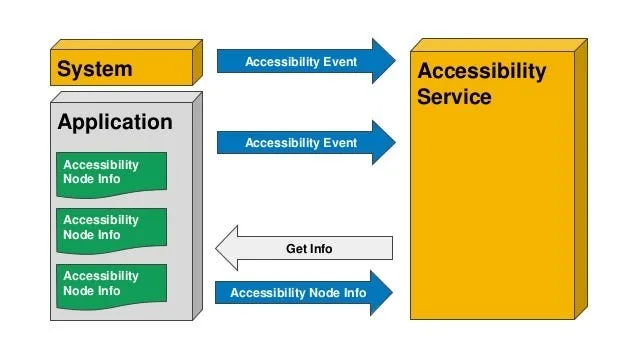
Accessibility automation follows an event-driven loop where UI changes trigger an accessibility event, the service reads the UI tree, and then the action is executed.
Unlike ADB, Accessibility Services understand what an element is instead of simply knowing where it is located.
Key Capabilities
Accessibility Services provide access to the UI hierarchy, event-based interaction, gesture simulation, and screen-content detection.
Pros
Accessibility-based automation has high UI awareness, creates more human-like behaviour, works better for complex user flows, and does not require ADB once it has been enabled.
Cons
The main downside is that it requires sensitive permissions.
It can also be restricted by OEM changes or operating-system updates, is slower than ADB for raw commands, and is more visible to application-level scrutiny.
Accessibility Services are context-aware, but they operate at a higher layer.
Feature-by-Feature Comparison
Control & Precision
ADB provides strong system control but weak UI awareness.
Accessibility Services provide strong UI awareness but more limited system control.
Stability
ADB is more stable for system-level tasks.
Accessibility Services can break when UI layouts change.
Detection & Realism
ADB produces less human-like input.
Accessibility Services mimic real user interaction more naturally.
Maintenance
ADB requires fewer UI adjustments.
Accessibility Services require ongoing UI maintenance.
Security & Permissions
ADB requires debugging access.
Accessibility Services require sensitive operating-system permissions.
Scenario-Based Recommendations
Scenario 1: Device Setup & System Configuration
The best choice is ADB automation.
It provides direct system access.
Accessibility Services cannot install packages or change system configuration.
Scenario 2: Automating UI Navigation & Form Input
The best choice is Accessibility Services.
They provide structured UI detection.
ADB input commands can break when layouts change.
Scenario 3: Combined System & UI Workflows
The best choice is using both ADB and Accessibility Services together.
ADB handles setup while Accessibility Services handle interaction.
The trade-off is increased complexity.
Scenario 4: Large-Scale Mobile Automation
An alternative approach here is Appilot.
Appilot is useful because it provides real-device execution, structured UI interaction, and workflow scaling.
ADB lacks structured UI awareness while Accessibility Services require permission management.
Head-to-Head Pros and Cons
ADB Automation Advantages
ADB automation is fast, provides direct system control, is reliable for setup tasks, and has minimal UI dependency.
ADB Limitations
ADB has poor UI awareness, becomes fragile for complex flows, and requires debug mode.
Accessibility Services Advantages
Accessibility Services provide high UI awareness, structured interaction, more human-like behaviour, and are ideal for workflow-based automation.
Accessibility Services Limitations
They require sensitive permissions, are slower than system commands, and often need updates when the UI changes.
Appilot Advantages (Use-Case Specific)
Appilot is useful for real Android-device execution, scalable UI workflows, and device-level isolation.
Appilot Limitations
It is not a system-level replacement, is Android-only, and is built on top of Accessibility interaction.
Final Verdict
ADB automation and Accessibility Services are not direct competitors.
They operate at different layers.
ADB focuses on system control while Accessibility Services focus on UI interaction.
Most mature mobile automation systems use both approaches together.
Understanding this layered model makes it easier to build automation that is faster, more stable, easier to maintain, and more scalable.
FAQs
Is ADB faster than Accessibility?
Yes. It operates at a lower system layer.
Can Accessibility replace ADB?
No. It cannot perform many system-level tasks.
Are Accessibility Services risky?
They require sensitive permissions and may be restricted by OEM policies.
Can both methods be combined?
Yes. Many production systems use ADB for setup and Accessibility for UI execution.
Which is better for beginners?
Accessibility-based automation is easier for UI workflows, while ADB requires more technical understanding.