ADB Automation vs ADB-Free Automation: Why Appilot's Approach Wins
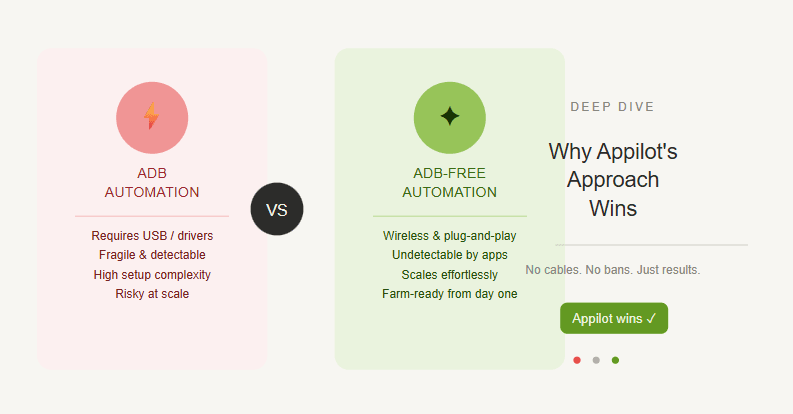
ADB automation has been one of the most common ways to control Android devices for testing, scraping, app workflows, and mobile automation. Developers use it because it gives direct command-line access to Android devices, making it possible to install apps, tap screens, pull logs, run scripts, and control devices from a computer.
For small technical projects, ADB can be useful. If you are testing one device on your desk, writing a quick script, or debugging an Android app, ADB gives you a lot of control.
But the moment you try to scale automation across many devices, ADB starts becoming painful. Cables disconnect. Drivers break. Devices stop responding. Battery drain becomes a problem. Laptops need to stay awake. Remote control becomes messy. What works for one device can become unstable with ten, twenty, or fifty devices.
That is where ADB-free automation becomes more practical.
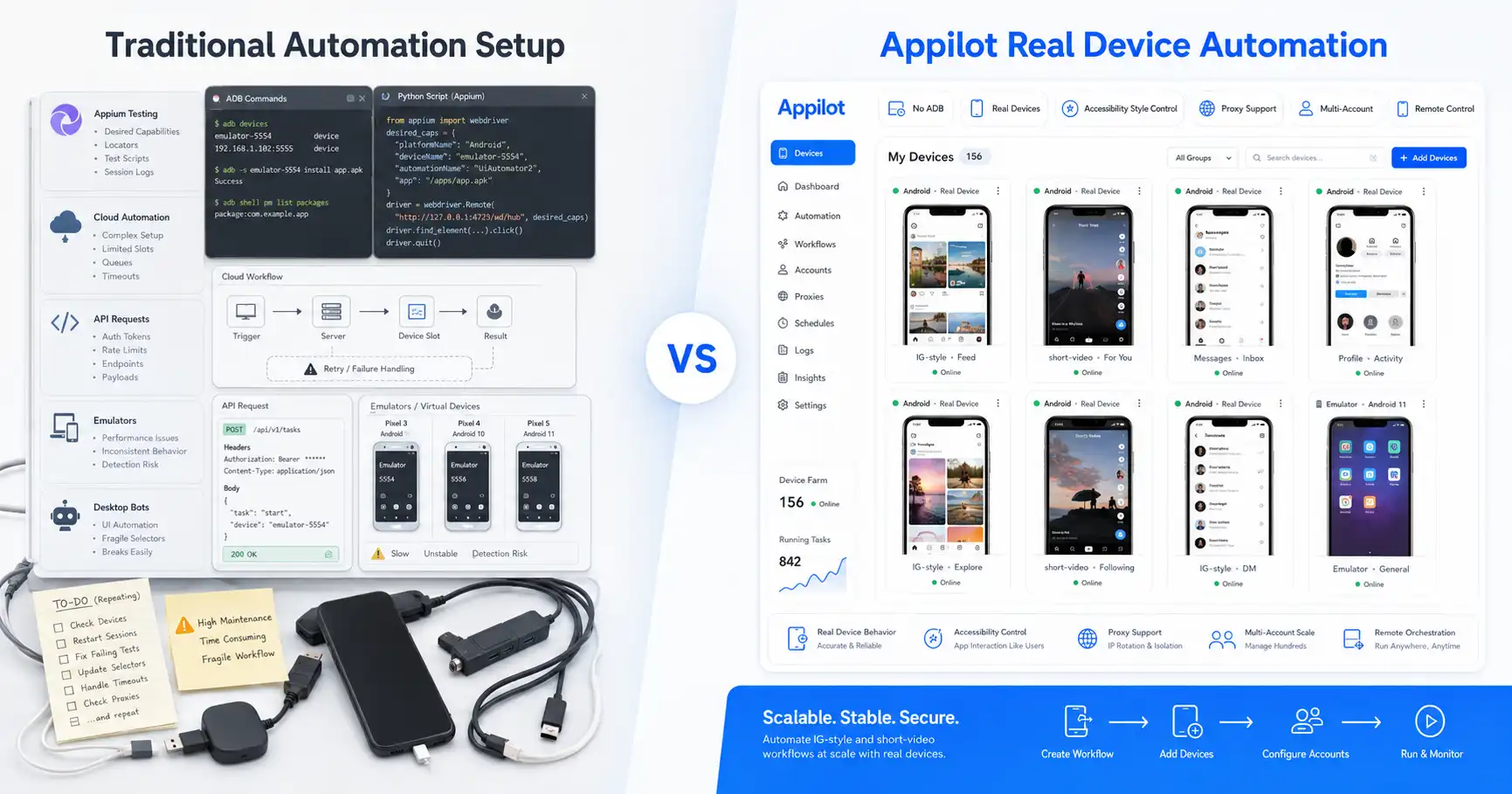
Appilot takes an ADB-free approach by running bots on real Android devices and emulators through a web dashboard. Users do not need to keep a laptop connected, do not need to manage USB cables, and do not need to fight with ADB setup just to run automation.
This blog compares ADB automation vs ADB-free automation and explains why Appilot’s approach is better for social media bots, phone farm operators, agencies, and multi-account automation workflows.
What Is ADB Automation?
ADB automation means using Android Debug Bridge to control Android devices from a computer. ADB allows a machine to communicate with an Android phone, tablet, or emulator through command-line instructions.
With ADB, a user can install APKs, start apps, simulate taps, send text, capture screenshots, pull files, push files, read logs, restart services, and perform many device-level actions.
That makes ADB useful for developers, QA engineers, Android testers, and technical automation teams. If someone is building or testing Android apps, ADB can be extremely helpful because it gives low-level access to the device.
The problem is that ADB was not designed to be the smoothest operational layer for non-technical automation users. It often requires debugging permissions, device authorization, USB or network setup, drivers, command-line knowledge, and constant troubleshooting.
For one device, that may be acceptable. For a phone farm or social media automation setup, it quickly becomes a bottleneck.
What Is ADB-Free Automation?
ADB-free automation means running mobile automation without depending on Android Debug Bridge as the main control method.
Instead of keeping devices connected to a laptop and sending commands through ADB, an ADB-free system uses another execution layer to run automation on Android devices or emulators.
Appilot uses this kind of approach. Bots run on real Android devices and emulators, while users manage them through a web dashboard. The automation can interact with mobile apps through Android-based workflows instead of requiring users to write ADB commands or keep USB connections alive.
This makes the workflow easier for operators who care about results, not debugging infrastructure. They can launch bots, monitor devices, control workflows, and manage accounts remotely without turning their laptop into the center of the whole operation.
ADB-free automation is especially useful for social media bots because platforms like Instagram, TikTok, Threads, Snapchat, Telegram, YouTube, Reddit, Discord, and LinkedIn often require app-based behavior. Users need stable mobile workflows, not constant cable and driver management.
Appilot’s ADB-Free Approach
Appilot is a social media automation platform that runs bots on real Android devices and emulators through a remote web dashboard.
Instead of asking users to connect devices through ADB, Appilot gives them a cleaner way to manage mobile automation. Users can control bots remotely, run workflows inside Android environments, and avoid common ADB problems like device disconnects, driver conflicts, laptop dependency, and cable instability.
This is especially useful for phone farm operators and agencies. A phone farm operation is not just one device. It may involve many accounts, many apps, many proxies, and many devices running continuously.
In that environment, every weak point matters. If automation depends on a laptop, a USB cable, a driver, and a fragile ADB session, the operation becomes harder to manage.
Appilot removes that dependency. The user manages automation from the dashboard, while bots run where they should run: inside Android environments.
Why ADB Automation Becomes Painful at Scale
ADB automation works well when the setup is small and technical. The problems start when the setup becomes operational.
A single device connected to a laptop may behave fine. But once multiple devices are involved, ADB introduces more failure points. One cable may disconnect. One driver may stop working. One device may need reauthorization. One laptop may sleep. One USB hub may fail. One automation run may stop because the device suddenly appears offline.
This is why ADB is not ideal for large social automation workflows. Operators do not want to spend their day checking whether a device is still authorized or whether a cable is loose.
Battery drain is another common problem. Devices connected through debugging workflows can behave differently over long sessions, especially when they are constantly controlled, charged, disconnected, or kept awake.
Remote access also becomes harder. If the control layer depends on one local machine, the user needs access to that machine to fix issues. That creates a fragile setup for agencies and teams.
The more devices you add, the more ADB feels like infrastructure overhead instead of automation infrastructure.
Why ADB-Free Automation Is Easier to Manage
ADB-free automation is easier because it removes the most annoying parts of device control from the user’s daily workflow.
Instead of managing command-line sessions, drivers, USB connections, device authorizations, and local scripts, users can manage automation through a dashboard. This is closer to how modern teams expect software to work.
Appilot makes this especially useful for non-technical users. A marketer, agency operator, or phone farm manager should not need to understand ADB commands just to run an Instagram bot or TikTok workflow.
They should be able to choose a bot, connect the device environment, configure the workflow, and monitor results remotely.
ADB-free automation also makes collaboration easier. A team can access the dashboard and manage workflows without needing physical access to the laptop connected to the devices.
For long-running automation, this is a major advantage.
Real Android Automation Without ADB
The strongest part of Appilot’s approach is that it still uses Android environments without forcing users to manage ADB.
That matters because the goal is not to avoid Android. The goal is to avoid the fragile control layer that makes Android automation difficult at scale.
Appilot runs bots on real Android devices and emulators, which means automation can happen inside mobile apps where real users normally interact. Bots can move through app interfaces, tap buttons, scroll screens, type messages, wait between actions, and follow app workflows.
This is different from desktop-based automation, browser scripts, or simple API workflows. For mobile-first platforms, real app behavior matters.
Appilot gives users that real Android workflow while removing the need to control everything through ADB.
That combination is what makes the approach useful for social media automation.
ADB Automation for Developers vs Automation Operators
ADB still has a place. It is not useless.
Developers and QA teams often need ADB because they work close to the Android system. They may need logs, debug access, shell commands, package management, crash investigation, test automation, and device-level troubleshooting.
For that type of work, ADB is powerful.
But social media automation operators have different needs. They are not usually trying to debug Android internals. They want to run bots reliably, manage accounts, control workflows, rotate proxies, avoid device downtime, and monitor performance.
For them, ADB is often unnecessary complexity.
This is the key distinction. ADB is good for developers. ADB-free automation is better for operators.
Appilot is built for the operator workflow, where the user wants real Android automation without becoming an Android debugging expert.
Laptop Dependency Is a Hidden Cost
One of the biggest problems with ADB automation is laptop dependency.
If automation depends on a laptop, that laptop becomes a single point of failure. It must stay powered on, connected, awake, and stable. If the laptop updates, sleeps, crashes, disconnects, or loses internet, automation can stop.
Some users try to solve this by using a dedicated machine or remote desktop setup, but that still adds maintenance. Someone still has to manage that machine, check connections, troubleshoot ADB, and restart automation when something fails.
Appilot avoids this problem by giving users dashboard-based control. Users do not need to keep a laptop connected to devices all day.
For agencies and phone farm operators, this matters because automation should not depend on one person’s computer.
A good automation system should be manageable from anywhere.
ADB-Free Automation for Phone Farm Operators
Phone farm operators benefit the most from ADB-free automation because they usually manage more than one device.
A phone farm workflow may involve several Android phones or emulators, multiple social media accounts, mobile proxies, account warmup, engagement actions, posting workflows, messaging workflows, and monitoring.
Trying to run that through ADB creates unnecessary complexity. Every extra device increases the chance of cable issues, authorization problems, power problems, or local machine instability.
Appilot is better suited to phone farm workflows because it gives operators a web dashboard for controlling bots and devices without needing ADB.
This makes the operation easier to scale. Instead of spending time fixing device connections, operators can focus on workflows, account quality, proxy setup, and growth strategy.
ADB-Free Automation for Agencies
Agencies also benefit from Appilot’s ADB-free approach because teams need repeatable systems.
An agency managing client accounts cannot rely on a fragile setup that only one technical person understands. If one person’s laptop controls the whole operation, the agency creates a risk.
Appilot’s dashboard-based workflow makes automation easier to hand off, monitor, and manage across a team.
A non-technical team member can start or monitor bots without running ADB commands. A manager can check activity remotely. A technical user can still think about workflow quality without spending time on cable and driver issues.
That makes Appilot more practical for agencies that want social media automation to become part of operations, not a constant technical headache.
Proxy Support and Account Safety
ADB-free automation does not remove the need for good account safety practices.
Users still need to think about proxies, action limits, account warmup, content quality, timing, and message behavior. No automation platform can make reckless automation safe.
Appilot supports proxy-aware workflows, including mobile and residential proxies, which are important for multi-account operations.
This is especially useful when automation runs across many accounts. Good proxies help create cleaner account separation, while real Android workflows help create more natural app behavior.
The strongest setup combines both. It uses real-device automation, careful timing, quality proxies, realistic limits, and accounts that do not behave like spam bots.
ADB-free automation improves the operating layer, but smart strategy still matters.
Bot Store and Ready-to-Use Workflows
Another advantage of Appilot’s approach is the bot store.
With traditional ADB automation, users often need custom scripts, technical setup, and ongoing maintenance. That is fine for developers, but it slows down non-technical users.
Appilot gives users access to ready-to-use bots for platforms such as Instagram, TikTok, Twitter/X, LinkedIn, Discord, Reddit, Snapchat, YouTube, Threads, Telegram, Gmail, Chrome, and more.
This makes it easier to start automation without building everything manually.
For teams with specific needs, custom bot development is also possible. That gives Appilot flexibility for both simple and advanced workflows.
The result is a system that feels easier for beginners but still useful for teams that need more serious automation.
Where ADB Automation Still Wins
ADB automation still wins when the user needs deep technical control.
If someone is debugging an Android app, testing builds, collecting logs, running shell commands, installing packages manually, or building low-level QA workflows, ADB is still useful.
It gives direct access that many developers need.
ADB also makes sense for short technical experiments. If a developer wants to quickly test something on one device, using ADB may be faster than setting up a broader automation platform.
The problem is that most social media automation users do not need that level of control. They need reliability, scale, remote management, and simple workflows.
That is where Appilot wins.
Where Appilot Wins
Appilot wins when automation needs to be stable, remote, and scalable.
Its biggest advantage is that users can run bots on Android devices and emulators without managing ADB. This removes cable dependency, driver problems, laptop dependency, and many of the setup issues that make traditional Android automation frustrating.
Appilot also wins because it gives users a dashboard. Bots can be started, monitored, and managed remotely, which is much better for agencies and phone farm operators.
The real Android execution layer is another major advantage. Appilot still gives users mobile app automation, but without forcing them to handle the technical burden of ADB.
For social media automation, this is the better model. Users get Android-based workflows, remote control, proxy support, and ready-to-use bots from one system.
Who Should Use ADB Automation?
ADB automation is best for developers, QA engineers, Android testers, and technical users who need low-level device control.
It makes sense when the user needs logs, shell commands, app debugging, package management, or deep testing workflows.
It can also work for small technical scripts on one or two devices if the user is comfortable with command-line tools and troubleshooting.
But for social media automation, phone farms, agencies, and non-technical operators, ADB often creates more friction than value.
Who Should Use Appilot?
Appilot is best for users who want Android automation without ADB.
It is especially useful for phone farm operators, social media agencies, growth teams, outreach teams, and multi-account users who need real-device automation, remote dashboard control, proxy support, no laptop dependency, and ready-to-use bots.
Appilot is also a strong fit for users who want to automate across multiple platforms, including Instagram, TikTok, Twitter/X, LinkedIn, Discord, Reddit, Snapchat, YouTube, Threads, Telegram, Gmail, Chrome, and more.
If the goal is to run mobile automation reliably without managing the technical mess of ADB, Appilot is the better choice.
Final Verdict
ADB automation is powerful, but it is not always practical.
For developers and QA teams, ADB is useful because it provides deep Android control. For automation operators, especially those managing social media bots, phone farms, agencies, and multi-account workflows, ADB often becomes a source of instability.
Appilot’s ADB-free approach is better for modern mobile automation because it removes laptop dependency, cable issues, driver problems, battery drain, and constant device troubleshooting.
It still gives users real Android automation, but through a cleaner web dashboard workflow.
If you need low-level Android debugging, ADB still has a place. If you need scalable mobile app automation without the setup pain, Appilot wins.
You can explore Appilot’s bot store and try it at appilot.app.
FAQ
Q1: What is the biggest difference between ADB automation and ADB-free automation?
ADB automation depends on Android Debug Bridge, cables, drivers, and a connected machine. ADB-free automation removes that dependency and makes workflows easier to manage remotely.
Q2: Is ADB automation bad?
No, ADB is useful for developers and QA teams that need low-level Android control. It becomes painful when users try to scale social media automation across many devices.
Q3: Does Appilot require ADB?
No, Appilot works without ADB. Users can manage bots through a web dashboard without keeping devices connected to a laptop.
Q4: Is Appilot better for phone farm operators?
Yes, Appilot is better for phone farm operators because it supports real Android automation, remote control, proxy-aware workflows, and no-ADB setup.
Q5: Who should choose Appilot over ADB automation?
Agencies, phone farm operators, growth teams, and non-technical users should choose Appilot when they need scalable mobile automation without ADB setup problems.