AdsPower API and Appilot: Advanced Automation Techniques
Once you move beyond basic browser profile management, the next challenge is control. Opening profiles manually and assigning simple schedules can work for small setups, but larger operations usually need something more structured. When you are managing many browser profiles across different campaigns, accounts, teams, and platforms, you eventually need a workflow system that is more flexible, more repeatable, and easier to scale.
That is where the combination of the AdsPower API and Appilot becomes especially useful. AdsPower already gives you strong browser profile isolation with separate fingerprints, cookies, proxies, timezones, and browser environments. The API layer makes that setup far more powerful because it allows profile actions to be controlled in a more systematic way. Appilot helps turn that control into practical automation by organizing profiles, assigning workflows, scheduling repeated actions, and making larger profile operations easier to manage.
Instead of treating each browser profile like a separate manual task, you can start treating your whole environment like an automation system. That shift matters because advanced automation is not only about doing more work. It is about doing the same work more consistently, with less friction, across a much larger number of profiles.
Why the AdsPower API Matters for Advanced Automation
A normal browser profile setup is useful for account separation, but advanced operations usually need more than separation alone. Once you have dozens of profiles, you need better ways to control how they launch, when they run, which groups they belong to, and how they fit into broader workflows.
This is where the AdsPower API becomes important. The API gives you a more structured way to interact with your browser environment. Instead of handling profiles only through manual clicks in the interface, API-based workflows make it easier to connect profile actions with a wider system.
That becomes especially valuable when your operation includes multiple account groups, different workflow timings, repeated browser actions, or team-based processes. For example, one group of browser profiles may need to run in the morning for campaign reviews, another may need to be opened later for store checks, and another may need repeated dashboard visits across the week. Managing all of that manually creates a lot of overhead.
Appilot helps by sitting on top of that setup and turning those profile actions into manageable workflows. It gives structure to the operational side of automation so that profile launches, repeated tasks, and scheduling logic are easier to organize.
How Appilot Extends AdsPower API Workflows
The AdsPower API gives you control, but control alone is not the same as workflow management. A system can expose powerful actions and still become difficult to manage if everything is handled as separate profile events with no structure around them.
Appilot helps solve that problem by adding the workflow layer. Instead of thinking only in terms of profile launches or API-triggered actions, you can think in terms of grouped tasks, repeated routines, profile categories, and scheduled operational flows.
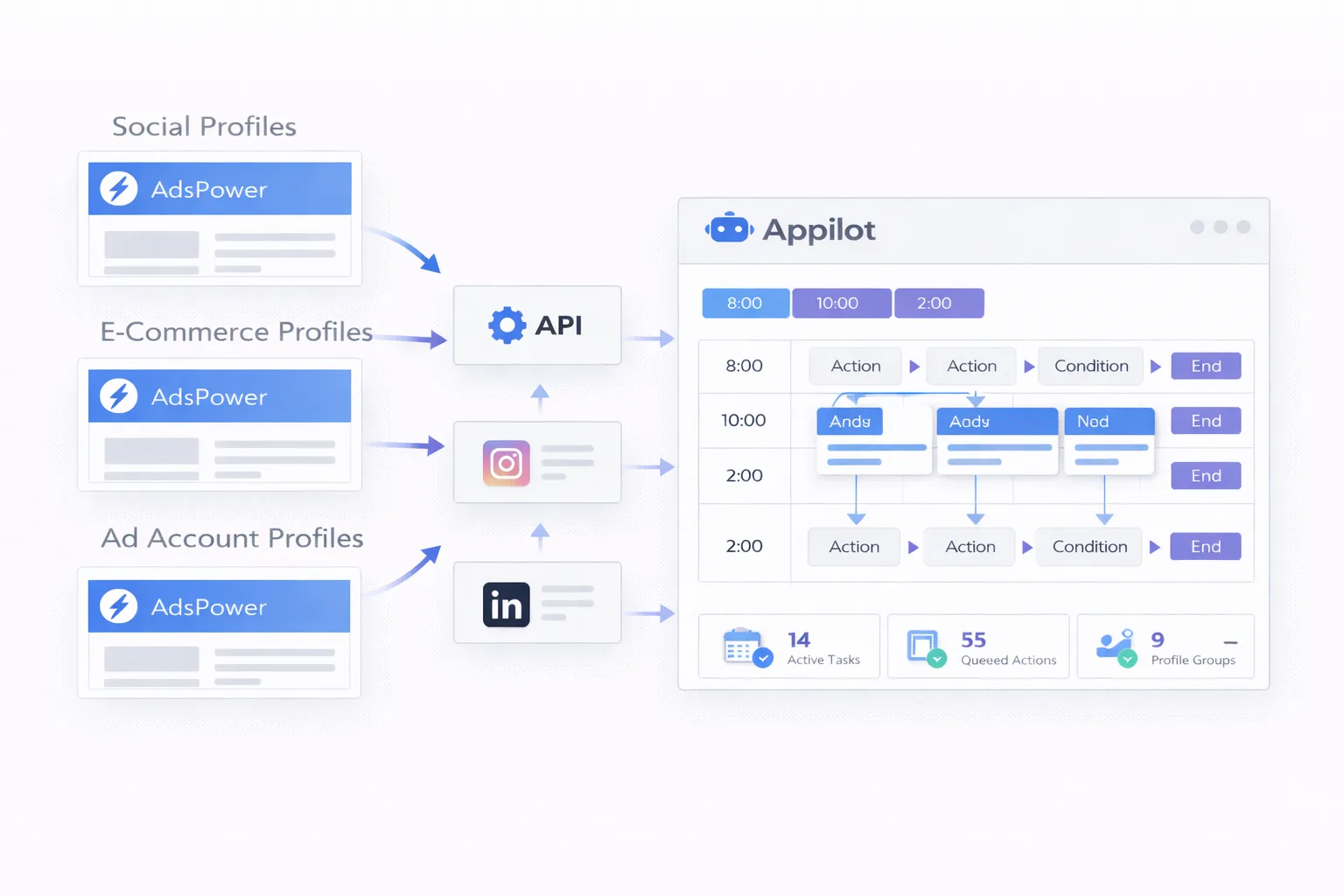
For example, one set of profiles may be assigned to social media account management, another to e-commerce dashboards, another to affiliate campaign reviews, and another to ad account monitoring. Appilot makes it easier to organize these groups so that the automation has a clear operating structure. That structure matters because advanced automation becomes much harder to maintain when profiles are technically connected but operationally disorganized.
This is what makes the combination powerful. AdsPower gives you a strong multi-profile browser environment. The API allows deeper control. Appilot helps turn that control into something repeatable and usable in day-to-day operations.
Common Advanced Automation Scenarios
Advanced automation usually appears when simple workflows are no longer enough. A small setup may only need basic launch and login routines, but a larger setup often needs broader workflow coordination.
One common scenario is multi-stage profile management. A browser profile may need to be launched, directed to a dashboard, checked for a specific account status, revisited later, and then grouped into a different follow-up process. That kind of logic becomes much easier to handle when profiles are not just stored individually but organized into operational systems.
Another common scenario is team-based profile automation. A business may have one team working on ad accounts, another on social media operations, another on e-commerce monitoring, and another on scraping or data collection. Each team may need its own browser profile groups, its own schedule windows, and its own repeated processes. Advanced automation techniques help coordinate that without forcing every team to work manually profile by profile.
There are also campaign-based workflows where different profile groups need to behave according to different schedules and priorities. One group may need frequent checks, another may need light daily activity, and another may only be revisited periodically. The more variation you have across your workflows, the more valuable API-driven control and Appilot-based organization become.
Organizing Profiles for More Advanced Control
One of the biggest differences between basic automation and advanced automation is profile organization. In a basic system, profiles are often just a list of accounts. In a more advanced system, profiles are structured according to role, workflow type, client, campaign, region, or operational purpose.
This kind of organization is important because advanced workflows depend on logic. If profiles are not grouped properly, even a technically strong API setup can become hard to manage. You may know how to trigger profile actions, but not how to coordinate them cleanly.
A better approach is to build profile groups around actual operational needs. Social media profiles can be separated from e-commerce profiles. Client accounts can be separated by project. Ad account environments can be separated by region or traffic source. Scraping sessions can be isolated into their own groups with their own timing and workflow rules.
Once that structure exists, Appilot can help make the automation much cleaner. It becomes easier to assign schedules, repeated tasks, and monitoring routines to profile groups that already have a defined purpose.
Best Practices for Advanced Automation Techniques
The best advanced setups are usually the ones that remain simple at the operational level. That may sound counterintuitive, but it is true. Many users make the mistake of trying to automate everything at once, which often creates workflows that are technically impressive but difficult to understand and maintain.
A better approach is to build depth gradually. Start with clearly grouped profiles. Then create stable routine workflows. Then add more layers of scheduling, profile logic, and repeated tasks once the base system is already working cleanly.
It is also important to avoid forcing every profile into one giant automation structure. Smaller grouped workflows are usually easier to track and easier to adjust when something changes. If one workflow needs to be updated, you do not want that change to create confusion across every other profile group.
Another important practice is keeping browser environments realistic and consistent. Advanced automation should not mean careless automation. Profile settings, proxy logic, timezone alignment, and browser identity should still make sense together.
Monitoring also matters. The more advanced your setup becomes, the more important it is to regularly review whether your workflows still match the way your accounts actually need to operate. Good automation is not only about execution. It is also about maintaining a structure that stays useful over time.
Common Problems in Advanced Browser Automation
One common problem is overengineering. Users sometimes create automation systems that are more complicated than their actual workflow needs. This usually leads to confusion, difficult troubleshooting, and profile groups that are technically connected but operationally messy.
Another common issue is poor profile grouping. If browser profiles are not organized clearly, advanced workflows become harder to understand. A schedule may run properly, but the wrong profiles may be attached to the wrong process.
Some users also create too much dependence on large all-in-one workflows. When everything is tied together too tightly, even a small adjustment can become difficult. Smaller workflow groups are usually much more stable and easier to control.
There can also be timing issues when schedules, proxy settings, regions, and browser profile behavior are not aligned properly. Even with good automation tools, inconsistency in the underlying profile setup can still create problems.
The safest approach is to keep your structure clean, build gradually, and treat advanced automation as an operating system rather than a collection of disconnected tricks.
Frequently Asked Questions
Q1: Do I need coding skills to use advanced automation techniques with AdsPower and Appilot?
No. Many users can organize profile groups, connect workflows, and manage advanced scheduling without writing code themselves. The main value comes from building a clean structure around the browser profiles rather than relying only on manual work.
Q2: Is the AdsPower API useful even if I already manage profiles manually?
Yes. Manual management can work for small setups, but API-based control becomes much more valuable as the number of profiles, workflows, and repeated tasks increases.
Q3: What makes Appilot useful in an API-based browser automation setup?
Appilot helps turn profile control into practical workflow management. Instead of handling profile actions as isolated events, it helps organize schedules, tasks, profile groups, and repeated processes into a cleaner system.
Q4: Should I build one large automation workflow for all profiles?
Usually no. It is generally better to separate profiles into smaller groups with their own schedules and task logic. That makes the system easier to understand, easier to manage, and easier to expand later.
Q5: What is the best way to start with advanced automation?
The best starting point is to organize your browser profiles clearly, define a small number of repeatable workflows, and expand only after the structure is stable. Advanced automation works best when the underlying system is already clean.
Conclusion
The AdsPower API makes advanced browser profile control possible, but real operational value comes from how that control is organized. Appilot helps turn that raw control into something much more practical by giving you structure, scheduling, and workflow management across your browser profiles.
Together, AdsPower and Appilot create a stronger setup for users who need more than simple profile launching. They make it easier to organize repeated actions, manage grouped workflows, and scale browser automation without relying entirely on manual work.
The best approach is to start with a clean profile structure, build a few stable workflows, and then expand your automation step by step. That gives you a system that is not only more powerful, but also much easier to manage over time.