Advanced Fingerprint Rotation Across Browsers with Appilot
Browser fingerprints are one of the most important parts of browser automation because they help platforms identify whether a session looks normal or suspicious. Even if you are using good proxies and separate browser profiles, repeated fingerprints can still create patterns that connect browser sessions together.
Many users assume that changing IP addresses alone is enough. In reality, platforms often analyze much more than just the proxy. They look at browser versions, operating systems, screen resolution, timezone, language settings, fonts, canvas fingerprints, WebGL values, audio fingerprints, device memory, hardware concurrency, browser plugins, and many other signals.
This means that if several browser profiles share the same fingerprint, platforms may still connect them even if the IP addresses are different. Fingerprint rotation helps reduce this risk by spreading activity across different browser identities instead of repeating the same browser environment again and again.
Appilot makes this process easier because it allows you to manage multiple browser types, browser profiles, schedules, and fingerprint groups from one place. Instead of manually editing browser fingerprints across different browser platforms, you can create a more organized system for fingerprint rotation.
Why Fingerprints Matter More Than Many Users Realize
Most modern detection systems no longer rely only on IP addresses. Browser fingerprints have become one of the main ways platforms identify browser sessions.
For example, if ten browser profiles all use the same browser version, operating system, timezone, language, screen size, font list, and WebGL configuration, platforms may recognize that those sessions are closely related even if the proxies are different.
This is why many users experience account overlap even when they are rotating proxies correctly. The browser fingerprints remain too similar, so the platform still sees the same environment returning repeatedly.
Fingerprints also matter because they contribute to trust. A browser profile with realistic settings that match its proxy region and device type usually looks more natural. A profile with mismatched settings often looks suspicious.
For example, if a browser profile claims to be in Germany but uses a United States timezone, an Asian language setting, and a mobile screen resolution that does not match the browser type, the session may attract more attention.
Fingerprint rotation is not only about making every profile different. It is about making every profile believable.
What Browser Fingerprints Usually Include
Browser fingerprints are made up of many small pieces of information that together create a browser identity.
Common fingerprint elements include browser type, browser version, operating system, timezone, language, screen resolution, color depth, fonts, installed plugins, device memory, CPU cores, WebGL values, canvas fingerprinting, audio fingerprinting, and browser storage behavior.
Some platforms also look at deeper signals such as header structure, TLS fingerprints, JavaScript execution quality, browser feature support, and even how mouse movement and scrolling behavior appear over time.
This means that fingerprint rotation is not only about changing one or two settings. Strong fingerprint rotation usually requires several browser signals to change together in a way that still looks realistic.
For example, if you rotate the operating system, you may also need to rotate fonts, screen sizes, browser versions, and browser capabilities so that everything still matches the new environment.
The goal is not randomness. The goal is realistic variation.
Why Fingerprint Rotation Becomes Difficult Across Multiple Browsers
Fingerprint rotation becomes much harder once you start managing several browser types at the same time.
A workflow may involve Chrome profiles, Firefox sessions, GoLogin environments, AdsPower workspaces, Dolphin Anty profiles, Multilogin browsers, and mobile browser sessions. Each browser platform handles fingerprints differently.
Some browsers support detailed fingerprint editing, while others rely more heavily on built-in browser defaults. Some platforms automatically generate fingerprints, while others require manual customization.
Managing all of these browser fingerprints manually becomes difficult because you need to remember which profiles use which settings, which browser groups should stay similar, and which browser types should remain completely separate.
There is also the issue of consistency. Fingerprint rotation only works if the browser profile still looks believable. Randomly mixing settings without logic can actually make the profile look more suspicious instead of less suspicious.
How Appilot Helps with Fingerprint Rotation
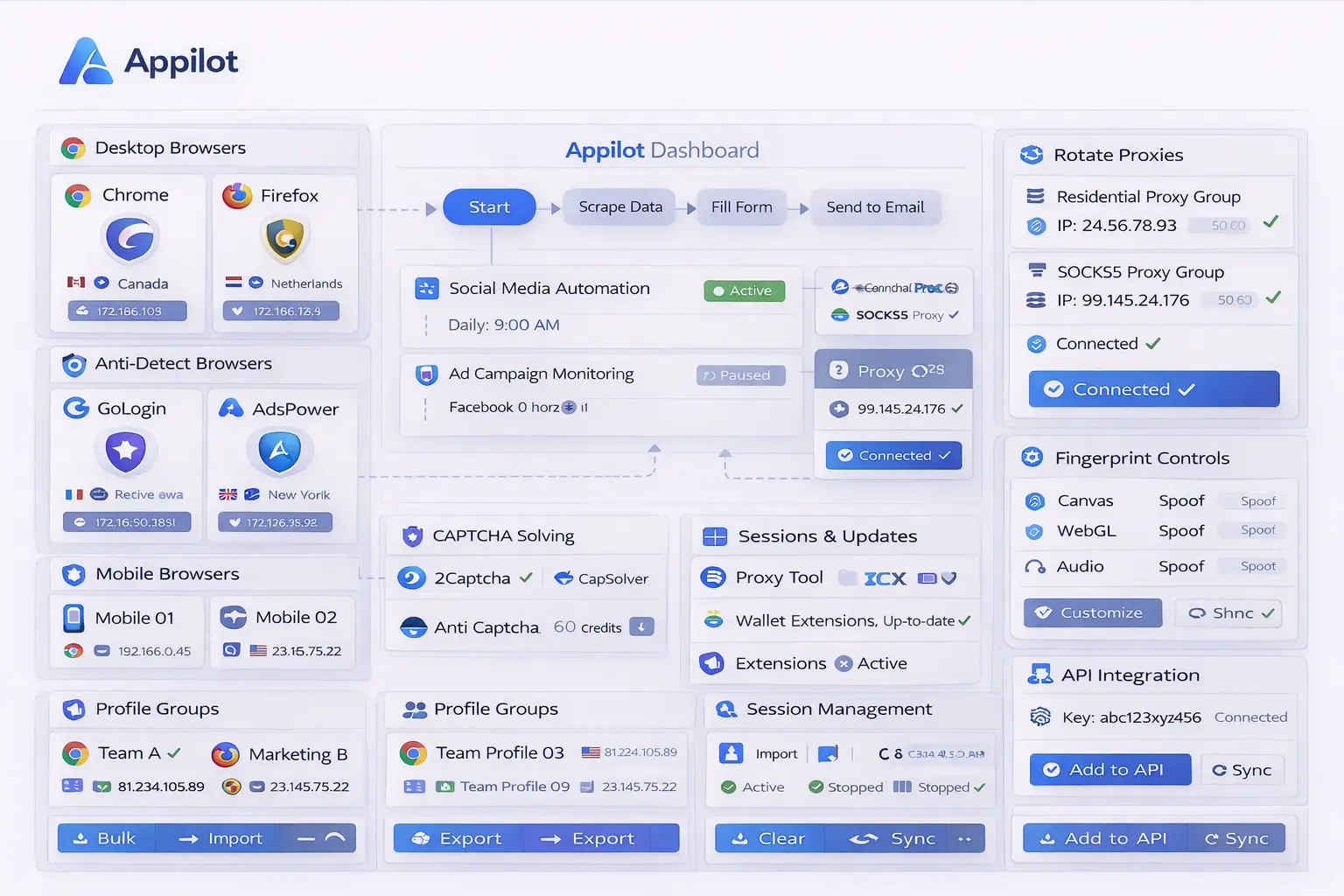
Appilot makes fingerprint rotation easier because it gives you one place to manage browser profiles, profile groups, schedules, and browser environments.
Instead of editing fingerprints inside every browser separately, you can organize browser profiles by purpose and assign different fingerprint groups to different workflows.
For example, one fingerprint group may be used for social media browser profiles, another for e-commerce stores, another for affiliate campaigns, and another for scraping workflows.
Appilot can also help keep browser fingerprints aligned with other signals. For example, a profile with a French timezone can also use French language settings, European screen sizes, matching browser versions, and proxies from France.
Another useful feature is browser scheduling. Instead of launching the same browser fingerprints repeatedly at the same time every day, Appilot can rotate activity patterns so that browser sessions appear more natural.
You can also separate desktop fingerprints, mobile fingerprints, and antidetect browser fingerprints into different groups so they do not overlap too heavily.
This creates a stronger browser environment and reduces repeated fingerprint activity across accounts.
Best Practices for Browser Fingerprint Rotation
One of the best practices is keeping browser fingerprints internally consistent. If you change the timezone, the language, operating system, screen size, and proxy region should also make sense together.
Another important practice is grouping fingerprints by purpose. Social media profiles should not necessarily use the same fingerprints as scraping profiles or e-commerce accounts.
You should also avoid reusing the same fingerprint combinations too often. Even if browser profiles have different names, repeated fingerprint patterns can still create overlap.
It is also important to rotate fingerprints gradually instead of changing everything too aggressively. Real users do not suddenly switch operating systems, languages, screen sizes, and browser versions every day.
You should also review browser fingerprints regularly because browser versions, browser capabilities, and common device patterns change over time.
Finally, keeping fingerprints aligned with proxies, cookies, browser history, and browser behavior creates more realistic browser sessions overall.
Common Fingerprint Rotation Mistakes
One common mistake is focusing only on proxies while ignoring browser fingerprints completely. IP rotation alone is often not enough.
Another mistake is using unrealistic fingerprint combinations. For example, combining an old browser version with a very new operating system, a mobile screen size with a desktop browser, or a United States timezone with a Russian language setting can create suspicious sessions.
Some users also rotate fingerprints too often. If a browser profile constantly changes its identity, platforms may see that instability as suspicious.
Another issue is reusing the same fingerprint templates across too many accounts. Even if proxies are different, repeated fingerprint structures can still connect sessions together.
Finally, many users forget that browser behavior also contributes to fingerprint quality. Even strong fingerprints can become less effective if the browser always behaves in exactly the same way.
Frequently Asked Questions
Q1: What is browser fingerprint rotation?
Browser fingerprint rotation is the process of changing browser identity signals such as timezone, language, browser version, screen size, fonts, and operating system settings across different browser profiles.
Q2: Is rotating proxies enough without fingerprint rotation?
Usually not. Platforms often analyze browser fingerprints in addition to IP addresses.
Q3: Should every browser profile have a completely different fingerprint?
Not necessarily. Fingerprints should be varied enough to reduce overlap, but they should still remain realistic and internally consistent.
Q4: Can Appilot help manage fingerprint groups across multiple browsers?
Yes. Appilot can help organize browser profiles, fingerprint groups, schedules, and browser-specific settings from one place.
Q5: Why do unrealistic fingerprints create more risk?
Unrealistic fingerprint combinations can make browser sessions look suspicious because the environment does not match how real users normally behave.
Conclusion
Browser fingerprint rotation is one of the most important parts of browser automation because it helps reduce repeated identity patterns across browser sessions. Without proper fingerprint variation, even strong proxies and separate browser profiles can still become connected over time.
Appilot makes fingerprint rotation easier by helping you organize browser profiles, browser groups, schedules, and fingerprint settings from one place. This creates a cleaner workflow and makes it easier to scale browser automation without creating unnecessary overlap.