Antidetect Browser Integration with Appilot: Complete Guide
Antidetect browsers have become one of the most important tools for people managing multiple accounts, separate browser identities, and isolated online sessions. They are commonly used by affiliate marketers, e-commerce sellers, media buyers, social media managers, web scrapers, agencies, and crypto users because they help prevent accounts from being linked together.
A standard browser shares the same cookies, browser fingerprint, local storage, timezone, user agent, and IP-related information across every website you visit. This makes it easy for platforms to connect multiple accounts back to the same user.
Antidetect browsers solve this problem by creating isolated browser profiles. Each profile can have its own fingerprint, cookies, screen resolution, language settings, WebRTC configuration, timezone, proxy, and device details. Instead of using one browser for everything, you can create separate environments for different accounts and projects.
The problem is that once you start managing many browser profiles, the manual work becomes difficult. Opening profiles, assigning proxies, launching sessions, logging into accounts, checking tasks, and keeping everything organized takes time. This is where Appilot becomes useful.
Appilot helps bring browser profile management, automation, scheduling, and workflow organization into one place. Instead of opening profiles manually every day, you can use Appilot to automate repetitive browser workflows and manage larger numbers of profiles much more efficiently.
What Is an Antidetect Browser?
An antidetect browser is a browser designed to create isolated browser identities. Instead of every browser session sharing the same fingerprint, the browser can generate separate profiles with unique settings.
These settings often include user agent changes, timezone settings, screen resolution, WebRTC masking, language settings, canvas fingerprint adjustments, WebGL modifications, cookie separation, and proxy assignments.
For example, one browser profile can appear as a Windows laptop in New York using Chrome with a residential proxy, while another profile can appear as a Mac device in London using a different browser version and another IP address.
This makes antidetect browsers useful for anyone who needs to keep accounts separated. Social media managers can keep client accounts isolated, e-commerce sellers can manage multiple storefronts, affiliate marketers can separate ad accounts, and web scrapers can rotate browser environments without using the same identity repeatedly.
Why Integrate Antidetect Browsers with Appilot?
Antidetect browsers already solve the problem of browser fingerprinting and account separation, but they do not completely solve the problem of repetitive work.
You still need to launch browser profiles, assign proxies, run tasks, log into accounts, visit websites, monitor dashboards, and close sessions. When you are only managing a few profiles, this is still possible manually. Once you reach dozens or hundreds of profiles, it becomes much harder to manage.
Appilot helps automate those repetitive actions. Instead of manually opening browser profiles every day, you can create workflows that automatically launch specific profiles, run actions, monitor results, and close sessions afterward.
This makes the browser environment much more useful because profile isolation is combined with scheduling, workflow management, task automation, and centralized monitoring.
Antidetect Browsers That Can Work with Appilot
Many antidetect browsers can be used together with Appilot depending on the workflow you are trying to build.
Popular options include GoLogin, Multilogin, Sphere Browser, Dolphin Anty, AdsPower, Ghost Browser, FraudFox, Incogniton, Aximon Browser, VMLogin, Linken Sphere, Indigo Browser, Hidemium, ClonBrowser, and other profile-based browser systems.
Most of these browsers provide some combination of profile management, proxy assignments, cookie storage, browser fingerprint customization, and API support.
Appilot can sit on top of these browser environments and help manage profile groups, task scheduling, proxy rotation, browser launches, and workflow automation.
Common Workflows You Can Automate
One of the most common workflows is social media management. Agencies and marketers often need to manage many Instagram, Facebook, TikTok, LinkedIn, Reddit, Twitter, or Pinterest accounts. Appilot can help automate profile launches, content posting, notification checks, engagement tasks, and browser sessions.
E-commerce sellers can use antidetect browsers for managing Shopify stores, Amazon accounts, Etsy stores, supplier dashboards, and payment accounts. Appilot can automate repetitive actions such as reviewing orders, exporting reports, checking inventory, and opening store dashboards.
Affiliate marketers often use antidetect browsers for managing ad accounts, landing pages, and campaign tracking environments. Appilot can help automate campaign reviews, account launches, traffic checks, and daily reporting.
Crypto users frequently rely on separate browser profiles for exchange accounts, NFT activities, wallets, and airdrop farming. Appilot can automate browser launches, login flows, and repetitive account checks.
Web scraping teams can also benefit because antidetect browsers provide separate browser fingerprints and proxies while Appilot helps automate browser sessions, website visits, and data collection workflows.
How to Set Up an Antidetect Browser with Appilot
The setup process usually starts with creating browser profiles inside the antidetect browser. Each profile should have its own fingerprint settings, proxy assignments, and purpose.
After the profiles are created, the next step is connecting the browser platform with Appilot. This often requires an API key, account credentials, workspace ID, or profile group access.
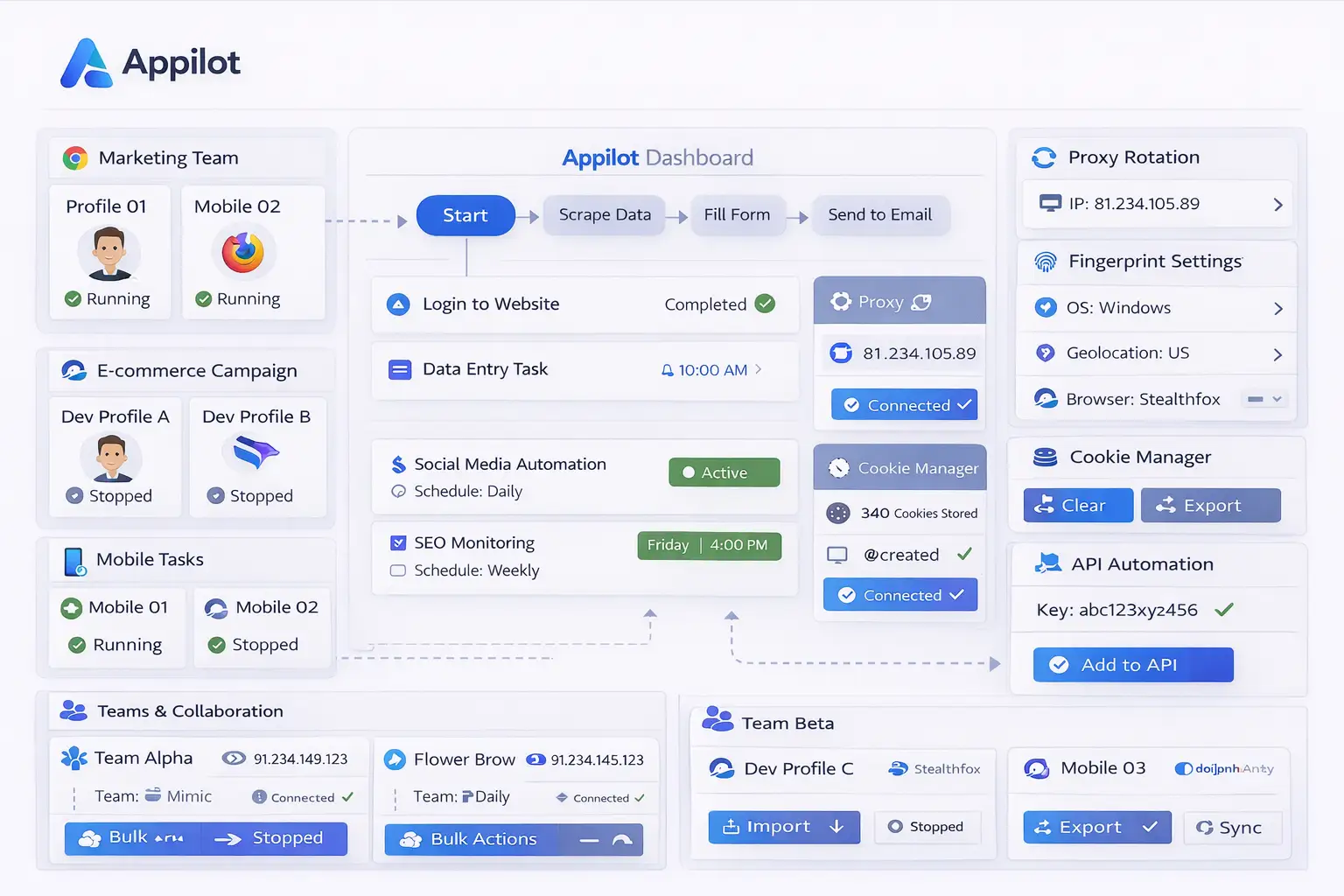
Once the connection is active, Appilot can import the available browser profiles into its dashboard. From there, you can organize the profiles into groups, assign workflows, create schedules, and manage proxy settings.
The next step is testing the setup. Start with a few browser profiles first to make sure the sessions launch correctly, the right proxies load, and the workflows run as expected.
After everything is stable, you can gradually increase the number of browser profiles and create more advanced workflows.
Benefits of Combining Antidetect Browsers with Appilot
One of the biggest benefits is time savings. Tasks that normally require hours of manual work every day can be reduced to a few minutes of setup.
Another major benefit is consistency. Instead of relying on manual work, workflows run in the same way every time. This reduces the chance of mistakes such as opening the wrong profile, using the wrong proxy, or mixing browser sessions together.
Scalability is another important advantage. A person managing five browser profiles may still be able to handle the work manually, but managing fifty or one hundred profiles becomes much more difficult. Appilot makes it easier to scale because profiles, workflows, and schedules can all be managed from one dashboard.
The centralized view is also useful because it allows you to see which profiles are active, which workflows are running, which sessions failed, and which tasks need attention.
Best Practices for Antidetect Browser Management
The best way to manage browser profiles is to stay organized from the beginning. Use clear profile names so that it is easy to understand what each browser environment is used for.
You should also group profiles based on purpose. Keep social media profiles separate from e-commerce profiles, affiliate accounts, scraping environments, and crypto accounts.
Using separate proxies for separate profiles is also important because it reduces the chance of account linking. Reusing the same proxy across too many browser profiles increases the risk that websites will connect those accounts together.
It is also important to review logs and workflow status regularly. Even if most tasks are automated, there will still be times when websites change layout, login sessions expire, or proxies stop working.
Finally, it is usually better to start with small workflows before scaling up. A simple workflow that works reliably is more valuable than a large workflow that becomes difficult to troubleshoot.
Common Problems and Troubleshooting
One common issue is that browser profiles fail to launch correctly because the proxy settings are wrong. If a profile uses an invalid proxy, it may fail to load websites or trigger suspicious activity warnings.
Another issue is that websites may change their layout over time. If buttons, menus, or login fields change location, workflows may stop working until they are updated.
Users also sometimes create too many browser profiles without a clear naming system. This makes it harder to identify which profiles belong to which accounts.
Another common problem is running too many browser sessions at the same time without enough system resources. If too many profiles are launched at once, the device may slow down and workflows may fail.
Frequently Asked Questions
Q1: What is the main benefit of using an antidetect browser with Appilot?
The biggest benefit is that you get both browser profile isolation and workflow automation in the same setup.
Q2: Can Appilot work with multiple antidetect browser platforms?
Yes. Appilot can work with many different browser platforms depending on the profile system and workflow requirements.
Q3: Is this setup useful for social media automation?
Yes. Social media managers often use antidetect browsers together with Appilot for content posting, engagement, browser launches, and profile warm-up tasks.
Q4: Should every browser profile use a different proxy?
Using separate proxies for separate profiles is usually the safest approach because it reduces the chance of account linking.
Q5: Can Appilot help manage large numbers of browser profiles?
Yes. Appilot helps organize profiles, create workflows, schedule tasks, and monitor browser activity from one dashboard.
Conclusion
Antidetect browsers are already useful for browser fingerprint control, account isolation, and profile management. When they are combined with Appilot, they become much more powerful because workflows, schedules, browser launches, and repetitive tasks can all be managed from one place.
This makes it easier to save time, reduce mistakes, and scale larger browser operations without needing to manually control every browser session.