API-Based Automation vs Real Device Automation: Which Gets Banned Less?
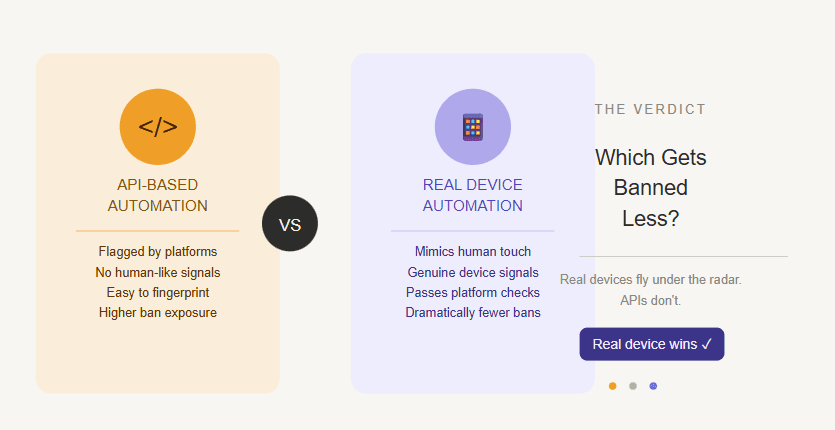
The question “which gets banned less?” sounds simple, but the honest answer is more nuanced.
API-based automation and real device automation can both be useful. They can also both get accounts restricted, flagged, or banned when used badly. The difference is not only the tool. It is the environment, the behavior pattern, the account quality, the proxy setup, the action speed, and whether the automation looks like something the platform expects.
API-based automation usually sends requests directly from a server, script, backend tool, or unofficial integration. This can be fast, efficient, and useful for approved workflows, but it can look suspicious when used for sensitive account actions like mass liking, following, commenting, messaging, scraping, or repeated engagement.
Real device automation runs actions through actual Android devices or emulators. When done carefully, this can look more natural because the automation happens inside the mobile app environment, where real users normally scroll, tap, type, wait, swipe, and interact.
Appilot uses the real device approach. It runs bots on real Android devices and emulators through a remote web dashboard, without requiring ADB or a laptop connected all day.
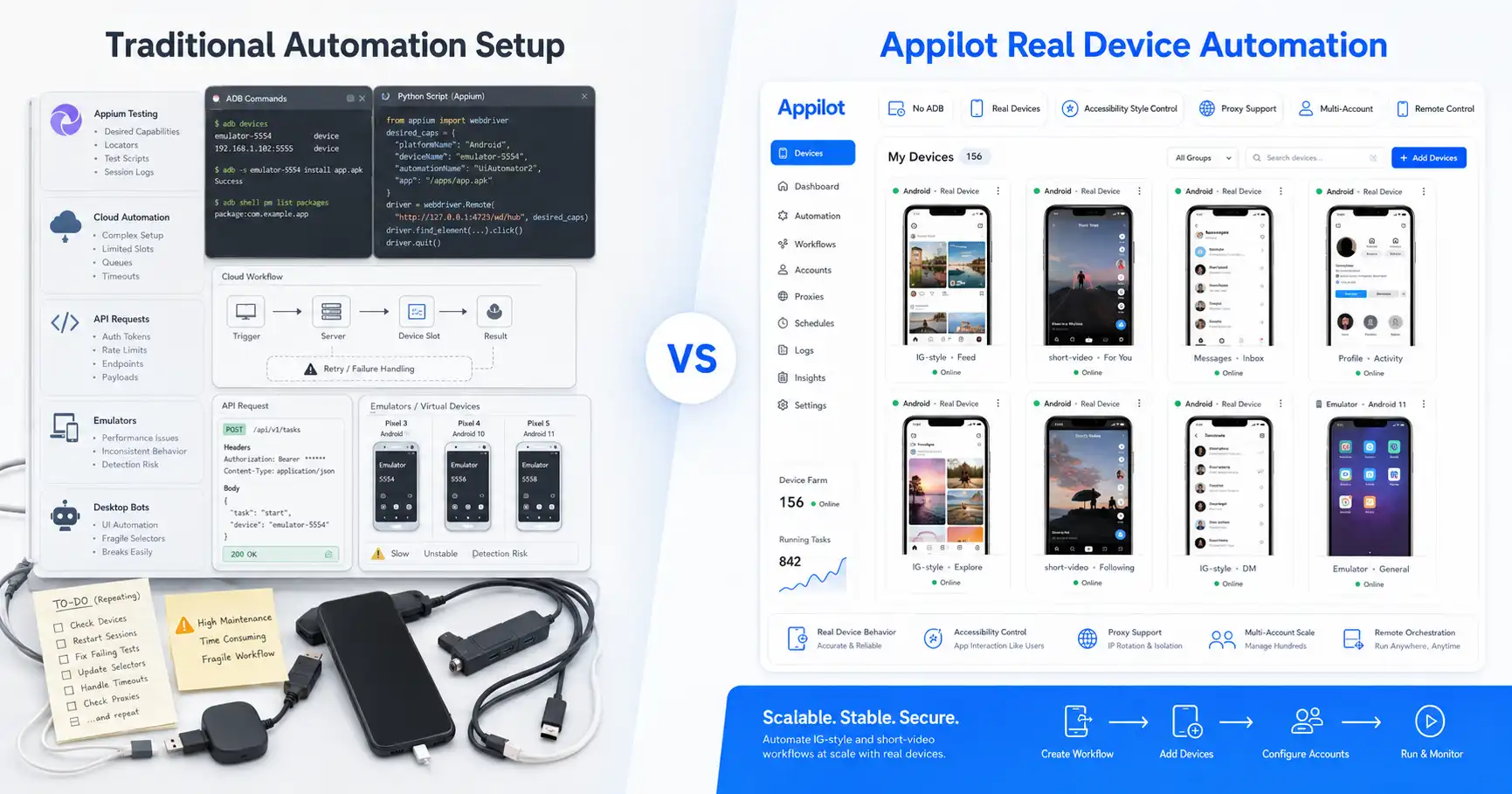
What Is API-Based Automation?
API-based automation means software communicates with a platform through requests instead of manually using the app interface. In simple terms, a script or server sends instructions directly to a platform endpoint or integration layer.
This can be completely legitimate when the API is official and the use case is allowed. Many businesses use APIs for analytics, publishing, reporting, CRM sync, customer support, internal dashboards, and approved platform integrations.
The risk starts when API-based automation is used for actions the platform does not want automated, especially through unofficial endpoints, reverse-engineered APIs, private APIs, or high-volume scripts.
For example, if a tool sends too many likes, follows, comments, messages, or profile actions from a server-side workflow, the platform may see patterns that do not match normal app usage.
API automation is powerful because it is fast. That same speed is also what makes it risky when used carelessly.
What Is Real Device Automation?
Real device automation means running automation through Android devices or emulators where the app is actually installed and used.
Instead of sending backend requests directly, the automation interacts with the app interface. It can tap buttons, scroll screens, type messages, open profiles, watch videos, view stories, and move through the app like a mobile user would.
This does not make automation invisible or risk-free. A real device can still get flagged if the account acts unnaturally. If the bot sends too many messages, repeats the same comment, uses bad proxies, or performs actions too quickly, the platform can still restrict the account.
The difference is that real device automation starts from a more natural environment. For mobile-first platforms like Instagram, TikTok, Threads, Snapchat, Telegram, YouTube, and similar apps, real app behavior matters.
Appilot is built around this model. It lets users run bots on Android devices and emulators while managing everything remotely from a dashboard.
API-Based Automation vs Real Device Automation: The Main Difference
The biggest difference is the execution layer.
API-based automation operates through requests. Real device automation operates through app behavior.
That difference matters because platforms do not only look at what action happened. They also look at how it happened. A like, follow, comment, or message sent through an unusual request pattern may look different from the same action performed inside a normal app session.
API-based automation can be safe when it uses official APIs for approved use cases. It can become risky when it tries to imitate normal user actions without normal user behavior.
Real device automation is usually better for social media account actions because it works inside the mobile app environment. The action happens through screens, taps, waits, and app navigation rather than only through backend calls.
For account-sensitive workflows, that usually gives real device automation a lower obvious-ban-risk profile.
Why API-Based Automation Gets Flagged
API-based automation often gets flagged because it can create unnatural request patterns.
A human using Instagram or TikTok does not normally send hundreds of direct action requests from a server in a short time. They open the app, wait for screens to load, scroll, pause, watch content, tap, type, and move through sessions at human speed.
API workflows can skip much of that natural behavior. They may perform actions faster than a real user, repeat the same request shape, use unusual headers, come from server IPs, or trigger endpoints in a way that does not match normal app flow.
Unofficial APIs are especially risky because platforms can change them, block them, or detect patterns that come from automation tools.
This is why API automation can be fragile for social media growth. It may work for a while, then suddenly start causing restrictions when the platform updates detection rules.
API automation is not automatically bad. It is just risky when used for actions that platforms expect to happen through real user sessions.
Why Real Device Automation Usually Gets Banned Less
Real device automation usually gets banned less because it can follow the natural app path.
A bot running on an Android device or emulator can open the app, wait, scroll, tap, type, and interact with screens in a way that looks closer to normal usage. The platform sees activity coming from an app environment rather than only from backend requests.
This matters most for mobile-first platforms. Instagram, TikTok, Threads, Snapchat, Telegram, and YouTube are built around mobile app sessions. If automation happens inside those sessions, the environment is more believable.
That does not mean real device automation is automatically safe. Bad behavior is still bad behavior. If the account follows hundreds of users too quickly, sends spammy messages, or uses weak proxies, it can still get restricted.
But when configured carefully, real device automation reduces some of the obvious signals that make API-based automation suspicious.
This is why Appilot focuses on real Android automation instead of API-style shortcuts.
Ban Risk Is Not Only About the Tool
A lot of users ask whether one automation type is safer than another, but safety is not only a tool choice.
Platforms look at patterns. If an account is new, has no content, uses a poor proxy, sends repetitive messages, follows too fast, comments generic phrases, and logs in from strange locations, it may get flagged no matter what automation method it uses.
The tool matters, but the strategy matters just as much.
Real device automation gives users a better environment, but users still need to control action limits, warm up accounts slowly, use good proxies, avoid repetitive copy, and keep behavior realistic.
API-based automation can also be safe when used properly for approved workflows. For example, syncing data through an official API is very different from using an unofficial script to mass-send actions.
The better question is not “which method is magically safe?” The better question is “which method creates fewer obvious risk signals for this workflow?”
For social media account actions, real device automation usually wins.
Best Uses for API-Based Automation
API-based automation is best when the platform officially allows the workflow.
It makes sense for reporting, analytics, publishing through approved integrations, CRM syncing, internal dashboards, data exports, customer support workflows, and backend operations that do not imitate sensitive user behavior.
API automation is also useful when speed and structure matter more than app realism. If the task is moving data between systems, updating records, generating reports, or connecting approved tools, APIs are often the cleanest solution.
The key word is approved. When the API is official and the workflow follows platform rules, API automation can be reliable and scalable.
The risk comes when users try to use unofficial APIs for growth actions, engagement actions, scraping, or messaging workflows that platforms actively monitor.
In those cases, real device automation is often the safer path.
Best Uses for Real Device Automation
Real device automation is best when the workflow needs to happen inside a mobile app.
It is especially useful for Instagram bots, TikTok workflows, Threads activity, Snapchat automation, Telegram app actions, YouTube mobile workflows, Reddit app behavior, Discord tasks, and multi-account social media operations.
These workflows often depend on app behavior, timing, screen navigation, device consistency, and account trust signals.
Real device automation also makes more sense for phone farm operators and agencies managing many accounts. They need automation that behaves more like a real user session, not only fast request execution.
Appilot is built for this use case. It runs bots on real Android devices and emulators, supports proxy-aware workflows, and lets users manage automation remotely from a web dashboard without ADB.
For app-based social automation, that is a stronger operating layer than API-only automation.
Instagram Automation: API or Real Device?
For Instagram automation, real device automation is usually the better choice.
Instagram is heavily mobile-first. Real users spend time in the app, watch stories, scroll Reels, open profiles, send DMs, reply to comments, and interact through touch-based navigation.
API-style automation can be risky when used for unofficial engagement actions because it may not match normal app behavior. It can create suspicious request patterns, especially if it is fast, repetitive, or not tied to a believable session.
Real device automation gives Instagram workflows a more natural foundation because the bot operates inside Android environments.
This does not mean every Instagram workflow should be automated. Manual strategy still matters, especially for content, targeting, and high-value conversations.
But if automation is used, real device workflows are generally a better fit than unofficial API shortcuts.
TikTok Automation: API or Real Device?
TikTok is another platform where real device automation usually makes more sense.
TikTok is built around app behavior. Users watch videos, pause, scroll, like, follow, comment, search, open profiles, and interact through short mobile sessions.
API-style automation can be especially risky if it tries to bypass the normal app experience. TikTok and similar platforms care about behavior patterns, device signals, and session quality.
Real device automation allows bots to move through the app more naturally. It can follow mobile UI flows, wait between actions, and operate in a way that better matches actual user behavior.
For TikTok growth or account workflows, real device automation is usually the more practical choice.
Appilot’s Android-based setup is useful here because users can manage workflows remotely while actions still happen in a mobile environment.
Multi-Account Workflows
Multi-account workflows increase risk because platforms can compare patterns across accounts.
If many accounts use the same API script, same timing, same request style, same messages, same server ranges, or same behavior pattern, they become easier to group together.
Real device automation can help because each account can run through a more distinct app environment, especially when paired with proper proxies and device separation.
This is one reason phone farm operators and agencies often prefer device-based automation. They want each account to look less like part of one obvious automation cluster.
Appilot helps by giving users a dashboard for managing bots across Android devices and emulators.
The system still needs careful configuration. If every account behaves identically, the risk remains. But real device automation gives users more room to design believable workflows.
Proxy Support and Network Signals
Whether you use API-based automation or real device automation, proxy quality matters.
API-based automation often runs from cloud servers or backend environments. If those requests come from suspicious IP ranges, poor proxies, or repeated locations, the platform may flag the activity.
Real device automation also needs good proxies, especially when managing multiple accounts. A real Android device does not protect an account if the network signal is weak or shared across too many accounts.
Appilot supports proxy-aware workflows, including mobile and residential proxies. This helps users create cleaner account separation.
But proxies are not a magic fix. A good proxy paired with bad behavior still creates risk.
The strongest setup combines realistic app behavior, high-quality proxies, gradual warmup, and human-like timing.
Speed vs Believability
API automation wins on speed. Real device automation wins on believability.
A server can send requests very quickly. It can process large lists, perform backend tasks, and move data efficiently. That is why API automation is useful for approved data workflows.
But social media account actions should not always be fast. In fact, speed can be one of the biggest ban signals.
A real user does not like, follow, comment, and message at machine speed. They pause, scroll, read, watch, think, and get distracted.
Real device automation is better suited to slower, more believable workflows. It is not always as fast as API automation, but that is often a good thing for account safety.
For social media bots, speed is not always the goal. Sustainable behavior is the goal.
Where API-Based Automation Wins
API-based automation wins when the workflow is approved, structured, and data-focused.
It is better for analytics, dashboards, data sync, publishing through official integrations, reporting, internal tools, CRM workflows, and backend automation.
It also wins when the user needs speed and does not need real mobile app behavior.
For developers and technical teams, API automation can be clean, scalable, and easy to maintain when used properly.
The trade-off is that API automation becomes risky when users use unofficial methods for sensitive social media actions.
If the platform expects the action to happen inside a real app session, API automation can expose more obvious risk signals.
Where Real Device Automation Wins
Real device automation wins when the workflow is account-sensitive and app-based.
It is better for Instagram, TikTok, Threads, Snapchat, Telegram, YouTube, Reddit, Discord, and other mobile-first social workflows where behavior matters.
It is also better for phone farm operators, agencies, and multi-account users who need realistic app sessions, proxy support, remote control, and safer operating patterns.
Appilot wins in this category because it gives users real Android automation without ADB, laptop dependency, or desktop bot infrastructure.
Users can manage bots through a web dashboard while automation runs on Android devices and emulators.
For social media automation, that is usually a better model than relying only on API-based actions.
Final Verdict
API-based automation and real device automation both have a place.
API automation is better for approved integrations, data workflows, internal tools, reporting, publishing, and backend tasks. It is fast and efficient when used within platform rules.
Real device automation is better for social media account actions, mobile app workflows, multi-account operations, phone farm setups, and Instagram or TikTok bots.
So which gets banned less?
For approved API workflows, API automation can be safe. For unofficial social media growth actions, real device automation usually gets banned less because it better matches real mobile app behavior.
Appilot is built around that advantage. It runs bots on real Android devices and emulators, works without ADB, supports remote dashboard control, and gives users a stronger foundation for social media automation.
You can explore Appilot’s bot store and try it at appilot.app.
FAQ
Q1: What is the biggest difference between API-based automation and real device automation?
API-based automation sends requests from scripts or servers, while real device automation performs actions through Android app environments. Real devices are better for mobile social behavior.
Q2: Which gets banned less for Instagram automation?
Real device automation usually gets banned less for Instagram because it better matches normal mobile app behavior. API shortcuts can look suspicious when used for unofficial growth actions.
Q3: Is API-based automation always unsafe?
No, API automation can be safe when it uses official APIs for approved workflows. It becomes risky when used for unofficial engagement, messaging, scraping, or growth actions.
Q4: Does Appilot use real device automation?
Yes, Appilot runs bots on real Android devices and emulators. Users can manage workflows remotely through a web dashboard without ADB or laptop dependency.
Q5: Who should choose real device automation over API automation?
Agencies, phone farm operators, and growth teams should choose real device automation when they need Instagram, TikTok, or mobile-first social media workflows.