API Rate Limit Hit Every Day? Here's How to Manage It
The System Works Until The API Says Stop
One of the most frustrating problems in automation is when the workflow itself is correct, the logic is clean, the requests are valid, and everything appears to be running properly, but the system still stops because the API refuses to accept more traffic. At first, the issue may look temporary. A few requests fail, a job slows down, a sync pauses, or a scraper starts returning empty responses. Then it keeps happening again and again until you realize the same pattern is repeating every day. The workflow is not really broken, but the API has become the bottleneck.
This becomes even more painful when the rest of the system depends on that API. Content stops publishing, reports arrive late, browser tasks lose data, lead pipelines become incomplete, and account actions start failing in batches. The worst part is that the workflow may still look busy on the surface. Tasks are still running, logs are still updating, and some requests still succeed, but the overall system is now unstable because too many requests are hitting the same limit.
Why API Rate Limits Keep Happening
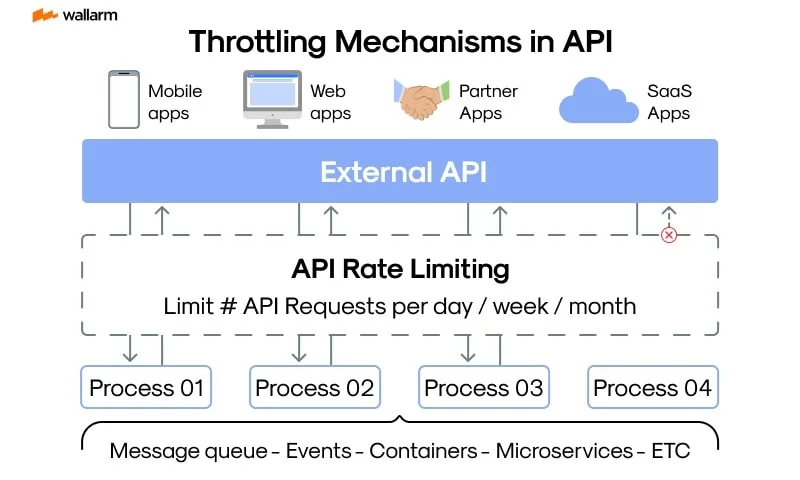
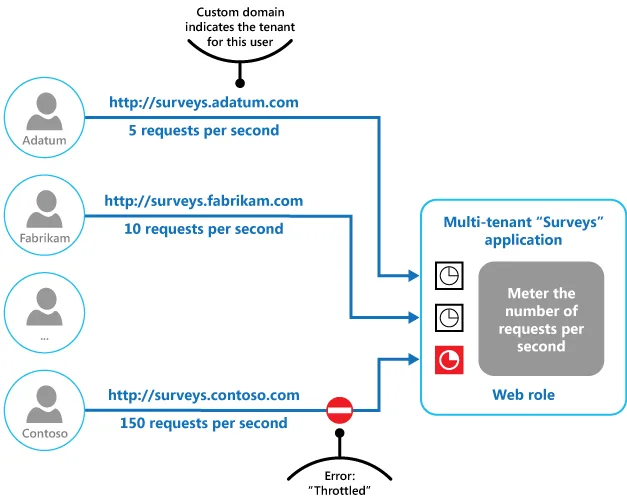
Most rate limit problems happen because the workflow is sending requests faster than the platform expects or allows. That sounds obvious, but the real problem is usually deeper. A lot of systems are built around the idea that if one request works, then a thousand requests should also work as long as the code is technically correct. APIs do not work that way. Most providers control traffic by setting request limits per minute, per hour, per account, per token, per IP, or per endpoint. That means a workflow that looks completely fine in development can start failing the moment it moves into production volume.
Another common issue is that people underestimate how many requests are actually being generated. One task may look simple, but behind the scenes it might call the same API multiple times for login checks, account validation, content retrieval, retries, status polling, error checks, and confirmations. Once that happens across dozens of accounts or multiple browser workflows, the total request count rises much faster than expected. That is why many people feel like the API is failing randomly when the real issue is that the workflow has been quietly over-consuming requests the entire time.
The Biggest Mistake: Treating The API Like Unlimited Infrastructure
One of the biggest reasons teams keep hitting rate limits is because they treat the API as if it were internal infrastructure they fully control. They build workflows assuming the API will always respond instantly, always accept another request, and always behave the same way under scale. That assumption creates fragile systems very quickly. The workflow becomes dependent on constant real-time calls, repeated status checks, unnecessary refreshes, and duplicate requests that do not really need to happen.
This gets worse when retries are added badly. A request fails, so the workflow immediately retries. Then it fails again and retries again. Instead of solving the problem, the system starts multiplying the pressure on the same API that is already refusing traffic. At that point, the automation is no longer just limited by the API. It is actively making the limit problem worse.
The stronger approach is to assume the API is a shared and limited resource. Every call should have a reason. Every repeated request should be questioned. Every retry should be controlled. Once you start thinking that way, it becomes much easier to build workflows that stay under the limit instead of colliding with it every day.
Why Repeated Polling Causes Hidden Overuse
One of the biggest hidden causes of rate limit problems is polling too aggressively. A lot of automations keep asking the API the same question over and over again. Has the task finished yet? Has the new message arrived? Has the record been updated? Has the account changed status? Those checks may feel harmless because each request is small, but once they happen every few seconds across many tasks, they become one of the biggest sources of API pressure.
Polling is especially dangerous because it often feels invisible. People focus on the big requests like content uploads or data syncs, but the background checks keep running quietly and consume a huge amount of the daily request budget. In many systems, the API limit is not being hit by the main workflow at all. It is being hit by all the unnecessary status checks surrounding the workflow.
A much better approach is reducing how often the system asks for updates or replacing constant polling with smarter timing. In some cases, it is enough to check every few minutes instead of every few seconds. In others, the workflow can move forward based on a known delay instead of repeatedly asking the API whether something changed.
Why Daily Limits Usually Mean The Workflow Is Too Chatty
If the system hits rate limits every single day, that usually means the workflow is too chatty. In other words, it is making more API calls than the actual task truly requires. A clean workflow should do the minimum needed to complete the action. A noisy workflow keeps checking, refreshing, confirming, retrying, and validating every little step whether it needs to or not.
This becomes especially common when multiple systems are layered together. One tool may call the API directly, another may call it through a browser workflow, another may run background syncs, and another may be logging the same state through a reporting job. Each individual workflow may look reasonable on its own, but together they create daily traffic spikes that quickly hit the provider’s limits.
That is why rate limit problems often feel worse at scale. The issue is not just one script. It is the combined behavior of many small automations all talking too much at once.
The System That Keeps API Usage Under Control
The easiest way to manage rate limits is to make the workflow more selective. The system should only call the API when it actually needs new information or must complete an action. That means reducing duplicate requests, lowering unnecessary polling, caching stable data when possible, and spacing out tasks instead of letting them all hit the same endpoint at once.
Another important step is adding proper backoff logic. If the API starts limiting requests, the workflow should slow down instead of pushing harder. A smart system should recognize rate limit responses, pause for the correct amount of time, then continue gradually instead of retrying in a tight loop. This alone can make a huge difference because it prevents small errors from turning into full system-wide throttling.
It also helps to spread workload more intelligently. If fifty accounts all sync at exactly the same minute, the API gets slammed. If those same tasks are staggered across a wider window, the total daily work may stay the same while the rate limit pressure drops dramatically. In many cases, the workflow does not need fewer tasks. It just needs better distribution.
Why Centralization Makes This Easier
API rate limit problems become much harder to diagnose when requests are being triggered from different systems at the same time. You may have one automation calling the API from a browser workflow, another through a backend script, another through scheduled syncs, and another through reporting or monitoring tools. That makes it difficult to see where the request volume is actually coming from and which workflows are consuming the most capacity.
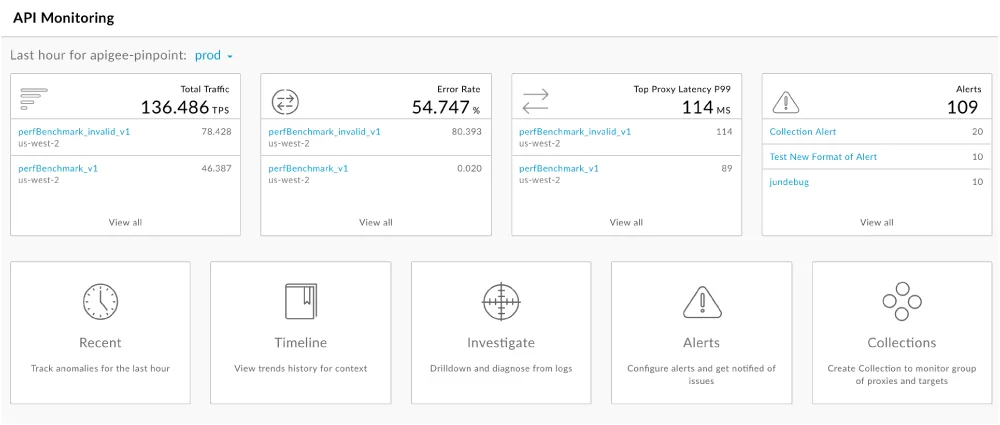
This is one of the reasons Appilot becomes useful when operations start scaling. Instead of keeping browser workflows, Android automations, schedules, account actions, and task history spread across different systems, everything can stay visible from one dashboard. That makes it easier to see which workflows are running too often, which tasks are generating too many repeated checks, and where API-heavy processes need to be slowed down or redesigned.
Conclusion: Rate Limits Usually Mean The Workflow Needs Better Discipline
If your API rate limit gets hit every day, the issue is usually not that the provider is being unreasonable. The problem is that the workflow is making too many unnecessary requests, polling too often, retrying too aggressively, or letting too many tasks hit the same endpoints at the same time.
Once you reduce noisy requests, add smarter backoff logic, stagger heavy jobs, and monitor which workflows are consuming the most API traffic, it becomes much easier to keep the system stable. That is what allows automation to keep running without getting throttled every day by the same limit.