API Response Time Slower Than 5 Seconds? Here's the Fix
The API Works, But Everything Feels Slow
One of the most frustrating problems in automation is when the API technically works but feels painfully slow. Requests eventually succeed, data eventually loads, and the workflow eventually finishes, but every action takes several seconds longer than it should. At first the delay may not seem serious. Then it starts stacking up across dozens of requests, multiple accounts, background jobs, browser workflows, and scheduled tasks until the entire system feels sluggish.
This becomes especially painful in large automations because API delays multiply quickly. A workflow that makes ten slow requests becomes annoying. A workflow that makes hundreds of slow requests becomes almost unusable. Pages wait longer to load, browser tasks sit idle waiting for responses, syncs take forever, dashboards update slowly, and users begin assuming the whole system is broken when the real issue is simply that the API layer is taking too long.
The important thing to understand is that slow APIs are usually not caused by one single problem. Most of the time, the delay is being created by several small inefficiencies that stack together.
Why API Response Times Become Slow
Most slow API problems happen because the workflow is doing more work than necessary. The request may trigger multiple database queries, extra validation steps, repeated authentication checks, external service calls, large payload generation, or expensive calculations before the response is finally returned.
Sometimes the API itself is not even the main problem. The real issue may be the network, the proxy, the server location, the browser environment, or the fact that the workflow is making too many requests back-to-back.
For example, an API server in the United States may feel fast for a local user but much slower for an automation running through distant proxies or overseas servers. Similarly, a request that looks simple may actually trigger multiple downstream services behind the scenes, and every extra dependency adds more delay.
That is why API response time issues often feel inconsistent. One request may finish in one second while the next takes six seconds because the second request depended on more services, more data, or a slower route.
The Biggest Mistake: Sending Too Many Small Requests
One of the biggest reasons APIs feel slow is because the workflow keeps sending too many separate requests instead of combining work together.
For example, instead of making one request for all account data, the automation may make ten separate requests for ten small pieces of information. Instead of fetching everything once, it may repeatedly ask for the same data again and again.
This creates unnecessary delay because every request has its own network time, authentication checks, processing overhead, and response handling.
A workflow that makes fifty tiny requests can easily feel much slower than a workflow that makes five larger requests, even if both are technically retrieving the same information.
The stronger approach is reducing unnecessary calls, combining related requests where possible, caching stable data, and avoiding repeated queries for information that does not change often.
Why Slow Authentication Makes Every Request Worse
Authentication can add more delay than people expect. Some APIs verify tokens, permissions, account status, IP restrictions, and session validity on every request. That means even a simple API call may spend part of its time just confirming that the request is allowed to happen.
This becomes even slower when the workflow keeps refreshing tokens too often, rebuilding sessions unnecessarily, or re-authenticating before every request.
Another common issue is using browser-based authentication when direct API authentication would be faster. Browser sessions, cookies, and repeated login checks often create more overhead than lightweight token-based requests.
That is why strong auth handling matters not only for security but also for speed.
Why Large Payloads Slow Everything Down
A lot of API delays happen because the response itself is too large. The workflow may be requesting more data than it actually needs. Instead of returning only the required fields, the API may send huge objects, long lists, full account histories, unnecessary metadata, large images, or repeated nested structures.
That extra data takes longer to generate, longer to transfer, and longer to process after it arrives.
This becomes especially painful in automations that run across large account groups because the same oversized response may be repeated hundreds of times.
The easiest way to improve speed is requesting only the data the workflow truly needs.
Why Queueing And Concurrency Create Delays
Another major reason APIs become slow is because too many requests are happening at once. If the system launches fifty tasks at the same time, the API server may become overloaded or the requests may start waiting in line.
This often happens in large automations where multiple browser profiles, Android devices, schedules, and backend jobs all hit the same API simultaneously.
At that point, even a normally fast API can become slow because it is being overwhelmed by concurrency.
The stronger approach is spreading requests out more intelligently, batching jobs when possible, and avoiding situations where every account tries to do the same thing at the exact same second.
The System That Makes API Performance Faster
The easiest way to improve API response times is reducing unnecessary work. That means combining requests, limiting payload size, caching stable information, improving authentication handling, and avoiding excessive retries or repeated polling.
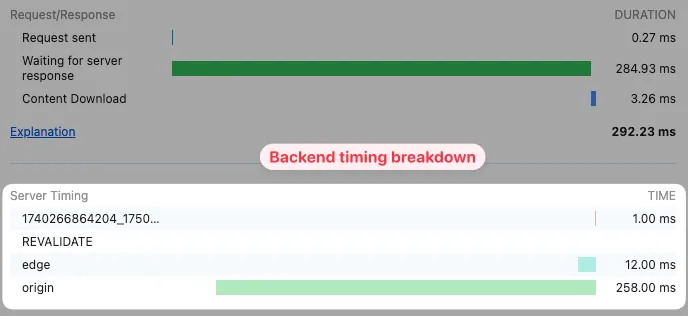
It also helps to track which endpoints are actually slow. Many teams know the system feels slow, but they do not know which specific request is creating the bottleneck. Once you identify the slowest endpoints, the fix usually becomes much more obvious.
Another important step is separating urgent actions from background work. If something does not need to happen instantly, move it into a background queue instead of blocking the main workflow. That keeps the system feeling faster even if the total amount of work stays the same.
Why Centralization Makes This Easier
Slow APIs become much harder to diagnose when browser workflows, backend jobs, schedules, account actions, logs, and performance tracking are spread across different systems. One tool may trigger the request, another may process the data, another may log delays, and another may schedule the task. That makes it difficult to see which part of the workflow is actually slowing everything down.
This is one of the reasons Appilot becomes useful when operations start scaling. Instead of keeping browser workflows, Android automations, schedules, task history, account actions, and performance tracking spread across different systems, everything can stay visible from one dashboard. That makes it easier to compare endpoint speed, identify bottlenecks, monitor slow workflows, and keep the entire system performing better.
Conclusion: Slow APIs Usually Come From Too Much Unnecessary Work
If your API response times are slower than five seconds, the issue is usually not that the API itself is completely broken. The problem is that the workflow is making too many requests, sending oversized payloads, overloading authentication, or forcing too many tasks to happen at once.
Once you reduce unnecessary calls, improve caching, limit response size, spread out concurrency, and monitor which endpoints are actually slow, API performance becomes much easier to improve. That is what allows the rest of the automation to stay fast instead of spending most of its time waiting for slow responses.