Appilot vs MassPlanner: Real Device Automation vs Desktop-Based Bots
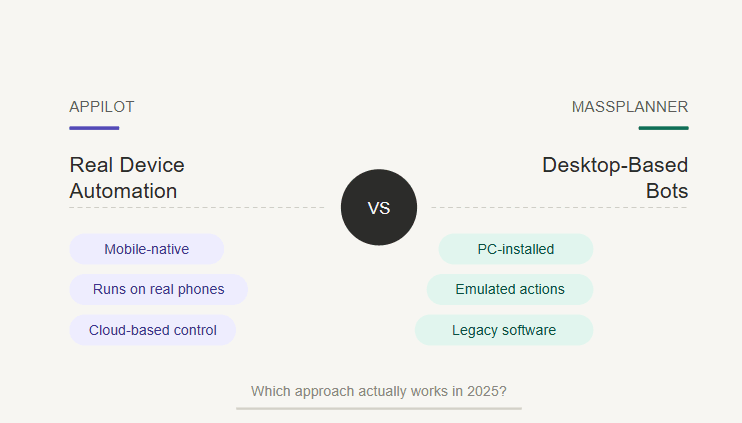
MassPlanner was one of those tools that almost every serious social media automation user heard about at some point. It became popular because it helped marketers, growth hackers, small businesses, and agencies automate repetitive social media tasks from a desktop-based setup.
For its time, MassPlanner made sense. Users wanted a way to manage multiple accounts, automate engagement, schedule posts, assign proxies, and reduce the manual workload that came with running social media growth campaigns.
But social media automation has changed a lot since MassPlanner’s peak. Platforms are stricter, mobile behavior matters more, and older desktop-based bot workflows are much easier to question in 2025.
MassPlanner also has a long shutdown history. Several industry sources reported that MassPlanner shut down around May 2017, with LinkedIn coverage noting that users were informed the Instagram and Facebook tools were being shut down, while Boostlikes described the shutdown as happening on May 12 of that year.
That makes this comparison less about choosing between two currently equal tools and more about understanding the shift from old desktop-based social media bots to newer real-device automation platforms like Appilot.
What Was MassPlanner?
MassPlanner was a desktop-based social media automation tool used to automate actions across platforms such as Instagram, Facebook, Twitter, Pinterest, and other social networks. It was popular with users who wanted to save time on repetitive actions like following, unfollowing, liking, commenting, direct messaging, joining communities, and scheduling posts. Socinator’s historical writeup describes MassPlanner as a broad social media solution for accounts like Facebook, Twitter, Pinterest, and Instagram, and also lists its common automation actions such as following, liking, commenting, direct messaging, and scheduling.
Its biggest strength was control. Users could configure campaigns, set activity limits, assign proxies, and manage several accounts from one environment. For experienced operators, that flexibility made MassPlanner useful because it gave them a central place to build growth workflows.
The weakness was that MassPlanner belonged to the desktop bot era. The automation depended on a local machine or VPS-style setup, which meant the user still had to maintain the machine, keep it running, manage software stability, and deal with the risks of desktop-based automation patterns.
That model worked better years ago, but it feels dated now because social platforms have become much better at detecting unusual automation behavior.
What Is Appilot?
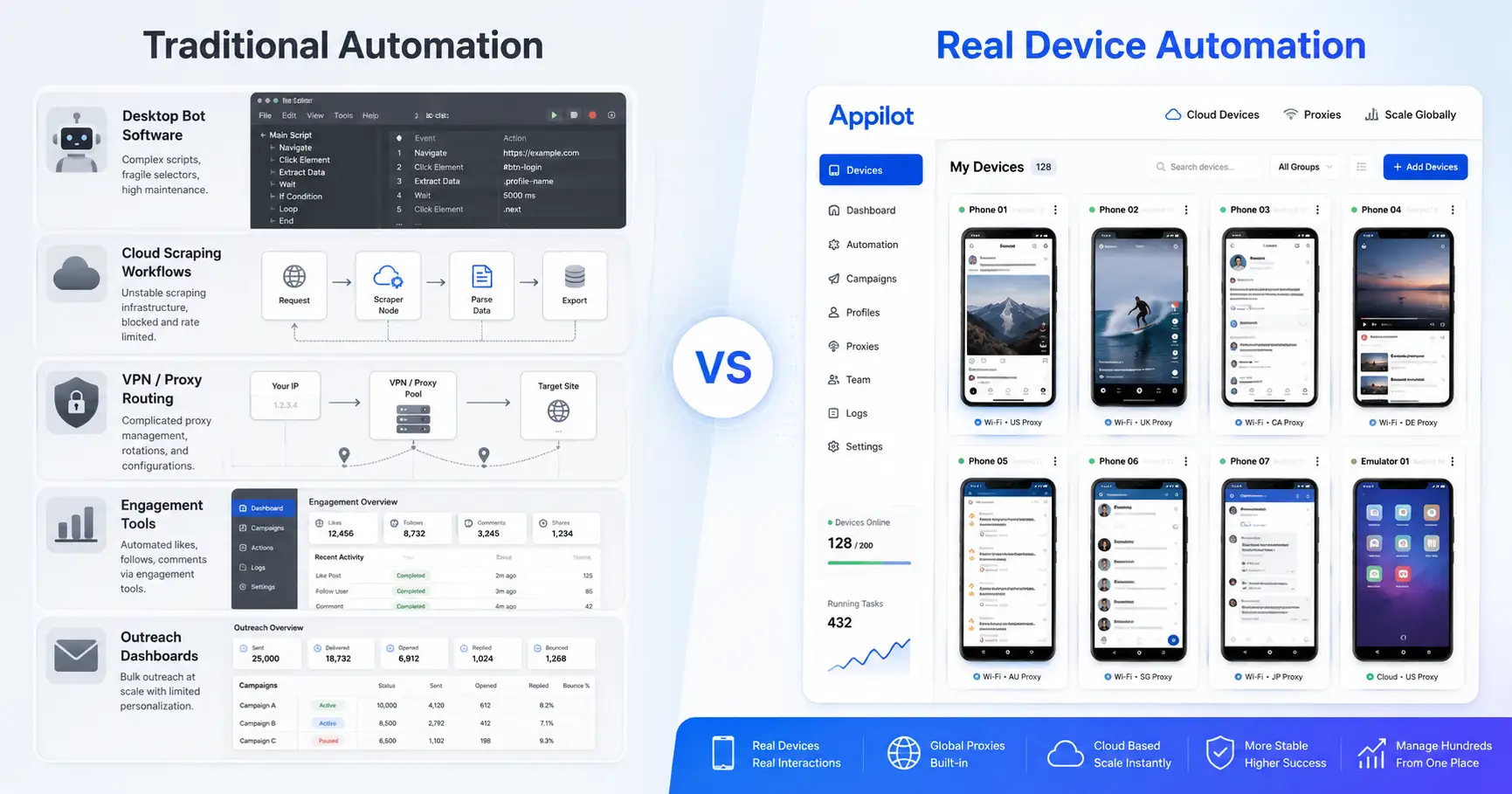
Appilot is a social media automation platform that runs bots on real Android devices and emulators through a web dashboard. Instead of depending on desktop-based bot activity, Appilot lets automation happen inside mobile environments where social apps naturally run.
This matters because many of today’s most important platforms are mobile-first. Instagram, TikTok, Threads, Snapchat, Telegram, YouTube, and similar apps are built around mobile sessions, taps, swipes, scrolling, typing, and in-app navigation.
Appilot is designed around that reality. It uses Android automation through accessibility service and UIAutomator-based workflows, which helps bots interact with apps in a way that is closer to normal mobile behavior.
The platform also removes common setup problems that usually come with mobile automation. Users do not need ADB, do not need to keep a laptop connected, and do not need to manage USB cables, drivers, or constant device disconnections.
Appilot also includes a bot store with ready-to-use automation workflows for Instagram, TikTok, Twitter/X, LinkedIn, Discord, Reddit, Snapchat, YouTube, Threads, Telegram, Gmail, Chrome, and more.
Appilot vs MassPlanner: The Main Difference
The main difference between Appilot and MassPlanner is the environment where automation happens. MassPlanner was built around desktop-based bot workflows, while Appilot is built around real Android devices and emulators.
That difference is important because modern social platforms look at more than just the action itself. They may evaluate login patterns, device consistency, app behavior, browser signals, timing, network quality, repeated actions, and whether the account’s overall behavior looks natural.
A desktop-based bot can still automate tasks, but it may not match the way users naturally interact with mobile-first apps. Appilot’s real-device approach is more aligned with how platforms like Instagram, TikTok, Threads, Snapchat, and Telegram are actually used.
This does not mean Appilot makes automation risk-free. No automation tool can promise that. Poor proxies, aggressive limits, repetitive messages, weak accounts, and bad warmup strategies can still cause problems.
But real-device automation starts from a more believable environment than older desktop-based bot workflows, especially when the target platform is built primarily for mobile use.
Why Desktop-Based Bots Became Riskier
Desktop-based automation had a practical advantage in the early social media growth era because it was easier to install one tool, connect accounts, add proxies, and let campaigns run from a computer or VPS.
The problem is that platforms became more sophisticated. They now have more ways to identify suspicious sessions, unnatural behavior, repeated engagement patterns, login mismatches, and automation signals that do not match normal user activity.
MassPlanner was popular partly because users believed a locally run tool could be more resilient than cloud-based bots. LinkedIn’s 2017 coverage even noted that many users thought MassPlanner might be immune because it ran locally on the user’s machine rather than on a server, but the tool still became part of the broader shutdown wave around automation.
That history matters because it shows that local desktop automation alone is not enough. Running a bot from a machine does not automatically make the behavior safe, natural, or acceptable to platforms.
In 2025, the better question is not whether automation runs locally or in the cloud. The better question is whether the automation environment matches how real users interact with the platform.
Why Real-Device Automation Fits 2025 Better
Real-device automation is more relevant now because social platforms are increasingly mobile-native. A user opening Instagram, TikTok, Threads, Snapchat, or Telegram on an Android device behaves differently from a script running through a desktop-based tool.
Appilot’s real-device approach gives automation a more natural execution layer. Bots can move through the app interface, tap buttons, scroll screens, type messages, wait between actions, and interact with the mobile UI.
This is not about pretending automation is completely undetectable. It is about reducing obvious mismatches. A mobile-first platform expects mobile sessions, mobile UI behavior, and device-consistent interactions.
For agencies and phone farm operators, this difference is practical. They are not just looking for a tool that can perform actions. They need a system that can run workflows across many accounts without constantly fighting setup issues, device problems, or desktop dependency.
Appilot’s model is better suited to that kind of operation because it combines real Android execution with remote dashboard management.
Setup and Maintenance
MassPlanner required users to work inside a desktop environment. That usually meant installing software on a Windows machine or running it through a VPS. This gave users control, but it also created ongoing maintenance.
The user had to keep the machine running, make sure the software stayed stable, configure proxies correctly, monitor account behavior, and manage campaign settings. For technical users, this was normal. For less technical users, it could become overwhelming.
Appilot removes much of that friction. The user manages automation from a web dashboard, while bots run on Android devices or emulators. This means the workflow does not depend on one laptop staying awake or one desktop session staying open.
The no-ADB setup is also a major difference. ADB can be useful for developers, but it is not friendly for large-scale social automation. It can create driver issues, battery drain, cable dependency, and random device disconnects.
Appilot avoids that by giving users a dashboard-driven setup that is easier to manage remotely.
Remote Control and Laptop-Free Automation
MassPlanner was built around an older idea of automation control. The user had a machine, the tool ran on that machine, and the campaigns depended on that environment staying active.
This was workable, but it was not ideal for remote teams, agencies, or people managing many accounts. If the machine crashed, slept, disconnected, or needed updates, the workflow could stop.
Appilot is built around remote control. Users can manage bots, devices, and accounts through a web dashboard without keeping a laptop connected all day.
This makes a big difference for phone farm operators and agencies because they need systems that can be monitored from anywhere. They do not want one physical laptop or one VPS session to become the weak point in the entire operation.
With Appilot, the control layer is easier to access, and the automation layer stays closer to the mobile device environment.
Supported Platforms and Workflows
MassPlanner historically supported major social platforms and became known for handling multi-account workflows across Instagram, Facebook, Twitter, Pinterest, and similar networks. It helped users automate common growth tasks and gave them a bird’s-eye view of social activity across several accounts.
Appilot supports a broader modern automation stack built around today’s social and communication platforms. It can support workflows for Instagram, TikTok, Twitter/X, LinkedIn, Discord, Reddit, Snapchat, YouTube, Threads, Telegram, Gmail, Chrome, and more.
The difference is not only platform coverage. It is the way those platforms are automated.
For mobile-first apps, Appilot’s Android-based approach makes more sense than a traditional desktop bot model. It fits better when the workflow involves in-app navigation, mobile UI actions, and account behavior that should look closer to real mobile usage.
Proxy Support and Multi-Account Management
MassPlanner users cared a lot about proxies because multi-account automation without network separation can create serious account risk. Assigning proxies, spacing actions, and avoiding repeated patterns were all important parts of using tools like MassPlanner.
Appilot also supports proxy-aware workflows, including mobile and residential proxies, which are important for users managing many accounts across different platforms.
The advantage with Appilot is that proxy strategy can be paired with real-device automation and remote dashboard control. This creates a more complete workflow for agencies and operators who need to manage accounts, devices, bots, and network identity from one system.
Good proxy use still matters. A real-device automation tool does not fix bad proxy quality or reckless activity limits. But when good proxies are combined with real Android behavior and careful automation settings, the setup is much stronger than an old desktop bot workflow.
Where MassPlanner Wins
MassPlanner deserves credit for its legacy. It helped shape how marketers thought about social media automation and gave users a lot of control over campaign workflows.
For advanced users, MassPlanner had the appeal of detailed configuration. It allowed users to manage many accounts, automate repetitive actions, and build structured growth campaigns from one place.
It was also cost-effective for many users at the time. Small businesses and marketers used it because it reduced manual work and helped them stay active across social platforms when organic reach was becoming more difficult.
The problem is that this legacy does not make MassPlanner a practical choice today. Its shutdown history is well documented, and the tool belongs to an older automation environment that does not match the way mobile-first platforms operate in 2025.
Where Appilot Wins
Appilot wins because it is built for the current automation landscape rather than the old desktop bot era.
Its biggest advantage is real-device Android automation. Instead of running actions from a desktop-style setup, Appilot runs bots on real Android devices and emulators, which better matches how users interact with mobile-first platforms.
The second advantage is simpler operations. Appilot does not require ADB, laptop dependency, USB cables, or local driver troubleshooting. This makes it much easier for non-technical users and more practical for operators managing many accounts.
The third advantage is remote control. Users can manage automation from a web dashboard, which makes Appilot better suited for agencies, distributed teams, and phone farm operators.
The fourth advantage is the bot store. Users can start with ready-to-use workflows instead of building everything manually. For teams that need something specific, custom bot development is also available.
For anyone looking for a MassPlanner alternative in 2025, Appilot is the stronger fit because it replaces the old desktop bot model with a mobile-first automation system.
Who Should Use MassPlanner?
MassPlanner is mainly useful today as a reference point. If someone wants to understand how social media automation evolved, MassPlanner is worth studying because it shows what early multi-account desktop automation looked like.
Users who previously worked with MassPlanner may still benefit from the concepts it popularized, such as action limits, campaign structure, proxy separation, account warmup, and source targeting.
But for active social media automation, MassPlanner is not the right choice in 2025. The tool has a shutdown history, and its desktop-based workflow does not fit the modern platform environment as well as real-device automation.
Who Should Use Appilot?
Appilot is better for users who want mobile-first social media automation without the maintenance burden of desktop bots.
It is a strong fit for phone farm operators, social media agencies, growth teams, outreach teams, and non-technical users who want ready-made bots they can control remotely.
It is also useful for people who previously liked the idea of MassPlanner but now need something more modern. If the goal is to automate across platforms like Instagram, TikTok, Threads, Twitter/X, LinkedIn, Telegram, YouTube, Reddit, Discord, Gmail, and Chrome, Appilot gives users a more current workflow.
The best fit is someone who wants real Android automation, proxy support, no ADB, no laptop dependency, and dashboard-based management.
Final Verdict
MassPlanner was a powerful tool in its time, but it belongs to the desktop-based bot era. It helped many marketers automate social media workflows, but its shutdown history and old operating model make it difficult to recommend today.
Appilot is the better choice for users who want a modern MassPlanner alternative. It runs automation on real Android devices and emulators, works without ADB, does not require a laptop, supports remote dashboard control, and offers ready-to-use bots for many platforms.
If you are researching MassPlanner because you want to understand old-school social automation, it is still worth knowing. If you want a tool that fits social media automation in 2025, Appilot is the better option.
You can explore Appilot’s bot store and try it at appilot.app.
FAQ
Q1: What is the biggest difference between Appilot and MassPlanner?
MassPlanner was a desktop-based bot tool, while Appilot runs bots on real Android devices and emulators. Appilot is better suited to mobile-first automation.
Q2: Is MassPlanner still available?
MassPlanner has a long shutdown history, with multiple sources reporting its shutdown around May 2017. It is not a practical active choice for new users today.
Q3: Is Appilot a MassPlanner alternative?
Yes, Appilot is a strong MassPlanner alternative for users who want real-device automation, remote dashboard control, no ADB, and multi-platform bot workflows.
Q4: Does Appilot require a laptop or ADB?
No, Appilot works without ADB and does not require users to keep a laptop connected. Bots are managed through a web dashboard.
Q5: Who should use Appilot instead of MassPlanner?
Appilot is best for agencies, phone farm operators, growth teams, and users managing many accounts across mobile-first social platforms.