Appium vs Appilot: When to Use Each for Mobile Social Media Automation
Appium and Appilot both relate to mobile automation, but they are built for very different users.
Appium is an open-source automation framework mainly used by developers and QA teams to test mobile apps. It gives technical users a way to write scripts, automate UI flows, and test Android, iOS, and other app platforms through a WebDriver-based approach.
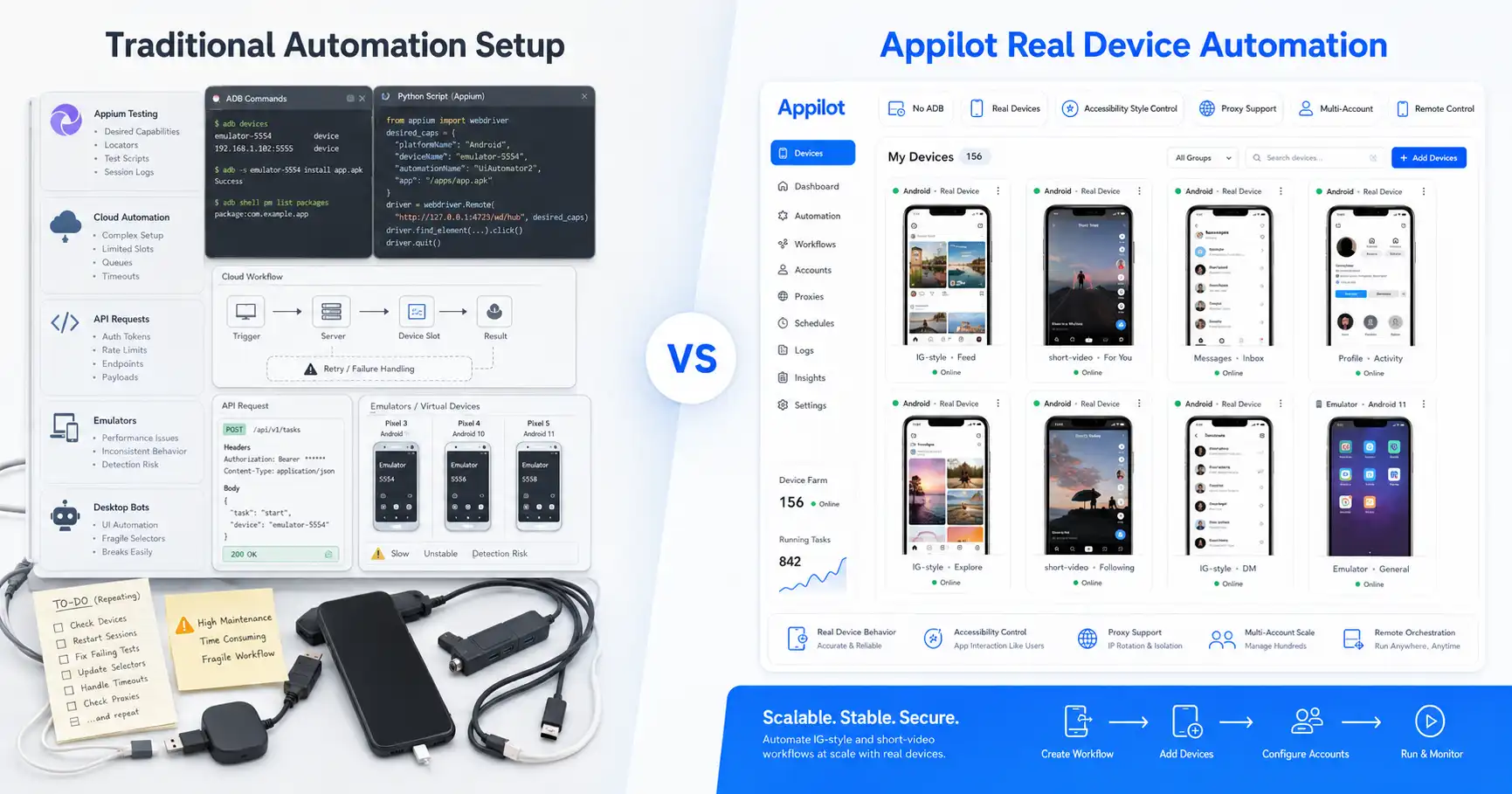
Appilot is built for social media automation operators. It runs bots on real Android devices and emulators through a remote web dashboard, without requiring users to manage ADB, cables, local scripts, or always-on laptops.
That difference matters because mobile social media automation is not the same as mobile app testing. Testing teams usually want repeatable scripts, assertions, CI/CD integration, and full control over test logic. Social media operators usually want ready-to-use bots, proxy-aware workflows, account management, remote control, and stable execution across platforms like Instagram, TikTok, LinkedIn, Discord, Reddit, YouTube, Threads, Telegram, Gmail, and Chrome.
This guide compares Appium vs Appilot and explains when to use each one for mobile social media automation.
What Is Appium?
Appium is an open-source mobile automation framework used for UI automation across mobile apps, browsers, desktop apps, TVs, and other platforms. In mobile testing, it is commonly used to automate Android and iOS apps through code.
Developers and QA engineers use Appium to write test scripts that interact with app screens, buttons, forms, menus, and workflows. It is useful when a team wants to verify that an app works correctly across devices, operating systems, and user flows.
Appium’s strength is control. A technical team can write scripts in languages such as JavaScript, Python, Java, Ruby, C#, or other supported languages, connect them to test frameworks, and integrate those tests into QA pipelines.
That makes Appium a strong choice for product teams building and testing mobile apps.
But Appium is not designed as a plug-and-play social media bot platform. It requires technical setup, test code, environment configuration, device management, and ongoing script maintenance.
What Is Appilot?
Appilot is a social media automation platform that runs bots on real Android devices and emulators. Users manage bots through a web dashboard, while the automation happens inside Android app environments.
Instead of asking users to write Appium scripts, configure drivers, or manage ADB-heavy workflows, Appilot gives users a dashboard-based system for running social media bots remotely.
This is useful for users who want to automate workflows across platforms like Instagram, TikTok, Twitter/X, LinkedIn, Discord, Reddit, Snapchat, YouTube, Threads, Telegram, Gmail, Chrome, and more.
Appilot also works without ADB, which removes common pain points like USB cable dependency, driver issues, device disconnects, battery drain, and laptop dependency.
For social media agencies, phone farm operators, growth teams, and non-technical users, Appilot is easier to operate because it focuses on ready-to-use automation rather than code-first testing.
Appium vs Appilot: The Main Difference
The main difference between Appium and Appilot is the intended user.
Appium is for developers and QA teams who want to build custom mobile automation scripts. Appilot is for operators who want to run social media bots without building and maintaining automation infrastructure themselves.
Appium gives deep technical control. If a team needs to test a mobile app, validate UI flows, run automation in CI/CD, or write custom test logic, Appium is the right kind of tool.
Appilot gives operational simplicity. If a user wants to run Instagram bots, TikTok workflows, LinkedIn actions, Reddit automation, Discord workflows, Telegram tasks, YouTube app flows, or Gmail and Chrome automation from one dashboard, Appilot is the better fit.
The distinction is simple: Appium is a framework, while Appilot is a managed automation platform.
That difference affects setup, maintenance, risk, scalability, and who can actually use the tool day to day.
When Appium Makes Sense
Appium makes sense when the user needs full technical control over mobile automation.
If a developer is testing a mobile app, Appium is useful because it allows the team to write exact test flows. They can define what screen to open, what element to tap, what input to enter, what result to verify, and what failure condition should stop the test.
Appium also makes sense when automation must be integrated into a software testing pipeline. QA teams can connect Appium tests with CI/CD systems, reporting tools, device farms, and test management workflows.
It is also useful when the team has developers who are comfortable writing and maintaining scripts. Appium gives flexibility, but that flexibility comes with maintenance responsibility.
For technical teams, that trade-off is acceptable. They want control, and they are willing to manage the setup.
For non-technical social media operators, that same setup can feel heavy.
When Appilot Makes Sense
Appilot makes sense when the user wants social media automation without building everything from scratch.
If a user wants to run bots on Instagram, TikTok, LinkedIn, Discord, Reddit, YouTube, Threads, Telegram, Gmail, Chrome, or similar platforms, Appilot is usually more practical than Appium.
The reason is simple: Appilot is built around operational workflows. Users do not need to write scripts, maintain test code, configure drivers, or keep a laptop connected to devices.
They can use a web dashboard, choose ready-to-use bots, manage devices or emulators, and run workflows remotely.
This is especially valuable for agencies and phone farm operators. Those users usually care about account operations, proxy support, bot stability, device behavior, and remote access. They do not want to spend most of their time debugging automation code.
For that use case, Appilot is the better tool.
Code-First Automation vs Dashboard-Based Automation
Appium is code-first. That is one of its strengths and one of its weaknesses.
Code-first automation gives technical users complete flexibility. They can write custom logic, build reusable test suites, connect automation with development pipelines, and control every detail of the workflow.
But code-first automation also creates a maintenance burden. Scripts break when app UIs change. Selectors need updates. Device setup can be fragile. Test environments need maintenance. Someone technical must own the system.
Appilot is dashboard-based. The goal is to make mobile social automation easier to operate.
Users do not need to write every workflow manually. They can start with ready-to-use bots and manage them remotely. Teams that need custom workflows can still request custom bot development, but they do not need to start from raw automation code.
For mobile app testing, code-first is often better. For social media automation operations, dashboard-based control is usually better.
ADB, Device Setup, and Operational Pain
Appium often depends on a more technical mobile automation setup. For Android automation, teams commonly deal with Android SDK tools, device drivers, emulators, permissions, debugging settings, and device connectivity.
This is normal for QA teams, but it can be painful for social media operators.
A phone farm operator does not want to manage ADB sessions all day. An agency does not want every workflow to depend on one technical person’s laptop. A growth team does not want bots to stop because a device disconnected or a local script failed.
Appilot avoids this by working without ADB. Users do not need to keep a laptop connected, manage USB cables, fix driver problems, or troubleshoot device disconnects as part of their daily workflow.
This is one of Appilot’s biggest advantages for non-technical users and operators managing multiple accounts.
Social Media Automation Use Cases
Social media automation has different requirements from app testing.
A testing team might want to verify that a login button works. A social automation operator might want to warm up an account, browse content, send messages, engage with posts, manage replies, rotate workflows, and run tasks across multiple platforms.
Those workflows are more operational than technical.
Appium can technically automate many app actions if someone writes the scripts. But that does not make it the best tool for social media automation. The user still has to build and maintain all the logic.
Appilot is already built around social media bot workflows. Its bot store gives users ready-to-use automation options, while its dashboard gives operators a cleaner way to manage accounts and workflows remotely.
That makes Appilot more practical for agencies, growth teams, and phone farm operators.
Real Devices and Emulators
Both Appium and Appilot can work with Android automation environments, but they approach the problem differently.
Appium gives developers a framework to automate devices and emulators through scripts. This is useful when the team wants to test specific app behavior and control the test environment closely.
Appilot gives operators a platform for running bots on real Android devices and emulators without dealing with the same level of technical setup.
For social media automation, both real devices and emulators can be useful. Emulators are good for testing and lower-risk workflows. Real devices are stronger when mobile realism and account trust matter more.
Appilot’s advantage is that it makes both environments easier to manage from a dashboard.
Multi-Account Growth
Multi-account growth is where Appilot becomes much more practical than Appium.
With Appium, every workflow needs to be designed, scripted, maintained, and monitored by someone technical. That can work for internal QA, but it becomes inefficient for agencies managing many social accounts.
Appilot is designed for operators who need to manage multiple accounts and workflows. It supports proxy-aware operations, remote control, bot management, and Android-based execution.
This makes it more useful for Instagram agencies, TikTok operators, LinkedIn outreach teams, Reddit growth workflows, Telegram automation, Discord community operations, and phone farm setups.
If the goal is to automate one app for testing, Appium is strong. If the goal is to manage many social automation workflows, Appilot is stronger.
Where Appium Wins
Appium wins when the user needs custom-coded automation and technical control.
It is the better choice for QA teams, developers, test engineers, and product teams that need to test mobile apps across Android and iOS.
Appium also wins when automation needs to be part of a larger software testing system. If a company already has CI/CD pipelines, automated test reports, QA processes, and developers maintaining test scripts, Appium fits naturally.
It is also open-source, which gives technical teams flexibility and avoids vendor lock-in.
The trade-off is that Appium requires technical ownership. It is powerful, but it is not a simple social media bot dashboard.
Where Appilot Wins
Appilot wins when the user wants mobile social media automation without building everything manually.
Its strongest advantage is operational simplicity. Users can run bots on real Android devices and emulators, manage everything through a web dashboard, and avoid ADB dependency.
Appilot also wins for non-technical users because they do not need to write scripts or maintain automation code.
The bot store makes it easier to start quickly, while custom bot development gives teams flexibility when they need something specific.
For phone farm operators, agencies, and growth teams, Appilot is better because it is built for running social workflows, not just testing app interfaces.
Who Should Use Appium?
Appium is best for developers, QA engineers, test automation teams, and companies that need mobile app testing.
It is a strong choice when the goal is to verify app functionality, run regression tests, automate QA flows, or build custom testing infrastructure.
It also makes sense when a team has engineers who can write and maintain automation scripts.
If the user wants full control and has the technical team to support it, Appium is a great tool.
Who Should Use Appilot?
Appilot is best for social media agencies, phone farm operators, growth teams, outreach teams, and users managing multiple social accounts.
It is the better choice when the goal is to run bots across platforms like Instagram, TikTok, Twitter/X, LinkedIn, Discord, Reddit, Snapchat, YouTube, Threads, Telegram, Gmail, Chrome, and more.
Appilot is also better for users who want no ADB, no laptop dependency, remote dashboard control, proxy-aware workflows, and ready-to-use bots.
If the user wants to operate social media automation rather than build a test automation framework, Appilot is the better fit.
Final Verdict
Appium and Appilot are both useful, but they solve different problems.
Appium is better for developers and QA teams that need open-source, code-first mobile app testing. It gives technical users deep control and flexibility across mobile automation environments.
Appilot is better for social media automation operators who want ready-to-use bots, real Android workflows, remote dashboard control, proxy support, no ADB, and no laptop dependency.
If you are testing a mobile app, use Appium. If you are running social media bots and managing multi-account workflows, use Appilot.
You can explore Appilot’s bot store and try it at appilot.app.
FAQ
Q1: What is the biggest difference between Appium and Appilot?
Appium is a code-first mobile automation framework for developers and QA teams. Appilot is a no-ADB social media automation platform with ready-to-use bots.
Q2: Is Appilot an Appium alternative?
Appilot is an alternative only for social media automation use cases. For mobile app testing and QA pipelines, Appium is still the better fit.
Q3: Does Appium require coding?
Yes, Appium usually requires users to write and maintain automation scripts. It is best for technical teams that need custom mobile app testing.
Q4: Does Appilot require ADB or a laptop?
No, Appilot works without ADB and does not require users to keep a laptop connected. Bots can be managed through a remote web dashboard.
Q5: Who should choose Appilot over Appium?
Agencies, phone farm operators, growth teams, and non-technical users should choose Appilot when they need ready-to-use social media bots and remote mobile automation.