Automating AdsPower Team Collaboration with Appilot Dashboard
AdsPower is widely used by teams that manage multiple browser profiles across different clients, platforms, and workflows. It allows teams to create isolated browser environments with separate fingerprints, cookies, proxies, and sessions.
This makes it useful for agencies, marketing teams, affiliate operators, and businesses handling multi-account operations.
However, as teams grow, collaboration becomes more complex.
Different team members may be responsible for different accounts, workflows, and profile groups. Some workflows may need to run at specific times, while others may need continuous monitoring.
Managing all of this manually can quickly become inefficient.
This is where Appilot Dashboard becomes useful.
Appilot Dashboard helps automate AdsPower team collaboration so teams can organize workflows, assign schedules, manage profile groups, and monitor automation from one place.
Why Team Collaboration Becomes Challenging
When multiple team members are working on the same set of browser profiles, coordination becomes important.
One team member may handle account creation, another may manage daily operations, and another may monitor performance or run scraping workflows.
Without a centralized system, tasks can overlap, schedules can conflict, and profiles can be mismanaged.
Teams may rely on spreadsheets, manual updates, or messaging tools to coordinate tasks.
This creates delays and increases the chances of mistakes.
As the number of browser profiles increases, these problems become even more noticeable.
How Appilot Dashboard Improves Team Collaboration
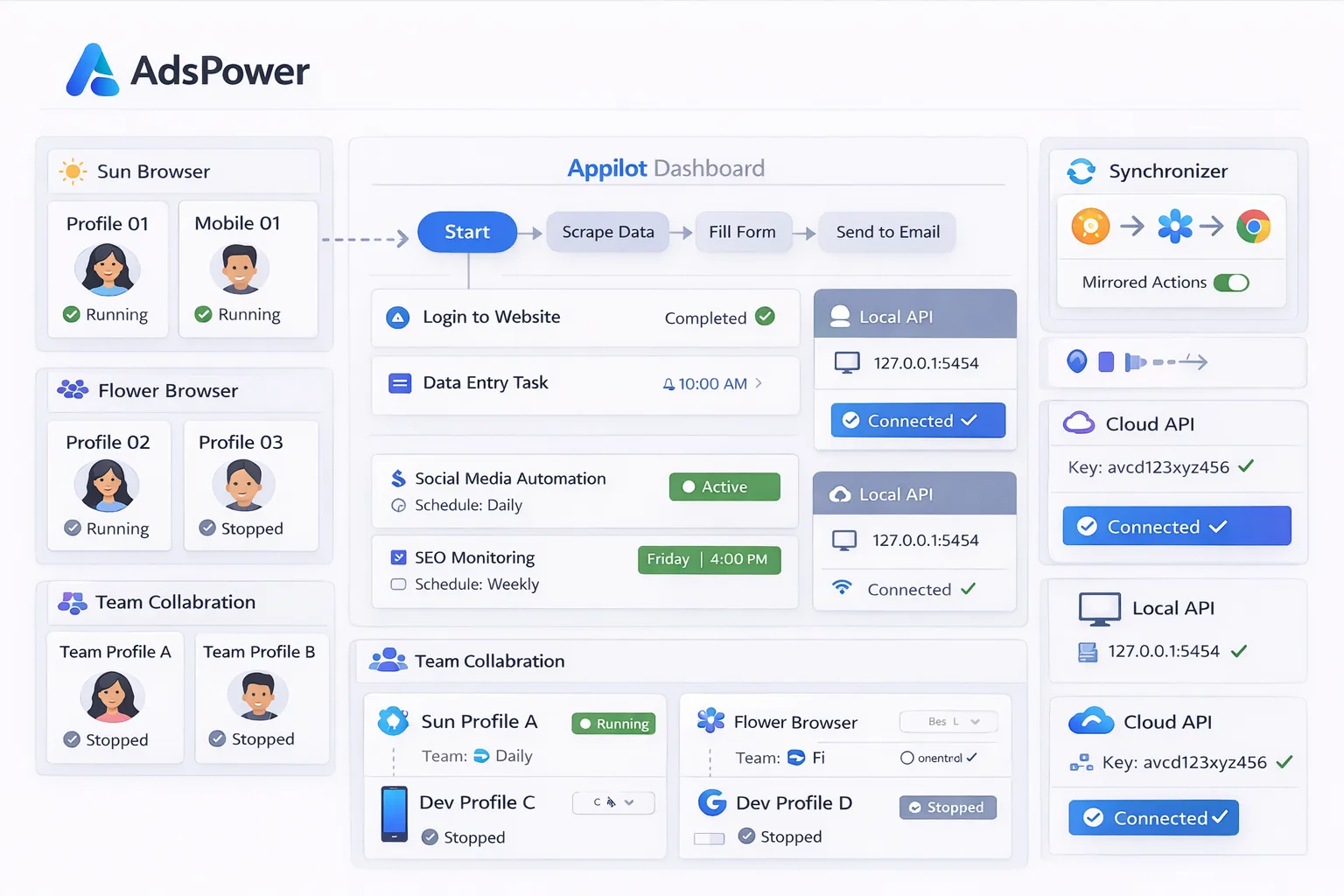
Appilot Dashboard acts as the central workflow and scheduling layer above AdsPower.
First, browser profiles are created or imported inside AdsPower. Each profile has its own fingerprint, cookies, proxy settings, session data, and account information.
These profiles can then be grouped based on client, platform, workflow type, region, or team responsibility.
Inside Appilot Dashboard, teams can organize these profile groups, assign workflows, create schedules, and monitor activity from one place.
For example, one team may handle social media accounts, another may manage e-commerce workflows, and another may run scraping tasks.
Each group can have its own schedules, timing rules, delays, and workflow assignments.
This makes it easier for teams to collaborate without constantly switching between tools or manually coordinating tasks.
Common Team Collaboration Workflows
Different teams often manage different types of workflows.
For example, social media teams may handle engagement, posting, and account management.
E-commerce teams may monitor product listings, update inventory, and track pricing.
Affiliate teams may manage campaigns, test landing pages, and analyze performance.
Scraping teams may collect data, process information, and export results.
Appilot Dashboard makes it easier to organize these workflows and assign them to specific profile groups and team responsibilities.
This helps teams work more efficiently without overlapping tasks.
Benefits of Automating Team Collaboration
One major benefit is better organization.
Teams can clearly see which workflows belong to which profile groups and which team members are responsible for each task.
Another major benefit is time savings.
Appilot Dashboard can automate workflow scheduling, reducing the need for manual coordination between team members.
Automation also helps reduce mistakes.
It becomes easier to avoid missed schedules, duplicated tasks, and conflicting workflows.
Another important advantage is improved visibility.
Team leads can monitor workflow performance, track task completion, and identify issues from one dashboard.
This makes it easier to manage team performance and maintain workflow consistency.
Best Practices for Team-Based Automation
One of the most important rules is to clearly define profile groups and team responsibilities.
Each profile group should be assigned to a specific workflow and team function.
Using clear naming conventions helps team members understand which profiles belong to which tasks.
For example, profiles can be named based on client, platform, and workflow type.
It is also important to avoid overlapping schedules.
Different teams should have separate timing windows to prevent conflicts.
Another important rule is to maintain consistent proxy and fingerprint settings across profiles.
Finally, test workflows on a small number of profiles before scaling across the entire team setup.
Common Mistakes to Avoid
One common mistake is poor organization between team members.
Without clear profile grouping and workflow assignments, tasks can overlap and create confusion.
Another mistake is running identical workflows across all profiles without considering different team responsibilities.
Some teams also scale too quickly before testing workflows properly.
Using the same proxy across too many profiles is another issue because it increases overlap and detection risks.
The biggest problem is lack of structure. Without a centralized system, managing team collaboration becomes difficult.
The best approach is to stay organized, define clear workflows, and scale gradually.
Frequently Asked Questions
Q1: Why should teams use Appilot Dashboard with AdsPower?
Appilot Dashboard helps teams organize workflows, assign schedules, and manage browser profiles from one place.
Q2: Can multiple team members manage profiles at the same time?
Yes. Teams can collaborate by assigning different profile groups and workflows to different members.
Q3: How does Appilot improve workflow management?
It centralizes scheduling, automation, and monitoring, making it easier to manage multiple workflows.
Q4: Why is organization important in team automation?
Organization reduces confusion, prevents task overlap, and improves efficiency.
Q5: What is the biggest mistake in team collaboration?
The biggest mistake is poor structure. Without clear roles, schedules, and profile groups, collaboration becomes difficult.
Conclusion
AdsPower is powerful for managing multiple browser profiles, but team collaboration becomes challenging as the number of profiles and workflows increases.
Appilot Dashboard helps solve this problem by providing a centralized system where teams can organize profiles, assign workflows, create schedules, and monitor activity.
The best approach is to define clear roles, avoid overlapping tasks, and scale gradually as your team automation setup becomes more structured and efficient.