Automating Aximon Browser Workflows Using Appilot Scheduler
Managing a few browser profiles manually is usually not difficult. You open the browser, select the correct profile, log into the required account, complete the task, and close the session. That process works when you only have a handful of profiles.
The problem begins when you need to repeat the same actions across dozens of profiles every day. Launching browser sessions manually, assigning the correct proxy, checking notifications, opening websites, posting content, scraping information, or logging into accounts becomes repetitive and time-consuming very quickly.
This is where Appilot Scheduler becomes useful. Aximon Browser already gives you profile isolation, browser fingerprint control, and proxy management, but Appilot Scheduler adds another layer by helping you automate repetitive browser workflows. Instead of manually opening profiles every day, you can build workflows that automatically launch browser profiles, perform actions, and close sessions on a schedule.
Why Browser Workflow Automation Matters
Browser workflow automation is important because repetitive work consumes a large amount of time when you are managing multiple accounts. A person managing social media accounts, affiliate campaigns, e-commerce stores, or scraping tasks may need to open the same profiles and repeat the same sequence of actions every single day.
For example, a social media manager may need to open ten browser profiles every morning, log into Instagram accounts, check messages, review notifications, post content, and close the sessions. An e-commerce seller may need to open several store accounts, check inventory, review orders, export reports, and monitor ad campaigns. A scraper may need to open browser profiles with different proxies, visit websites, collect information, and save the data.
Doing all of this manually is possible, but it is slow and increases the chance of mistakes. You may accidentally use the wrong profile, open the wrong proxy, forget to close sessions, or miss an important task. Workflow automation helps remove these problems by making tasks repeatable and structured.
How Appilot Scheduler Works with Aximon Browser
Aximon Browser handles the browser profile side of the operation. It allows you to create separate browser environments with their own cookies, user agents, screen resolutions, proxies, and fingerprint settings. This prevents websites from linking multiple accounts together.
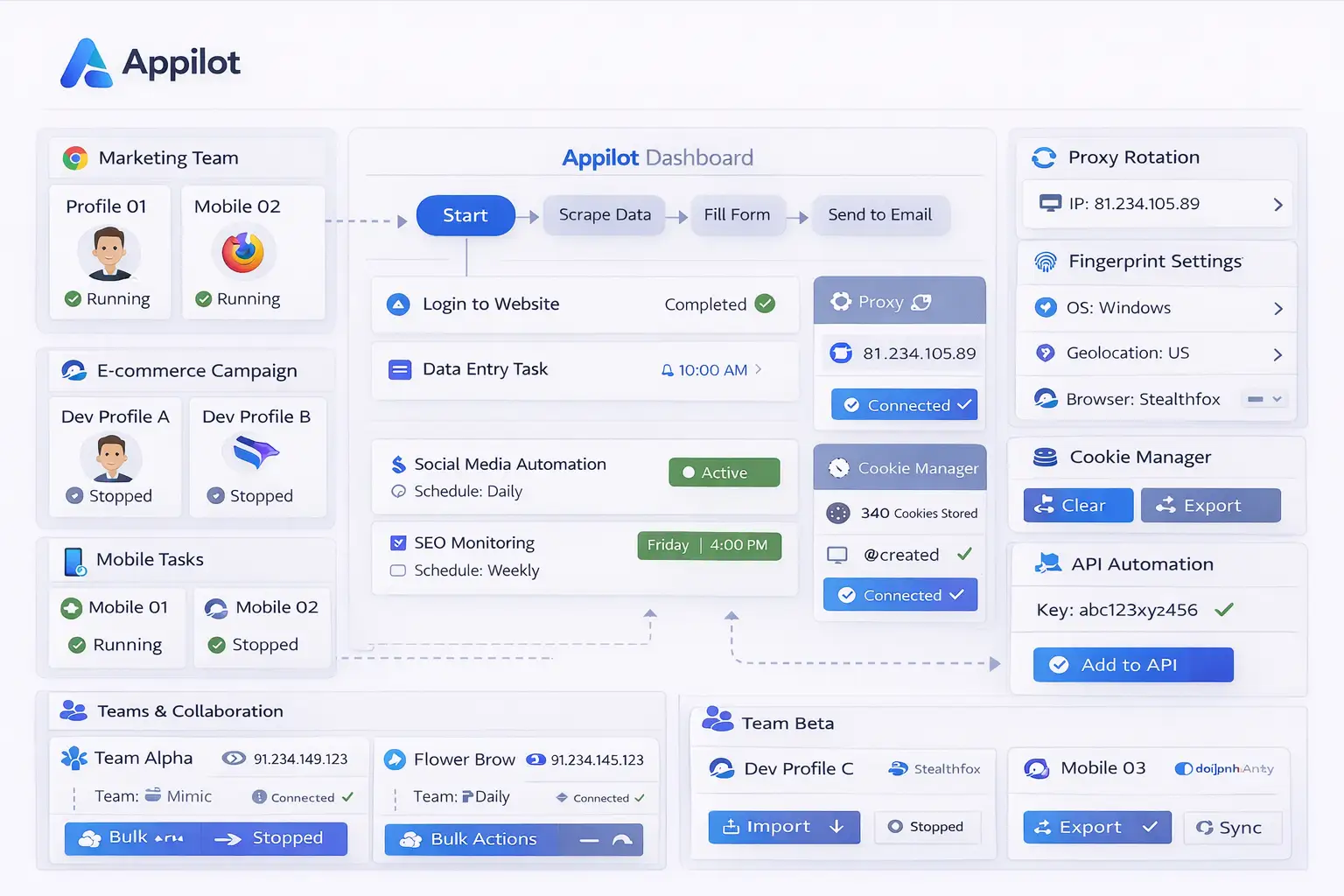
Appilot Scheduler sits on top of that browser environment and controls when workflows should start, which profiles should launch, what actions should happen, and when sessions should close. This makes it possible to automate repetitive tasks without needing to manually manage every step.
For example, you can create a workflow that launches five browser profiles every day at 9 AM, opens specific websites, logs into accounts, checks messages, exports data, and closes the sessions afterward. Once the workflow is saved, it repeats automatically according to the schedule you define.
This is especially useful when you are managing a large number of profiles because it allows you to keep everything organized from one dashboard instead of manually switching between browser sessions.
Common Workflows You Can Automate
There are many different workflows that can be automated with Aximon Browser and Appilot Scheduler.
Social media managers often automate profile warm-up activities, content posting, engagement checks, message replies, and account monitoring. This can save several hours every week because the same tasks no longer need to be done manually.
E-commerce sellers frequently automate store login sequences, order reviews, inventory checks, product research, and performance reporting. Instead of manually opening multiple stores every day, Appilot Scheduler can handle those tasks automatically.
Affiliate marketers often automate ad account monitoring, landing page checks, campaign reviews, and traffic source tracking. Since affiliate marketers usually manage multiple accounts and campaigns at once, automation makes operations much easier to scale.
Crypto users can automate workflows for exchange logins, wallet monitoring, NFT activities, airdrop farming, and research across different accounts. Since crypto workflows often involve a large number of separate browser profiles, scheduling becomes very useful.
Web scraping teams can automate browser launches, proxy rotation, page visits, data collection, and session closures. This allows scrapers to gather information from multiple websites without manually controlling every session.
Setting Up Your First Workflow
The easiest way to begin is by creating a simple workflow for a small group of browser profiles. Start by selecting a few profiles inside Appilot Scheduler and assign a basic task sequence.
For example, you might want to create a workflow that launches three browser profiles every morning, opens a social media website, checks notifications, and closes the profiles afterward. Once the workflow is created, you can assign a schedule such as every day at 9 AM.
After the task is running correctly, you can add more actions. You might include proxy changes, multiple website visits, exporting reports, taking screenshots, scraping data, or logging into different platforms.
It is usually better to start with a simple workflow first because it makes troubleshooting easier. Once the first automation is stable, you can gradually add more profiles and more actions.
Benefits of Using Scheduled Browser Workflows
One of the biggest advantages of workflow automation is time savings. Tasks that normally take several hours each day can often be reduced to a few minutes of setup time. Once the workflow is saved, it continues running automatically.
Another benefit is consistency. Manual work often leads to small mistakes such as using the wrong profile, missing a step, forgetting a proxy, or leaving sessions open. Automated workflows follow the same process every time, which makes operations more reliable.
Automation also makes scaling easier. If you are managing five profiles manually, it may still be manageable. If you are managing fifty or one hundred profiles, manual work becomes difficult. Scheduled workflows allow you to manage more profiles without needing a larger team.
The centralized dashboard is another major advantage. Instead of opening profiles one by one and keeping track of separate tasks manually, Appilot Scheduler gives you one place where you can manage profiles, monitor workflows, and review task results.
Best Practices for Workflow Automation
The best approach is to start small and expand gradually. Test workflows with a few browser profiles before running them across larger groups. This helps you catch problems early and prevents larger failures.
You should also separate profiles into groups based on their purpose. Keeping social media profiles separate from e-commerce profiles, affiliate accounts, and scraping profiles makes workflow management much easier.
Using separate proxies for separate profiles is also important because it reduces the chance of account linking. If too many profiles use the same proxy, platforms may treat them as related accounts.
Another good practice is reviewing task logs regularly. Even if a workflow is mostly automated, it is still important to monitor results and make sure everything is running correctly. Small issues such as changed page layouts, expired logins, or broken proxies can affect performance over time.
You should also avoid building overly complex workflows too early. A simple and reliable workflow is usually better than a large workflow with too many actions that becomes difficult to manage.
Common Problems and Troubleshooting
One common problem is that browser profiles launch correctly, but the workflow itself does not complete all of the steps. This often happens because websites change their layout or because the task timing is too fast.
Another issue is that proxies stop working or become blocked. If this happens, browser sessions may fail to load websites or may trigger suspicious activity warnings. Testing proxies regularly helps avoid these issues.
Sometimes workflows fail because accounts are logged out. If a session expires or login details change, the automation may stop working until the account is updated.
Users also sometimes schedule too many profiles at once without enough system resources. Running too many browser sessions simultaneously can slow down the system and reduce performance. It is usually better to stagger workflows across different times rather than running everything at once.
Frequently Asked Questions
Q1: How many workflows can I run at the same time?
The number depends on your system resources, the number of browser profiles you are using, and how many proxies are available. Most users begin with a small number of workflows and scale up gradually.
Q2: Can I automate different types of tasks for different browser profiles?
Yes. Appilot Scheduler allows you to assign different workflows to different groups of browser profiles so each group can run its own task sequence.
Q3: Is Appilot Scheduler useful for social media automation?
Yes. Social media managers often use it for profile warm-up, content posting, notification checks, engagement tracking, and message replies.
Q4: Can I automate proxy rotation for Aximon Browser profiles?
Yes. Proxy management can be included as part of the workflow so that different browser profiles automatically use different proxies.
Q5: What happens if a scheduled workflow fails?
Appilot Scheduler can show logs and status reports for failed workflows so you can review the issue and make corrections before the next scheduled run.
Conclusion
Aximon Browser already gives you strong browser profile isolation, fingerprint control, and proxy management. When you combine it with Appilot Scheduler, you add automation, scheduling, centralized workflow management, and repeatable browser tasks.
This combination is useful for social media teams, affiliate marketers, e-commerce sellers, scraping operations, crypto users, and agencies managing multiple accounts. Instead of repeating the same work every day, you can automate the process, save time, and scale your workflows much more efficiently.