Automating LogMeOnce Browser Workflows with Appilot
Managing passwords, browser logins, account credentials, and secure sessions becomes much harder when you are working across many platforms and accounts. Social media managers, e-commerce sellers, affiliate marketers, agencies, crypto users, and web scraping teams often deal with dozens of logins every day.
Opening browser profiles, entering passwords, checking dashboards, reviewing notifications, exporting reports, and logging out of sessions manually can quickly become repetitive. The more accounts you manage, the more difficult it becomes to keep browser workflows secure and organized.
This is where LogMeOnce and Appilot become useful together. LogMeOnce helps manage passwords, browser logins, secure credentials, and identity protection, while Appilot helps automate the browser workflows that normally require repetitive manual work.
Instead of manually opening browser sessions every day and entering credentials over and over again, Appilot can automate those workflows while LogMeOnce helps keep the account information secure.
Why Browser Workflow Automation Matters
Many browser-based tasks follow the same process every day. A user may need to log into social media accounts, review notifications, check dashboards, export reports, monitor websites, or open browser profiles for client projects.
When these tasks are repeated across many accounts, they consume a large amount of time.
For example, an agency may need to open ten client dashboards every morning, log into advertising accounts, review campaign performance, export data, and close the browser sessions afterward. A social media manager may need to check messages, review comments, and log into several accounts every day.
Doing these tasks manually is possible when the number of accounts is small, but it becomes much harder when the number of profiles increases.
Automation helps solve this problem because the same actions can be repeated automatically without needing constant manual input.
How LogMeOnce and Appilot Work Together
LogMeOnce focuses on secure login management. It stores passwords, login credentials, secure notes, two-factor authentication details, and browser login information.
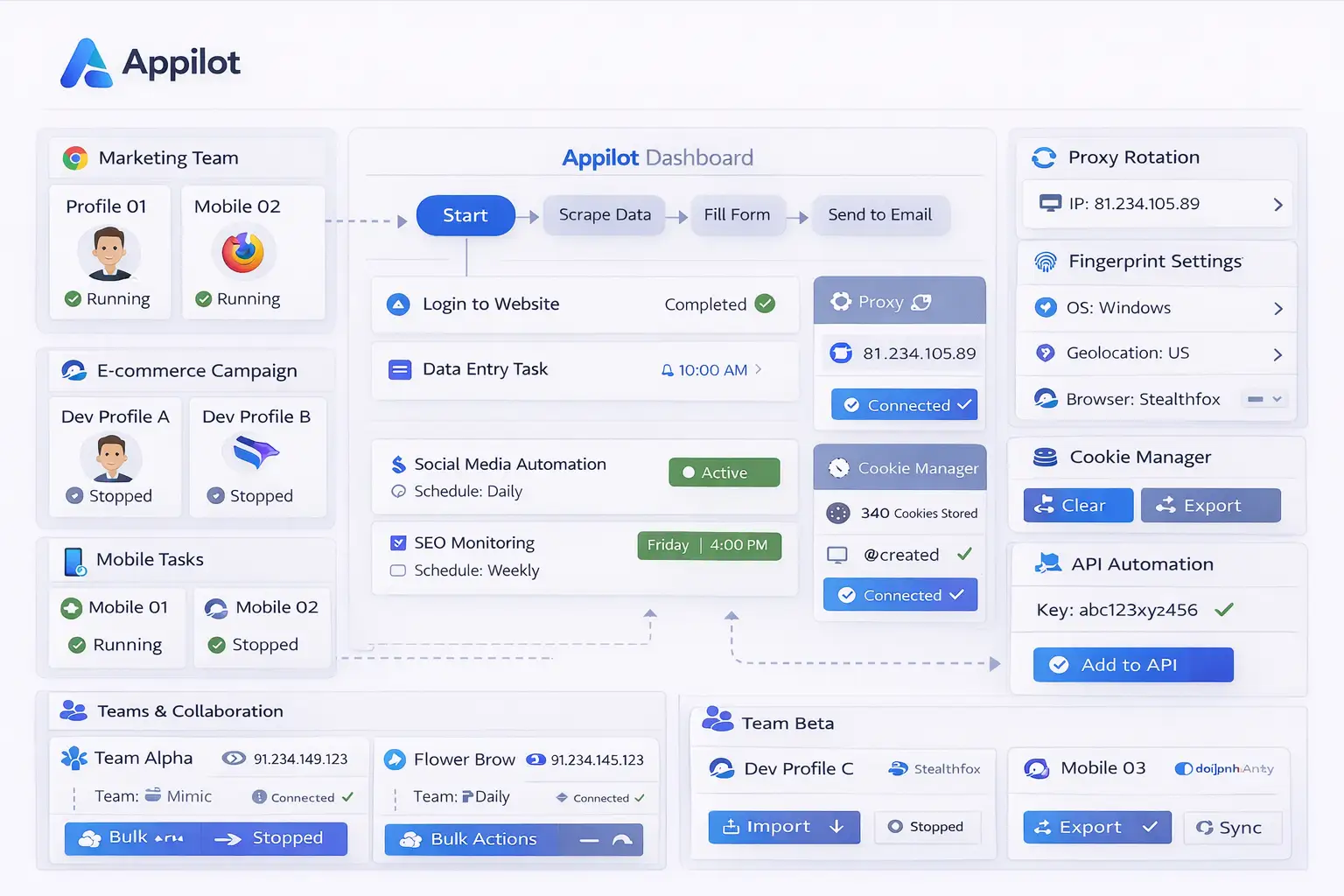
Appilot focuses on browser automation. It can launch browser profiles, run workflows, schedule tasks, open websites, monitor account activity, and close sessions automatically.
Together, these tools create a more complete system where browser workflows can happen automatically while login information stays organized and secure.
For example, a workflow may launch browser profiles every morning, log into specific dashboards, check reports, export data, and close the browser sessions afterward. LogMeOnce can help store the credentials needed for those accounts while Appilot handles the workflow itself.
This is especially useful for teams because it allows multiple people to access browser workflows without needing to share passwords through spreadsheets, chat messages, or unsecured documents.
Common Browser Workflows You Can Automate
One common use case is social media management. Social media teams often need to open browser profiles, check messages, review notifications, log into accounts, and monitor engagement across several platforms. Appilot can automate those actions while LogMeOnce helps keep the credentials secure.
E-commerce sellers often manage Shopify stores, Amazon dashboards, Etsy accounts, supplier platforms, and payment portals. Appilot can automate browser launches, dashboard checks, inventory reviews, and report exports while LogMeOnce stores the account credentials.
Affiliate marketers may need to log into advertising accounts, campaign dashboards, traffic platforms, and landing page tools every day. Appilot can automate these workflows while LogMeOnce keeps the credentials organized.
Crypto users often need to log into exchanges, research platforms, NFT tools, and wallets. Since crypto accounts are especially sensitive, using secure credential storage together with browser automation can help reduce risk.
Agencies can also benefit because they often manage multiple client accounts at the same time. LogMeOnce makes it easier to manage the login details while Appilot helps automate the daily browser tasks.
Setting Up Your First Automated Workflow
The best way to begin is with a simple workflow.
For example, you may want to automate a morning routine where Appilot launches several browser profiles, opens specific dashboards, logs into accounts, checks messages, exports reports, and closes the sessions afterward.
You can begin by selecting a small number of browser profiles and assigning a simple workflow to them. Once the process works correctly, you can gradually add more accounts, more browser profiles, and more actions.
It is usually better to keep the first workflow simple because this makes troubleshooting easier.
After the workflow is stable, you can expand it by adding more browser actions, more account types, more profile groups, or more complex schedules.
Benefits of Combining Security and Automation
One of the biggest advantages of combining LogMeOnce with Appilot is that browser workflows become both faster and safer.
Without a secure credential system, users often rely on spreadsheets, notes, browser bookmarks, or text files to store passwords. This creates security risks and makes it harder to manage larger groups of accounts.
By using LogMeOnce, credentials can stay organized and protected in one place.
Appilot then helps automate the workflows that rely on those credentials. This reduces the amount of repetitive manual work and lowers the chance of mistakes.
Another major benefit is consistency. Automated workflows follow the same process every time, which means there is less chance of opening the wrong browser profile, using the wrong account, or forgetting important tasks.
The combination is also useful for scaling because larger groups of browser profiles and accounts become easier to manage.
Best Practices for Secure Browser Automation
The best way to approach secure browser automation is to stay organized from the beginning.
Use strong passwords for every account and avoid reusing the same password across multiple browser profiles.
It is also important to enable two-factor authentication whenever possible because it adds another layer of protection.
Browser profiles should be grouped based on their purpose. Social media profiles should stay separate from e-commerce profiles, affiliate profiles, crypto accounts, and client dashboards.
You should also review browser activity, task logs, and login sessions regularly because account credentials may expire or workflows may stop working if a login session changes.
Starting with small workflows before scaling up is usually the safest approach.
Common Problems and Troubleshooting
One common issue is that a browser workflow fails because the login session has expired. If an account requires a password update or additional verification, the workflow may stop until the login information is updated.
Another issue is that users sometimes save passwords in multiple places instead of keeping them centralized. This often leads to confusion about which credentials are correct.
Teams also sometimes share passwords through insecure methods such as chat messages or spreadsheets. This creates unnecessary risk.
Users may also forget to update browser workflows after changing passwords, which can cause automated tasks to fail.
Keeping login credentials organized and reviewing them regularly can help prevent these problems.
Frequently Asked Questions
Q1: Why is secure password management important for browser workflows?
Secure password management helps reduce login errors, keeps credentials organized, and lowers the risk of account compromise.
Q2: Can LogMeOnce help teams manage shared browser accounts?
Yes. Teams can use LogMeOnce to manage shared account credentials more securely.
Q3: Is this setup useful for social media workflows?
Yes. Social media teams often need both secure credential storage and automated browser tasks.
Q4: Should each browser profile use separate credentials?
Yes. Using separate credentials for separate browser profiles is usually safer than reusing the same login details.
Q5: What happens if a browser workflow fails because of a login issue?
You can review the login session, update the credentials, and restart the workflow.
Conclusion
LogMeOnce helps protect passwords, browser sessions, and account credentials, while Appilot helps automate repetitive browser tasks and workflows.
Together, they create a more secure and efficient system for managing multiple accounts, browser profiles, and daily browser activities.
This makes it easier to save time without sacrificing browser security.