Aximon Browser and Appilot Integration: Getting Started
Aximon Browser is designed for people who need to manage multiple browser profiles without linking accounts together. It gives you control over browser fingerprints, cookies, user agents, WebRTC settings, proxy assignments, and local storage so that every profile behaves like a separate browser environment. This makes it useful for affiliate marketers, e-commerce sellers, social media managers, web scrapers, crypto users, and agencies that work with multiple client accounts.
The challenge is that once you start working with more than a handful of profiles, manual work becomes difficult to manage. Opening browser profiles one by one, assigning the correct proxy, running the same workflow every day, and keeping everything organized takes time. Even with a strong antidetect browser, there is still a lot of repetitive work involved.
This is where Appilot becomes useful. Aximon Browser handles the browser fingerprinting and profile isolation side, while Appilot adds centralized workflow management, task scheduling, profile grouping, and automation. Together, they create a system that helps you manage larger numbers of browser profiles with less manual effort.
What Is Aximon Browser?
Aximon Browser is an antidetect browser built for multi-account management. It allows you to create separate browser profiles that each have their own fingerprint, cookies, proxy settings, timezone, language, screen resolution, and browsing behavior. This prevents websites from easily linking multiple accounts together.
Each profile works like an isolated browser session. You can use one profile for Facebook advertising accounts, another for Shopify stores, another for affiliate campaigns, and another for crypto wallets without those environments overlapping. This type of browser isolation is important when you are managing multiple accounts on platforms that monitor suspicious behavior.
Aximon Browser is especially useful when you need to manage dozens of accounts at once. Instead of constantly logging in and out of the same browser, you can launch a specific profile that already contains the correct cookies, proxy, and fingerprint settings.
Why Integrate Appilot with Aximon Browser?
Aximon Browser already solves the browser profile side of multi-account management, but it does not fully solve the problem of repetitive work. You still need to manually open profiles, run tasks, log into websites, collect information, and close sessions.
Appilot helps automate those actions. Instead of opening twenty profiles manually every day, you can create workflows that automatically launch selected browser profiles, run a series of actions, and close everything when the task is complete.
This can save a significant amount of time every week. Many users spend hours every day opening profiles, assigning tasks, checking notifications, visiting websites, or repeating the same actions over and over. Once those actions are automated, the amount of manual work drops significantly.
Another advantage is consistency. Manual work often leads to mistakes like opening the wrong profile, using the wrong proxy, forgetting to close sessions, or mixing accounts together. Appilot reduces these problems by keeping workflows structured and organized.
The integration is also useful for scaling operations. When you are managing five profiles, manual work is still possible. Once you reach fifty or one hundred profiles, manual management becomes inefficient. Aximon Browser and Appilot together make it possible to manage larger operations without needing a larger team.
Prerequisites and Requirements
Before you connect Aximon Browser with Appilot, there are a few things you should prepare. You will need an active Aximon Browser account with API access enabled, an Appilot account, several test browser profiles, and working proxies assigned to those profiles. It is also a good idea to organize your browser profiles before importing them into Appilot because this will make it easier to create workflows later.
Most users can complete the integration process in around ten to fifteen minutes. If you are working with a larger number of profiles, you may need a little more time to organize profile groups, assign proxies, and create task categories.
Step-by-Step Integration Tutorial
The setup process is straightforward once you know where to find the right settings.
The first step is logging into your Aximon Browser account and opening the settings section. Most antidetect browsers place their API tools inside advanced settings, developer settings, or integration settings. Once you find the API key section, copy the key because you will need it inside Appilot.
Next, log into your Appilot dashboard and open the browser integrations area. From there, select Aximon Browser from the list of supported browser platforms. Appilot supports multiple antidetect browsers, so if you have connected another browser before, the process will feel familiar.
After selecting Aximon Browser, paste your API key into the connection form. Depending on your account setup, you may also need to provide additional details such as your workspace ID or account email.
Once you enter the credentials, Appilot will verify the connection. If everything is correct, you will see a confirmation message and the system will begin pulling your available browser profiles into the dashboard.
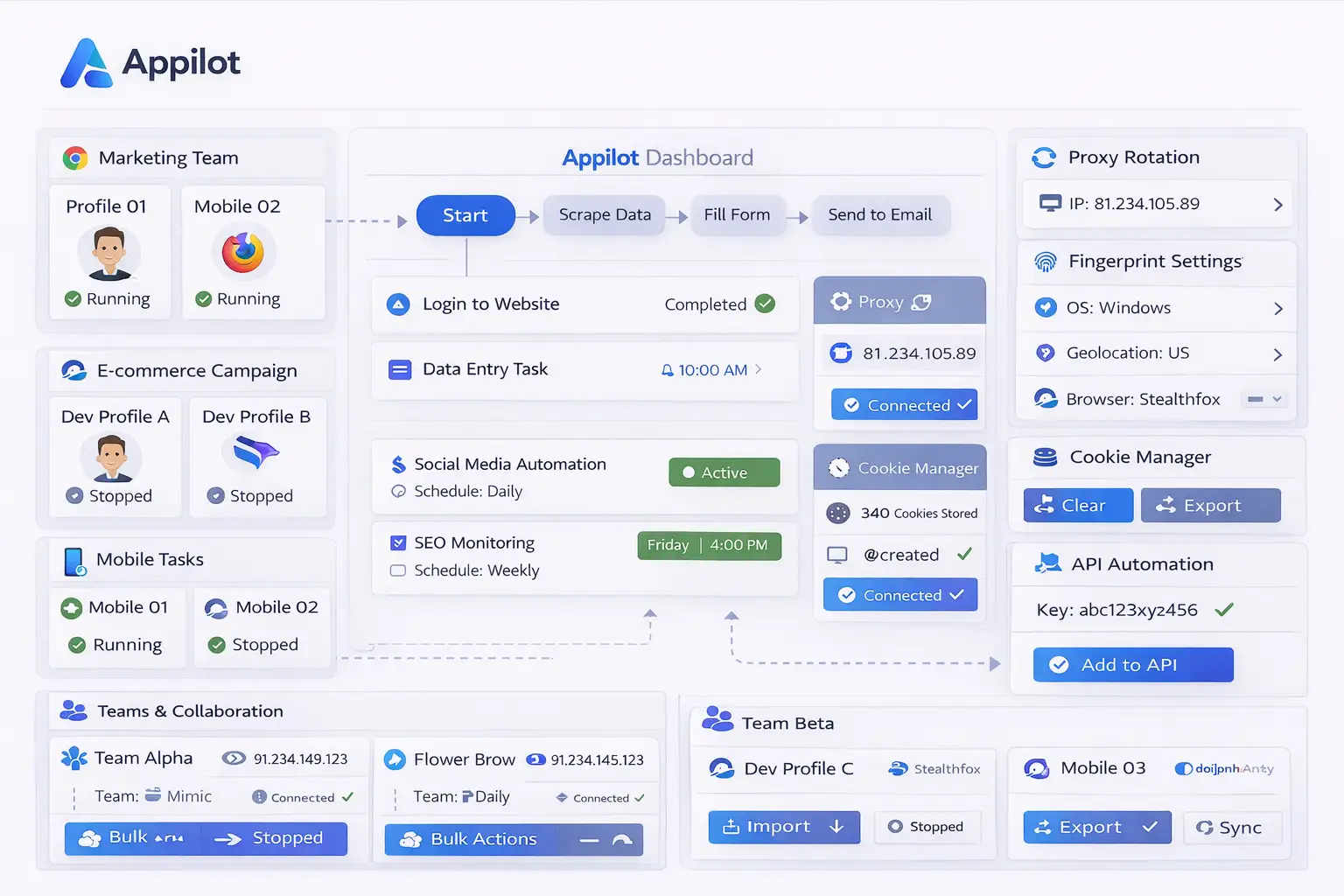
After the profiles appear inside Appilot, you can decide whether to import all of them or only specific groups. Most people start by importing a few profiles first so they can test the connection before moving everything over.
The next step is testing the setup. Launch one browser profile through Appilot and make sure the correct proxy loads, the fingerprint settings appear correctly, and the session opens without any problems. If everything works properly, you can move on to creating workflows.
The final setup stage is configuring your automation preferences. You can decide which profiles should launch automatically, how often tasks should run, whether profiles should rotate proxies, and how tasks should be grouped. This is where Appilot becomes especially useful because it gives you a centralized dashboard where you can manage everything from one place.
Setting Up Your First Automated Task
Once the connection is complete, the next step is building your first task. The easiest workflow to start with is a basic profile launch sequence. For example, you might want Appilot to open five browser profiles every morning, visit a set of websites, collect specific information, and close the profiles afterward.
Inside Appilot, you can create a new task, choose which profiles should be included, set a time schedule, and define the actions that should happen inside each browser session. This could include logging into accounts, opening websites, scraping information, posting content, checking messages, or collecting analytics.
For social media managers, the workflow may involve opening Instagram, checking notifications, posting content, and replying to messages. For e-commerce sellers, the workflow may include logging into multiple stores, checking inventory, and exporting order information. For affiliate marketers, it may involve opening ad accounts, reviewing campaigns, and rotating profiles.
The main benefit is that these tasks no longer need to be done manually every day. Once the workflow is saved, Appilot can repeat it automatically according to the schedule you choose.
Common Use Cases
One of the most common use cases for Aximon Browser and Appilot is social media account management. Agencies and marketers often need to manage multiple Instagram, Facebook, TikTok, or Twitter accounts at the same time. With browser profile isolation and automation combined, it becomes much easier to manage these accounts without linking them together.
Another major use case is e-commerce management. Sellers who manage multiple Shopify stores, Amazon accounts, Etsy stores, or supplier accounts often use separate browser profiles for each business. Appilot helps automate repetitive tasks such as logging in, checking orders, exporting reports, and reviewing performance.
Affiliate marketers can also benefit from the integration because they often work with multiple advertising accounts, landing pages, and traffic sources. By separating these accounts into different browser profiles and automating repetitive work, they can manage larger campaigns more efficiently.
Crypto users frequently use antidetect browsers for airdrop farming, exchange accounts, wallet management, and NFT activities. Since these workflows often involve many accounts, the combination of Aximon Browser and Appilot can save a lot of time.
Web scraping teams also benefit because they can launch multiple browser profiles with different proxies and fingerprints, collect information, and close sessions automatically. This makes large-scale scraping operations more manageable.
Best Practices and Pro Tips
The best way to approach this setup is to start small. Test your workflows with a few browser profiles first before trying to automate larger groups. This helps you identify mistakes early and makes troubleshooting easier.
You should also use separate proxies for separate profiles whenever possible. Reusing the same proxy across too many profiles increases the risk of account linking. Residential proxies are often more reliable than datacenter proxies for account-based workflows because they look more natural.
Another important practice is organizing your profiles into groups. Keeping e-commerce profiles separate from social media profiles, affiliate profiles, and scraping profiles makes it easier to manage automation later.
You should also check task logs regularly. Appilot can show which workflows ran successfully, which profiles failed to launch, and which tasks need attention. Monitoring these logs helps you identify problems before they affect a larger number of accounts.
Troubleshooting Common Issues
The most common issue during setup is an incorrect API key. If the connection fails, double-check that the key was copied correctly and that API access is enabled inside Aximon Browser.
Another common issue is missing browser profiles after import. In most cases, this happens because the selected workspace or profile group was not included during setup. Reconnecting the account usually solves this problem.
Proxy problems can also prevent profiles from launching correctly. If a profile opens with the wrong location, fails to load websites, or gets blocked immediately, test the proxy separately before trying again.
Sometimes the browser profile launches correctly, but the workflow itself does not work. This usually happens because page elements have changed, login information is incorrect, or timing delays need adjustment. In these situations, reviewing the task settings usually helps solve the issue.
Frequently Asked Questions
Q1: How many browser profiles can I schedule at once?
The number depends on your device resources, proxy setup, Appilot plan, and Aximon Browser account limits. Most users start with a small number of profiles and gradually scale up once they know the workflows are stable.
Q2: Does Aximon Browser support API access on all plans?
Most antidetect browsers only include API access on higher-tier plans. If you do not see the API section inside your dashboard, you may need to upgrade your account.
Q3: Can I use Appilot with other antidetect browsers too?
Yes. Appilot supports multiple browser platforms, so you can manage more than one browser ecosystem from the same dashboard if needed.
Q4: Is this setup useful for social media automation?
Yes. Social media managers often use Aximon Browser and Appilot together for content scheduling, profile warm-up, engagement workflows, and message management.
Q5: Can I automate proxy rotation with this integration?
Yes. Appilot can help manage profile-level proxy assignments and schedule tasks that automatically use the correct proxy for each browser profile.
Conclusion
Aximon Browser gives you strong profile isolation, browser fingerprint control, and multi-account management features. Appilot adds scheduling, workflow automation, profile grouping, and centralized management on top of that foundation.
Together, they create a much more efficient system for people managing multiple browser profiles. Instead of spending hours every day opening profiles and repeating the same tasks manually, you can automate most of the work and manage everything from one dashboard.
If you are already using Aximon Browser and want to scale your operation, connecting it with Appilot is one of the easiest ways to save time, reduce mistakes, and make your workflows more organized.