Best Snapchat Automation Tools: Is Real Device Automation the Only Safe Option?
Snapchat automation is one of the most sensitive areas in social media automation.
Unlike platforms where scheduling, API workflows, and third-party dashboards are more common, Snapchat is stricter about unauthorized third-party apps and plugins. That means users need to be careful when choosing any Snapchat automation tool, especially if the tool asks for login details, promises mass messaging, automates account actions aggressively, or behaves like a shortcut around the official app.
This does not mean every Snapchat workflow must be fully manual. Content planning, reminders, creative workflows, reporting, team approvals, and carefully controlled app-based tasks can still be useful. But Snapchat automation should be handled much more cautiously than Instagram, TikTok, Twitter/X, or LinkedIn automation.
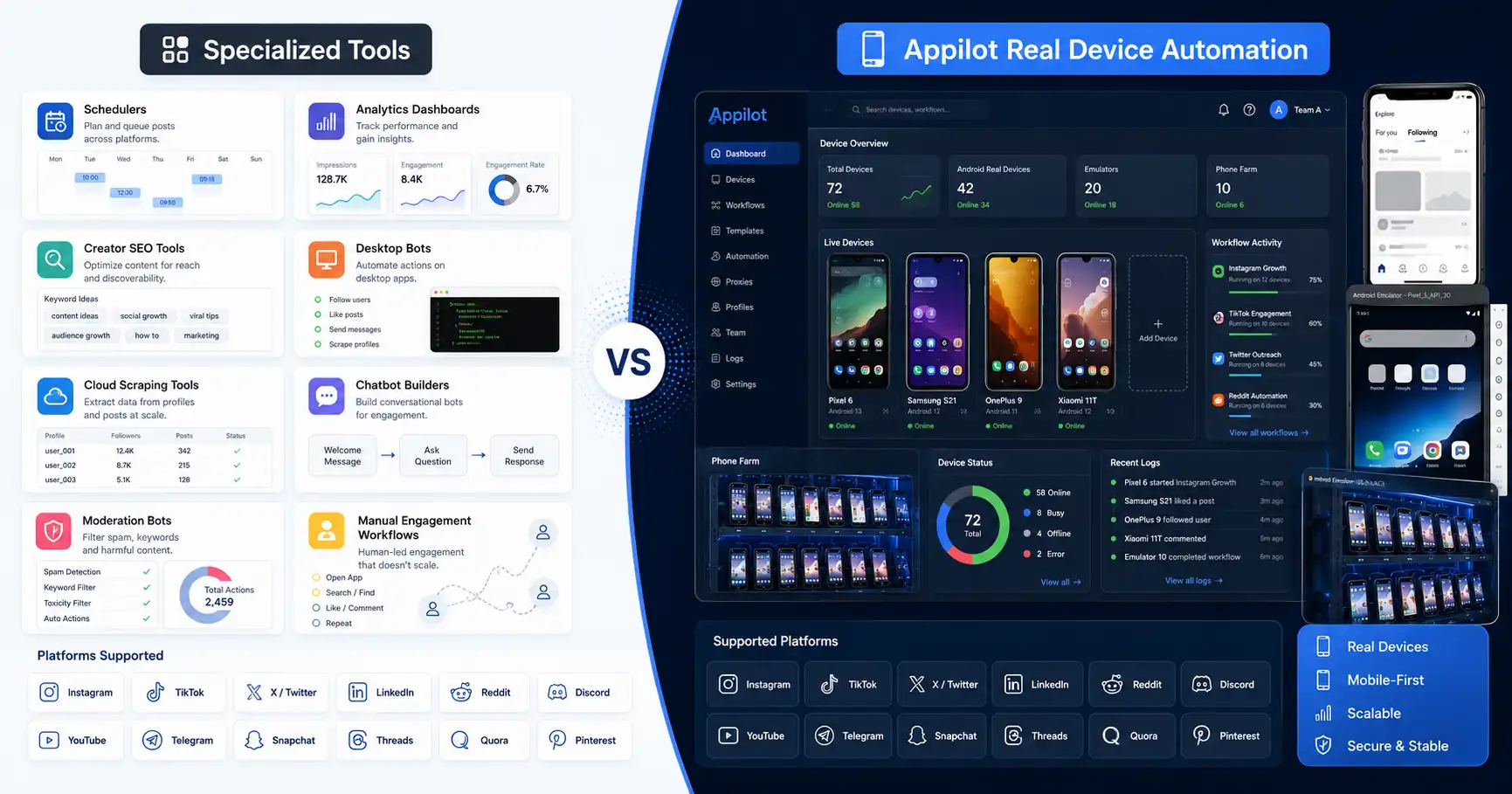
That is where real device automation becomes important. Appilot runs bots on real Android devices and emulators through a remote web dashboard, which makes it more suitable for workflows that need Snapchat app behavior rather than desktop scripts, browser shortcuts, or suspicious third-party login tools.
The honest answer is simple: real device automation is not automatically risk-free, but it is usually a better foundation when Snapchat workflows need to happen inside the mobile app environment.
Why Snapchat Automation Is Different
Snapchat is built around private communication, camera-first content, stories, messages, memories, and mobile-first interactions. A lot of activity happens inside the mobile app, not through a public web experience or open automation ecosystem.
That makes Snapchat automation more sensitive.
Snapchat’s own support guidance warns users against unauthorized third-party apps or plugins because they can put accounts at risk. It also explains that unauthorized third-party apps may use Snapchat login information instead of a secure connection like approved integrations.
This matters because many “Snapchat automation tools” online are not true safe automation platforms. Some may be outdated, some may rely on risky login methods, and some may promise actions that can quickly look like spam.
A safer Snapchat workflow should avoid unauthorized login tools, avoid aggressive messaging, avoid spam behavior, and stay close to normal mobile app usage.
What Is Appilot?
Appilot is a social media automation platform that runs bots on real Android devices and emulators through a remote web dashboard.
For Snapchat workflows, Appilot is useful because it focuses on Android app automation instead of relying on desktop-only shortcuts or unauthorized login tools. Bots can operate in Android environments where mobile app behavior is closer to how real users interact with Snapchat.
Appilot also works without ADB. Users do not need to keep a laptop connected, manage USB cables, troubleshoot drivers, or fix device disconnects all day.
The platform supports bots for Snapchat, Instagram, TikTok, Twitter/X, LinkedIn, Discord, Reddit, YouTube, Threads, Telegram, Gmail, Chrome, and more.
Appilot is especially useful for agencies, phone farm operators, growth teams, and multi-account users who want remote control, real Android execution, and broader social automation from one dashboard.
What Are Snapchat Desktop Tools?
Snapchat desktop tools usually fall into a few categories. Some are content planning tools that help teams prepare posts, captions, campaign ideas, creative assets, and reminders. Some are social media management tools that support Snapchat-related planning or reporting. Some are unofficial scripts or third-party tools that claim to automate Snapchat activity directly.
The safer category is content planning and workflow management. These tools do not need to behave like a Snapchat user or access the account in suspicious ways. They help organize work around Snapchat, but the actual account activity may still happen manually or through approved methods.
The riskier category is direct account-action automation. Tools that promise mass messages, automatic adding, scraping, account login automation, or growth shortcuts can create problems quickly.
Desktop tools can be useful for planning, but they are usually not the best fit for Snapchat app behavior. Since Snapchat is mobile-first, app-based workflows are better matched with mobile automation environments.
What Are Snapchat Schedulers?
Snapchat schedulers and planning tools are usually designed to help brands and teams manage content calendars, reminders, approvals, and publishing workflows.
These can be useful for marketing teams because Snapchat content often needs fast creative planning. A team may need to prepare assets, review captions, coordinate campaigns, plan stories, and track what should go live.
The important point is that scheduling support is different from bot automation. A scheduler helps organize content. A bot performs actions.
Schedulers are generally safer than aggressive automation because they do not need to imitate a user at scale. They support the content workflow instead of trying to manipulate account activity.
If your main Snapchat problem is planning and team organization, a scheduler may be enough. If your workflow needs real mobile app execution, Appilot is more relevant.
Real Device Automation vs Desktop Automation
The biggest difference between real device automation and desktop automation is the environment.
Desktop automation often runs through a computer, script, browser, unofficial tool, or cloud workflow. That may be useful for planning, reporting, or creative management, but it may not match normal Snapchat mobile behavior.
Real device automation runs through Android devices or emulators. This is closer to the environment where Snapchat activity naturally happens.
That does not make real device automation automatically safe. A real device can still get restricted if the account sends spam, behaves aggressively, uses weak proxies, or repeats unnatural actions.
But for app-based workflows, real device automation usually has a better starting point because the automation happens inside a mobile environment rather than through suspicious desktop shortcuts.
This is why Appilot’s real Android approach is stronger for Snapchat app workflows.
Is Real Device Automation the Only Safe Option?
Real device automation is not the only safe option, but it is often the safest practical option for Snapchat app workflows.
Content planning tools can be safe because they do not directly automate risky account behavior. Manual posting can be safe because a real person controls the final action. Approved integrations can be safe when they follow Snapchat’s rules.
But when the workflow needs to interact with Snapchat as a mobile app, real device automation is usually safer than desktop scripts or unauthorized third-party tools.
The reason is simple. Snapchat is designed as a mobile app experience. A workflow that runs inside an Android environment is better aligned with that reality than a workflow that tries to bypass the app experience.
The safest approach is still careful. Use realistic limits, avoid spam, protect account credentials, avoid unauthorized plugins, and keep human review involved.
Account Safety and Snapchat Restrictions
Snapchat account safety should be taken seriously.
Snapchat warns against unauthorized third-party apps and plugins, and users should avoid any tool that asks for login details in suspicious ways or promises shortcuts that violate platform expectations.
Automation can also become risky if it sends repeated messages, adds users aggressively, scrapes data, or behaves in a way that looks abusive.
Real device automation can reduce some environment mismatch, but it does not protect bad behavior. A spammy workflow is still spammy on a real device.
The safest Snapchat automation strategy is conservative. Keep workflows slow, relevant, and human-reviewed. Use automation for operational support, not mass abuse.
For valuable accounts, account safety matters more than speed.
Best Uses for Appilot in Snapchat Automation
Appilot is best for Snapchat workflows that need Android app execution, remote control, and real-device behavior.
This can include controlled app navigation, routine workflow support, mobile app task management, multi-account operations, testing, and broader social automation where Snapchat is one platform among many.
Appilot is also useful for teams that manage Snapchat alongside Instagram, TikTok, YouTube, Reddit, Discord, Telegram, LinkedIn, Twitter/X, Gmail, Chrome, and other platforms.
The biggest advantage is the operating layer. Users can manage bots through a web dashboard without ADB, laptop dependency, USB cables, or constant device troubleshooting.
For phone farm operators and agencies, this makes Appilot more practical than old desktop-based setups.
Best Uses for Snapchat Desktop Tools
Desktop tools are best for planning, approvals, creative workflows, reporting, and content organization.
If a team needs to plan Snapchat stories, manage creative assets, approve campaigns, coordinate posts, or track performance, desktop tools can be very useful.
They are also better when the workflow does not need to control the Snapchat app directly.
Desktop tools are weaker when users need real app behavior. A desktop planner cannot replace mobile app execution, and unofficial scripts can create account risk.
So desktop tools are best for the management layer, not the app-action layer.
Best Uses for Manual Snapchat Workflows
Manual workflows are still important for Snapchat.
Because Snapchat is personal, camera-first, and communication-heavy, human judgment matters. A real person is better at deciding what to send, when to reply, what feels natural, and whether a message might look spammy.
Manual workflows are especially important for high-value accounts, personal brands, creators, influencers, and businesses that depend on trust.
Automation should support manual work, not replace it completely.
A good Snapchat strategy may use manual content creation, manual reply review, and automation only for routine operational support.
Where Appilot Wins
Appilot wins when the user needs Snapchat app workflows through Android devices or emulators.
It is better than desktop tools for mobile-first app behavior, remote dashboard control, no-ADB operations, multi-platform workflows, and phone farm-style automation.
Appilot also wins when users want one system for more than Snapchat. Since it supports many platforms, it can fit agencies and growth teams that need a wider automation stack.
The key advantage is real-device execution. If the workflow needs to happen inside the Snapchat app environment, Appilot is the better fit.
Where Desktop Tools Win
Desktop tools win when the workflow is planning-based.
They are better for content calendars, creative approvals, social media reporting, campaign planning, and team collaboration.
They also win when the user does not need direct Snapchat app automation.
If your Snapchat workflow is mostly strategy, scheduling, and creative management, a desktop planning tool may be enough.
If the workflow requires app-based execution, desktop tools become less suitable.
Where Manual Work Wins
Manual work wins when trust and context matter.
Snapchat messages, replies, stories, and personal communication can feel strange when automated badly. A human can adjust tone, timing, content, and context in ways that automation cannot.
Manual work is also safer for sensitive accounts.
If the account is new, valuable, or personal, automation should be used lightly.
For Snapchat, the best workflow is usually human-led and automation-supported.
Final Verdict
Real device automation is not the only safe option for Snapchat, but it is usually the best option when automation needs to happen inside the Snapchat app.
Desktop tools are useful for planning, approvals, content workflows, and reporting. Manual work is best for personal communication, creative judgment, and trust. Appilot is best for controlled Snapchat app workflows on real Android devices and emulators.
The safest approach is not reckless automation. It is careful automation.
Appilot gives users real Android execution, remote dashboard control, no ADB, no laptop dependency, and multi-platform bot support. That makes it a strong fit for Snapchat workflows that need mobile app behavior.
You can explore Appilot’s bot store and try it at appilot.app.
FAQ
Q1: Is real device automation the only safe option for Snapchat?
No, content planning and manual workflows can also be safe. But for Snapchat app-based automation, real device automation is usually safer than desktop scripts or unauthorized tools.
Q2: Is Snapchat automation risky?
Yes, Snapchat automation can be risky if it uses unauthorized tools, spammy behavior, mass messaging, or suspicious third-party login methods.
Q3: What is Appilot best for in Snapchat automation?
Appilot is best for Snapchat workflows that need Android app execution, remote dashboard control, no ADB, and multi-platform automation.
Q4: Are Snapchat desktop tools useful?
Yes, desktop tools are useful for content planning, creative approvals, reporting, and team workflows. They are less suitable for real Snapchat app behavior.
Q5: Who should use Appilot for Snapchat automation?
Agencies, phone farm operators, growth teams, and multi-account users should use Appilot when Snapchat workflows need real-device automation and remote control.