Best Social Media Automation Strategy for Amazon FBA Sellers in 2025
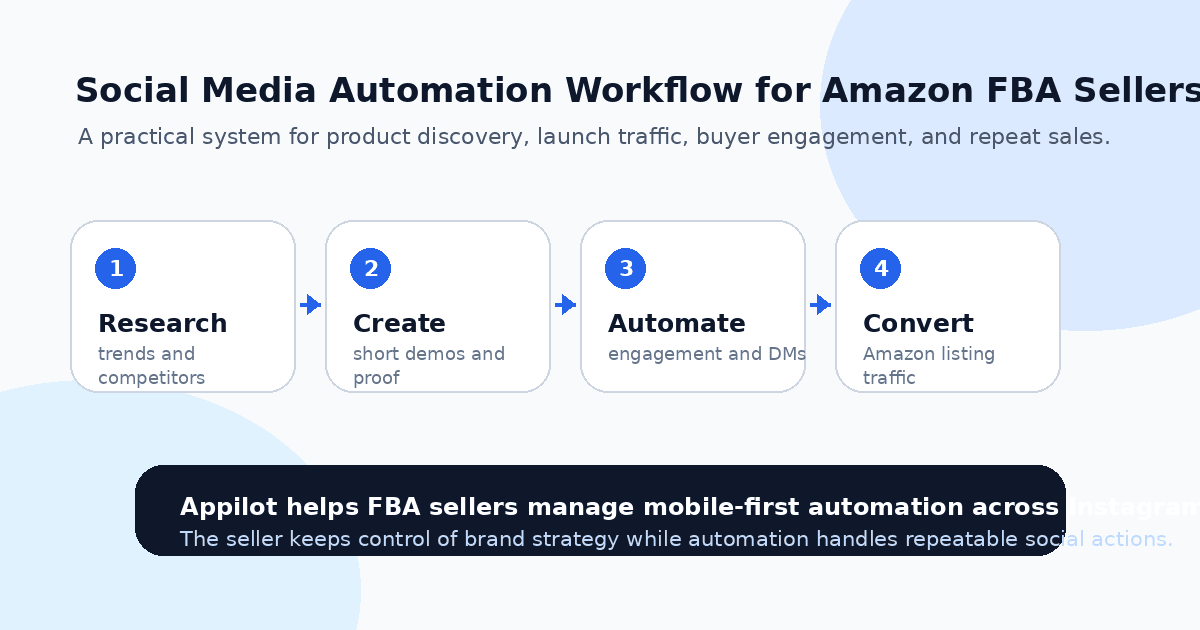
You launch a new Amazon FBA product, optimize the listing, add strong photos, write clean bullets, and wait for sales to pick up.
A few orders come in. Maybe you run ads. Maybe you ask friends to check the product. Maybe you post once on Instagram or TikTok and hope something catches.
Then the real problem shows up. Amazon gives you a storefront, but it does not automatically give you attention.
That is why social media matters for FBA sellers in 2025. If you only depend on Amazon search, sponsored ads, and price cuts, your growth becomes expensive and unstable. Social media gives you another route: build product awareness before buyers search, warm up audiences before launch, answer questions faster, and create traffic that is not fully controlled by Amazon ads.
Social media automation helps because most FBA sellers do not have time to manually post, engage, reply, follow up, and research trends every day. The goal is not to spam. The goal is to build a repeatable system that keeps your product visible.
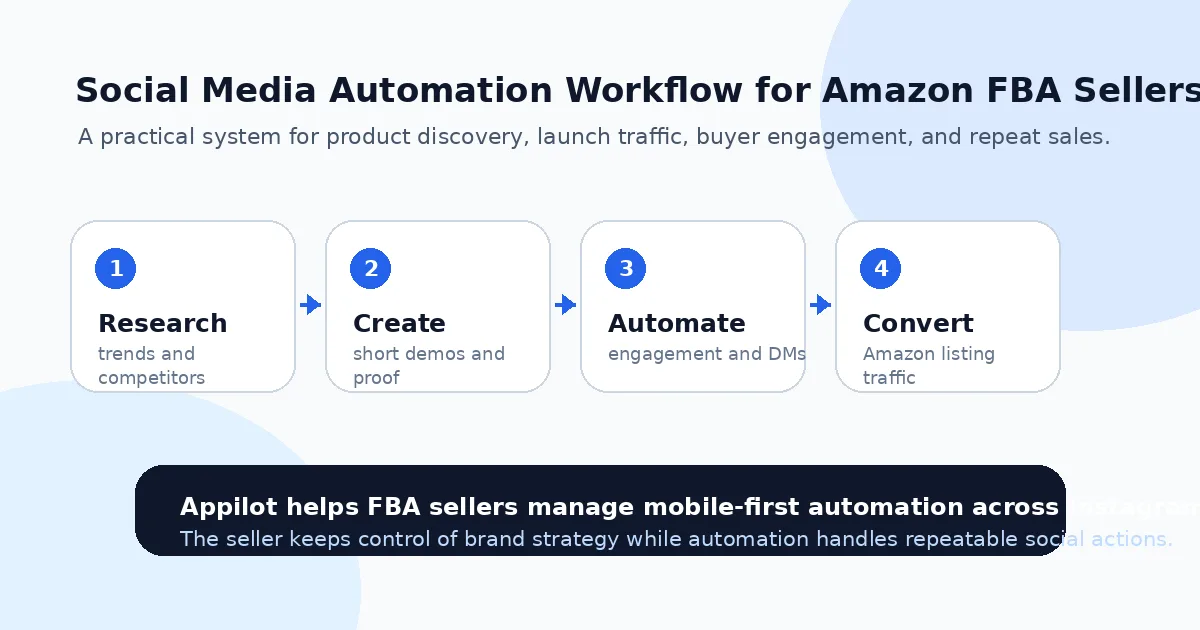
Why Amazon FBA Sellers Struggle With Social Media Growth
Amazon FBA sellers usually think in terms of listings, keywords, reviews, inventory, margins, and ad spend. That makes sense because those things directly affect sales.
But social media works differently.
A buyer on TikTok, Instagram, Pinterest, or LinkedIn is not always searching for your exact product. They might discover it through a demo, a problem-solution video, a before-and-after post, a story reply, a creator mention, or a short product comparison.
That means the seller has to think like a brand, not just a listing operator.
This is where many FBA sellers get stuck. They post product images that look like Amazon gallery photos, but social platforms reward context. People want to see the product being used, the problem it solves, the result it creates, and why it is different from every other option.
Manual engagement also takes time. A small seller might need 45 to 90 minutes a day to research competitors, reply to comments, engage with niche users, check hashtags, answer DMs, and monitor content performance.
Most sellers cannot do that consistently while also managing inventory, suppliers, PPC, shipping issues, and customer support.
What Social Media Automation Means for FBA Sellers
Social media automation means using software to handle repeatable tasks across platforms like Instagram, TikTok, LinkedIn, Pinterest, Reddit, or YouTube. For FBA sellers, that can include trend research, profile engagement, story replies, product DM flows, comment monitoring, content scheduling support, and buyer discovery.
The safest approach is not to run aggressive desktop bots or random browser scripts. A better route is real-device automation, where actions run through actual Android devices or emulators and interact with mobile apps in a more natural way.
This matters because platforms like Instagram and TikTok are built around mobile behavior. A real-device workflow can look closer to normal app usage than API-only or desktop-based automation.
A platform like Appilot is built for this kind of setup. It lets FBA sellers run automation on real Android devices or emulators from a browser dashboard, without ADB setup, coding, or keeping a laptop connected all day. That makes it easier to build social workflows around product discovery, engagement, and customer conversations without turning the seller into a developer.
Automation should support the brand. It should not become the brand.
Step 1: Choose the Right Social Channels for Your Product
Not every FBA product needs every social platform.
A kitchen gadget, beauty tool, pet product, fitness accessory, home organizer, or baby product usually fits TikTok and Instagram well because visual demos matter. A home decor product may also perform on Pinterest because people use it for planning and discovery. A wholesale-friendly product might make sense on LinkedIn if you want retail buyers or distributors.
The mistake is trying to post everywhere with the same content.
Start with the platform where your product is easiest to demonstrate. If the product solves a visible problem, TikTok and Instagram Reels are usually strong. If the product is aesthetic or planning-based, Pinterest can work well. If the product has B2B potential, LinkedIn can support wholesale outreach.
Your automation strategy should follow the buyer journey. First, help people discover the product. Then answer their questions. Then send them to the Amazon listing or brand storefront when they are ready.
That is much better than dropping a product link everywhere and hoping people click.
Step 2: Use TikTok for Product Discovery and Demand Testing
TikTok is useful for FBA sellers because it shows what people react to quickly.
You can watch competing products, track product hooks, study comment sections, and see which demos make people stop scrolling. A product might not look exciting in a static Amazon image, but it can become interesting when shown in a 12-second problem-solution video.
Automation can help monitor hashtags, competitor accounts, niche creators, and product categories more consistently. Instead of manually scrolling every night, you can use automated workflows to surface patterns and keep track of which products or angles keep appearing.
For example, a seller with a cleaning product can monitor cleaning hacks, apartment resets, kitchen organization, and before-and-after videos. A seller with a fitness accessory can watch home workout creators, gym bag videos, recovery routines, and product demo content.
Appilot’s TikTok automation can support this research by running repetitive mobile actions through Android devices or emulators. The seller still makes the final product and content decisions, but automation helps collect signals faster.
The key is to look beyond views. Buyer-style comments, saves, repeated demos, and practical questions often matter more than one viral spike.
Step 3: Use Instagram to Build Trust Around the Product
Instagram is where FBA sellers can make a product feel more like a real brand.
Your Amazon listing might explain features, but Instagram can show lifestyle use, customer proof, behind-the-scenes content, comparisons, and short answers to common questions. This is especially useful for products where trust matters, such as beauty, wellness, baby products, supplements, home goods, or higher-priced accessories.
Automation can help with story engagement, profile visits, targeted following, comment replies, and DM flows. For example, if someone replies to a story asking where to buy, you can send the Amazon product link. If someone comments “does this come in black?” you can respond faster with the right answer. If people engage with competitor pages, you can use that audience for discovery.
This is where Appilot fits naturally for FBA sellers who want mobile-first Instagram automation without writing scripts. You can manage workflows from a web dashboard while actions run on real Android devices or emulators, which makes it easier to keep Instagram active without manually handling every small task.
The goal is to create a warmer path to Amazon. A buyer who has seen your product demo, read your comments, and asked a question is more likely to click with intent.
Step 4: Use Pinterest for Long-Term Product Discovery
Pinterest is often underrated by FBA sellers because it does not feel as fast as TikTok or Instagram.
But for certain products, it can be powerful. Home organization, decor, kitchen tools, beauty routines, gift products, planning supplies, parenting items, fitness ideas, and DIY-related products can all benefit from Pinterest-style discovery.
The strategy is different. Pinterest content should be more searchable and evergreen. Instead of chasing short-lived trends, you create pins around use cases, problems, seasonal needs, gift guides, and lifestyle moments.
Automation can support repetitive posting, content distribution, and keyword-based discovery workflows, but the content itself still needs to be useful. A boring product image will not do much. A pin that shows “small apartment storage idea” or “gift idea for new dog owners” has a better chance.
For FBA sellers, Pinterest works best when the product solves a clear problem that people plan for ahead of time.
Step 5: Use LinkedIn for Wholesale and Partnership Opportunities
Not every FBA seller thinks about LinkedIn, but it can be useful if your product has B2B potential.
Some FBA products can also sell through boutiques, gyms, salons, clinics, gift shops, corporate gifting programs, or small retail chains. In that case, LinkedIn automation can help you find buyers, owners, distributors, and purchasing managers.
The message should not be a hard pitch. Wholesale buyers respond better to specific, low-pressure outreach. You might mention the product category, why it fits their store, and ask whether they review new suppliers.
Automation can help with discovery and follow-up, but the relationship still needs to be human. Once a buyer shows interest, move the conversation to email, catalog, samples, or a call.
This gives FBA sellers another growth path beyond marketplace ranking and paid ads.
Step 6: Build DM and Comment Flows Around Buyer Questions
Comments and DMs are where social media becomes sales support.
For FBA sellers, common questions might include where to buy, whether the product is Prime eligible, what size or color is available, how shipping works, whether it fits a certain use case, or how it compares with another option.
You should not answer these from scratch every time.
Create simple reply flows around the most common questions. If someone asks “where can I buy?” send the Amazon link. If someone asks about size, send the size details. If someone asks whether it works for a specific situation, send a short answer and point to the product page.
The best automation feels like fast support. It does not feel like a generic marketing blast.
This is especially helpful during product launches, influencer campaigns, flash sales, seasonal pushes, and viral content moments when message volume can jump quickly.
Step 7: Keep Automation Limits Conservative
Social media automation fails when sellers get greedy.
They try to follow too many people, send too many messages, view too many stories, or comment too aggressively. That may create short-term activity, but it can damage account trust and make the brand look spammy.
Start slow. Use buyer-led triggers where possible. Focus on people already engaging with your niche, content, competitors, or product category. Keep messages relevant and short.
A real-device setup like Appilot can help make automation more manageable, but it does not remove the need for restraint. No automation tool should be treated as permission to spam.
A good rule is simple: automate what a good assistant would do, not what a spammer would do.
Step 8: Track Social Activity Against Amazon Sales
FBA sellers often struggle to connect social media activity with Amazon sales.
That does not mean tracking is impossible. You can watch branded search lift, external traffic, Amazon attribution links where available, coupon usage, storefront visits, product ranking movement, review velocity, and changes in conversion after campaigns.
You can also track softer signals, such as comments, DMs, saves, shares, link clicks, and repeated product questions.
The important thing is to treat social media as a system. Do not just ask, “Did this post go viral?” Ask whether the platform is increasing trust, search demand, traffic quality, and buyer intent over time.
A social strategy that consistently sends warm buyers to your Amazon listing can become a serious advantage, especially when ad costs rise.
Common Mistakes Amazon FBA Sellers Should Avoid
Treating Social Media Like an Amazon Listing
A product photo and feature list are not enough. Social content needs context, demos, problems, outcomes, and real use cases.
Automating Before the Brand Looks Trustworthy
If your profile has weak content, no clear positioning, and no proof, automation will only send more people to a page that does not convert.
Sending Product Links Too Early
People usually need a reason to care before they click. Use content and conversation to create interest before pushing the Amazon link.
Ignoring Platform Differences
TikTok, Instagram, Pinterest, and LinkedIn do not work the same way. Each platform needs its own content angle and automation style.
Relying Only on Automation
Automation helps with consistency, but product quality, creative strategy, listing optimization, reviews, and customer experience still decide long-term success.
Is Social Media Automation Right for Amazon FBA Sellers?
Social media automation is a good fit if your product is easy to demonstrate, your brand has a clear audience, and you want traffic beyond Amazon ads. It works especially well for products with visual benefits, repeat questions, lifestyle use cases, or strong niche communities.
It may not be right if your product has no clear positioning, your content is inconsistent, or your Amazon listing is not ready to convert. Automation can bring attention, but weak offers still lose buyers.
The best time to use automation is when you already know who your buyer is and need a more consistent way to reach them.
Final Thoughts
The best social media automation strategy for Amazon FBA sellers in 2025 is not about blasting links everywhere. It is about building a repeatable system around discovery, content, engagement, replies, and conversion.
Use TikTok for product angles and fast feedback. Use Instagram for trust and buyer conversations. Use Pinterest for long-term discovery. Use LinkedIn when your product has wholesale potential. Then automate the repetitive parts carefully.
If you want to manage mobile-first social workflows without coding, ADB setup, or constant manual device handling, Appilot gives FBA sellers a browser-based way to run automation across Android devices, emulators, and ready-to-use bots for platforms like Instagram, TikTok, LinkedIn, and more. You can check it out at appilot.app.
FAQs
Q1: Can Amazon FBA sellers use social media automation?
Yes, FBA sellers can use automation for product research, engagement, DM replies, story actions, and traffic-building workflows across social platforms.
Q2: Which social platform is best for Amazon FBA sellers?
TikTok and Instagram are strong for visual product demos, Pinterest helps with evergreen discovery, and LinkedIn works for wholesale opportunities.
Q3: Is social media automation safe for Amazon FBA brands?
It is safer when activity is gradual, relevant, and run through realistic mobile workflows. Spam-style automation can still hurt account trust.
Q4: Can Appilot help Amazon FBA sellers automate social media?
Yes, Appilot helps run mobile-first automation on Android devices or emulators from a browser dashboard without coding or ADB setup.
Q5: Does automation replace Amazon PPC?
No. Automation supports external traffic, awareness, and buyer conversations, while Amazon PPC still helps with marketplace visibility and keyword demand.