Best Telegram Automation Tools in 2025: Mobile Bots vs Desktop Tools
Telegram automation is not one single category.
For some users, Telegram automation means building a simple bot that replies to messages, sends alerts, collects leads, or supports customers. For developers, it may mean using the Telegram Bot API, Telethon, or Python scripts to create custom workflows. For marketers, it may mean scheduling posts, managing channels, handling communities, sending broadcasts, or building chatbot funnels. For operators, it can mean running Telegram workflows inside the mobile app across multiple accounts and devices.
That is why the “best Telegram automation tool” depends on what you are trying to automate.
Desktop tools and API-based bots can be very useful for official bot accounts, customer support, notifications, CRM integrations, group management, and scripted workflows. But they are not always the best fit when the workflow needs real Telegram app behavior, Android device execution, proxy-aware operations, or multi-platform automation.
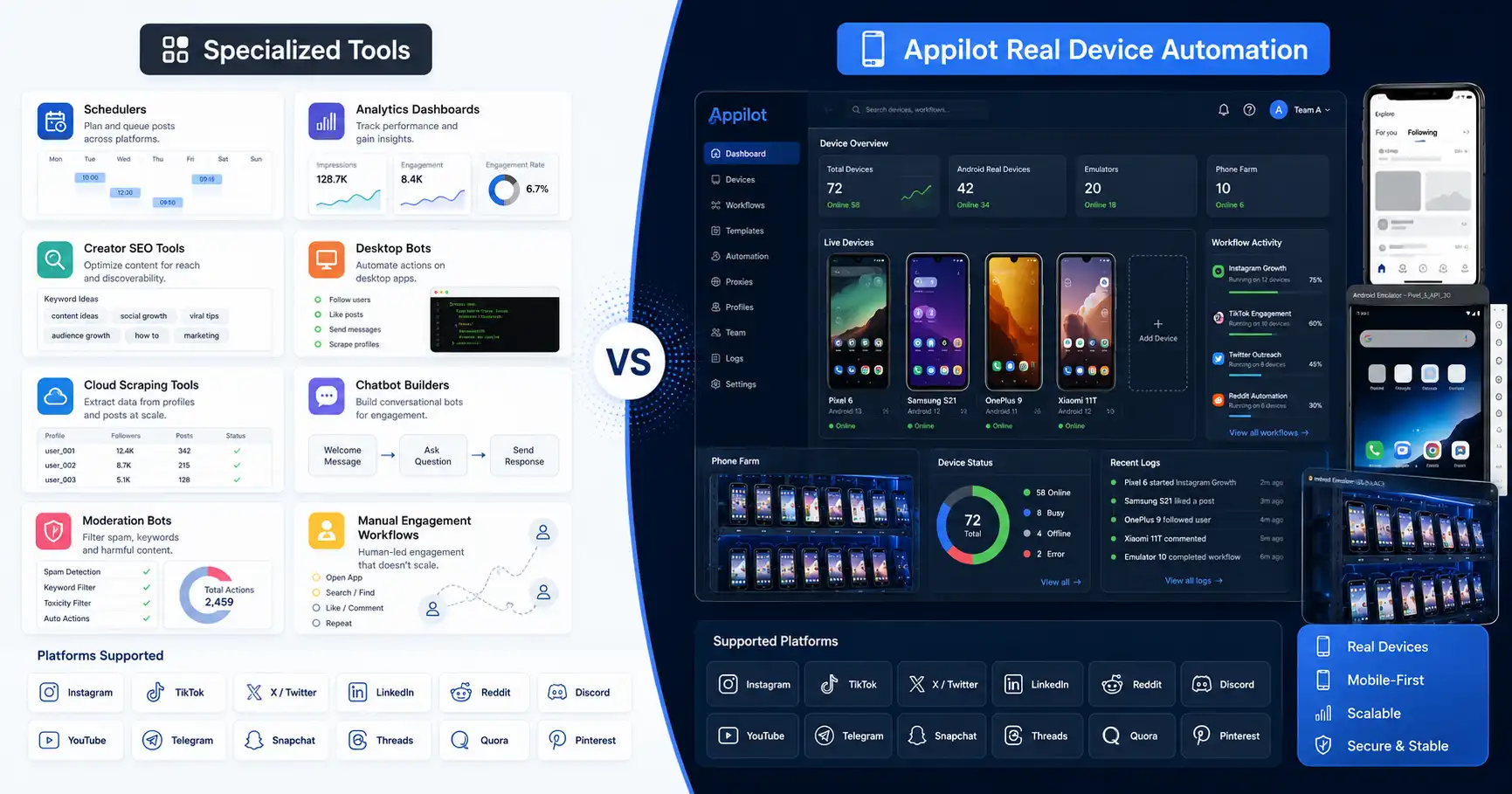
Appilot fits that second category. It runs bots on real Android devices and emulators through a remote web dashboard, which makes it useful for Telegram mobile workflows, no-ADB automation, phone farm operations, and social automation across multiple platforms.
What Makes Telegram Automation Different?
Telegram is different from many other social platforms because it has a strong official bot ecosystem. Developers can create Telegram bots through the Bot API, and those bots can send messages, respond to commands, manage chats, integrate with services, and support many business workflows.
That makes Telegram automation more open than platforms where automation is mostly hidden or unofficial.
But there is still an important difference between a Telegram bot and a Telegram user account workflow. A Telegram bot is a special account designed for automation. It does not behave exactly like a normal user account and has its own limitations. A user account workflow happens through Telegram as a normal app user, which may involve joining groups, reading chats, replying, managing channels, checking messages, and navigating the app interface.
This distinction matters. If you need an official chatbot, the Bot API or a no-code builder may be enough. If you need Telegram app workflows through real Android environments, Appilot becomes more relevant.
What Is Appilot?
Appilot is a social media automation platform that runs bots on real Android devices and emulators through a remote web dashboard.
For Telegram automation, this means Appilot can support workflows that need the Telegram Android app environment instead of only API calls, desktop scripts, or cloud dashboards.
Appilot works without ADB, so users do not need to keep a laptop connected, manage USB cables, fix driver problems, or troubleshoot device disconnects. Users can control bots remotely from a web dashboard while the automation runs inside Android environments.
The platform supports bots for Telegram, Instagram, TikTok, Twitter/X, LinkedIn, Discord, Reddit, Snapchat, YouTube, Threads, Gmail, Chrome, and more.
Appilot is especially useful for agencies, growth teams, outreach teams, phone farm operators, and users who need Telegram automation as part of a wider multi-platform workflow.
What Are Telegram Bot API Tools?
Telegram Bot API tools are built around Telegram’s official bot framework. Developers can create bots that respond to commands, send messages, manage chats, connect to databases, handle customer support, collect form responses, and integrate with external systems.
This is one of the cleanest ways to automate Telegram because it uses Telegram’s official bot infrastructure.
Bot API workflows are best for business chatbots, alerts, admin tools, support bots, lead capture bots, and integrations where users interact with a bot account.
The limitation is that Bot API bots are not the same as normal user accounts. They cannot perfectly replace app-based user behavior. If the workflow needs to behave like a real Telegram user inside the mobile app, a standard bot account may not be enough.
That is where mobile automation tools like Appilot become useful.
What Is Telethon?
Telethon is a Python library that allows developers to interact with Telegram using Python. It is commonly used for custom Telegram automation, scripting, message handling, account workflows, channel tools, and developer-built integrations.
Telethon is powerful because it gives technical users deep control. A developer can write custom scripts, connect Telegram with other systems, process messages, listen for events, and build workflows that go far beyond a simple no-code bot builder.
The downside is that Telethon is code-first. It requires setup, programming knowledge, API credentials, error handling, account management, and ongoing maintenance.
For developers, that control can be valuable. For non-technical users, agencies, and operators who just want to run Telegram workflows reliably, a managed platform like Appilot may be easier.
Telethon is best for developers. Appilot is better for operators who want dashboard-based mobile automation.
What Are Telegram No-Code Builders?
Telegram no-code builders help users create bots without writing code. These tools are often used for lead capture, customer support, quizzes, FAQs, broadcasts, booking flows, and simple automation.
No-code builders are useful because they reduce technical barriers. A marketer, business owner, or community manager can create a Telegram bot flow without hiring a developer.
They are strongest when the workflow is simple and bot-account based. For example, a business may use a Telegram bot to answer common questions, collect customer information, send updates, or guide users through a menu.
The limitation is flexibility. No-code builders may not handle complex workflows, custom logic, user-account behavior, or real Telegram app automation.
If the workflow needs mobile app interaction, multiple accounts, Android device execution, or automation across Telegram plus other platforms, Appilot is the stronger fit.
Mobile Bots vs Desktop Tools: The Main Difference
The biggest difference is the execution environment.
Desktop tools, Bot API bots, Python scripts, and cloud builders usually run outside the mobile app. They are useful for official bots, integrations, scripts, dashboards, and backend workflows.
Mobile automation tools like Appilot run workflows inside Android environments. This is useful when the automation needs to interact with Telegram as an app workflow rather than only through an official bot or server script.
This difference matters because Telegram automation can mean two very different things. A business chatbot can run perfectly through the Bot API. But a mobile workflow involving the Telegram app, multiple accounts, phone farm operations, or cross-platform social automation may need real Android execution.
The better choice depends on whether your workflow is bot-account based or app-behavior based.
Telegram Channel Automation
Telegram channel automation is usually about posting updates, managing subscribers, sending announcements, organizing content, and keeping communication consistent.
For simple channel posting, Bot API tools or no-code builders can work well if the workflow is allowed and properly configured.
For more advanced channel workflows, developers may use Python tools like Telethon to create custom scripts, monitor posts, forward content, or connect Telegram with databases and external systems.
Appilot is useful when channel workflows need to happen through the Telegram Android app or when Telegram is only one part of a larger social automation operation.
If you only need a bot to post updates, a Bot API tool may be enough. If you need real app workflows, Android device execution, and multi-platform automation, Appilot is better.
Telegram Group Automation
Telegram group automation often includes moderation, welcome messages, spam filtering, role-like controls, alerts, community responses, and member support.
Official bots can handle many of these tasks well. A Telegram group bot can greet users, answer FAQs, enforce rules, send reminders, and help admins manage repetitive tasks.
Desktop tools and custom scripts can also help with more advanced workflows.
Appilot becomes useful when group workflows need app-based behavior or when teams manage Telegram groups alongside other platforms. For example, an agency may manage Telegram, Discord, Instagram, Reddit, TikTok, and YouTube workflows together.
In that case, Appilot gives a broader automation layer rather than only a Telegram-specific bot.
Telegram Outreach and Messaging Workflows
Telegram outreach should be handled carefully.
Unsolicited messages, repetitive outreach, spammy group posting, and aggressive automation can create account risk and damage reputation. Telegram automation should support useful, permission-aware workflows rather than mass spam.
Desktop scripts and API tools can be powerful, but that power can also create problems if used aggressively.
Appilot can support mobile app workflows, but it should also be used responsibly. Real-device automation does not make spam safe. It simply gives users a more app-based execution layer.
The best Telegram outreach strategy is controlled, relevant, and human-reviewed. Automation can help with routine actions, but message quality, targeting, timing, and consent still matter.
Multi-Account Telegram Automation
Multi-account Telegram automation requires extra caution.
Some legitimate teams manage multiple Telegram accounts for brands, communities, support teams, or regional operations. But multi-account workflows can also become risky if accounts behave unnaturally, send repeated messages, or look coordinated in a spammy way.
Appilot is useful for multi-account workflows because it supports real Android devices and emulators, remote dashboard control, no ADB, and proxy-aware operations.
Desktop tools can also manage multiple accounts, but they may require more technical setup, local sessions, scripts, or manual maintenance.
If the workflow is developer-led, Telethon or custom tools may work. If the workflow is operator-led and needs mobile app behavior, Appilot is easier to manage.
Security and Privacy Considerations
Telegram automation should be designed with security in mind.
Bot tokens, API credentials, session files, account access, chat data, and customer messages can all be sensitive. If these are stored badly or shared with unsafe tools, accounts and communities can be exposed.
Official Bot API workflows are useful, but users still need to protect bot tokens and avoid giving bots unnecessary access. Python scripts and desktop tools can be powerful, but they need careful credential handling. No-code builders can be convenient, but users should understand what data the tool can access.
Appilot also needs responsible use because automation may involve real accounts and app workflows.
The safest setup is the one where access is limited, credentials are protected, workflows are transparent, and automation does not create spam or privacy risk.
Where Desktop Tools Win
Desktop tools, Bot API integrations, and Python scripts win when the workflow is developer-led or bot-account based.
They are better for official Telegram bots, support automation, CRM integrations, alerts, channel updates, simple group management, and backend workflows.
Telethon and similar libraries are especially useful for developers who need custom logic and are comfortable maintaining code.
No-code builders win when the user wants a simple Telegram chatbot without hiring a developer.
If the workflow is structured around Telegram’s official bot system, desktop and API-based tools are often the better choice.
Where Appilot Wins
Appilot wins when Telegram automation needs real Android app execution.
It is better for users who want Telegram workflows running on real Android devices or emulators, no ADB, no laptop dependency, proxy-aware operations, remote dashboard control, and multi-platform social bots.
Appilot is also stronger when Telegram is part of a wider automation setup involving Instagram, TikTok, Twitter/X, LinkedIn, Discord, Reddit, Snapchat, YouTube, Threads, Gmail, Chrome, and more.
For agencies, phone farm operators, growth teams, and multi-account users, Appilot provides a more practical operating layer than manually managing phones, ADB, scripts, and local machines.
Who Should Use Telegram Bot API Tools?
Telegram Bot API tools are best for developers and businesses that want official bot-account workflows.
They are a strong fit for customer support bots, alerts, FAQs, lead capture, channel updates, admin tools, and integrations with websites or CRMs.
They are also useful when the workflow does not need to imitate a normal Telegram user inside the mobile app.
If you need a clean official bot, the Bot API is the right starting point.
Who Should Use Telethon or Python Scripts?
Telethon and Python scripts are best for developers who want custom control over Telegram automation.
They fit technical users who need custom message handling, data processing, account workflows, channel tools, event listeners, or deeper integrations.
They are powerful, but they require setup, maintenance, and careful handling of account sessions and API credentials.
If you are comfortable coding and maintaining the automation yourself, Telethon can be a strong choice.
Who Should Use Appilot?
Appilot is best for users who want Telegram mobile automation without managing scripts, ADB, or laptop-based control.
It fits agencies, phone farm operators, growth teams, outreach teams, and multi-account users who need Android device automation, emulator workflows, proxy support, and remote dashboard control.
It is also useful when Telegram automation needs to be combined with Instagram, TikTok, Reddit, Discord, YouTube, LinkedIn, Twitter/X, Gmail, Chrome, and other platforms.
If the workflow needs real app behavior rather than only bot API integration, Appilot is the better fit.
Final Verdict
The best Telegram automation tool in 2025 depends on the workflow.
Telegram Bot API tools are best for official bots, support flows, alerts, channel updates, and integrations. Telethon and Python scripts are best for developers who need custom control. No-code builders are best for simple chatbots and lead flows. Desktop tools can work for admin workflows and local automation.
Appilot is best for Telegram mobile app automation.
It runs bots on real Android devices and emulators, works without ADB, does not require a laptop, supports proxy-aware workflows, and gives users a remote dashboard for managing automation.
If you need an official Telegram chatbot, use the Bot API or a no-code builder. If you need developer-level custom scripting, use Telethon. If you need real Telegram app workflows as part of a broader social automation system, Appilot is the stronger choice.
You can explore Appilot’s bot store and try it at appilot.app.
FAQ
Q1: What is the biggest difference between mobile Telegram bots and desktop tools?
Mobile automation runs workflows inside Android app environments, while desktop tools usually use APIs, scripts, or dashboards. Appilot is stronger for real app workflows.
Q2: Which Telegram automation tool is best for official bots?
The Telegram Bot API is best for official bot-account workflows such as support bots, alerts, FAQs, admin tools, and channel updates.
Q3: Is Telethon good for Telegram automation?
Yes, Telethon is powerful for developers who want custom Python-based Telegram automation. It requires coding, setup, and ongoing maintenance.
Q4: Does Appilot require ADB or a laptop?
No, Appilot works without ADB and does not require users to keep a laptop connected. Bots can be managed through a remote web dashboard.
Q5: Who should choose Appilot for Telegram automation?
Choose Appilot if you need Telegram Android app workflows, multi-account automation, phone farm operations, proxy support, or Telegram automation alongside other social platforms.