Best YouTube Automation Bots: Appilot vs TubeBuddy vs VidIQ
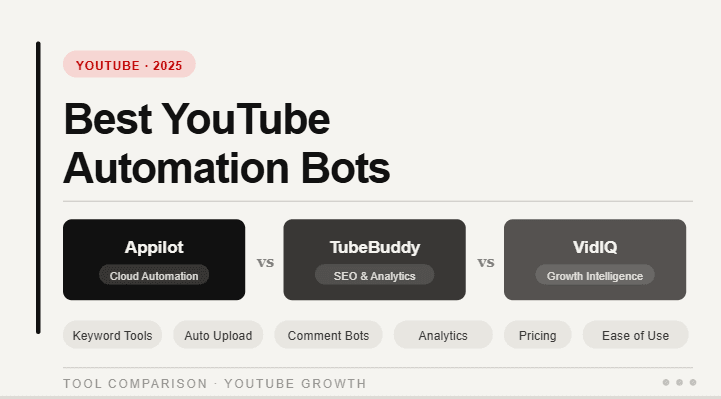
YouTube automation can mean two very different things.
For most creators, YouTube automation means making the content workflow easier. That includes keyword research, title ideas, thumbnail testing, SEO optimization, analytics, video planning, comment management, and channel growth insights.
For operators, agencies, and automation teams, YouTube automation can mean something different. It can mean running workflows inside the YouTube mobile app, managing accounts across Android devices, supporting repeatable app actions, and using automation as part of a larger social media system.
That is why Appilot, TubeBuddy, and VidIQ are not the same kind of tool.
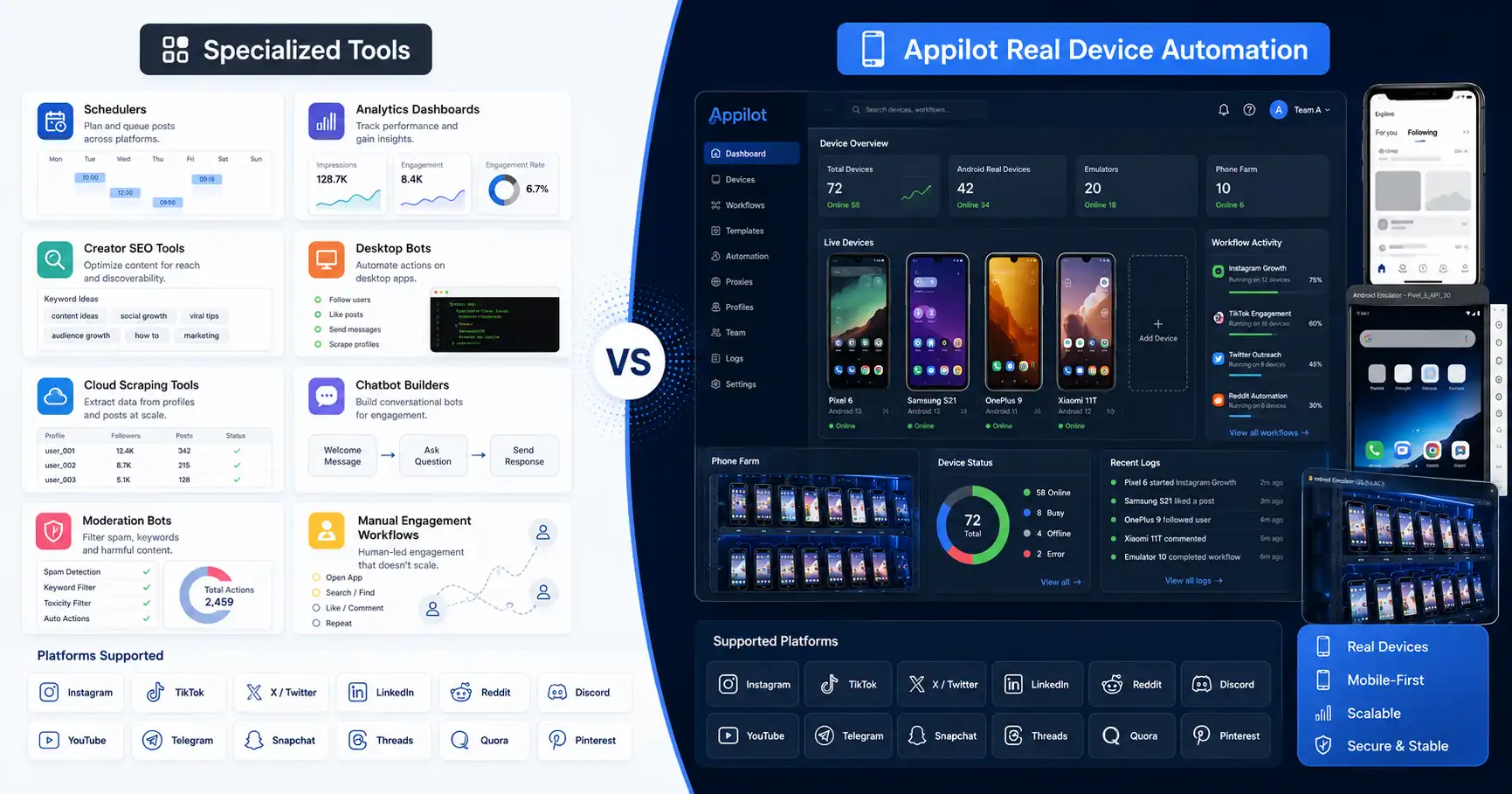
TubeBuddy and VidIQ are creator growth platforms. They help creators improve videos, optimize metadata, research keywords, analyze competitors, generate ideas, and understand channel performance. Appilot is a real-device automation platform. It runs bots on Android devices and emulators through a remote web dashboard.
This guide compares Appilot vs TubeBuddy vs VidIQ so you can decide which YouTube automation tool actually fits your workflow.
What Makes a Good YouTube Automation Tool?
A good YouTube automation tool should help users save time without creating low-quality, spammy, or artificial behavior.
YouTube is strict about spam, scams, fake engagement, and artificial metrics. YouTube does not allow anything that artificially increases views, likes, comments, or other engagement metrics through automatic systems. That means a good automation strategy should support real creator work, not fake popularity.
The best YouTube tools usually help with useful tasks like keyword research, title optimization, thumbnail improvement, analytics, scheduling, comment workflows, idea generation, and content planning.
For creators, TubeBuddy and VidIQ are strong because they help improve content packaging and channel strategy.
For real-device workflows, Appilot is stronger because it runs automation inside Android environments where the YouTube app actually operates.
The right tool depends on whether you need creator optimization or mobile app automation.
What Is Appilot?
Appilot is a social media automation platform that runs bots on real Android devices and emulators through a remote web dashboard.
For YouTube automation, Appilot is useful when the workflow needs Android app execution instead of only SEO tools or analytics dashboards. It can support YouTube app workflows as part of a broader automation setup across platforms.
Appilot works without ADB, so users do not need to keep a laptop connected, manage USB cables, troubleshoot drivers, or deal with constant device disconnects.
The platform supports bots for YouTube, Instagram, TikTok, Twitter/X, LinkedIn, Discord, Reddit, Snapchat, Threads, Telegram, Gmail, Chrome, and more.
Appilot is especially useful for agencies, phone farm operators, growth teams, and users who need real Android automation and multi-platform workflows.
It is not mainly a keyword research tool or thumbnail testing platform. Its strength is real-device automation.
What Is TubeBuddy?
TubeBuddy is a YouTube creator growth and optimization tool. It is best known for helping creators improve YouTube SEO, research keywords, optimize video metadata, test titles and thumbnails, analyze channels, and manage creator workflows.
TubeBuddy offers tools such as Keyword Explorer, SEO Studio, Click Magnet, A/B Testing, thumbnail tools, channel insights, productivity features, bulk editing, and community management tools.
This makes TubeBuddy useful for creators who want to improve video discoverability and optimize content before and after publishing.
TubeBuddy is not mainly a real-device automation platform. It helps creators optimize videos and channels, but it does not replace Android app automation, phone farm workflows, or multi-platform bot operations.
If your main problem is YouTube SEO and channel optimization, TubeBuddy is a strong option.
What Is VidIQ?
VidIQ is a YouTube growth platform focused on AI-powered optimization, analytics, keyword research, video ideas, competitor insights, thumbnails, scripts, and creator coaching.
VidIQ is useful for creators who want help choosing better topics, improving titles, finding keywords, analyzing performance, and generating ideas based on YouTube data.
Its current positioning is heavily focused on helping creators grow faster with AI tools, personalized insights, video optimization, trend discovery, and analytics.
Like TubeBuddy, VidIQ is not mainly a mobile app automation tool. It helps creators improve strategy and content performance, but it is not built for real Android device workflows.
If your goal is creator growth, content ideas, and YouTube analytics, VidIQ is a strong option.
Appilot vs TubeBuddy vs VidIQ: The Main Difference
The biggest difference is the type of automation each tool supports.
TubeBuddy and VidIQ automate parts of the creator workflow. They help with research, optimization, planning, analytics, thumbnails, titles, tags, and growth insights.
Appilot automates mobile app workflows. It runs bots on Android devices and emulators, giving users a real-device automation layer for YouTube and other social apps.
This means TubeBuddy and VidIQ are better for creators who want to improve content performance. Appilot is better for users who need YouTube app automation as part of a broader social automation system.
If you want to improve your video title, thumbnail, tags, and topic strategy, use TubeBuddy or VidIQ.
If you want to run YouTube app workflows through Android devices or emulators, use Appilot.
YouTube SEO and Keyword Research
TubeBuddy and VidIQ are strongest in YouTube SEO and keyword research.
TubeBuddy helps creators optimize titles, tags, descriptions, rankings, thumbnails, and metadata. VidIQ helps creators find keywords, discover ideas, analyze competitors, and improve video optimization.
These tools are useful because YouTube growth depends heavily on packaging. A good video can underperform if the title is weak, the thumbnail is unclear, or the topic does not match search intent.
TubeBuddy and VidIQ help creators understand what people are searching for and how to position videos more effectively.
Appilot is not mainly designed for keyword research. It is better for running YouTube workflows through Android environments.
So if your main goal is SEO, TubeBuddy or VidIQ is the better choice.
Video Ideas and Content Strategy
VidIQ is especially strong for video ideas and AI-powered creator support. It helps creators discover topics, generate titles, analyze competitors, and get recommendations for channel growth.
TubeBuddy also supports content strategy through channel insights, topic analysis, keyword tools, and optimization features.
This is valuable because YouTube growth starts before upload. The topic, angle, hook, title, thumbnail, and audience fit matter more than most creators realize.
Appilot does not replace strategy tools. It does not decide which video topic will perform best or which thumbnail has the strongest click appeal.
Instead, Appilot helps with the execution layer when workflows need to happen inside the YouTube app or across social platforms.
For content strategy, TubeBuddy and VidIQ win.
Thumbnail and Title Optimization
TubeBuddy and VidIQ are both useful for improving titles and thumbnails.
TubeBuddy offers tools for thumbnail analysis, title generation, A/B testing, and optimization. VidIQ offers AI-powered tools for thumbnails, titles, video ideas, scripts, and optimization.
This matters because YouTube recommendations depend heavily on whether viewers click and keep watching. A better title and thumbnail can improve click-through rate, while better content structure can improve retention.
Appilot is not a title or thumbnail optimization tool. It is not trying to compete in that category.
If your channel needs better packaging, TubeBuddy or VidIQ is the better fit.
If your workflow needs YouTube mobile app automation, Appilot is the better fit.
YouTube App Automation
YouTube app automation is where Appilot has the advantage.
Some workflows need to happen inside the YouTube mobile app environment. This may include app navigation, account workflows, checking mobile behavior, managing routine app actions, or running YouTube-related tasks as part of a broader Android automation system.
Appilot runs bots on real Android devices and emulators, which makes it better for these workflows than TubeBuddy or VidIQ.
TubeBuddy and VidIQ help creators optimize content, but they do not provide real-device YouTube app automation.
If a user needs Android-based execution, remote dashboard control, no ADB, and multi-platform workflows, Appilot is the better option.
Comment Management and Community Workflows
YouTube comment workflows need care.
Replying to real comments can be useful. Spammy or repetitive comment automation can create problems. YouTube’s fake engagement and spam policies make it clear that artificial engagement and deceptive behavior are not allowed.
TubeBuddy includes community management and productivity tools that can help creators interact with viewers more efficiently. VidIQ helps creators understand performance and grow their channel, but it is more focused on insights and optimization than comment automation.
Appilot can support app-based workflows, but users should be careful with comment automation. Any comment workflow should be relevant, human-reviewed, and not designed to fake engagement.
For creator community management, TubeBuddy may be more directly useful. For Android app workflow automation, Appilot is stronger.
Multi-Platform Automation
Appilot wins when YouTube automation is only one part of a bigger social media workflow.
A creator or agency may need to manage YouTube alongside Instagram, TikTok, Twitter/X, LinkedIn, Reddit, Discord, Telegram, Gmail, Chrome, and other platforms.
TubeBuddy and VidIQ are focused mainly on YouTube creator growth. That focus is helpful for YouTube strategy, but it does not solve broader multi-platform automation.
Appilot supports many social and app workflows from one real-device automation layer.
This makes Appilot useful for agencies, growth teams, and phone farm operators who manage more than one platform.
If YouTube is your only concern, TubeBuddy or VidIQ may be enough. If YouTube is part of a larger automation system, Appilot becomes more valuable.
Account Safety and YouTube Policy
YouTube automation should never be used to create fake engagement.
Artificial views, likes, comments, subscribers, or watch behavior can violate YouTube’s policies and put channels at risk. YouTube also maintains broader spam and deceptive practices policies that apply across the platform.
This means any YouTube automation strategy should be careful and legitimate.
TubeBuddy and VidIQ are generally used for optimization, analytics, and creator workflow support, which is different from fake engagement automation.
Appilot should also be used responsibly. Real-device automation is powerful, but it should not be used to inflate metrics, spam comments, or create deceptive activity.
The safest automation supports real content, real viewers, and real workflow efficiency.
Where TubeBuddy Wins
TubeBuddy wins when the user wants YouTube SEO, channel optimization, productivity tools, thumbnail testing, metadata improvement, and creator workflow support.
It is a strong choice for creators who want practical tools to improve titles, descriptions, tags, thumbnails, rankings, and video performance.
TubeBuddy also works well for creators who want a YouTube-focused tool that fits directly into their publishing and optimization process.
The trade-off is that TubeBuddy is not a real Android automation platform.
If your workflow is creator optimization, TubeBuddy is strong. If your workflow is mobile app automation, Appilot is stronger.
Where VidIQ Wins
VidIQ wins when the user wants AI-powered YouTube growth support.
It is useful for creators who need video ideas, keyword research, competitor insights, channel analytics, script support, thumbnail help, and personalized growth recommendations.
VidIQ is especially strong for creators who want guidance on what to make next and how to improve existing content.
The trade-off is that VidIQ is not built for real-device automation or phone farm-style workflows.
If your workflow is YouTube strategy and analytics, VidIQ is strong. If your workflow is Android app automation, Appilot is stronger.
Where Appilot Wins
Appilot wins when the user needs YouTube automation through real Android devices or emulators.
It is best for users who want app-based workflows, remote dashboard control, no ADB, no laptop dependency, and multi-platform social automation.
Appilot is also stronger for agencies, phone farm operators, growth teams, and users managing many apps from one automation layer.
It is not a replacement for TubeBuddy or VidIQ’s SEO and analytics features. Instead, it solves a different problem: real-device workflow execution.
If you need YouTube mobile app automation, Appilot is the better fit.
Who Should Use TubeBuddy?
TubeBuddy is best for YouTube creators who want SEO and optimization support.
It fits creators who need keyword research, title improvement, tag optimization, thumbnail testing, channel insights, productivity tools, and better video packaging.
It is especially useful for creators who want to improve discoverability and performance without building complex automation workflows.
If your main goal is to optimize YouTube videos, TubeBuddy is worth considering.
Who Should Use VidIQ?
VidIQ is best for creators who want AI-powered YouTube growth insights.
It fits users who want video ideas, keyword research, competitor analysis, thumbnail support, script help, analytics, and personalized creator coaching.
It is useful for creators who want to understand what to publish next and how to improve channel performance.
If your main goal is content strategy, VidIQ is a strong choice.
Who Should Use Appilot?
Appilot is best for users who want YouTube app automation as part of a broader social media automation system.
It fits agencies, phone farm operators, growth teams, outreach teams, and users managing multiple platforms.
It is especially useful when the workflow needs real Android automation, emulator support, no ADB, no laptop dependency, proxy-aware workflows, and remote dashboard control.
If your automation needs go beyond SEO and analytics, Appilot is the better choice.
Final Verdict
TubeBuddy, VidIQ, and Appilot are all useful, but they solve different YouTube automation problems.
TubeBuddy is strongest for YouTube SEO, metadata optimization, thumbnails, rankings, productivity, and creator workflow tools. VidIQ is strongest for AI-powered ideas, keyword research, analytics, competitor insights, and content strategy. Appilot is strongest for real-device YouTube app automation and broader social media workflows.
If you want to improve titles, thumbnails, tags, and video SEO, TubeBuddy is a strong choice. If you want AI-powered growth recommendations and video ideas, VidIQ is a strong choice. If you want YouTube automation through Android devices and emulators, Appilot is the better fit.
The best YouTube automation stack may even use more than one tool. TubeBuddy or VidIQ can help with creator optimization, while Appilot can help with real app workflow automation.
You can explore Appilot’s bot store and try it at appilot.app.
FAQ
Q1: What is the biggest difference between Appilot, TubeBuddy, and VidIQ?
TubeBuddy and VidIQ help with YouTube SEO, analytics, ideas, and creator optimization. Appilot helps with real Android automation and YouTube app workflows.
Q2: Which tool is best for YouTube SEO?
TubeBuddy and VidIQ are stronger for YouTube SEO because they offer keyword research, optimization tools, analytics, and content strategy features.
Q3: Is Appilot good for YouTube automation?
Yes, Appilot is useful when YouTube workflows need real Android app execution, remote control, no ADB, and multi-platform automation.
Q4: Is YouTube automation safe?
YouTube automation is safe only when it supports legitimate workflows. Artificial views, likes, comments, subscribers, or spammy behavior can put channels at risk.
Q5: Who should choose Appilot over TubeBuddy or VidIQ?
Choose Appilot if you need YouTube app automation, real Android workflows, phone farm operations, or automation across YouTube plus other platforms.