BlueStacks Emulator vs Real Android Phone for Social Media Automation
BlueStacks and real Android phones can both run Android apps, but they are not equal when the goal is social media automation.
BlueStacks is a popular Android emulator for PC and Mac. It is mainly known for running Android games and apps on a desktop environment, with features like multi-instance support, keyboard and mouse controls, and performance optimization for PC users.
A real Android phone is different. It gives the app a physical mobile environment, with real hardware behavior, real device signals, real app storage, real battery conditions, and a more natural mobile session.
For social media automation, that difference matters. Instagram, TikTok, Threads, Snapchat, Telegram, YouTube, Reddit, Discord, and similar platforms care about more than whether an app opens. They can look at behavior patterns, device consistency, account history, network signals, timing, and whether the session looks like normal mobile usage.
This blog compares BlueStacks emulator vs real Android phone for social media automation and explains when each one makes sense.
What Is BlueStacks?
BlueStacks is an Android emulator that lets users run Android apps and games on a Windows or Mac computer. Its official positioning is heavily focused on gaming, app performance, multi-instance use, keyboard and mouse controls, and running Android apps on a larger PC screen.
For automation users, BlueStacks can be useful because it creates a virtual Android environment without requiring a physical phone. A user can install apps, test workflows, run multiple instances, and experiment with automation logic on a desktop machine.
That makes BlueStacks attractive for testing. If someone wants to check whether a bot can open Instagram, move through a flow, or interact with an app screen, an emulator can be convenient.
The limitation is that BlueStacks is still an emulator. It does not provide the same signals as a physical Android phone. For serious social media automation, especially with valuable accounts, that difference can matter.
What Is Real Android Phone Automation?
Real Android phone automation means running bots on physical Android devices instead of virtual emulator environments.
A real phone gives the automation a more natural mobile environment. The app runs on actual hardware, with real system behavior, real sensors, real battery behavior, real app sessions, and more believable device characteristics.
For social media automation, this is important because many platforms are mobile-first. Instagram, TikTok, Snapchat, Threads, Telegram, and YouTube are built around mobile app usage. A real user normally taps, scrolls, swipes, types, watches, waits, and moves through the app on a phone.
Real Android phones usually provide the strongest environment for live social media automation because they better match how real users behave.
The trade-off is hardware management. Real phones cost more, take physical space, need charging, can overheat, and require more organization than emulators.
BlueStacks vs Real Android Phone: The Main Difference
The biggest difference between BlueStacks and a real Android phone is realism.
BlueStacks is convenient. It is easier to install on a PC, easier to clone, easier to reset, and easier to test with than a collection of physical phones. It is useful for development, experimentation, and low-risk workflows.
A real Android phone is more believable. It gives social apps a real mobile environment, which is better for account trust, app behavior, and long-term operations.
This does not mean BlueStacks is useless for automation. It can be very useful for testing and prototyping. But it is usually not the best first choice for serious Instagram or TikTok account operations where device signals and session realism matter.
The better way to think about it is simple: BlueStacks is good for testing; real Android phones are better for production social automation.
Where BlueStacks Works Well
BlueStacks works well when the goal is convenience.
If a user wants to test a bot, check a UI flow, run an app on a bigger screen, or experiment with Android automation without buying phones, BlueStacks can be useful.
It also helps users create multiple emulator instances. This can be helpful for testing different app states, checking how workflows behave across accounts, or experimenting before moving to real devices.
BlueStacks is also easier for beginners because it removes hardware setup. A user does not need to buy a phone, connect charging cables, arrange physical devices, or manage a phone rack.
For low-risk testing, BlueStacks can be a practical starting point.
The key is not to confuse testing convenience with production reliability.
Where BlueStacks Falls Short
BlueStacks falls short when realism matters.
A social platform may treat emulator environments differently from real devices. Even if the app runs, the platform may still detect signals that suggest the session is not coming from a normal physical phone.
This can matter for account-sensitive workflows like Instagram growth, TikTok engagement, DM outreach, account warmup, story viewing, commenting, following, and multi-account operations.
BlueStacks can also depend heavily on the host computer. If the PC slows down, runs out of memory, crashes, updates, or becomes overloaded with instances, automation can become unstable.
Another issue is scaling. Multi-instance support is useful, but running many emulator instances can consume a lot of CPU, RAM, GPU, and disk resources.
For serious social media automation, those weaknesses can become expensive.
Where Real Android Phones Work Well
Real Android phones work best when the account matters.
If the automation involves real Instagram, TikTok, Snapchat, Threads, Telegram, YouTube, Reddit, or Discord accounts, physical phones usually provide a stronger foundation.
The main advantage is device realism. A real phone has physical hardware behavior and app environment signals that an emulator cannot fully duplicate.
Real phones are also better for long-running workflows. A phone can stay assigned to a specific account, paired with a proxy, and used as part of a consistent environment over time.
This is especially valuable for phone farm operators and agencies. When accounts are valuable, the automation environment should look as close to normal mobile usage as possible.
The downside is that real phones require more physical management, but that trade-off is often worth it for live account operations.
Where Real Android Phones Fall Short
Real phones are not perfect.
They cost more than emulators. A user needs to buy hardware, keep devices powered, organize cables, manage storage, handle app updates, and monitor device health.
Physical phones can overheat, freeze, slow down, lose connectivity, or require manual attention. If a user manages many devices, the physical setup can become messy without a proper system.
Scaling also takes time. Adding more real phones means buying devices, setting them up, assigning accounts, configuring proxies, and organizing the operation.
This is why emulators remain useful. They are faster for testing and easier to reset.
The best automation setup often uses both: emulators for testing and real phones for serious live workflows.
Instagram Automation: BlueStacks or Real Phone?
For Instagram automation, a real Android phone is usually the better choice.
Instagram is a mobile-first platform. Real users scroll feeds, watch Reels, view stories, open profiles, send messages, reply to comments, and interact through mobile app sessions.
BlueStacks can run Instagram, and it can be useful for testing bot flows. But for live Instagram growth, real phones provide better realism.
This matters because Instagram automation risk is not only about the action. It is about the whole pattern: device environment, IP quality, action speed, account age, timing, message quality, and session behavior.
A real phone does not make automation risk-free, but it gives the account a stronger mobile foundation than an emulator.
TikTok Automation: BlueStacks or Real Phone?
For TikTok automation, real Android phones also have the advantage.
TikTok is extremely mobile-native. The user experience is built around swiping, watching, pausing, liking, following, commenting, opening profiles, and interacting inside short app sessions.
BlueStacks can be useful for testing whether a TikTok bot flow works, but it is not the ideal environment for high-trust live account activity.
A real phone gives better alignment with normal TikTok behavior.
For phone farm operators and growth teams, this matters because TikTok accounts can be sensitive to unusual behavior. Real device automation gives users a more believable starting point.
Multi-Account Automation
Multi-account automation is where the difference becomes more serious.
BlueStacks multi-instance support can be useful for running or testing multiple app environments on one computer. This makes it attractive for users who want to experiment without buying many phones.
The problem is that many emulator instances still depend on one host machine. If the PC has limited CPU, RAM, storage, or GPU resources, performance can drop quickly.
Real phones scale differently. Each device has its own hardware. That makes the setup more physical, but it also reduces dependence on one overloaded machine.
For serious multi-account social automation, real phones are usually better because each account can be tied to a more distinct device environment.
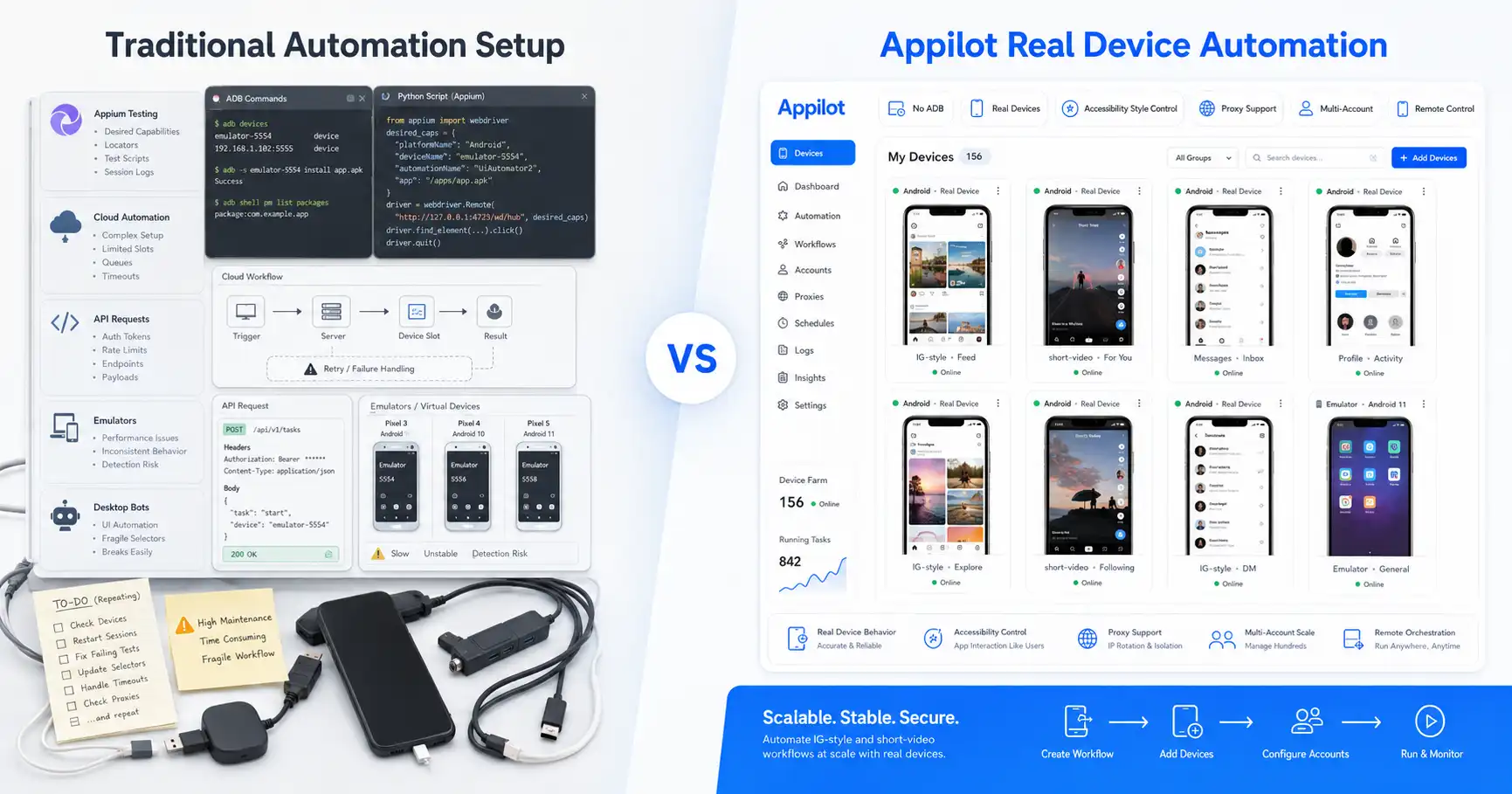
Appilot helps manage this by giving users a web dashboard for real Android device and emulator automation without relying on ADB or a laptop connection.
Account Safety and Ban Risk
No tool or device can guarantee account safety.
A real Android phone can still get an account banned if the user sends spam, uses bad proxies, follows too aggressively, repeats comments, or ignores warmup.
BlueStacks can also work for some workflows if used carefully, but emulator environments usually create more questions for account-sensitive platforms.
Account safety depends on the full setup. Device environment, proxy quality, account age, warmup, timing, content quality, and action limits all matter.
Real Android phones generally have the advantage because they reduce emulator-specific signals and provide a more natural app environment.
That is why many serious social media operators prefer real-device automation for live accounts.
Proxy Strategy
Proxy strategy matters whether you use BlueStacks or real phones.
If several accounts use the same weak proxy, suspicious IP range, or unstable network pattern, the platform may connect those accounts or restrict them.
BlueStacks users often need to configure proxies carefully at the emulator, app, or network level. This can become complicated when managing many instances.
Real phone setups also need proxies, especially for phone farms. Mobile and residential proxies are common for multi-account workflows because they help create better account separation.
Appilot supports proxy-aware workflows, including mobile and residential proxies, which makes it easier to manage automation across accounts and devices.
The strongest setup combines real device behavior with good proxy quality and careful action limits.
Where BlueStacks Wins
BlueStacks wins when the user needs convenience, testing, and lower upfront cost.
It is useful for running Android apps on a PC, testing bot workflows, experimenting with app behavior, and using multi-instance setups before investing in real devices.
It is also helpful for developers and operators who want to debug workflows quickly.
For early-stage testing, BlueStacks can be a practical option.
The trade-off is that it is not the strongest environment for live social media account operations. When account trust and realism matter, a real phone is usually better.
Where Real Android Phones Win
Real Android phones win when the workflow involves valuable accounts, mobile-first platforms, and long-term automation.
They provide better device realism, stronger mobile app behavior, and a more natural environment for Instagram, TikTok, Snapchat, Threads, Telegram, YouTube, Reddit, Discord, and similar platforms.
Real phones are also better for phone farm operators who need consistent account environments over time.
The trade-off is hardware management. Real devices cost more and require more organization.
Appilot makes this easier by letting users manage real Android automation remotely through a web dashboard, without ADB or laptop dependency.
How Appilot Fits Into This Comparison
Appilot is useful because it does not force users into only one environment.
Users can run bots on real Android devices and emulators, manage workflows through a remote dashboard, and avoid ADB-based setup problems.
This means a team can test workflows on emulator-style environments, then run important accounts on real phones when realism matters more.
Appilot also removes much of the old phone farm pain. Users do not need to keep a laptop connected, manage USB cables, or constantly troubleshoot ADB sessions.
For social media automation, this is a practical middle ground. Users get the flexibility of Android automation and the stronger realism of real devices when needed.
Final Verdict
BlueStacks and real Android phones both have a place in social media automation.
BlueStacks is better for testing, experimentation, lower-cost development, and multi-instance workflow checks. It is convenient, easy to start with, and useful for early-stage bot validation.
Real Android phones are better for serious live automation, valuable accounts, phone farm operations, and mobile-first social platforms where device realism matters.
If you are testing a bot, BlueStacks can help. If you are running Instagram, TikTok, Snapchat, Threads, Telegram, or YouTube automation on real accounts, a real Android phone is usually the better choice.
Appilot gives users a cleaner way to manage both types of workflows through real Android automation, emulator support, no ADB, no laptop dependency, and a remote web dashboard.
You can explore Appilot’s bot store and try it at appilot.app.
FAQ
Q1: What is the biggest difference between BlueStacks and a real Android phone?
BlueStacks is an Android emulator running on a PC, while a real Android phone is physical hardware. Real phones provide stronger device realism for social automation.
Q2: Is BlueStacks good for Instagram automation?
BlueStacks can be useful for testing Instagram bot workflows. For serious live Instagram automation, real Android phones are usually safer and more realistic.
Q3: Are real Android phones better for phone farms?
Yes, real Android phones are usually better for phone farms because they provide stronger device signals, app behavior, and long-term account consistency.
Q4: Does Appilot support emulators and real devices?
Yes, Appilot supports automation on real Android devices and emulators. Users can manage workflows remotely through a web dashboard without ADB.
Q5: Who should use BlueStacks instead of a real phone?
BlueStacks is best for testing, development, and low-risk experiments. Real phones are better for valuable accounts and production social media automation.