Bluestacks vs Genymotion vs NoxPlayer: Best Emulator for Social Media Bots
Choosing the right emulator for social media bots is not just about which one runs Android apps faster. For social media automation, the emulator affects workflow stability, account management, device behavior, multi-instance performance, scripting options, resource usage, and how easily a team can scale operations across multiple accounts.
BlueStacks, Genymotion, and NoxPlayer are three of the most common Android emulator options. Each one can run Android apps on a desktop machine, but they are built with different priorities. BlueStacks is heavily optimized for gaming and multi-instance use. Genymotion is more developer and testing focused, with desktop and cloud options. NoxPlayer is also gaming-focused, with script recording and multiple-instance support.
For social media bots, the best choice depends on the workflow. A solo user testing simple tasks may care about convenience. A developer may care about automation APIs and testing integrations. An agency running many accounts may care about stability, device separation, repeatable workflows, and centralized control.
The honest answer is that no emulator alone is a complete social media automation system. Emulators can provide the Android environment, but teams still need account management, workflow monitoring, responsible pacing, network consistency, and a practical automation layer. This is where Appilot fits well because it helps teams manage Android devices, emulators, and mobile workflows from a web dashboard instead of manually operating each emulator one by one.
Why Emulator Choice Matters for Social Media Bots
Social media bots usually fail for one of two reasons. Either the automation logic breaks, or the operating environment becomes unstable. Many users focus only on the script, but the emulator environment is just as important.
Instagram, TikTok, Telegram, Snapchat, Threads, and other mobile-first platforms are built around app behavior. If a workflow runs inside an emulator, the emulator needs to be stable enough to keep sessions alive, load apps reliably, support repeated actions, and avoid constant crashes or resets.
For multi-account workflows, emulator management becomes even more important. Running one Instagram account in one emulator is simple. Running ten, twenty, or fifty accounts across emulator instances is much harder. The team needs clean separation, predictable performance, organized sessions, and a way to monitor what is happening.
This is why the best emulator for social media bots is not always the one with the highest gaming FPS. It is the one that supports stable mobile workflows, multiple instances, automation compatibility, and manageable operations.
BlueStacks Overview
BlueStacks is one of the most popular Android emulators for Windows and Mac. It is mainly designed for mobile gaming, but its multi-instance features also make it attractive for users who want to run multiple Android environments on one machine.
BlueStacks officially highlights multi-instance support, allowing users to run multiple games or multiple accounts at the same time, and it includes features like Eco Mode for optimizing PC resources when several instances are running in the background. BlueStacks also promotes features like multi-instance, macros, scripts, performance modes, memory trimming, and high-FPS gaming features.
For social media bots, BlueStacks can be useful because it is widely used, easy to install, and familiar to many non-technical users. It works well for basic app testing, manual account management, and smaller automation workflows.
The downside is that BlueStacks is still primarily a consumer gaming emulator. It is not designed as a professional social media automation platform. When workflows grow across many accounts, users may need additional systems for monitoring, account separation, proxy setup, workflow orchestration, and automation control.
BlueStacks is best for beginners, solo operators, and small teams that need a familiar emulator with multi-instance support.
Genymotion Overview
Genymotion is more developer-focused than BlueStacks and NoxPlayer. It is designed for Android testing, development, automation, virtual device infrastructure, and cloud-based device workflows. Genymotion positions itself as an Android emulator available in the cloud and on desktop, with integrations for testing frameworks and CI servers.
Genymotion Desktop supports customizable phone and tablet templates, Android versions, and device features such as GPS, camera, media injection, and biometrics. Genymotion’s cloud product also highlights team management, test automation, CLI control, and parallel testing.Its recent 3.10.0 desktop release also shows that Genymotion is actively maintaining its desktop product, with updates around UI, cloud virtual devices, ADB Tunnel, and workflow improvements.
For social media bots, Genymotion is attractive if the team is technical. Developers can create cleaner virtual device setups, test apps across Android versions, automate workflows, and integrate with broader testing infrastructure.
The downside is that Genymotion may feel too technical for non-developers. It is not designed specifically for Instagram bots, TikTok workflows, phone farms, or social media growth operations. It gives you a strong Android environment, but you still need a separate automation and management layer.
Genymotion is best for developers, QA teams, technical automation teams, and users who need structured emulator control rather than a consumer gaming emulator.
NoxPlayer Overview
NoxPlayer is another popular Android emulator built mainly for gaming. It supports keyboard controls, gamepad support, script recording, and multiple instances. Its official site describes it as an Android emulator for PC with support for keyboard, gamepad, script recording, and multiple instances. Nox support documentation also shows multi-instance management features through its emulator manager.
For social media bot users, NoxPlayer is attractive because it is relatively simple, supports multiple instances, and includes script recording for repetitive actions. Users who want to experiment with simple app workflows may find it easier than setting up developer-focused tools.
The downside is that NoxPlayer, like BlueStacks, is still mainly a gaming emulator. It is not built as a professional automation operations platform. Script recording can be useful for simple repetition, but social media workflows often require more context, session handling, error recovery, account separation, and monitoring.
NoxPlayer is best for users who want a simple emulator with built-in macro-style features and multi-instance support, but it is less suitable for professional, large-scale social media automation unless combined with stronger workflow tooling.
BlueStacks vs Genymotion vs NoxPlayer for Social Media Bots
BlueStacks is usually the easiest option for beginners. It has a familiar interface, strong multi-instance support, and many consumer-friendly features. It can work well for small social media automation setups, especially when the user wants a simple Android emulator without a steep learning curve.
Genymotion is usually the best option for technical users. It is more professional, more developer-focused, and better suited for structured Android testing and automation environments. It is especially useful when users need configurable virtual devices, Android version control, cloud options, and integration with automation frameworks.
NoxPlayer is useful for simple macro-style workflows. Its script recording and multiple-instance features make it attractive for users who want quick repetition without building a full automation framework. However, it can become limited when workflows require advanced monitoring, reliability, or account-level logic.
For serious social media bot workflows, emulator choice is only one part of the stack. The more important question is how the emulator is managed. A team running many accounts needs a system to organize devices, track workflows, monitor sessions, and avoid manual chaos.
Which Emulator Is Best for Instagram Bots?
For Instagram bots, Genymotion is usually the strongest technical emulator because it is built around testing, virtual devices, and automation-friendly infrastructure. It is better suited for users who understand Android environments and want more control.
BlueStacks is easier for beginners and can be a practical choice for basic Instagram app workflows. Its multi-instance support makes it useful for small account setups, but it may not be ideal for professional automation teams that need cleaner orchestration.
NoxPlayer can work for simple Instagram tasks and macro-style workflows, but it should be treated carefully. Simple script recording may not be enough for modern Instagram operations because real workflows often require conditional logic, session handling, and monitoring.
For Instagram automation at scale, the better answer is not just choosing one emulator. The better answer is using a mobile automation layer like Appilot that can help manage Android devices and emulators from one dashboard.
Which Emulator Is Best for TikTok Bots?
TikTok workflows are often more performance-sensitive because video playback, scrolling, uploads, and app behavior can be heavier than simple text-based workflows. BlueStacks and NoxPlayer may feel smoother for consumer-style TikTok testing because they are optimized for gaming-style performance.
Genymotion may be better for technical testing and structured automation, but users should evaluate whether the specific TikTok workflow performs well inside the chosen virtual device setup.
For TikTok bots, stability matters more than raw speed. If an emulator crashes, lags, or loses session data, the workflow becomes unreliable. Teams running multiple TikTok accounts should focus on device consistency, resource allocation, and workflow monitoring.
Again, Appilot can help when the goal is not just running TikTok inside an emulator but managing repeatable mobile workflows across multiple devices or emulator instances.
Which Emulator Is Best for Multi-Account Social Media Management?
For multi-account workflows, BlueStacks has an advantage in ease of use because its multi-instance manager is simple and designed for running multiple accounts or games at the same time. NoxPlayer also supports multiple instances and can be useful for users who want a simpler consumer emulator setup.
Genymotion has an advantage for technical scaling because it supports desktop and cloud virtual devices, testing integrations, CLI workflows, and parallel testing infrastructure.
But multi-account social media management is not only about opening many emulator windows. A real workflow also needs account organization, network consistency, session tracking, action monitoring, and recovery when something fails. This is where a normal emulator interface becomes limiting.
For agencies and phone farm operators, Appilot is stronger because it is designed to centralize mobile workflow control. Instead of manually managing separate emulator windows, teams can use a web dashboard to control Android devices and emulator-based workflows more cleanly.
Performance and Resource Usage
BlueStacks and NoxPlayer are both designed for consumer performance, especially gaming. BlueStacks promotes features such as Eco Mode, performance modes, and memory trimming, which can help when running multiple instances. NoxPlayer also emphasizes smooth gameplay, script recording, and multi-instance use.
Genymotion is more focused on professional virtual device management and testing rather than gaming performance. It may be a better fit when the user cares about configurable device profiles, testing workflows, and automation integrations rather than high-FPS consumer app usage.
For social media bots, resource usage becomes important when running multiple accounts. Every emulator instance consumes CPU, RAM, storage, and network resources. If a machine is overloaded, automation becomes unstable. Apps may freeze, sessions may drop, actions may fail, and workflows may become unpredictable.
A good setup should start small, measure performance, and scale gradually. Running too many emulator instances on one machine can create more risk than benefit.
Automation Compatibility
Genymotion is usually the strongest for technical automation compatibility because it is built for testing and development workflows. Its cloud product supports automation, CLI control, and parallel testing, which makes it more suitable for users building structured systems.
BlueStacks and NoxPlayer can support simpler automation through macros, scripts, or external tools, but they are not as developer-focused. They are easier for casual users but less ideal for teams that need reliable automation pipelines.
For social media bots, the best automation environment depends on whether the user is technical. A developer may prefer Genymotion because it gives more control. A non-technical user may prefer BlueStacks or NoxPlayer because they are easier to operate. An agency may prefer Appilot because it gives a practical workflow layer above the emulator or device environment.
Stability for Social Media Bots
Stability is the most important factor for social media automation. A fast emulator is not useful if it crashes, loses sessions, or behaves unpredictably during workflows.
BlueStacks is stable enough for many users and benefits from a large user base. NoxPlayer is also popular and accessible, but its macro-style approach may be too basic for advanced social media workflows. Genymotion is more professional and testing-focused, which can make it more attractive for technical teams that care about predictable virtual device behavior.
However, emulator stability also depends on machine resources, Android version, app version, network setup, automation logic, and how many instances are running. No emulator can make an unsafe or overloaded workflow stable by itself.
For teams that need serious reliability, Appilot can help by adding a centralized control layer for Android and emulator workflows. This makes the operation easier to manage than manually juggling multiple emulator windows.
Safety Considerations for Social Media Bots
Emulators can be useful, but they should not be used to spam platforms, mass-message users, or run aggressive engagement loops. Social platforms can restrict accounts when behavior violates their rules or appears unnatural.
The safer approach is to use emulators for controlled, responsible workflows. This includes account checks, content workflows, app testing, DM management, scheduled tasks, and operational support. Automation should support real business workflows, not replace authentic content or real engagement.
Users should also avoid constantly changing device environments, overloading accounts with actions, or mixing too many accounts inside unstable setups. A safer system keeps each account environment consistent and uses realistic pacing.
Where Appilot Fits Compared With Emulators
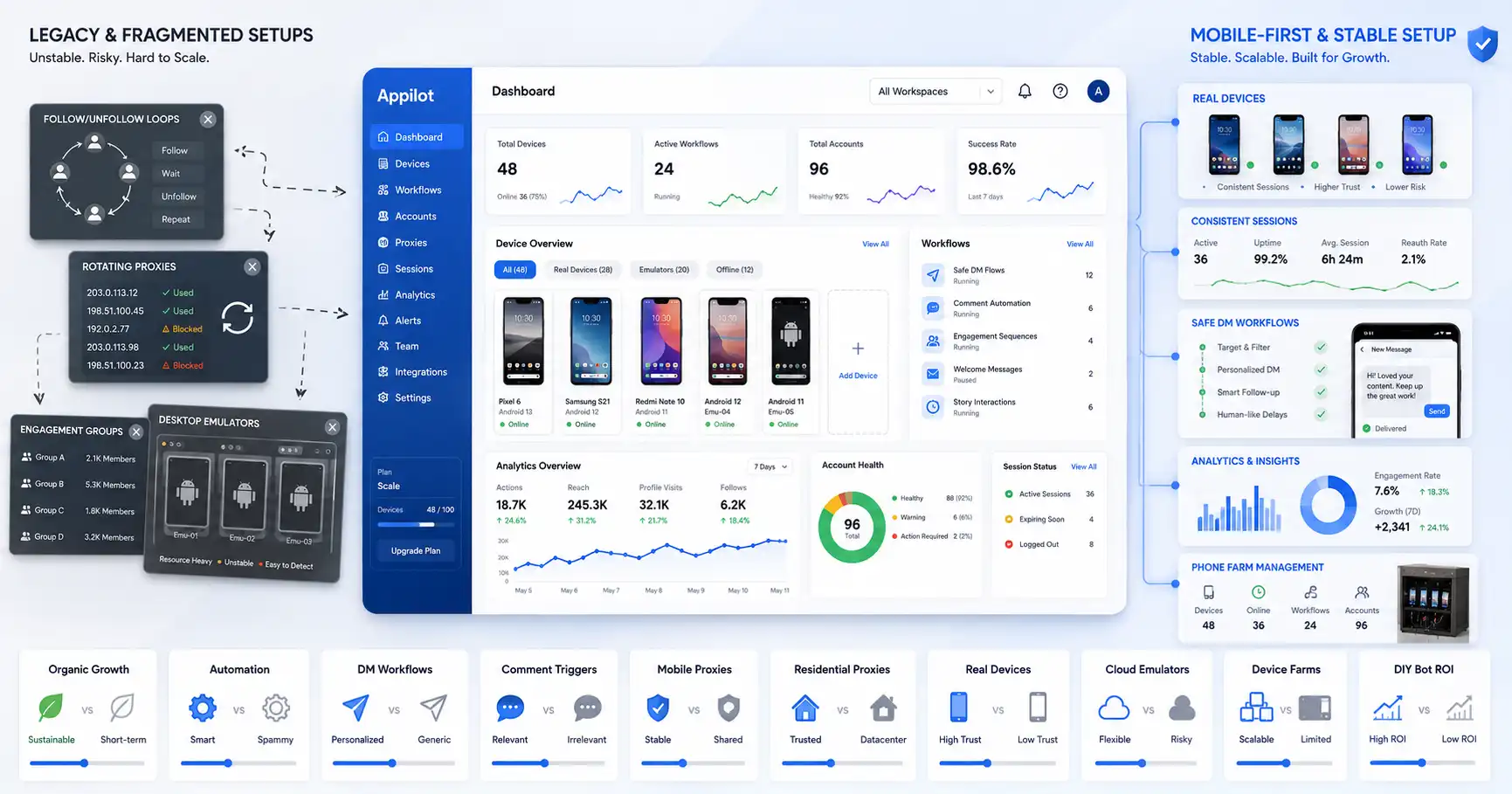
Appilot is not just another emulator. It is a mobile automation workflow layer for teams that need to manage Android devices, emulators, and social media workflows from one dashboard.
This matters because BlueStacks, Genymotion, and NoxPlayer provide the Android environment, but they do not fully solve workflow management. They do not automatically organize social media accounts, manage automation flows, monitor activity across devices, or give agencies a clean operational dashboard.
Appilot helps fill that gap. It is useful for teams that need real-device automation, emulator workflows, multi-account management, phone farm operations, and mobile app execution. Instead of asking team members to manually control many emulator windows, Appilot helps centralize the workflow.
For serious social media bot operations, the strongest setup may combine a reliable Android environment with Appilot’s workflow management layer.
Final Verdict
BlueStacks is best for beginners and small teams that want an easy emulator with strong multi-instance support. NoxPlayer is best for simple macro-style workflows and users who want a lightweight consumer emulator with script recording and multiple instances. Genymotion is best for developers and technical teams that need more professional Android virtual device control, testing integrations, and cloud options.
For social media bots specifically, Genymotion is the strongest technical choice, BlueStacks is the easiest general choice, and NoxPlayer is the simplest macro-friendly choice. But none of them alone is the best complete system for agencies, phone farms, or serious multi-account social media workflows.
For that, Appilot is the better operational layer because it helps teams manage Android devices, emulators, and mobile automation workflows from one dashboard. The emulator gives you the Android environment. Appilot helps turn that environment into a manageable workflow system.
FAQs
Q1: Which emulator is best for social media bots?
Genymotion is usually best for technical users, BlueStacks is easiest for beginners, and NoxPlayer is useful for simple macro-style workflows. For serious operations, Appilot adds the needed workflow layer.
Q2: Is BlueStacks good for Instagram bots?
BlueStacks can work for basic Instagram bot workflows because it is easy to use and supports multiple instances, but it is not a complete automation management platform.
Q3: Is Genymotion better than BlueStacks for automation?
Genymotion is generally better for technical automation because it is built for Android testing, configurable virtual devices, cloud options, and automation integrations.
Q4: Is NoxPlayer good for multi-account social media workflows?
NoxPlayer supports multiple instances and script recording, so it can help with simple workflows. For larger or professional setups, it usually needs stronger workflow management.
Q5: How does Appilot help with emulator-based social media bots?
Appilot helps teams manage Android devices, emulators, and mobile workflows from a web dashboard, making it useful for multi-account operations and mobile-first automation.