Browser Automation Detection: Selenium, Puppeteer Signatures

As browser automation tools like Selenium and Puppeteer become more powerful, websites have developed specialized techniques to detect them. These tools are widely used for testing, scraping, and automation, but they often leave behind identifiable traces known as automation signatures.
Understanding how automation detection works is important because even well-configured scripts can be identified if these signatures are not properly handled. Detection systems analyze both technical indicators and behavioral patterns to determine whether a browser is controlled by automation. This guide explains how Selenium and Puppeteer are detected and what signals are used.
What Is Browser Automation Detection?
Browser automation detection is the process of identifying whether a browser session is controlled by an automated tool rather than a human user.
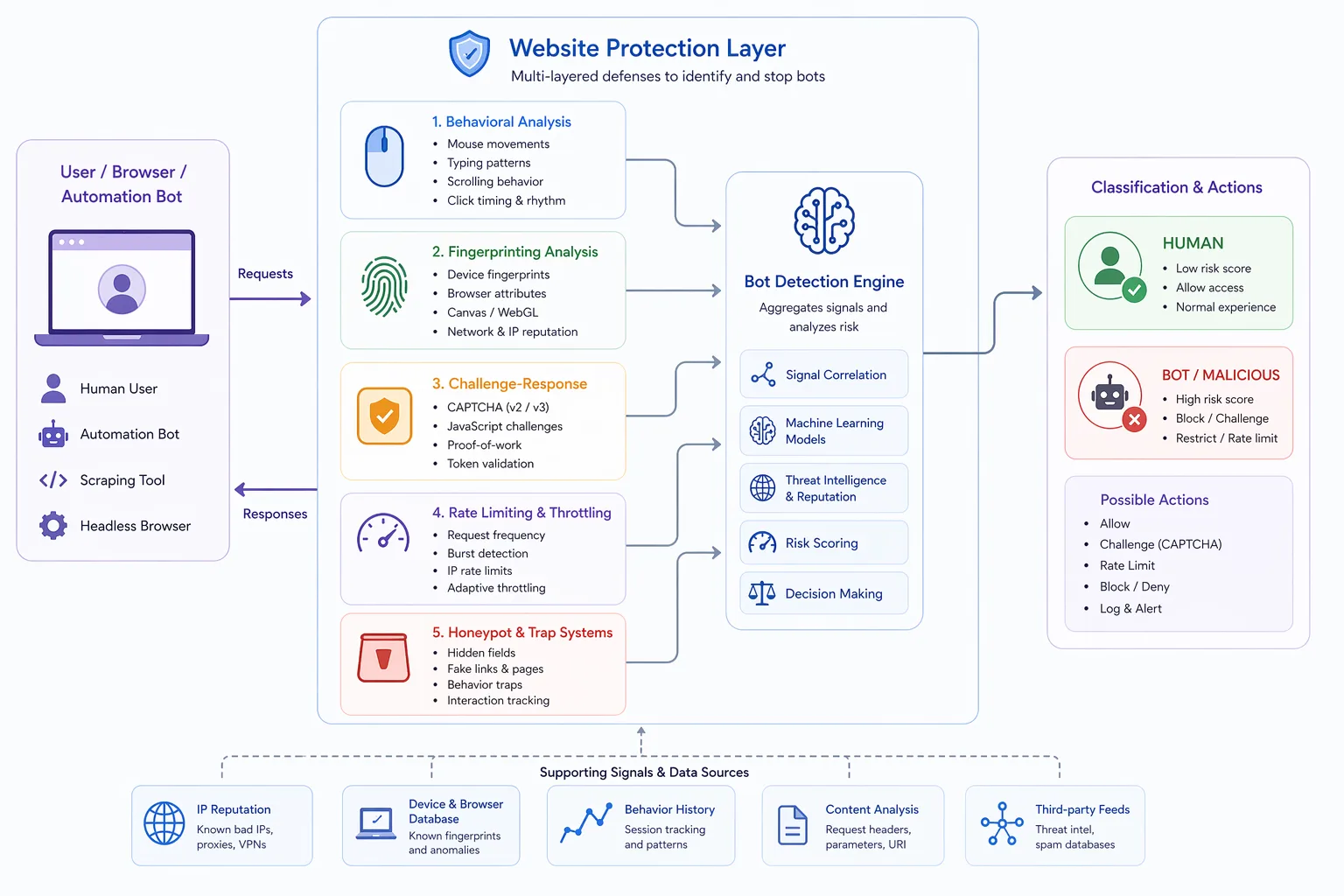
Websites use a combination of fingerprinting, JavaScript checks, and behavioral analysis to detect automation frameworks.
The goal is to identify inconsistencies or known patterns associated with tools like Selenium and Puppeteer.
The Core Principle Behind Automation Detection
The core principle behind automation detection is identifying unnatural environments and behaviors.
Automation tools often modify or expose browser properties in ways that differ from standard user environments.
Even when these tools attempt to hide their presence, subtle inconsistencies can reveal automation.
Detection systems combine multiple signals to improve accuracy.
Common Selenium Detection Signals
Selenium is one of the most widely used automation tools, and it has several known detection points.
One common signal is the presence of the navigator.webdriver property, which indicates that the browser is controlled by automation.
Selenium-driven browsers may also expose specific window properties or missing features that differ from standard environments.
Timing patterns can also reveal automation, as scripts often execute actions faster and more consistently than humans.
Additionally, Selenium sessions may use default configurations that produce recognizable fingerprints.
Common Puppeteer Detection Signals
Puppeteer, especially when used in headless mode, has its own set of detectable signatures.
Headless browsers often expose differences in rendering behavior and available APIs.
Certain browser properties, such as plugins, languages, or permissions, may appear incomplete or inconsistent.
Puppeteer can also be detected through JavaScript checks that reveal anomalies in how the browser executes code.
Network behavior and request patterns may also differ from real user traffic.
Why Automation Signatures Exist
Automation signatures exist because tools like Selenium and Puppeteer need to control the browser programmatically.
This control often introduces changes to the environment, such as exposing specific properties or altering behavior.
Even when attempts are made to hide these changes, complete invisibility is difficult to achieve.
Detection systems take advantage of these differences.
Behavioral Signals in Automation Detection
In addition to technical signatures, behavior plays a key role in detecting automation.
Automated scripts often perform actions with consistent timing and predictable sequences.
Humans, on the other hand, exhibit variability and hesitation.
Detection systems analyze these differences to identify bots.
Combining behavioral and technical signals increases accuracy.
Headless vs Headful Detection
Headless browsers are more likely to be detected because they often lack certain features or behave differently from standard browsers.
Headful browsers, which display a user interface, are closer to real environments but can still be detected through other signals.
Detection systems evaluate both types using multiple methods.
Understanding this distinction is important for interpreting detection results.
JavaScript-Based Detection Techniques
Websites use JavaScript to probe browser properties and identify automation.
This includes checking for specific variables, testing API behavior, and analyzing execution timing.
These checks can reveal whether the browser environment has been modified.
JavaScript-based detection is widely used because it operates directly within the client environment.
Limitations of Automation Detection
Despite its effectiveness, automation detection has limitations.
False positives can occur, where legitimate users are flagged due to unusual configurations or behavior.
There is also the challenge of evolving tools. As automation frameworks improve, detection systems must continuously adapt.
This creates an ongoing cycle of advancement.
Automation Detection vs Anti-Detection Techniques
Automation detection and anti-detection techniques are closely related.
Detection systems aim to identify automation, while anti-detection approaches attempt to mask or remove signatures.
This includes modifying browser properties, simulating behavior, and using alternative environments.
However, achieving perfect alignment across all signals is difficult.
Automation Detection vs Real-Device Environments
A key distinction in modern detection is the difference between simulated environments and real-device environments.
Automation frameworks like Selenium and Puppeteer often operate in controlled or modified environments, which can introduce detectable inconsistencies.
Real-device approaches operate on actual hardware where browser behavior, system properties, and network patterns naturally align. Tools like Appilot follow this approach by running automation on real Android devices, reducing reliance on masking or spoofing techniques.
This creates a more consistent environment.
When Automation Detection Is Most Strict
Automation detection is most strict in environments where security and resource protection are critical.
This includes platforms that handle sensitive data, high-value transactions, or large-scale interactions.
In these scenarios, detection systems use more advanced techniques and stricter thresholds.
Understanding this helps in adapting to different environments.
Frequently Asked Questions
Q: What is browser automation detection?
It is the process of identifying automated browser activity.
Q: How is Selenium detected?
Through properties like navigator.webdriver and timing patterns.
Q: How is Puppeteer detected?
Through headless browser signals, API inconsistencies, and behavior.
Q: What are automation signatures?
They are identifiable traces left by automation tools.
Q: Can automation be hidden completely?
No, detection risk can be reduced but not eliminated.
Q: How do real-device solutions compare?
Real-device solutions like Appilot align signals naturally, reducing inconsistencies compared to simulated environments.
Key Takeaways
Browser automation detection identifies tools like Selenium and Puppeteer by analyzing technical signatures and behavioral patterns. Common signals include properties like navigator.webdriver, headless browser characteristics, timing patterns, and missing APIs. Detection systems combine these signals to identify automation with high accuracy. While anti-detection techniques can reduce risk, achieving complete invisibility is difficult. Understanding these mechanisms is essential for working with modern automation systems.