Understanding Browser Feature Detection for Tracking

Most users assume websites only check basic details like browser name or version, but modern tracking systems go much deeper by analyzing what your browser can actually do. Instead of relying on declared information, websites test features directly to understand capabilities. This approach is known as browser feature detection.
Understanding browser feature detection is important because it reveals how tracking systems move beyond static data into real capability testing. It also explains why simply modifying visible attributes like user agent strings is often not enough to avoid detection. This guide explains how browser feature detection works, why it is used for tracking, and what it means in practical scenarios.
What Is Browser Feature Detection?
Browser feature detection is a technique used to determine which features, APIs, and capabilities are supported by a user’s browser. Instead of trusting declared values such as the user agent, websites run tests to verify actual functionality.
These tests can include checking support for JavaScript APIs, CSS properties, media capabilities, and hardware-related features. The results form a capability profile that describes what the browser can do.
While feature detection is primarily used for compatibility and performance optimization, it also plays a role in fingerprinting by revealing unique combinations of supported features.
The Core Principle Behind Feature Detection
The core principle behind browser feature detection is that different browsers and devices support different sets of features. Even small differences in version, configuration, or environment can change which features are available.
For example, one browser may support a specific Web API while another does not. Similarly, experimental features or hardware acceleration settings can create differences in capability.
These variations create a pattern that can be used to identify and differentiate users. Because the results are based on actual behavior rather than declared values, they are more reliable for detection systems.
How Feature Detection Differs from Other Fingerprinting Methods
Browser feature detection differs from other fingerprinting methods because it focuses on capability verification rather than data collection or behavior analysis.
For example, canvas and WebGL fingerprinting analyze rendering output, hardware fingerprinting examines system performance, and HTTP header fingerprinting looks at request metadata. Feature detection, on the other hand, tests what the browser can do.
A useful way to understand this is to think of feature detection as a validation layer that confirms whether a browser environment is genuine and consistent.
Why Browser Feature Detection Matters
Browser feature detection matters because it allows websites to verify the authenticity of a browser environment. It reduces reliance on easily spoofed attributes and increases confidence in identification.
In fraud detection systems, feature detection helps identify inconsistencies between declared and actual capabilities. For example, a browser claiming to support certain features but failing to pass corresponding tests can be flagged as suspicious.
From a privacy perspective, feature detection contributes to tracking by revealing detailed information about the browser’s configuration. While individual features may not be unique, the combination of supported and unsupported features can create a distinctive profile.
For developers building automation systems, feature detection presents a significant challenge. If the environment does not accurately reflect real-world capabilities, detection systems can identify it as synthetic. Maintaining realistic feature support is therefore critical.
How Browser Feature Detection Works in Practice
Browser feature detection works by running tests, collecting results, and integrating them into a broader fingerprint.
Running Capability Tests
When a user visits a website, scripts execute tests to check for the presence of specific features. These tests may involve attempting to use APIs, checking property availability, or running small code snippets.
The results indicate whether the feature is supported, partially supported, or unavailable.
Collecting and Structuring Results
The outcomes of these tests are collected and structured into a capability profile. This profile represents the browser’s feature set and can be used for analysis.
Because feature detection covers a wide range of capabilities, the resulting profile can be quite detailed.
Integrating into the Fingerprint
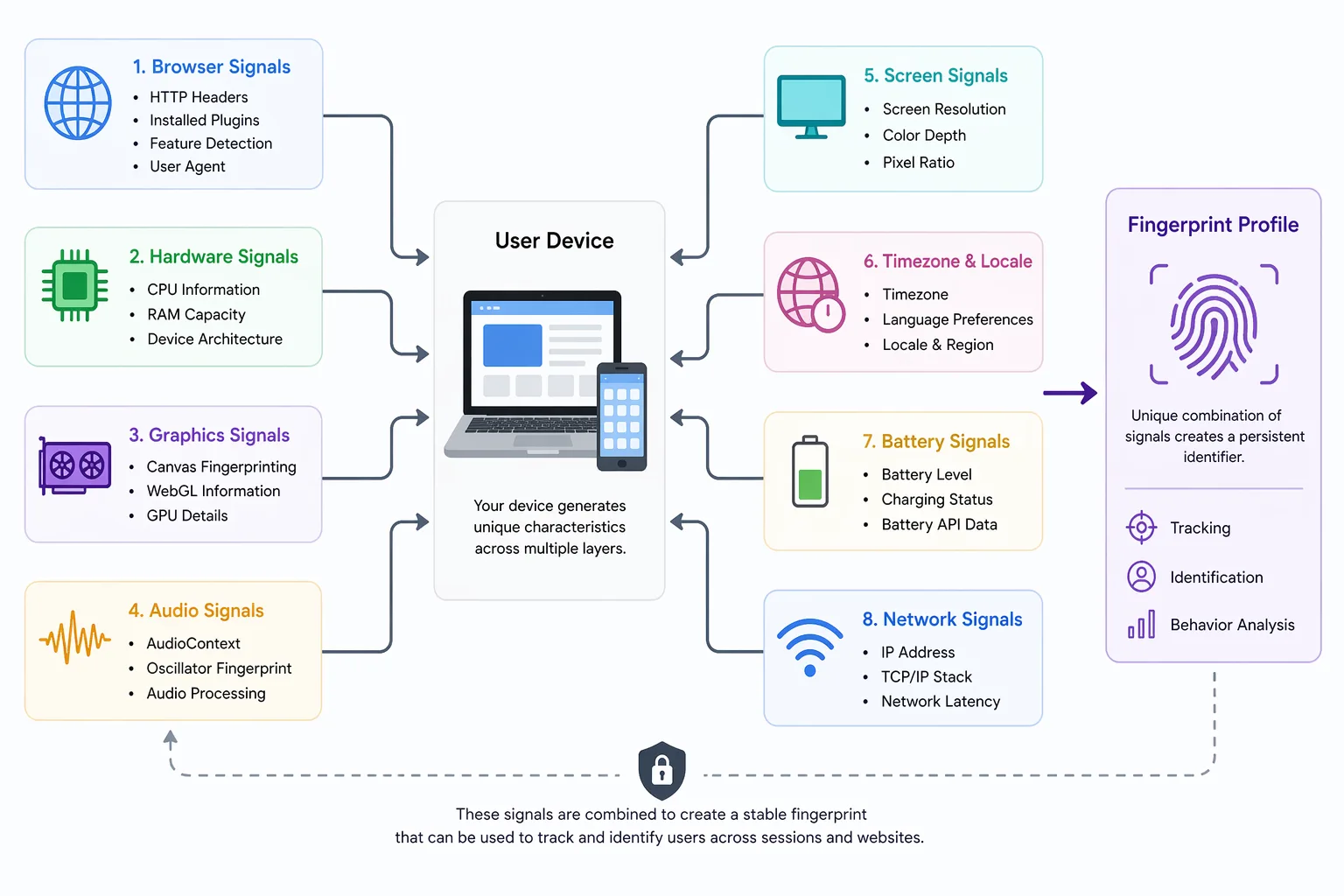
The capability profile is combined with other signals to form a fingerprint. While feature detection alone may not uniquely identify a user, it strengthens the overall profile by verifying consistency.
Because features do not change frequently, this profile can persist across sessions.
Common Misconceptions About Browser Feature Detection
There are several misconceptions about browser feature detection that can lead to confusion about its role in tracking.
One common belief is that changing the user agent prevents detection, but feature detection bypasses declared values by testing actual capabilities.
Another misconception is that feature detection is only used for improving compatibility, but it is also widely used in tracking and detection systems.
There is also a belief that feature detection alone can uniquely identify users, but it is typically used in combination with other signals. Its strength lies in validating and strengthening broader fingerprinting systems.
Real-World Examples of Browser Feature Detection
Browser feature detection is widely used in systems that require accurate identification and validation.
In financial platforms, it helps detect fraudulent behavior by identifying inconsistencies between declared and actual capabilities. This allows systems to flag suspicious activity even when other signals appear normal.
In social media environments, feature detection contributes to detecting automated behavior. Platforms analyze capability profiles alongside other attributes to identify bots. Tools like Appilot help address this challenge by running automation on real Android devices, where feature support naturally aligns with real-world environments instead of synthetic configurations.
In analytics systems, feature detection helps optimize user experience while also contributing to tracking and identification.
The Technical Side of Browser Feature Detection
From a technical perspective, browser feature detection relies on moderate entropy. While individual features are not unique, the combination of supported and unsupported capabilities creates a distinctive pattern.
The process involves running tests, collecting results, and integrating them into a structured profile. This profile can be compared across sessions to identify users or detect inconsistencies.
Understanding these technical details helps explain why feature detection is an important component of modern tracking systems.
When Browser Feature Detection Applies
Browser feature detection becomes especially relevant in scenarios where verifying authenticity and consistency is critical.
It is important in fraud detection systems, where identifying mismatched capabilities can help detect suspicious activity. It is also critical in automation systems, where maintaining realistic feature support is necessary to avoid detection. In performance optimization, feature detection ensures that content is delivered appropriately based on browser capabilities.
Frequently Asked Questions
Q: How does browser feature detection work?
It works by running tests to check which features and APIs your browser supports and using the results as part of a fingerprint.
Q: What is browser feature detection used for?
It is used for compatibility, performance optimization, fraud detection, and tracking users.
Q: Can you block browser feature detection?
You cannot fully block it, but you can reduce its effectiveness by using consistent and realistic environments.
Q: Is feature detection accurate for tracking?
It is moderately effective and becomes more powerful when combined with other fingerprinting methods.
Q: Does changing user agent stop feature detection?
No, feature detection tests actual capabilities, so changing the user agent does not prevent it.
Q: How does feature detection affect automation tools?
It can expose automation systems if their capabilities do not match real-world environments. Tools that use real-device environments, such as Appilot, tend to produce more reliable results because they maintain consistent system behavior.
Key Takeaways
Browser feature detection is a technique that tests what a browser can actually do rather than relying on declared information, and it plays a key role in modern tracking and detection systems. By analyzing supported features and capabilities, websites can build profiles that help identify users and detect inconsistencies. While it is not highly unique on its own, it strengthens fingerprinting when combined with other signals, making it essential for understanding how advanced tracking works.