What Is Browser Fingerprinting? Complete Technical Guide

Browser fingerprinting sounds like something complex and technical, but it is happening every time you visit a website, often without you realizing it. Most people assume that clearing cookies or using incognito mode is enough to stay anonymous online, yet modern tracking systems go far beyond that. Even when traditional tracking methods are disabled, websites can still identify you using subtle signals from your browser and device.
Understanding this concept is critical today because it directly impacts privacy, fraud detection, and automation reliability. Whether you are a developer building systems, a marketer running campaigns, or simply a user concerned about tracking, browser fingerprinting plays a role in how the web interacts with you. This guide explains browser fingerprinting, how it works, and why it matters in practical, real-world scenarios.
What Is Browser Fingerprinting?
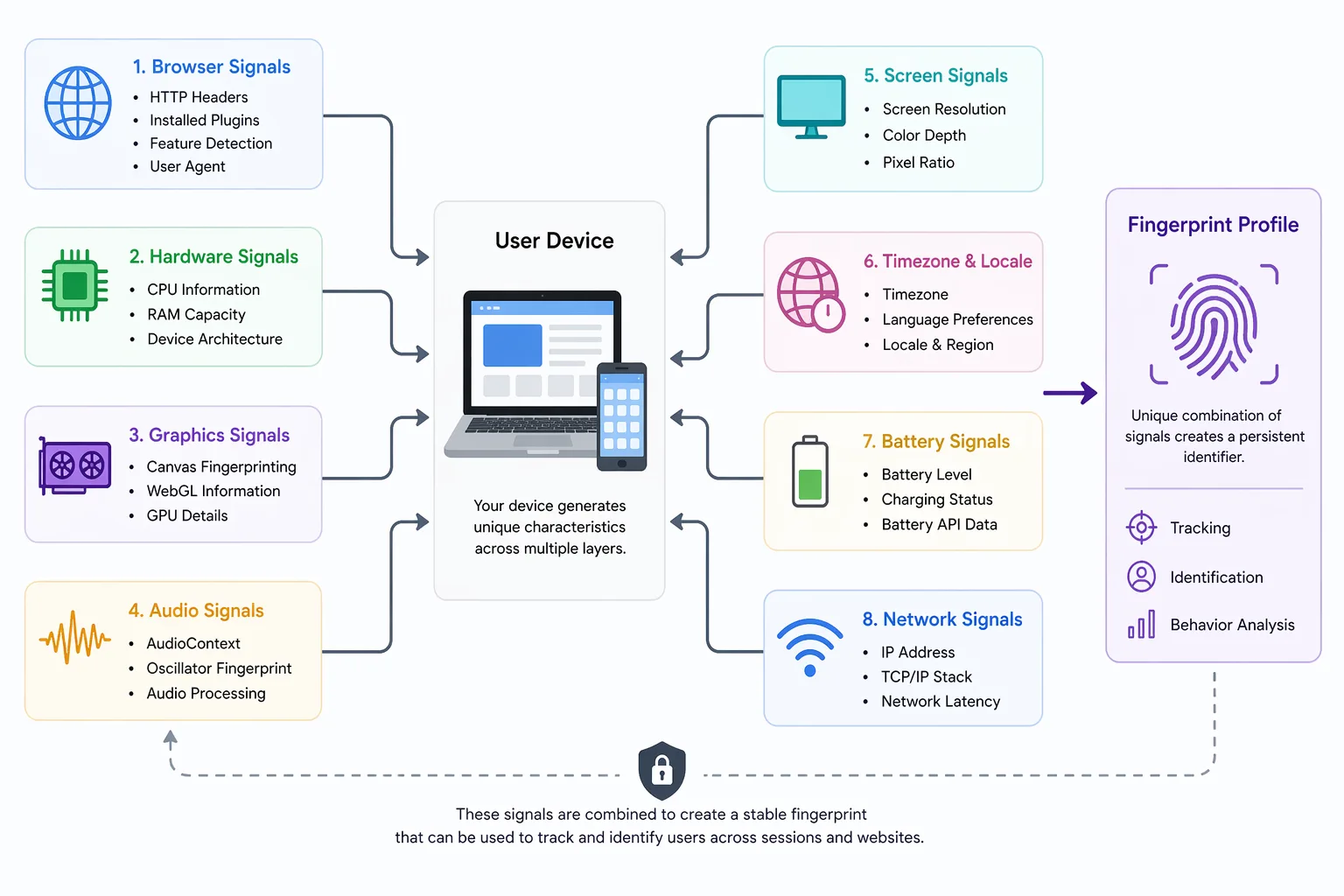
Browser fingerprinting is a method used by websites to identify users based on a combination of characteristics from their browser and device environment rather than relying on stored data like cookies. These characteristics include things such as screen resolution, browser version, installed fonts, timezone, and how your system renders graphics. Individually, these signals seem insignificant, but when combined, they create a unique profile that can distinguish one user from another.
The concept works because every device and browser setup is slightly different, even if two users are using the same browser type. Small variations in system configuration, hardware behavior, and software settings contribute to a unique identity that persists across sessions. This is why browser fingerprinting is considered more persistent than traditional tracking methods, as it does not depend on data stored on your device.
The reason browser fingerprinting exists is rooted in the need for reliability in identification. Websites and platforms use it to prevent fraud, detect bots, and maintain security, especially in environments where users can easily manipulate or delete cookies. Over time, it has evolved into a core part of modern browser detection systems.
The Core Principle Behind Browser Fingerprinting
The core principle behind browser fingerprinting is that combining multiple low-value signals results in a highly unique identifier. When a website collects dozens of attributes from your browser, the probability that another user shares the exact same combination becomes extremely low. This is not about any single piece of data being unique, but about the collective uniqueness that emerges when many attributes are combined.
When these signals are processed together, they form a fingerprint that remains relatively stable over time. Even if one or two attributes change, such as switching networks or updating a browser, the overall fingerprint can still be recognized with high confidence. This is why fingerprint detection systems rely on patterns and probabilities rather than absolute certainty.
How Browser Fingerprinting Differs from Device Fingerprinting
Browser fingerprinting focuses specifically on attributes that can be accessed through the browser environment, such as user agent strings, rendering behavior, and plugin availability. Device fingerprinting, on the other hand, extends deeper into hardware-level signals, including information about the device’s CPU, battery status, and sensors.
A simple way to understand the difference is to think of browser fingerprinting as identifying someone based on visible traits like clothing and voice, while device fingerprinting is more like identifying them using biological traits such as DNA. Both approaches aim to uniquely identify users, but device fingerprinting typically provides a deeper and more stable level of identification.
Why Browser Fingerprinting Matters
Browser fingerprinting has become one of the most powerful mechanisms for identifying users on the internet, and its importance continues to grow as traditional tracking methods become less reliable. Understanding it is essential because it directly affects how systems detect fraud, protect platforms, and track user behavior.
In fraud and bot detection, browser fingerprinting allows platforms to identify patterns that indicate automation or suspicious activity. When multiple accounts share identical or highly similar fingerprints, systems can flag them as potentially fraudulent, even if they are using different IP addresses. This is a key reason why many automation setups fail despite using proxies or other obfuscation techniques.
From a privacy perspective, browser fingerprinting raises important concerns because it enables tracking without requiring user consent in the same way cookies do. Since fingerprints are not stored on the user’s device, they are harder to control or reset, making it difficult for users to fully avoid tracking.
For developers and engineers, browser fingerprinting directly impacts the reliability of systems. If an application produces inconsistent or unrealistic fingerprints, it may trigger detection systems and lead to failures, bans, or degraded performance. Understanding how fingerprinting works allows developers to design systems that behave more naturally and avoid unnecessary detection.
Now that the importance of browser fingerprinting is clear, it becomes easier to understand how the process works in practice.
How Browser Fingerprinting Works in Practice
At a high level, browser fingerprinting is a structured process that involves collecting data, extracting deeper signals, and generating a unique identifier that can be compared across sessions.
- Data Collection
When a user visits a website, scripts written in JavaScript execute automatically in the browser and begin collecting information about the environment. This includes details such as screen resolution, timezone, language settings, browser version, and installed fonts. These values are easy to access and provide the foundation for the fingerprint.
Although this data might seem basic, it already introduces a level of differentiation between users. Even small differences, such as screen size or preferred language, contribute to the overall uniqueness of the fingerprint.
- Advanced Signal Extraction
Beyond basic data collection, modern fingerprinting techniques analyze how the system behaves rather than just what it reports. This includes methods like canvas fingerprinting, where the browser is asked to render a hidden image and the resulting output is analyzed for subtle differences. Similar techniques are used with WebGL to observe how the GPU processes graphics, and with audio contexts to measure how sound is handled.
These signals are particularly powerful because they depend on real hardware and software interactions, making them difficult to replicate accurately in virtual or automated environments. This is why they are widely used in advanced fingerprinting techniques and detection systems.
- Fingerprint Generation and Matching
Once all the data is collected, it is combined into a single identifier, often through hashing. This identifier represents the user’s fingerprint and can be stored or compared against previous visits. When a user returns to the site, the system generates a new fingerprint and checks how closely it matches existing ones.
This process allows websites to recognize users even if their IP address changes or if they are browsing in private mode. The matching is not always exact, but it relies on probability and similarity to determine whether two fingerprints belong to the same user.
Common Misconceptions About Browser Fingerprinting
Despite its widespread use, there are several misconceptions about browser fingerprinting that lead to misunderstandings about how it works and how effective it is.
One common belief is that incognito or private browsing modes prevent fingerprinting, but in reality, these modes only disable local storage mechanisms such as cookies and do not affect the ability of websites to collect device and browser signals. As a result, fingerprinting continues to function normally even in private sessions.
Another misconception is that changing your IP address is enough to avoid tracking. While IP addresses are one component of identification, fingerprinting relies on a much broader set of signals. Even with a new IP, the underlying fingerprint often remains consistent, allowing systems to link sessions together.
There is also a belief that fingerprinting provides perfect identification, but in practice, it is probabilistic rather than absolute. Fingerprints can change over time due to software updates or configuration changes, and different users can occasionally share similar fingerprints. Detection systems account for this by using confidence levels rather than relying on exact matches.
Real-World Examples of Browser Fingerprinting
Browser fingerprinting is not just a theoretical concept; it is actively used in a variety of real-world applications where identifying users accurately is critical.
In e-commerce, platforms use fingerprinting to detect fraudulent transactions by identifying patterns across multiple accounts that share similar fingerprints. This helps prevent abuse such as fake purchases or payment fraud.
In social media environments, fingerprint detection plays a major role in identifying automated behavior. Platforms analyze how users interact with the system and compare fingerprints to detect bots or coordinated activity. Tools like Appilot handle this challenge by running automation on real Android devices, which naturally produce authentic hardware-backed signals instead of synthetic browser fingerprints that are easier to detect.
In advertising and analytics, fingerprinting allows networks to track users across websites even when cookies are cleared. This enables more consistent measurement of user behavior, although it also raises ongoing concerns about privacy and transparency.
The Technical Side of Browser Fingerprinting
From a technical perspective, browser fingerprinting relies heavily on the concept of entropy, which measures how much identifying power a particular signal provides. Some attributes, such as language or timezone, have low entropy because many users share the same values, while others, such as canvas rendering output, have high entropy because they vary significantly between devices.
By combining multiple signals with varying levels of entropy, systems can achieve a high degree of uniqueness. The collected data is often processed and transformed into a hash, which allows for efficient storage and comparison without exposing the raw data.
Although these technical details are not always necessary to understand the concept at a high level, they explain why fingerprinting is so effective and why it is difficult to bypass using simple methods.
When Browser Fingerprinting Applies
Browser fingerprinting becomes particularly relevant in scenarios where accurate identification is critical or where traditional tracking methods are insufficient.
When building automation systems, maintaining consistent and realistic fingerprints is essential to avoid detection and ensure reliable operation. In fraud prevention systems, fingerprinting helps identify suspicious behavior and protect platforms from abuse. In privacy-sensitive applications, understanding fingerprinting allows developers to design systems that better respect user privacy while still maintaining functionality.
Frequently Asked Questions
Q: How does browser fingerprinting work?
It works by collecting multiple signals from your browser and device, combining them into a unique identifier, and comparing that identifier across sessions to recognize users.
Q: What is browser fingerprinting used for?
It is used for fraud detection, bot identification, analytics tracking, and improving security across online platforms.
Q: Can you block browser fingerprinting?
You can reduce its effectiveness using privacy-focused tools, but completely blocking it is extremely difficult because it relies on fundamental device and browser behavior.
Q: Is browser fingerprinting legal?
Its legality depends on regional regulations, with some jurisdictions requiring transparency or consent under privacy laws.
Q: How is browser fingerprinting different from cookies?
Cookies store data on your device, while fingerprinting identifies you based on your system’s characteristics without storing information locally.
Q: When should you worry about browser fingerprinting?
You should be concerned about it when privacy is important or when building systems that depend on avoiding detection, as fingerprinting directly affects both.
Key Takeaways
Browser fingerprinting is a powerful method for identifying users based on their browser and device characteristics, and it plays a central role in modern tracking and detection systems. It works by combining multiple small signals into a unique identity, making it more persistent than traditional methods like cookies. Its applications range from fraud detection and automation to analytics and user tracking, and understanding it is essential for building reliable systems and making informed decisions about privacy and technology.