Browser Rotation Strategies: Automating with Appilot
Running multiple browser sessions without a proper rotation strategy can create problems very quickly. Many users focus heavily on proxies, fingerprints, and browser profiles, but they forget that browser rotation itself is equally important. If the same browser profile, the same proxy, and the same browser fingerprint are used repeatedly for too many tasks, platforms can start detecting patterns.
This becomes even more important when you are managing large numbers of accounts across social media platforms, e-commerce stores, affiliate campaigns, scraping workflows, or crypto operations. Using one browser profile repeatedly may work in the beginning, but over time it creates unnecessary risk because your sessions become predictable.
This is where browser rotation becomes useful. Instead of using the same browser profile for every task, you rotate between different browser types, profile groups, sessions, and proxies. This creates more separation between activities and reduces the chance of account overlap.
Appilot helps simplify this process because you can automate browser rotation instead of doing everything manually. You can create browser groups, schedule profile switching, assign proxy pools, and rotate sessions based on your own rules. This makes it easier to manage large operations without constantly monitoring every browser manually.
Why Browser Rotation Matters
Most platforms look for patterns. If multiple accounts keep logging in from the same browser profile, the same IP address, the same device fingerprint, and the same browser version, it becomes easier for platforms to connect those accounts together.
Even if you are using antidetect browsers, poor browser rotation can still create problems. Many users spend time creating browser profiles but then keep using the same profile repeatedly for different tasks. Over time, this creates browser fatigue, session overlap, and repeated fingerprint activity.
A strong browser rotation strategy spreads your activity across different browser profiles, different browser types, different proxies, and different schedules. This makes your operation look more natural and helps reduce obvious patterns.
For example, instead of using one Chrome profile for every Facebook account, you may rotate between Chrome, Firefox, GoLogin, AdsPower, Dolphin Anty, and Multilogin profiles. You may also rotate the profile launch times, proxy regions, and browser sessions to make the activity look more realistic.
This is especially useful for users managing high numbers of accounts because it becomes much harder to keep rotation organized manually once the number of profiles grows.
The Main Types of Browser Rotation
There are several different ways to rotate browser activity depending on your workflow.
The first method is profile rotation. This means switching between different browser profiles instead of using the same profile repeatedly. For example, you may have ten browser profiles assigned to one campaign, and Appilot can rotate between them based on a schedule.
The second method is browser type rotation. Instead of relying only on one browser type, you rotate between Chrome, Firefox, antidetect browsers, and other environments. This creates more variation across sessions.
The third method is proxy rotation. Different browser profiles can be assigned to different residential, mobile, or datacenter proxies. Rotating proxies helps reduce IP overlap and keeps activity separated.
The fourth method is schedule rotation. Instead of launching the same browser profiles at the same time every day, you can rotate task timing so activity appears more natural.
The final method is geographic rotation. Some users rotate profiles across different countries, cities, or regions depending on the platform they are using.
The best browser operations usually combine all of these methods together rather than relying on only one type of rotation.
Common Problems Caused by Poor Rotation
Poor browser rotation creates several issues.
The first issue is account overlap. If the same browser profile or proxy is used across too many accounts, platforms may connect those accounts together. This can lead to account restrictions, login challenges, or suspicious activity warnings.
The second issue is fingerprint repetition. Every browser profile has its own browser fingerprint, including things like browser version, operating system, screen resolution, fonts, WebGL values, canvas fingerprinting, timezone, and language settings. If the same fingerprint is reused too often, it becomes easier to identify patterns.
The third issue is unnatural behavior. If the same profiles log in every day at exactly the same time, using the same browser type and the same IP address, the activity starts to look automated.
Another issue is operational inefficiency. Without a clear browser rotation system, you spend too much time remembering which profiles were used recently, which proxies are assigned to which profiles, and which browser sessions should be avoided.
How Appilot Helps with Browser Rotation
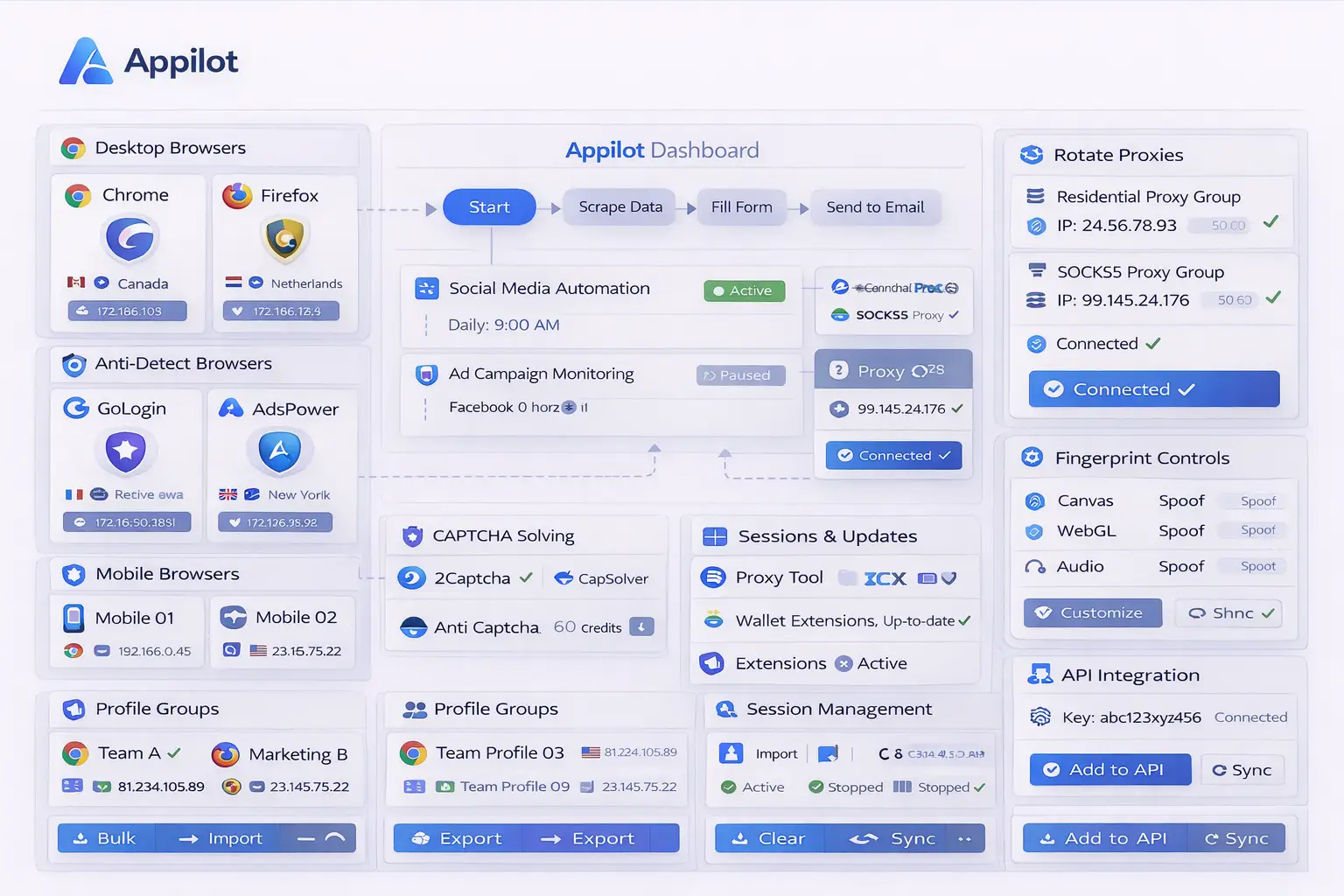
Appilot makes browser rotation easier because it gives you one place to manage browser groups, schedules, profile assignments, and automation rules.
Instead of manually remembering which profile was used last, you can create rotation rules inside Appilot. For example, you can tell Appilot to cycle through ten browser profiles before returning to the first one again. You can also create separate browser groups for different campaigns, platforms, or account types.
Another useful feature is proxy assignment. Appilot allows you to match different browser profiles with different proxy pools so you do not accidentally reuse the same IP addresses too often. This creates stronger separation between accounts.
Appilot can also rotate browser sessions based on time. For example, you can create schedules where certain browser profiles only run during specific hours, while other profiles stay inactive until later in the day. This makes browser activity look more natural.
If you are managing multiple browser types, Appilot can also rotate between different browsers automatically. For example, one task may launch inside Chrome profiles while another runs inside GoLogin or Dolphin Anty profiles.
This creates much stronger separation compared to using one browser for everything.
Best Practices for Browser Rotation
One of the best things you can do is create separate browser groups for different purposes. For example, social media profiles should stay separate from e-commerce profiles, affiliate campaigns, scraping tasks, and crypto wallets.
It is also important to avoid reusing the same proxies too often. Even if your browser fingerprints are different, reusing the same IP address across many profiles can still create overlap.
You should also randomize browser schedules whenever possible. Logging into the same accounts at exactly the same time every day creates a very predictable pattern. Adding variation to launch times helps reduce this issue.
Another good practice is mixing browser types together. Instead of relying only on Chrome, you can combine Chrome, Firefox, GoLogin, AdsPower, and other browser types depending on the task.
You should also refresh browser profiles periodically. Old profiles may contain outdated cookies, browser versions, or fingerprint settings. Refreshing profiles helps keep your setup healthier over time.
Finally, it is important to track which browser profiles have been used recently. This prevents profile fatigue and reduces the chance of repeated activity patterns.
Real Example of Browser Rotation
Imagine you are running fifty social media accounts across Facebook, Instagram, TikTok, and Pinterest.
Without browser rotation, you may use the same browser type, the same profiles, and the same proxy pool for every account. Over time, this creates overlap and increases the chance of restrictions.
With Appilot, you can separate those accounts into groups. Facebook accounts may rotate through Chrome and GoLogin profiles, Instagram accounts may use Dolphin Anty and Firefox profiles, TikTok accounts may use AdsPower, and Pinterest accounts may use Chrome profiles with different proxy pools.
You can then create schedules so that not every profile launches at the same time. Some profiles may start in the morning, some in the afternoon, and some at night. This creates a more natural pattern and spreads activity across different sessions.
The same idea can be applied to e-commerce accounts, affiliate campaigns, crypto wallets, scraping projects, and client work.
Common Browser Rotation Mistakes
One common mistake is rotating only proxies without rotating browser profiles. This still creates repeated fingerprint activity even if the IP addresses change.
Another mistake is using the same browser type for every account. Even if you have many profiles, relying on only one browser type creates less variation.
Some users also rotate too aggressively. Switching proxies, browser types, and browser fingerprints too frequently can make activity look unnatural. Rotation should feel realistic rather than random.
Another issue is reusing old browser profiles that have already been heavily used. Over time, browser profiles can become less effective because they contain too much repeated activity history.
Finally, many users forget to document their browser rotation rules. Without a clear system, it becomes much harder to manage large numbers of profiles and browser groups.
Frequently Asked Questions
Q1: How often should browser profiles be rotated?
The ideal rotation frequency depends on the type of accounts you manage. Some users rotate profiles daily, while others rotate every few sessions or every few days.
Q2: Is rotating proxies enough for account safety?
No. Proxy rotation helps, but browser profiles, browser types, session timing, and browser fingerprints should also be rotated.
Q3: Can Appilot rotate browser profiles automatically?
Yes. Appilot can automate profile switching, browser launches, proxy assignments, and scheduling rules.
Q4: Should I use different browser types for different tasks?
Yes. Using different browser types for different workflows creates stronger separation and reduces repeated patterns.
Q5: Can browser rotation help reduce platform detection?
Yes. Browser rotation helps reduce repeated patterns, account overlap, and repeated fingerprint activity, which can improve account safety.
Conclusion
Browser rotation is one of the most important parts of any browser automation strategy because it helps reduce repeated patterns and account overlap. Without rotation, even strong browser profiles and good proxies can become less effective over time.
Appilot makes browser rotation easier by allowing you to automate profile switching, browser scheduling, proxy assignments, and multi-browser workflows from one place. Instead of manually managing every profile yourself, you can create structured rotation systems that scale with your operation.
This blog structure follows the user's requested Appilot blog format with one centered image, paragraph-style sections, no service or product page references, and FAQ formatting preferences.