Browser Tracking Protection: Firefox, Safari, Brave Compared
As online tracking becomes more sophisticated, modern browsers have introduced built-in protections to limit how websites collect user data. Among the most privacy-focused browsers are Mozilla Firefox, Safari, and Brave. Each takes a different approach to blocking trackers, managing cookies, and reducing fingerprinting.
Understanding how these browsers compare is important for choosing the right balance between privacy, usability, and performance. This guide breaks down their tracking protection features.
What Is Browser Tracking Protection?
Browser tracking protection refers to built-in features that prevent websites and third parties from collecting data about users without their consent, where these protections block trackers, limit cookies, and reduce the effectiveness of fingerprinting techniques. The goal is to give users more control over their data while maintaining a functional browsing experience.
The Core Idea Behind Tracking Protection
The core idea behind tracking protection is limiting cross-site identification, where browsers restrict how trackers can recognize users across different websites. This is achieved through blocking third-party cookies, isolating site data, and reducing access to sensitive browser APIs. Each browser implements these protections differently.
How Tracking Protection Works
Tracking protection works by identifying known tracking mechanisms and preventing them from accessing or storing data in the browser.
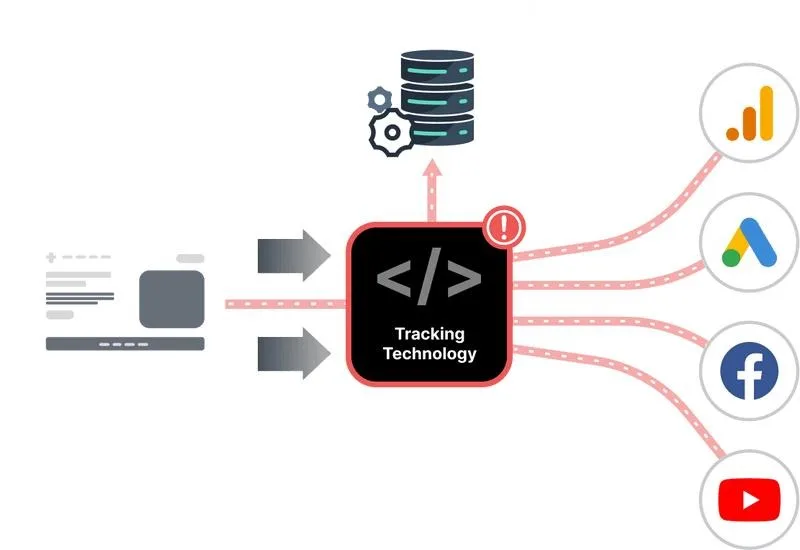
This includes blocking third-party cookies, limiting scripts that track behavior, and restricting fingerprinting signals. Some browsers also isolate data per site to prevent cross-site tracking.
Mozilla Firefox: Enhanced Tracking Protection
Firefox uses a feature called Enhanced Tracking Protection (ETP), which blocks known trackers by default, where it relies on curated lists to identify tracking scripts and cookies. It offers multiple levels of protection, including Standard, Strict, and Custom modes. Firefox also implements Total Cookie Protection, which isolates cookies per website, preventing cross-site tracking. This approach balances privacy with usability, allowing users to adjust settings as needed.
Safari: Intelligent Tracking Prevention
Safari uses Intelligent Tracking Prevention (ITP), which focuses on limiting how long tracking data can persist, where it uses machine learning to identify trackers and restrict their ability to follow users across sites. Instead of simply blocking trackers, Safari reduces their effectiveness by limiting cookie lifespan and isolating data. This approach is tightly integrated with the Apple ecosystem, prioritizing user privacy by default.
Brave: Aggressive Blocking and Shields
Brave takes a more aggressive approach by blocking ads, trackers, and third-party cookies by default, where its Shields feature prevents tracking scripts from loading and limits fingerprinting techniques. Brave also upgrades connections to HTTPS and includes built-in privacy tools. This makes it one of the most privacy-focused browsers, though it may occasionally affect website functionality due to strict blocking.
Cookie Handling Comparison
Cookie management is a key difference between these browsers, where Firefox isolates cookies per site, Safari limits cookie lifespan and access, and Brave blocks third-party cookies entirely. Each approach reduces cross-site tracking but with different trade-offs in compatibility and persistence.
Fingerprinting Protection
Fingerprinting protection varies across browsers, where Firefox includes optional protections that standardize certain browser signals, Safari reduces fingerprinting accuracy by limiting API access, and Brave actively blocks fingerprinting attempts through its Shields system. While none can completely eliminate fingerprinting, each reduces its effectiveness.
Usability and Compatibility
There are trade-offs between privacy and usability, where stricter protections can sometimes break website functionality. Firefox offers flexible settings, Safari prioritizes seamless integration with minimal user intervention, and Brave emphasizes maximum privacy even if it impacts some features. Users must choose based on their priorities.
Performance and Speed
Tracking protection can also affect performance, where blocking trackers often improves page load speed by reducing unnecessary scripts. Brave typically offers the fastest performance due to aggressive blocking, while Firefox and Safari provide balanced performance with strong privacy features.
Which Browser Is Best for Privacy?
The best browser depends on user needs, where Firefox offers flexibility and strong protection, Safari provides seamless privacy within the Apple ecosystem, and Brave delivers the most aggressive blocking by default. Each browser represents a different approach to privacy.
Tracking Protection vs Real-Device Environments
A key distinction in modern privacy and detection is the difference between modified environments and natural browsing behavior, where aggressive blocking or modification of signals can sometimes create unusual patterns that stand out. Real-device environments operate with standard configurations where signals align naturally, and tools like Appilot follow this approach by running automation on real Android devices, ensuring that browser behavior remains consistent with real-world usage. This reduces anomalies while maintaining functionality.
When Tracking Protection Matters Most
Tracking protection is most important in scenarios where users want to limit data collection, prevent cross-site tracking, and maintain privacy online, where choosing the right browser and settings can significantly reduce exposure to tracking.
Frequently Asked Questions
Q: Which browser has the best tracking protection?
Brave is the most aggressive, while Firefox and Safari balance privacy and usability.
Q: Do these browsers block cookies?
They limit or block third-party cookies in different ways.
Q: Can they stop fingerprinting?
They reduce it but cannot fully eliminate it.
Q: Are there trade-offs?
Yes, stricter protection can affect website functionality.
Q: Is Safari good for privacy?
Yes, especially within the Apple ecosystem.
Q: How do real-device solutions compare?
Real-device solutions like Appilot maintain natural browser behavior, reducing anomalies while preserving functionality.
Key Takeaways
Firefox, Safari, and Brave all provide strong tracking protection but use different approaches, where Firefox focuses on flexibility and cookie isolation, Safari uses intelligent restrictions and machine learning, and Brave blocks trackers aggressively by default. Understanding these differences helps users choose the right browser for their privacy needs.