Understanding Canvas Fingerprinting: How It Works

Most people assume websites track them using obvious methods like cookies or login data, but many tracking systems rely on something far more subtle. Even when you disable cookies or browse in private mode, websites can still identify you by analyzing how your device behaves at a technical level. One of the most powerful methods used for this is canvas fingerprinting.
Understanding canvas fingerprinting is important because it reveals how modern tracking works beneath the surface. It also explains why many automation systems fail and why privacy is harder to maintain than most users expect. This guide explains canvas fingerprinting, how it works, and why it matters in practical terms.
What Is Canvas Fingerprinting?
Canvas fingerprinting is a technique that uses the HTML5 canvas element to generate a unique identifier based on how your device renders graphics. Instead of relying on stored data, it analyzes the output of a drawing operation performed by your browser.
When a website asks your browser to draw text or shapes on a hidden canvas, your device produces a slightly different result compared to others. These differences come from variations in hardware, operating systems, graphics drivers, and browser implementations. Even two devices with similar configurations can produce slightly different outputs.
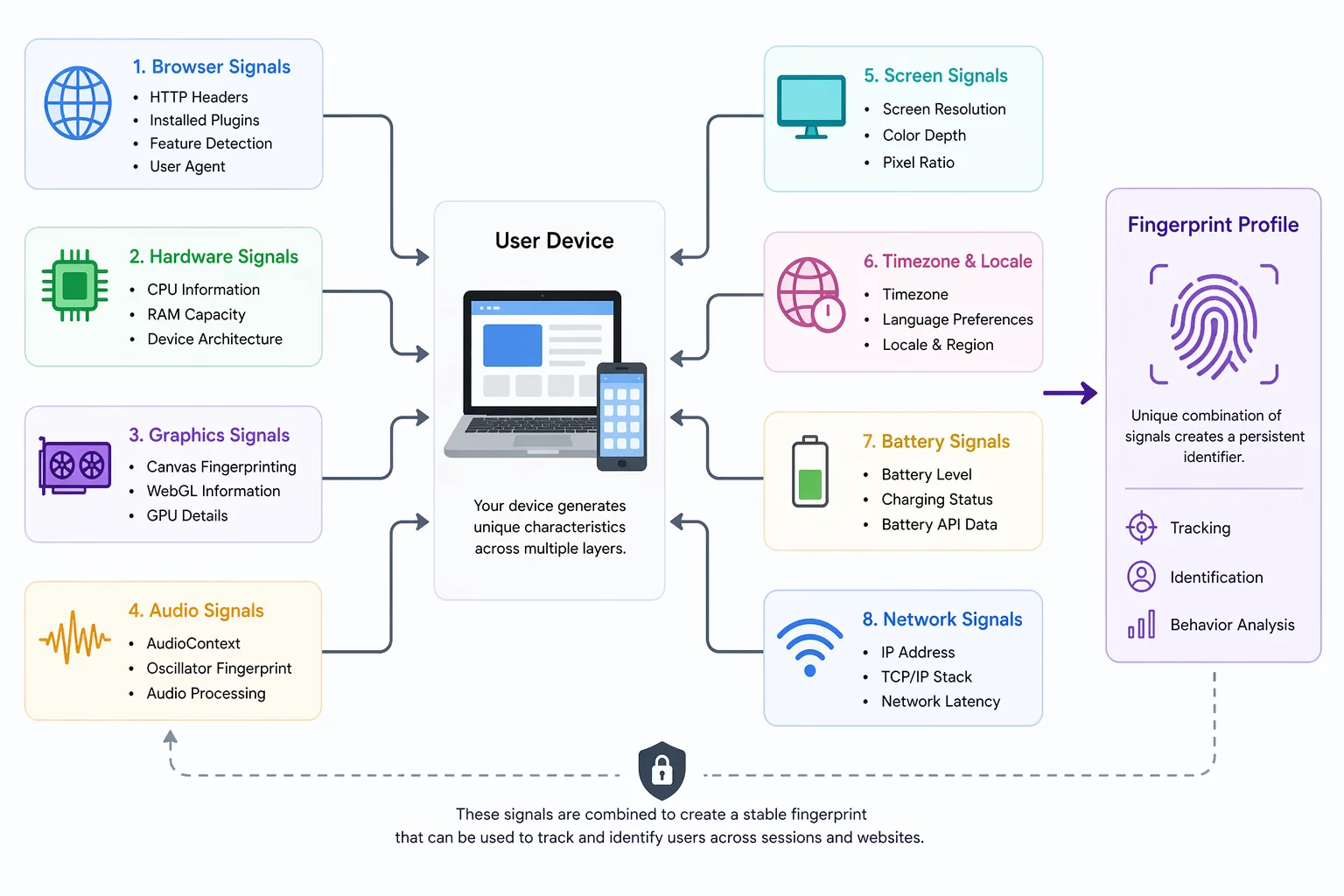
This output is then converted into a data string and used as part of a fingerprint that can identify you across sessions. Canvas fingerprinting is considered a subset of broader browser fingerprinting and is often one of the highest-entropy signals used in fingerprint detection systems.
The Core Principle Behind Canvas Fingerprinting
The core principle behind canvas fingerprinting is that rendering is not perfectly consistent across devices. When a browser draws an image or text, the result depends on multiple factors such as the graphics processing unit, installed fonts, rendering engine, and even anti-aliasing techniques.
These small inconsistencies create a pattern that is highly unique. When this pattern is captured and processed, it becomes a reliable signal for identification. This is why canvas fingerprinting is widely used in fingerprinting techniques that require high accuracy.
How Canvas Fingerprinting Differs from Browser Fingerprinting
Canvas fingerprinting focuses specifically on how graphics are rendered, while browser fingerprinting includes a wider range of signals such as screen size, timezone, plugins, and user agent data.
A helpful way to understand the difference is to think of browser fingerprinting as collecting general characteristics about your environment, while canvas fingerprinting captures how your system behaves at a deeper level. Because of this, canvas fingerprinting often provides stronger identifying power compared to many other signals.
Why Canvas Fingerprinting Matters
Canvas fingerprinting matters because it provides a level of uniqueness that is difficult to replicate or mask. It is particularly important in systems that require accurate identification, such as fraud detection, bot prevention, and analytics.
In fraud detection systems, canvas fingerprinting helps identify patterns across multiple accounts or sessions. If the same rendering output appears across different activities, it can indicate coordinated behavior or automation. This makes it a valuable tool for platforms that need to maintain security.
From a privacy perspective, canvas fingerprinting is concerning because it operates without storing data on the user’s device. This means users cannot simply clear cookies or local storage to reset their identity. The fingerprint is generated dynamically each time, making it harder to avoid tracking.
For developers working on automation, canvas fingerprinting is often one of the biggest challenges. If the rendering output appears artificial or inconsistent, detection systems can flag the activity. This is why realistic execution environments are critical when building reliable systems.
How Canvas Fingerprinting Works in Practice
Canvas fingerprinting follows a structured process that involves rendering, extraction, and comparison.
Rendering a Hidden Canvas
When you visit a website, a script creates a hidden canvas element and instructs your browser to draw specific text or shapes. This process is invisible to the user and happens instantly in the background.
The content drawn on the canvas is designed to highlight differences in rendering behavior. For example, it may include complex fonts, gradients, or overlapping shapes that produce subtle variations across devices.
Extracting the Image Data
Once the drawing is complete, the browser converts the canvas into an image representation, typically in the form of a data URL. This representation captures all the subtle differences produced during rendering.
The resulting data string is then processed, often by hashing it into a shorter identifier that represents the fingerprint. This step ensures that the fingerprint can be stored and compared efficiently.
Comparing and Matching Fingerprints
The generated fingerprint is either stored or compared against existing fingerprints to determine whether the user has been seen before. Even small differences in rendering output can significantly impact the fingerprint, making it a highly sensitive signal.
This means that in practice, canvas fingerprinting can identify users across sessions even when other tracking methods fail.
Common Misconceptions About Canvas Fingerprinting
There are several misconceptions about canvas fingerprinting that lead to confusion about how it works and how effective it is.
One common belief is that disabling JavaScript prevents canvas fingerprinting, but many modern websites rely on JavaScript for functionality, making it impractical to disable entirely. Even when JavaScript is restricted, other fingerprinting techniques can still be used.
Another misconception is that using a VPN or proxy prevents fingerprinting. While these tools change your IP address, they do not affect how your device renders graphics, which is the core of canvas fingerprinting.
There is also a belief that canvas fingerprinting provides perfect identification, but like other fingerprinting methods, it is probabilistic. Changes in system configuration, browser updates, or hardware differences can alter the fingerprint over time.
Real-World Examples of Canvas Fingerprinting
Canvas fingerprinting is widely used in real-world systems where accurate identification is critical.
In financial platforms, it helps detect fraudulent behavior by linking activities that share similar rendering characteristics. This allows systems to identify suspicious patterns even when other signals change.
In social media environments, canvas fingerprinting plays a role in detecting automated behavior. Platforms analyze rendering outputs alongside other signals to identify bots or coordinated actions. Tools like Appilot address this challenge by running automation on real Android devices, which produce authentic rendering outputs instead of synthetic ones that are easier to detect.
In analytics and advertising, canvas fingerprinting is used to track users across sessions and devices. Even when cookies are cleared, the fingerprint can provide continuity in identifying returning users.
The Technical Side of Canvas Fingerprinting
From a technical perspective, canvas fingerprinting relies on entropy, which measures how much identifying information a signal provides. Rendering output has high entropy because it varies significantly across devices, making it a strong contributor to uniqueness.
The process involves converting rendered images into data strings and then hashing them into compact identifiers. These identifiers can be stored and compared efficiently, enabling large-scale tracking and detection systems.
Understanding this technical foundation helps explain why canvas fingerprinting is so effective and why it is difficult to bypass using simple methods.
When Canvas Fingerprinting Applies
Canvas fingerprinting becomes especially relevant in scenarios where accurate identification or detection is required.
It is critical when building automation systems, where maintaining realistic rendering behavior is necessary to avoid detection. In fraud prevention systems, it helps identify suspicious patterns and protect platforms from abuse. In privacy-sensitive applications, understanding canvas fingerprinting allows developers to design systems that better account for tracking risks.
Frequently Asked Questions
Q: How does canvas fingerprinting work?
Canvas fingerprinting works by asking your browser to draw hidden graphics and then analyzing the output. Because rendering varies across devices, the result creates a unique identifier that can be used to track users.
Q: What is canvas fingerprinting used for?
It is used for fraud detection, bot identification, and user tracking. Platforms rely on it to detect suspicious behavior and maintain security across accounts and sessions.
Q: Can you block canvas fingerprinting?
You can reduce its effectiveness using privacy-focused browsers or extensions that randomize or block canvas data, but completely preventing it is difficult because it relies on core browser functionality.
Q: Is canvas fingerprinting accurate?
Canvas fingerprinting is highly effective but not perfect. It provides probabilistic identification, meaning it works with high confidence but can change slightly over time due to system updates or configuration changes.
Q: Does a VPN stop canvas fingerprinting?
No, a VPN only changes your IP address. Canvas fingerprinting depends on how your device renders graphics, which remains unchanged when using a VPN.
Q: How does canvas fingerprinting affect automation tools?
Canvas fingerprinting can expose automation systems if their rendering behavior looks artificial or inconsistent. This is why tools that use real-device environments—like Appilot—tend to produce more reliable results compared to synthetic browser setups.
Key Takeaways
Canvas fingerprinting is a powerful technique that identifies users based on how their devices render graphics, and it plays a key role in modern tracking and detection systems. It works by generating unique outputs from rendering operations, which are then used to create fingerprints that persist across sessions. Its applications span fraud detection, automation, and analytics, making it an essential concept for understanding how websites track users and how systems detect behavior.