Canvas Fingerprinting: What It Is and How to Bypass It
Canvas fingerprinting feels unsettling because it works silently.
You clear cookies, open a fresh session, and even switch accounts, yet somehow the site still recognises you.
That is because modern tracking increasingly measures how your browser behaves rather than what it stores.
Canvas fingerprinting sits at the centre of that shift.
For this guide, I’ll occasionally refer to Appilot because the same ideas around identity consistency, behavioural signals, and environment stability apply in both browser and mobile automation. While Appilot focuses on real Android devices rather than browser-only environments, the challenge of reducing fingerprint correlation still matters whenever platforms analyse repeated behaviour across sessions.
This guide explains what canvas fingerprinting is, how it works in practice, what “bypassing” realistically means, and why most advice about it is wrong.
No myths and no magic fixes.
Understanding Canvas Fingerprinting
Canvas fingerprinting is a browser-identification technique that uses the HTML5 canvas element to generate a device-specific signal.
Instead of storing an identifier, a website asks the browser to draw something invisible.
The way a system renders that drawing depends on fonts, GPU drivers, operating-system rendering stacks, browser builds, and hardware-acceleration paths.
Those tiny differences are then hashed into a fingerprint.
There are no cookies and no stored identifiers involved. The entire process is based on rendering behaviour.
The Core Principle Behind Canvas Fingerprinting
Rendering is not perfectly consistent.
When a browser draws text or shapes, font rasterisation differs, anti-aliasing varies, and GPU pipelines behave slightly differently.
When the browser renders a canvas, a stable and repeatable signature is produced.
That signature often remains stable across cookie clears, browser restarts, and incognito sessions.
This is why clearing storage alone does not stop identification.
How Canvas Fingerprinting Differs from Cookies
Cookies are explicit storage while canvas fingerprinting is implicit measurement.
Cookies essentially say, “Here is who you are.”
Canvas fingerprinting instead says, “Show me how you draw.”
That distinction is why it bypasses traditional privacy expectations.
Why Canvas Fingerprinting Is So Effective
1. Storage Independence
Nothing is saved on the client side.
The fingerprint is generated on demand every time.
Deleting cookies does not affect rendering behaviour.
2. Stability Over Time
As long as the environment remains stable, the fingerprint also remains stable across sessions.
Consistency creates correlation.
3. Low User Visibility
Canvas operations happen off-screen.
There are no popups, no prompts, and no visible interactions.
This makes canvas fingerprinting ideal as a background correlation signal rather than a primary identifier.
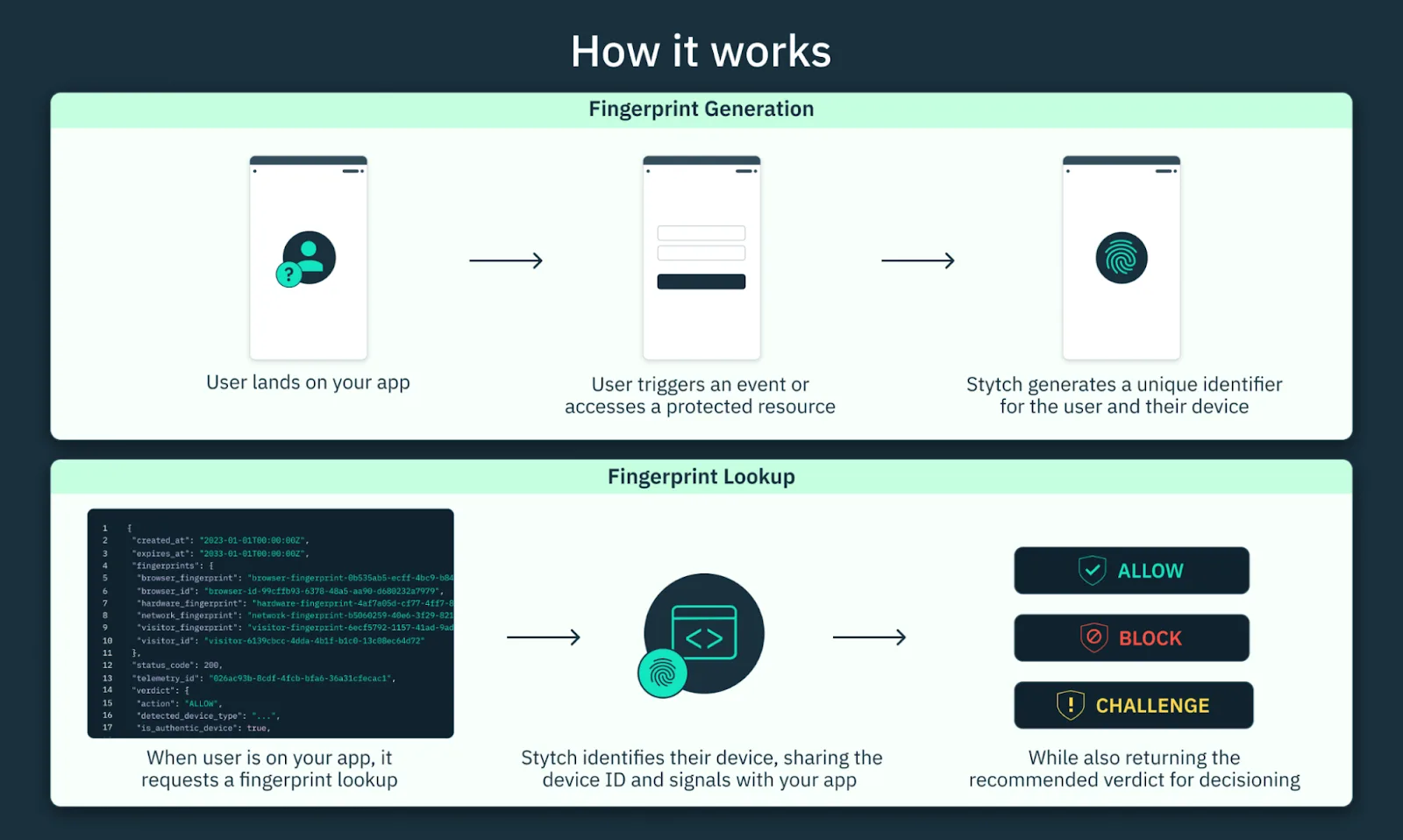
How Canvas Fingerprinting Works in Practice
Let’s break down the actual process.
Stage 1 – Canvas Creation
JavaScript creates an off-screen canvas element.
The user never sees it.
Stage 2 – Drawing Instructions
The script draws text or shapes using specific fonts, colours, transformations, and shadows.
These instructions are identical for every user.
Stage 3 – Pixel Extraction
The browser converts the canvas into either raw pixel data or a base64 string through functions such as toDataURL().
Stage 4 – Hashing
That data is hashed into a short fingerprint string.
The server compares it against known patterns.
The browser never directly gives an ID. It simply reveals its rendering behaviour.
Common Misconceptions About Canvas Fingerprinting
Bad advice about canvas fingerprinting often causes more harm than the fingerprint itself.
Misconception #1: “Private Mode Stops It”
Private mode prevents storage, but it does not change rendering behaviour.
Canvas output usually remains identical.
Misconception #2: “Changing IP Fixes It”
IP addresses are network-level identifiers while canvas fingerprints are browser- and device-level signals.
Rotating IPs while keeping the same fingerprint can actually increase suspicion.
Misconception #3: “You Can Fully Hide It”
You cannot eliminate rendering behaviour.
You can only reduce uniqueness, increase variability, and blend into common profiles.
That is why a “full bypass” is mostly a myth.
What “Bypassing” Canvas Fingerprinting Really Means
Bypassing does not mean invisibility.
It means reducing stable and high-confidence identification.
There are three legitimate approaches.
1. Reducing Fingerprint Stability
If the output changes slightly over time, long-term correlation becomes weaker.
This can happen through environment isolation, controlled variability, or different execution contexts.
Unstable fingerprints are harder to link across sessions.
2. Normalising Fingerprints
Instead of trying to be unique, the goal is often to look common.
If many users share similar outputs, identification precision decreases.
This is the philosophy behind hardened or uniform browser environments.
3. Aligning Signals Instead of Fighting Them
Canvas fingerprinting rarely works alone.
It is usually combined with behaviour timing, session continuity, interaction style, and navigation patterns.
If those signals look natural, canvas becomes a weaker supporting signal rather than a decisive one.
This is often more effective than trying to block canvas directly.
This is also why platforms like Appilot focus heavily on stable sessions, real-device execution, and natural behavioural timing. Instead of trying to suppress every fingerprinting signal individually, Appilot reduces detection risk by aligning multiple signals together in a way that looks more realistic.
Real-World Contexts Where Canvas Fingerprinting Matters
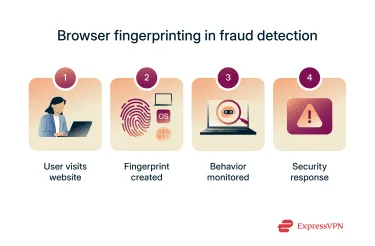
Fraud & Abuse Prevention
Platforms use fingerprints to detect repeated abuse attempts across supposedly “new” sessions.
Canvas strengthens correlation, even if it rarely acts alone.
Automation at Scale
Identical browser stacks produce identical canvas outputs.
At scale, this creates very strong linkage.
Without environment diversification, correlation becomes obvious.
Privacy-Focused Browsing
Most privacy tools do not block canvas outright.
Instead, they aim to reduce uniqueness, normalise outputs, and limit correlation strength.
Blocking canvas entirely often breaks legitimate websites.
The Technical Factors That Influence Canvas Output
Canvas output varies based on GPU model and drivers, operating-system font rendering, browser version and build, hardware-acceleration path, and installed fonts.
Even subtle differences can compound into identifiable patterns.
The APIs involved are all standard browser APIs such as getContext("2d"), fillText(), and toDataURL().
There is nothing malicious about these APIs on their own.
It is the comparison and hashing of the output that creates tracking value.
When Canvas Fingerprinting Is a Real Risk
Not everyone needs to worry about canvas fingerprinting equally.
1. You Repeatedly Clear Sessions
Clearing cookies while keeping the same environment increases reliance on fingerprint signals.
2. You Run Large-Scale Automation
Identical environments dramatically amplify fingerprint correlation.
This is one reason why platforms like Appilot rely on real Android devices rather than cloned browser environments. Real devices naturally create more believable diversity across hardware, operating-system behaviour, and user interaction.
3. You Interact With High-Security Platforms
Finance, advertising, and abuse-sensitive platforms usually weigh fingerprint signals much more heavily.
This explains why sites can still recognise a user even after clearing everything.
The rendering behaviour did not change.
Tools That Help Reduce Canvas Fingerprint Correlation
There are several different ways to manage fingerprint consistency.
Puppeteer provides fine control over browser environments and rendering behaviour.
Playwright offers stronger support for session management and multi-browser execution.
Antidetect browsers attempt to reduce fingerprint uniqueness, although unrealistic configurations often fail.
Appilot is useful for mobile automation because it runs on real Android devices where hardware signals, operating-system behaviour, and interaction patterns naturally align.
The best solution depends on whether the focus is browser automation, mobile automation, or large-scale multi-account management.
Key Takeaways
Canvas fingerprinting measures rendering behaviour rather than relying on storage.
It becomes strongest when environments remain stable and identical.
“Bypassing” canvas fingerprinting means reducing stability, blending into common outputs, and aligning other behavioural signals.
It does not mean disappearing completely.
When treated as one signal among many, canvas fingerprinting becomes manageable rather than magical.
If you are running automation at scale, Appilot can reduce fingerprint correlation by using real Android devices and stable behavioural patterns instead of identical browser-only environments.
Frequently Asked Questions
Q: What is canvas fingerprinting used for?
It is used to correlate sessions and devices through rendering behaviour rather than stored identifiers.
Q: Can I completely block canvas fingerprinting?
Not without breaking many websites. Most strategies focus on reducing uniqueness instead.
Q: Does private browsing stop canvas fingerprinting?
No. It prevents storage but does not change rendering-based signals.
Q: Is canvas fingerprinting legal?
Legality depends on the jurisdiction and disclosure practices.
Q: Why do automation tools struggle with canvas fingerprinting?
Because identical environments produce identical fingerprints at scale, which creates strong linkage.