ClonBrowser and Appilot Integration for E-commerce Automation
Running e-commerce operations across multiple accounts can become difficult very quickly.
A single business may have multiple Shopify stores, Amazon seller accounts, supplier dashboards, payment gateways, customer support logins, social media pages, and advertising accounts.
Trying to manage all of those accounts inside the same browser environment can create problems.
Accounts can become linked together, cookies can overlap, sessions can conflict, and platforms may begin triggering security checks.
This is where ClonBrowser becomes useful.
ClonBrowser allows you to create separate browser profiles with their own cookies, fingerprints, proxies, sessions, and browser settings.
Each browser profile behaves like a separate device.
That makes it easier to manage multiple e-commerce accounts without everything being tied to the same browser environment.
But once you start working with dozens of browser profiles, manual management becomes difficult.
That is where Appilot can help.
By combining ClonBrowser with Appilot, you can automate browser launches, organize account groups, schedule workflows, assign proxies, and reduce the amount of manual work required for e-commerce operations.
Why E-commerce Teams Use ClonBrowser
E-commerce businesses often need to manage multiple accounts at the same time.
For example, one team may be handling Shopify stores while another is managing Amazon accounts. Someone else may be working on supplier portals while another team member manages Facebook ad accounts or Google logins.
If all of those accounts are accessed from the same browser, platforms may start connecting them together.
That can create security warnings, login verifications, or account restrictions.
ClonBrowser helps reduce that risk by separating every browser profile.
Each profile can have its own cookies, proxy, browser fingerprint, language, timezone, screen resolution, and session history.
This creates stronger separation between browser environments and makes account management safer.
How Appilot Improves ClonBrowser Workflows
ClonBrowser is useful for browser profile management, but Appilot helps automate how those profiles are used.
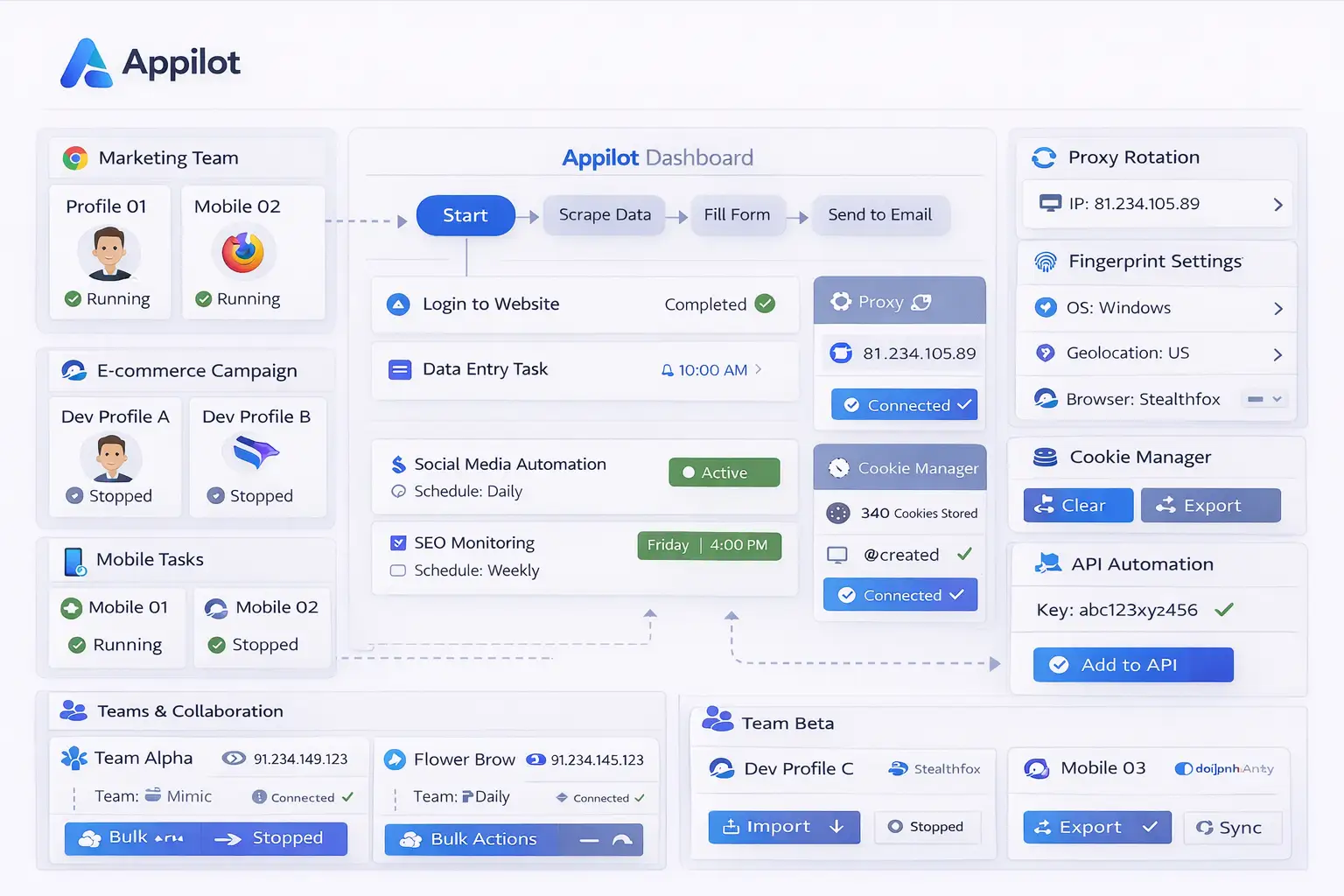
Instead of manually opening profiles every day, Appilot allows you to organize browser profiles into groups and automate when they launch.
For example, Shopify browser profiles can launch every morning for inventory checks while Amazon seller profiles launch later in the day for order management.
Supplier portals can have their own workflow while customer support profiles remain active during business hours.
This makes e-commerce operations more organized.
Instead of opening browser profiles one by one, teams can rely on scheduled workflows and profile groups.
Appilot can also help stagger browser launches so that not every profile opens at exactly the same time.
This creates more natural activity patterns.
Common E-commerce Use Cases
One of the most common use cases is managing multiple Shopify stores.
A business may have several stores for different regions, products, or brands.
Using separate browser profiles for each store helps keep cookies, sessions, and account activity separate.
Amazon sellers also benefit from browser profile separation.
For example, one profile may be used for seller central access while another profile is used for product research or advertising.
Supplier management is another common use case.
Many businesses use multiple supplier websites and portals.
Keeping those logins inside separate browser profiles helps reduce confusion.
Customer support teams may also need access to order management systems, support inboxes, and marketplace dashboards.
By separating those environments, teams can avoid conflicts between different account types.
Social media and advertising accounts can also be grouped separately.
For example, Facebook ad accounts, Google Ads accounts, TikTok business accounts, and Instagram profiles can all have their own browser groups.
Setting Up Browser Groups for E-commerce
The first step is organizing browser profiles into clear groups.
You should avoid storing every browser profile in one large list.
Instead, separate profiles based on workflow.
For example, you could create one group for Shopify stores, another for Amazon accounts, another for supplier portals, another for customer support, and another for advertising accounts.
This makes browser management much easier.
You should also use clear naming conventions.
Instead of generic profile names like “Store 1” or “Profile A,” use names that describe the account clearly.
For example, “US Shopify Store” or “Amazon Seller Germany” makes it easier to identify the correct browser profile.
Once profile groups are organized, Appilot can automate how those groups are used.
For example, support profiles may launch in the morning while supplier dashboards open later in the day.
Best Practices for E-commerce Automation
The most important rule is to keep browser environments separate.
Different account types should not all use the same browser profile.
A Shopify store profile should not also be used for Facebook ads, Amazon seller accounts, and supplier logins.
You should also keep separate proxy pools for different browser groups.
For example, Shopify stores may use residential proxies while scraping or research workflows use datacenter proxies.
It is also important to keep browser settings aligned with the proxy location.
If a browser profile uses a United States proxy, it should also use a United States timezone and language.
You should also stagger browser launches and actions.
If every profile launches at exactly the same time every day, the activity may look unnatural.
Adding randomized delays can help create more natural browsing behavior.
Common Problems Teams Face
One common issue is profile overlap.
If multiple account types are managed inside the same browser profile, cookies and sessions can become mixed together.
Another issue is proxy mismatch.
If the proxy country does not match the browser settings, the account may trigger verification requests.
Teams also sometimes use the same browser profile for too many tasks.
For example, one profile may be used for Facebook ads, Shopify, Gmail, and supplier logins.
That can make the environment look unusual.
Another common issue is poor organization.
If browser profiles are not grouped properly, team members may use the wrong accounts.
That can lead to mistakes, confusion, and account conflicts.
Frequently Asked Questions
Q1: Why do e-commerce teams use ClonBrowser?
ClonBrowser helps separate browser profiles so that stores, ad accounts, supplier portals, and support systems do not become linked together.
Q2: Can Appilot automate browser launches for e-commerce accounts?
Yes. Appilot can automate when browser profiles launch and how profile groups are scheduled.
Q3: Should every store use a different browser profile?
Yes. Different stores and account types should have separate browser profiles to keep cookies and sessions separate.
Q4: Why are proxies important for e-commerce automation?
Proxies help separate browser profiles by giving them different IP addresses and locations.
Q5: What is the biggest mistake with e-commerce browser management?
One of the biggest mistakes is using the same browser profile for too many account types and workflows.
Conclusion
ClonBrowser helps e-commerce teams separate browser environments so that stores, ad accounts, supplier dashboards, and support systems do not overlap.
Once browser operations grow, manual profile management becomes difficult.
By combining ClonBrowser with Appilot, teams can organize browser groups, automate launches, assign workflows, and make e-commerce account management much more efficient.
This makes browser automation easier to scale and much easier to manage.