ClonBrowser Bulk Operations with Appilot Scheduler

Managing a few browser profiles manually is one thing. Managing fifty, one hundred, or even more at the same time is a completely different challenge.
As soon as your operation starts growing, simple browser profile management turns into a daily coordination problem. You need to launch multiple profiles, organize different account groups, assign the correct proxies, keep workflows separated, and make sure tasks do not overlap. Doing all of that one profile at a time quickly becomes inefficient.
This is where ClonBrowser bulk operations become useful.
ClonBrowser helps you create isolated browser environments for different accounts, stores, workflows, or teams. Each profile can have its own cookies, browser fingerprint, proxy, session history, and settings. That separation is important when you are handling multi-account workflows across e-commerce, social media, research, scraping, affiliate campaigns, or support systems.
But profile separation alone is not enough once the volume increases.
That is where Appilot Scheduler becomes valuable. By combining ClonBrowser with Appilot Scheduler, you can organize browser profiles into groups, automate launches, control timing, assign workflows in batches, and manage large-scale browser operations in a much more structured way.
Why Bulk Operations Matter in ClonBrowser
Bulk operations matter because most serious browser workflows do not stay small for long.
A team may begin with ten browser profiles and then quickly expand to thirty more for new campaigns, new stores, new clients, or new departments. An agency may need separate browser environments for every client. A seller may need different browser groups for separate stores, ad accounts, support dashboards, and supplier logins. A scraping team may need batches of profiles for different targets, regions, or proxy pools.
If every action has to be done one profile at a time, the system slows down fast.
You end up repeating the same work again and again. You rename profiles one by one, launch them one by one, check their proxies one by one, and assign their tasks one by one. Even if each step only takes a few seconds, the time loss becomes significant when multiplied across dozens of profiles every day.
Bulk operations solve that problem by allowing teams to think in groups instead of individual browser profiles.
Instead of asking what should happen with one profile, you start asking what should happen with an entire category of profiles. That shift makes browser management much more scalable.
What Counts as a Bulk Operation
A bulk operation is any action applied across multiple browser profiles at once instead of being handled manually profile by profile.
That can include launching a group of profiles, assigning schedules to a whole category of accounts, moving profiles into the correct workflow groups, updating proxy assignments in batches, closing inactive profiles at the end of the day, or preparing a full set of browser environments for a team before work begins.
For example, an e-commerce business may want all Shopify-related profiles to launch every morning before inventory checks begin. A social media team may want all engagement profiles to open during working hours and all research profiles to run later in the day. A scraping team may want one batch of browser profiles to run overnight while another batch stays idle until the next shift begins.
These are all bulk operations because the workflow is applied to groups, not just individual browser sessions.
That is exactly where scheduling becomes important.
How Appilot Scheduler Improves ClonBrowser Bulk Operations
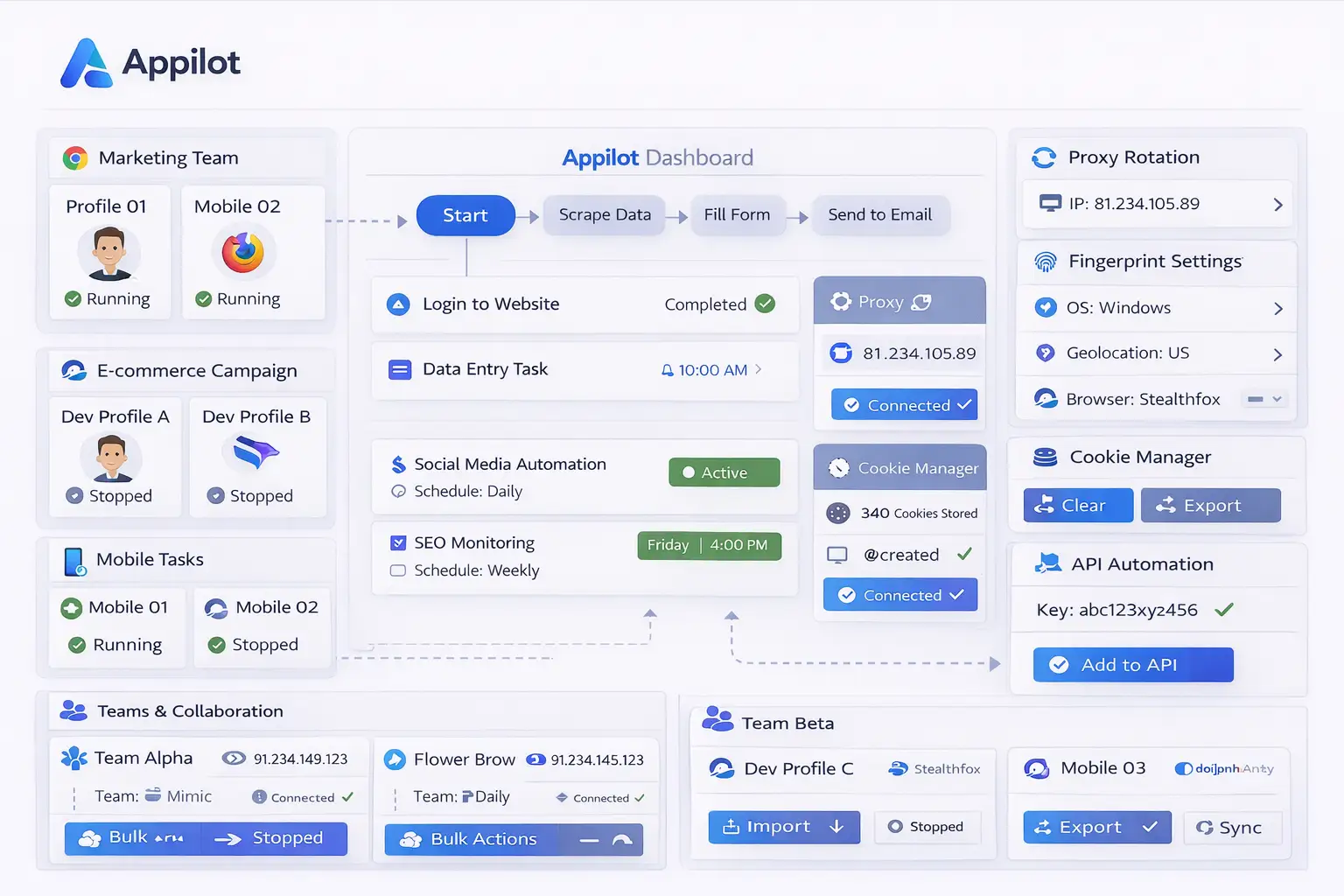
ClonBrowser gives you the isolated browser profiles. Appilot Scheduler adds time, structure, and workflow automation on top of them.
Instead of manually opening every profile, Appilot Scheduler allows you to assign timing rules to profile groups. That means different categories of browser profiles can launch at different times based on workflow needs. Profiles for support may launch during business hours. Profiles for scraping may launch overnight. Profiles for store management may open before the operations team begins work.
This creates order.
It also reduces the number of mistakes teams make. When everything is manual, it becomes easier to open the wrong browser profile, forget a task, or run multiple profile groups at the same time when they should be separated. With scheduling, the browser activity becomes more predictable and easier to manage.
Appilot Scheduler also helps with timing variation. Instead of opening twenty profiles at exactly the same second, it can spread those launches across a realistic window. That makes the workflow feel more natural and prevents all browser activity from looking too rigid.
Common Bulk Operation Use Cases
One of the most common use cases is e-commerce account management. A business may have several stores, supplier portals, support dashboards, and advertising accounts that all need browser separation. Instead of handling each profile manually, the team can create grouped schedules for each account type and run them in batches.
Another common use case is social media management. A team may be handling separate browser profiles for content posting, engagement, moderation, reporting, and account research. Each category can be grouped and scheduled independently so that different workflows do not overlap.
Agencies also benefit heavily from bulk operations. If multiple clients each have their own browser environments, the easiest way to stay organized is by grouping profiles by client and assigning schedules in bulk. This makes onboarding, daily operations, and internal coordination much easier.
Scraping workflows are another strong use case. Teams may need one batch of profiles for one region, another batch for another target, and separate timing windows for each. Bulk operations allow those profile groups to be managed in a more structured way.
Research teams, affiliate marketers, support teams, and even internal ops teams can all benefit from the same principle. Once profiles are grouped correctly, scheduling them in batches saves time and reduces confusion.
Setting Up ClonBrowser Groups for Bulk Scheduling
The first step is organizing your browser profiles properly. Bulk operations only work well when the profile structure is already clear.
You should avoid storing every ClonBrowser profile in one large unorganized list. That approach may work for a small operation, but it becomes messy very quickly once the number of profiles grows.
Instead, build profile groups based on the way the business actually operates.
You might create one group for Shopify stores, another for Amazon accounts, another for supplier dashboards, another for support logins, and another for advertising accounts. A social media team might separate content profiles, moderation profiles, analytics profiles, and research profiles. An agency might separate everything by client first and then by workflow type inside each client environment.
Naming also matters. Generic names make bulk operations harder to understand and harder to maintain. When profile names clearly describe their purpose, it becomes much easier to assign the right schedule to the right group and avoid mistakes.
Once those groups are prepared, Appilot Scheduler can apply automation at the group level instead of forcing the team to manage every profile manually.
How Scheduling Makes Bulk Operations Safer
Bulk operations are not only about speed. They also improve control.
When profile launches are random and manual, it becomes harder to keep track of what is happening. Different team members may open overlapping accounts, forget timing rules, or trigger unusual activity patterns by launching too many profiles at once. That can make browser operations inconsistent and harder to troubleshoot.
Scheduling helps reduce that risk by making activity more predictable.
For example, if one set of browser profiles should only be used in the morning and another should only be used at night, Appilot Scheduler can enforce that structure. If one workflow should launch gradually over thirty minutes instead of instantly, the scheduler can handle that too. If certain profile groups should close automatically after a shift ends, that can also be managed inside the workflow.
This does not just save time. It makes the system more stable.
The more structured your browser activity is, the easier it becomes to monitor, troubleshoot, and scale.
Best Practices for ClonBrowser Bulk Operations
The most important rule is to keep profile groups meaningful. A bulk action should only be applied to a group if every profile in that group genuinely belongs to the same kind of workflow. If unrelated browser profiles are grouped together, the schedule will become less useful and the workflow will be harder to manage.
It is also important to avoid launching too many profiles at exactly the same moment. Even when you are doing bulk operations, the activity should still look staggered and realistic. Timing windows and launch delays are helpful here because they reduce obvious patterns and create more natural behavior.
You should also keep proxy setup aligned with the group purpose. If a profile group is meant for one region or one type of account, the proxy settings should make sense for that environment. Mixing mismatched locations, languages, and browser settings inside the same scheduled group can create unstable workflows.
Another best practice is to test every bulk workflow on a smaller batch before applying it to a larger one. If a mistake exists in the schedule, proxy logic, or group structure, it is much better to catch it with five profiles than with fifty.
Clear naming, clean grouping, sensible scheduling windows, and small-scale testing all make a big difference when you start scaling browser operations.
Common Problems Teams Run Into
One of the most common problems is poor grouping. Teams often try to use bulk operations before their profile structure is actually organized. That leads to batches that contain unrelated profiles, unclear schedules, and browser activity that is hard to understand later.
Another issue is launching too many profiles at once. Even though bulk operations are supposed to save time, pushing everything live in one instant can create unnecessary strain on the workflow and make activity patterns look too rigid.
Proxy mismatch is another common problem. If the scheduled group contains browser profiles with completely different proxy needs, one schedule may not fit all of them properly. This can make the batch harder to manage and create instability across accounts.
Teams also sometimes forget to review inactive or outdated groups. Over time, old browser profiles, expired proxies, or unused workflows may still remain inside bulk scheduling systems. If those are not cleaned up, the structure becomes harder to maintain.
The solution is usually simple. Keep profile groups clean, review schedules regularly, and treat bulk operations as a system that needs structure rather than a shortcut that removes planning.
Frequently Asked Questions
Q1: What are bulk operations in ClonBrowser?
Bulk operations are actions applied across multiple browser profiles at once, such as launching groups of profiles, assigning schedules, or organizing workflow batches.
Q2: How does Appilot Scheduler help with bulk operations?
Appilot Scheduler helps by automating when grouped browser profiles launch, how they are timed, and how different workflow categories are separated.
Q3: Should I schedule all browser profiles at the same time?
No. It is usually better to stagger launches across a time window so that browser activity looks more natural and the workflow is easier to manage.
Q4: What is the best way to organize ClonBrowser profiles for bulk scheduling?
The best approach is to group profiles by workflow type, client, department, or account category so that each scheduled batch has a clear purpose.
Q5: What is the biggest mistake with bulk browser operations?
One of the biggest mistakes is applying bulk actions to badly organized profile groups where unrelated browser profiles are mixed together.
Conclusion
ClonBrowser bulk operations become much more useful when they are combined with Appilot Scheduler. Instead of managing browser profiles one by one, you can organize them into meaningful groups, assign clear schedules, automate launches, and build a workflow structure that actually scales.
That matters because large browser operations are not just about having more profiles. They are about managing those profiles in a way that stays clear, efficient, and stable as the workload grows.
If you are handling multiple accounts, teams, clients, or browser tasks every day, using ClonBrowser with Appilot Scheduler can help turn a messy manual process into a much more organized automation system.