Cross-Browser Testing Automation Using Appilot Dashboard
Cross-browser testing is one of the most important parts of managing websites, web applications, landing pages, e-commerce stores, and browser-based tools.
A website may work perfectly in one browser but behave differently in another. Layouts may break, buttons may not respond correctly, forms may fail, images may not load properly, and browser-specific features may behave differently across different browser environments.
This becomes even more difficult when businesses need to test websites across multiple browsers, multiple devices, different browser versions, different locations, and different account environments.
Manual testing can quickly become repetitive and time consuming because users need to launch each browser, open the same websites, repeat the same actions, compare the results, and document the differences.
This is where Appilot becomes useful. Instead of manually opening every browser and repeating every step, Appilot helps automate cross-browser testing workflows from one dashboard.
Why Cross-Browser Testing Matters
Users interact with websites through many different browsers.
Some people use Chrome, while others use Firefox, Safari, Edge, Opera, Brave, Vivaldi, or privacy-focused browsers.
Different browsers may render the same website differently because of browser engines, browser settings, privacy features, extensions, cookies, scripts, and browser-specific behaviors.
For example, a website may display correctly in Chrome but have spacing issues in Firefox. A button may work correctly in Edge but fail inside a privacy-focused browser. A checkout page may load correctly in one browser but break in another because of script blocking or cookie settings.
For businesses, these issues can directly affect conversions, user experience, sales, and customer trust.
Cross-browser testing helps identify these problems before they affect users.
Why Manual Cross-Browser Testing Becomes Difficult
Manual testing usually requires opening many browsers one by one.
Users need to visit the same pages, test the same buttons, review the same forms, check the same layouts, and repeat the same actions in each browser.
This takes time even for a small website.
For larger websites, e-commerce stores, SaaS dashboards, affiliate funnels, or multi-page applications, the amount of manual work becomes much larger.
The problem becomes even bigger when testing also requires multiple browser profiles, different screen sizes, different account logins, different locations, or different browser settings.
A team may need to test one website in Chrome, Firefox, Edge, Brave, Opera, and Safari while also checking logged-in states, checkout flows, mobile layouts, and account dashboards.
Without automation, this process becomes difficult to scale.
How Appilot Helps Automate Cross-Browser Testing
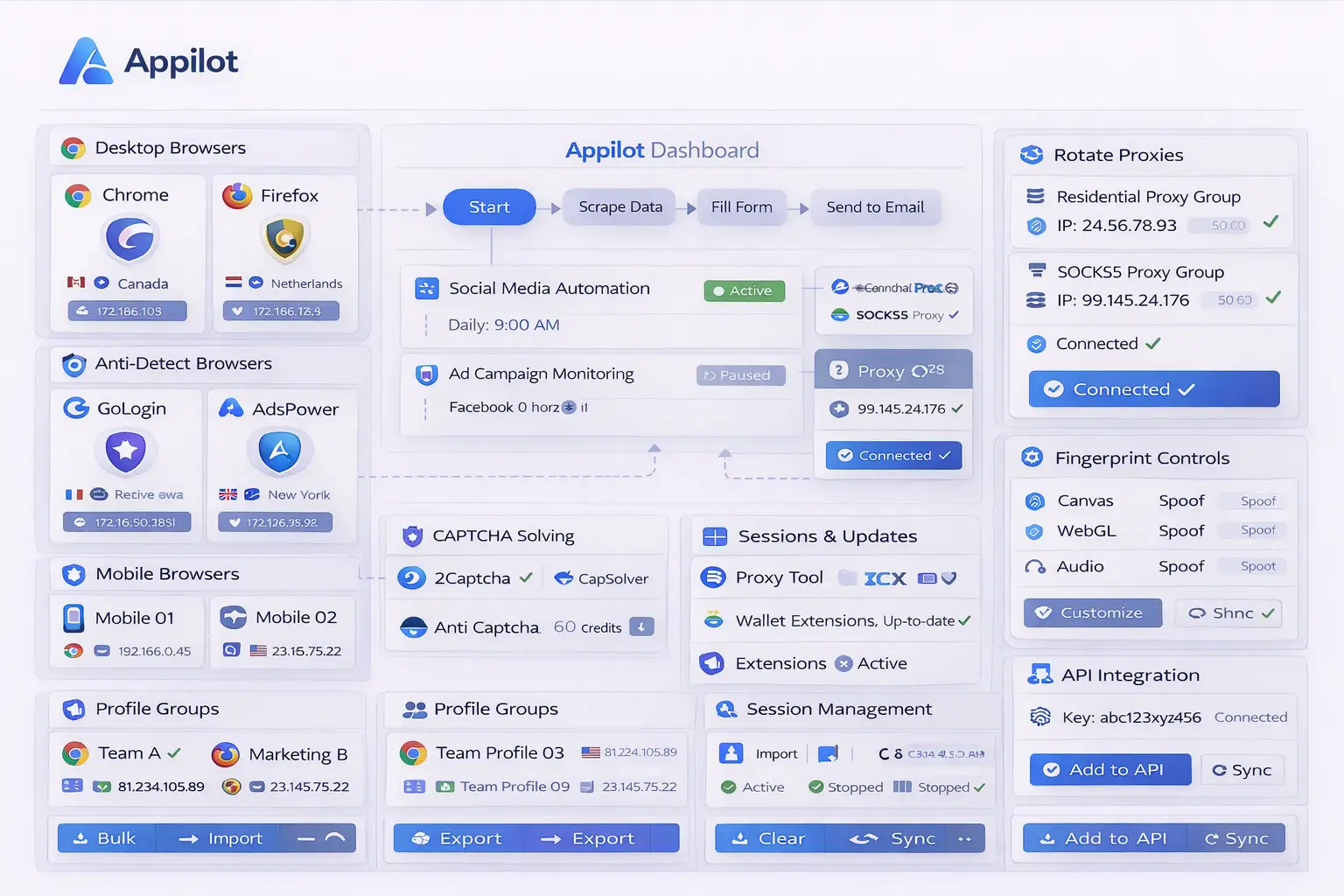
Appilot helps automate repetitive testing workflows across multiple browser environments.
Instead of manually opening every browser and repeating the same actions, users can create workflows that launch browsers automatically, open websites, test pages, check specific actions, and record the results.
For example, Appilot can launch Chrome, Firefox, Opera, Brave, and Edge at the same time, open the same landing page in each browser, review the layout, test forms, check buttons, and compare the results.
It can also schedule these tests to happen automatically every day, every week, or after major website updates.
This makes cross-browser testing much faster and more consistent.
Common Cross-Browser Testing Workflows
One common use case is landing page testing.
Businesses often need to make sure that landing pages display correctly across different browsers before running advertising campaigns.
Another common use case is e-commerce testing.
E-commerce sellers may want to check product pages, shopping carts, checkout flows, shipping pages, and payment forms across different browser environments.
SaaS companies often need to test dashboards, onboarding flows, login systems, user settings, and internal tools.
Affiliate marketers may want to test landing pages, opt-in forms, tracking pixels, analytics scripts, and checkout flows.
Agencies may also need to test client websites across multiple browsers before launch.
Benefits of Cross-Browser Testing Automation
One of the biggest benefits is time savings.
Instead of manually repeating the same test across every browser, Appilot can automate the process.
Another major benefit is consistency.
Every browser test follows the same workflow, which reduces the chance of missing a browser, skipping a page, or forgetting to test an important feature.
The setup is also useful for scaling because larger websites and larger browser groups can be tested more easily.
This is especially important for teams that manage multiple websites, landing pages, or applications.
Cross-browser automation also makes it easier to detect issues earlier because tests can run automatically after updates or code changes.
Best Practices for Cross-Browser Testing
The best approach is to test the most important user flows first.
For example, login pages, forms, checkout pages, navigation menus, and account dashboards should usually be tested before less important pages.
It is also important to test websites in both privacy-focused browsers and standard browsers because browser behavior may be different.
You should use separate testing groups for desktop browsers, mobile browsers, logged-in workflows, and anonymous sessions.
Reviewing logs and test results regularly can help identify browser-specific issues faster.
It is also a good idea to test websites after major updates, redesigns, or script changes.
Common Problems and Troubleshooting
One common issue is that websites may behave differently because of browser-specific features, privacy settings, or extension conflicts.
Another issue is that some tests may fail because login sessions expire or because websites change layout.
Users may also forget to include certain browser versions or browser types in their testing workflow.
Too many overlapping tests can also make browser testing harder to manage.
Keeping test groups organized and reviewing logs regularly usually helps prevent these problems.
Frequently Asked Questions
Q1: Can Appilot test multiple browsers at the same time?
Yes. Appilot can automate testing across multiple browsers simultaneously.
Q2: Is this useful for e-commerce and SaaS websites?
Yes. E-commerce stores, SaaS platforms, landing pages, and browser-based tools often benefit from cross-browser testing automation.
Q3: Can Appilot schedule browser tests automatically?
Yes. Browser tests can be scheduled daily, weekly, or after website updates.
Q4: Should I test privacy-focused browsers separately?
Yes. Privacy-focused browsers may block scripts, cookies, or trackers differently than standard browsers.
Q5: What happens if one browser test fails?
You can review logs, check browser settings, update the workflow, and investigate the browser-specific issue.
Conclusion
Cross-browser testing becomes difficult when websites need to be checked across multiple browsers, profiles, devices, and workflows.
Appilot helps solve this problem by automating browser launches, testing workflows, scheduling, and result tracking from one dashboard.
This makes it easier to save time, reduce testing mistakes, identify browser-specific issues earlier, and manage larger testing operations more efficiently.