Dedicated Device Farm vs Cloud Emulator Farm: Cost and Performance Compared
Mobile automation teams usually reach the same scaling question sooner or later: should they build a dedicated device farm with real phones, or should they run a cloud emulator farm?
Both options can work. Both can also become expensive, unstable, or difficult to manage when the setup grows. A dedicated device farm gives teams physical Android devices that behave closer to real mobile users. A cloud emulator farm gives teams flexible virtual Android environments that are easier to start, duplicate, and scale on demand.
For social media automation, Instagram workflows, TikTok operations, Telegram tasks, app testing, account management, and phone-farm-style workflows, the choice matters a lot. The infrastructure affects cost, speed, reliability, session continuity, maintenance, and how much control the team has over each account environment.
The honest answer is that dedicated device farms usually win on realism and long-term session quality, while cloud emulator farms usually win on flexibility, setup speed, and short-term scaling. The best choice depends on whether your workflow needs real-device behavior or fast virtual capacity.
What Is a Dedicated Device Farm?
A dedicated device farm is a setup where a team owns, rents, or controls physical mobile devices for automation workflows. These may be Android phones connected to a local machine, hosted in a rack, operated remotely, or managed through a dashboard.
In a dedicated farm, each device can maintain its own app sessions, storage, device identity, settings, and account environment. This makes it useful for workflows that depend on long-term continuity. Social media accounts often benefit from this because the account can keep returning to the same device environment instead of constantly moving between fresh virtual instances.
Dedicated devices are also useful when app behavior needs to be as close to a real user phone as possible. A physical device has real hardware, real sensors, real operating conditions, and a more natural mobile environment than most emulators.
The downside is that dedicated device farms require hardware, power, cooling, monitoring, repairs, setup, and operational discipline. A device farm can become messy if teams do not have a proper system for account mapping, device health, network setup, and workflow control.
What Is a Cloud Emulator Farm?
A cloud emulator farm uses virtual Android devices running on cloud infrastructure. Instead of managing physical phones, teams create emulator instances on remote servers. These virtual devices can be launched, stopped, cloned, scaled, and integrated into automation workflows.
Cloud emulator farms are popular because they are easier to start. You do not need to buy phones, build racks, manage cables, replace batteries, or troubleshoot physical hardware. You can create virtual devices when needed and shut them down when the workflow ends.
Genymotion, for example, offers Android virtual devices on cloud platforms and lists pricing around $0.60 per hour per instance before cloud platform fees, while its SaaS documentation also mentions active virtual device billing by the minute. AWS Device Farm is more testing-oriented and lists pay-as-you-go pricing at $0.17 per device minute after the free trial, while also offering private device lab options for exclusive real-device access.
The downside is that emulators are still virtual environments. They may not behave exactly like real phones, and some mobile apps can treat emulator environments differently from physical devices. For short-term testing, this may not matter. For account-sensitive social media workflows, it can matter a lot.
The Main Difference Between the Two
The main difference is ownership of the mobile environment. A dedicated device farm gives you persistent physical devices. A cloud emulator farm gives you flexible virtual devices.
Dedicated devices are better when you need long-term stability, realistic app behavior, persistent sessions, and strong account-to-device consistency. Cloud emulators are better when you need fast scaling, lower upfront cost, quick testing, and disposable environments.
This is why developers, QA teams, and CI/CD workflows often like cloud emulators, while social media operators and phone farm teams often prefer dedicated devices or real-device automation. The workload is different. Testing usually needs repeatable runs. Social media automation often needs persistent accounts that build history over time.
For Instagram, TikTok, Snapchat, Telegram, and other mobile-first platforms, the device environment can become part of the account’s trust history. That makes consistency more important than raw scalability.
Cost Comparison: Upfront Cost
A dedicated device farm usually has higher upfront cost. You need to buy or rent phones, chargers, hubs, racks, cables, SIMs or proxy infrastructure, power equipment, and possibly machines to control the devices. If you run the farm locally, you also need physical space and maintenance.
A cloud emulator farm usually has lower upfront cost because you do not need hardware. You pay for virtual devices, cloud compute, storage, network usage, and platform fees. This makes cloud emulators attractive for teams that want to test an idea before investing in hardware.
However, low upfront cost does not always mean low total cost. If emulator instances run continuously, cloud costs can grow quickly. For long-running workflows, always-on virtual devices may become more expensive than owning physical devices.
This is the first major tradeoff. Dedicated farms cost more to start but can become cheaper over long periods. Cloud emulator farms are easier to start but can become expensive when used continuously.
Cost Comparison: Ongoing Cost
Dedicated device farms have ongoing costs, but they are usually predictable. You pay for electricity, internet, mobile proxies or SIM plans, replacement devices, maintenance, software, and team time. Once the hardware is purchased, the marginal cost of keeping a device running may be lower than paying for cloud instances every hour.
Cloud emulator farms have usage-based costs. That can be efficient for short bursts, tests, demos, and temporary workflows. But if you need devices running all day, every day, costs can add up. For example, Genymotion’s cloud instance pricing is shown around an hourly model, while AWS Device Farm’s public pricing is minute-based for device usage.
For a team running a few short tests per day, cloud emulators may be cheaper. For a team running dozens of persistent social accounts all month, dedicated devices may be more cost-effective.
The real cost question is not “which one is cheaper?” The real question is “how long do the devices need to stay active?”
Performance Comparison
Dedicated devices usually provide more realistic performance because they are actual phones. App behavior, rendering, touch response, notifications, camera access, storage behavior, and background app handling are closer to real user conditions.
Cloud emulators can be faster in some technical workflows because they run on powerful servers and can be duplicated easily. They may also be easier to integrate into automated testing pipelines. Genymotion positions its cloud product around running multiple Android virtual devices for tests, CI, demos, and integrations with platforms such as GitHub Actions and CircleCI.
However, emulator performance can vary depending on cloud resources, configuration, virtualization overhead, app compatibility, and network latency. Some apps may behave differently on emulators, especially apps that depend on device-specific features or detect virtual environments.
For social media bots, performance should not only mean speed. Faster is not always safer. Stable, realistic, predictable performance is usually more valuable than raw execution speed.
Stability Comparison
Dedicated device farms usually offer better long-term session stability. A physical phone can keep the same app installation, same device settings, same storage, same account session, and same environment for long periods. This is useful for social media accounts that need continuity.
Cloud emulator farms can also preserve state if configured properly, but many teams use emulators as temporary environments. If instances are frequently recreated, reset, or cloned poorly, account continuity can become weaker.
For testing workflows, temporary environments are useful. For social media workflows, temporary environments can be a problem. Instagram, TikTok, Telegram, and similar platforms may be more sensitive to changing device and session environments.
A dedicated device farm is usually stronger when the workflow depends on keeping accounts stable over weeks or months.
Scalability Comparison
Cloud emulator farms usually scale faster. If you need ten more virtual devices, you can launch them without waiting for hardware. This is useful for testing, short-term campaigns, load-style simulations, app QA, and temporary experiments.
Dedicated device farms scale more slowly. You need more physical devices, more power, more organization, more network planning, and more maintenance. Scaling from 10 phones to 100 phones is a real operational project.
But fast scaling can also create problems. Social media automation does not always benefit from suddenly adding many new accounts or environments. Account quality, session consistency, pacing, and workflow design matter more than raw volume.
Cloud emulators win on elastic scale. Dedicated devices win on durable scale.
Maintenance Comparison
Dedicated device farms require more hands-on maintenance. Phones can overheat, disconnect, lose charge, require updates, break cables, fail batteries, freeze apps, or need physical resets. Someone must monitor the hardware layer.
Cloud emulator farms reduce physical maintenance. You do not manage batteries, cables, racks, or device repairs. If an emulator fails, you can often restart or recreate it. This is a major advantage for remote teams.
However, cloud emulator farms still require technical maintenance. Teams must manage images, configurations, cloud costs, automation compatibility, app versions, session storage, and instance orchestration.
The maintenance burden changes shape. Dedicated farms require hardware operations. Cloud farms require infrastructure and configuration discipline.
Realism Comparison
Dedicated device farms win on realism. Real phones behave like real phones because they are real phones. For social media automation, this matters. Mobile apps often rely on device behavior, app state, notifications, input patterns, and long-term session history.
Cloud emulators are useful, but they are still simulations. They may be good enough for app testing, QA workflows, and many automation tasks, but they do not always match real mobile behavior perfectly.
BrowserStack, for example, emphasizes real iOS and Android device testing, and its App Automate product is positioned around real device coverage and reliable mobile app testing. This reflects the broader testing-market reality: real devices still matter when accuracy and realistic behavior are important.
For Instagram bots and social media automation, realism is often more important than convenience. That is why dedicated devices or real-device automation platforms are usually stronger than pure emulator farms for account-sensitive workflows.
Network and Proxy Considerations
Both dedicated device farms and cloud emulator farms need careful network planning. A device environment is only one part of the setup. The network identity also matters.
Dedicated device farms can pair well with mobile proxies, SIM-based setups, or stable network routing. This can create a more natural mobile-first environment for Instagram and TikTok workflows.
Cloud emulator farms often run in datacenter environments unless they are paired with external proxy infrastructure. This can create a mismatch if the account is supposed to behave like a normal mobile app user. A cloud emulator plus datacenter IP may be less natural than a real Android device plus stable mobile proxy.
The safest setup depends on consistency. Each account should have a stable device, stable region, stable network path, and realistic activity pattern. Random rotation, unstable proxy pools, and mismatched locations can create problems in either setup.
Which Is Better for Instagram Automation?
For Instagram automation, a dedicated device farm is usually better if the workflow depends on long-term account management, DMs, app sessions, engagement workflows, account checks, or phone-farm operations.
Instagram is mobile-first, and many important workflows happen inside the app. A real device gives better alignment with normal usage patterns. It also supports stronger session continuity because the same account can keep returning to the same phone environment.
A cloud emulator farm can still be useful for testing workflows, lightweight automation, experiments, content checks, or non-sensitive tasks. But for long-term Instagram account operations, dedicated devices usually provide a stronger foundation.
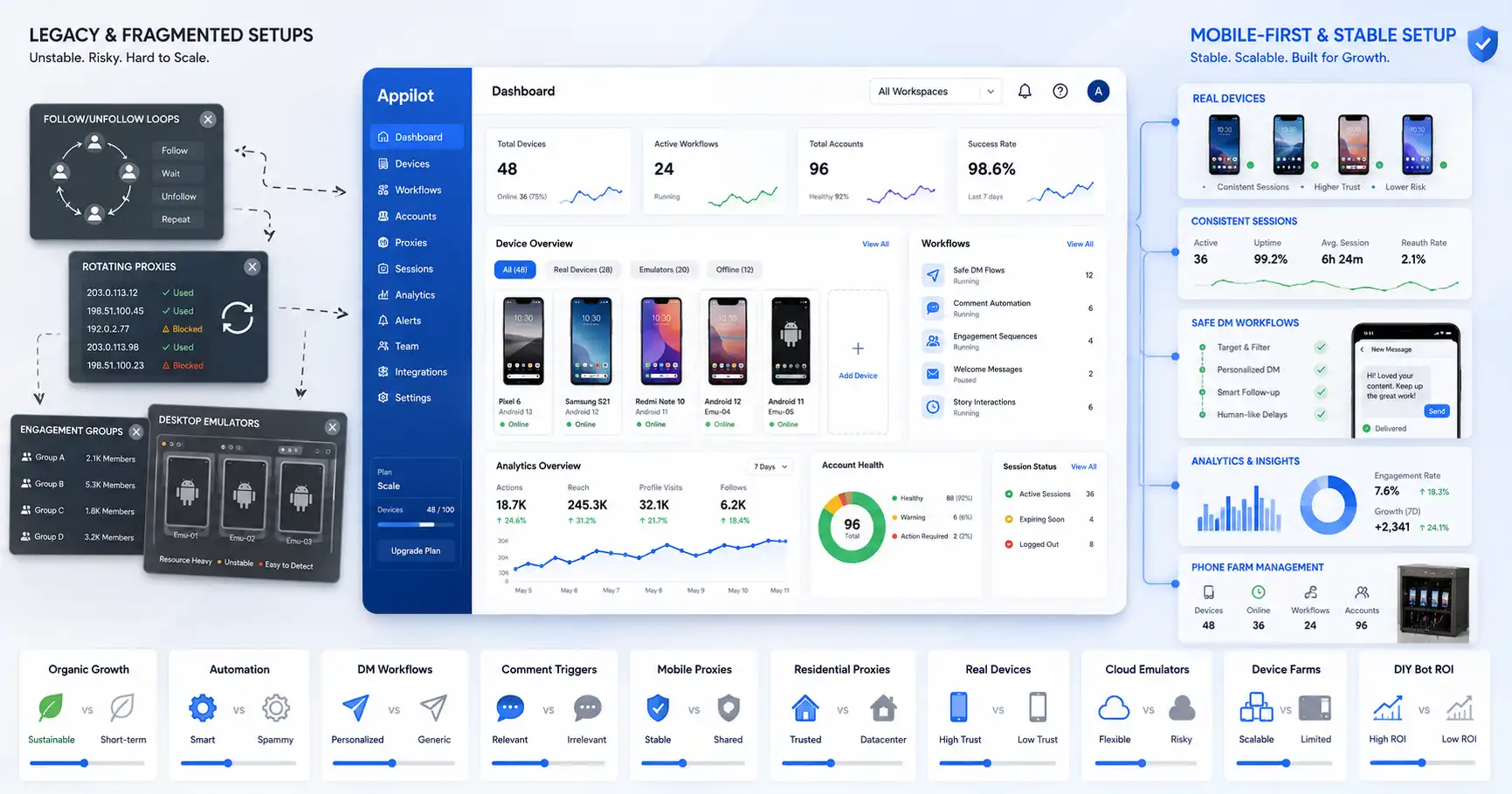
Appilot fits this use case because it helps teams manage real Android devices, emulators, and mobile workflows from a web dashboard. Appilot’s positioning specifically mentions social media automation bots on real devices, Android devices, and emulators without requiring ADB or a laptop for normal operation.
Which Is Better for TikTok Automation?
TikTok workflows are also mobile-first and performance-sensitive. Video playback, scrolling, posting, engagement, and account behavior are all shaped by mobile app usage.
Dedicated devices usually provide better realism for TikTok because they behave like actual phones. This matters for video-heavy workflows and long-term account sessions.
Cloud emulators can work for testing, app QA, or controlled tasks, but they may struggle with realism or app behavior depending on the environment. If the workflow involves persistent TikTok accounts, dedicated devices are usually safer.
For agencies and growth teams, the better option is often a hybrid setup where real devices handle account-sensitive workflows and cloud emulators support testing or lower-risk tasks.
Which Is Better for App Testing?
For app testing, cloud emulator farms can be very efficient. Developers and QA teams often need to run tests across many Android versions, screen sizes, and configurations. Cloud emulators make this easier because virtual devices can be created quickly and integrated into CI/CD workflows.
Genymotion focuses strongly on cloud Android virtual devices and testing integrations, while AWS Device Farm and BrowserStack provide real-device testing infrastructure for mobile apps.
For early-stage app testing, cloud emulators are usually cost-effective and flexible. For final validation, real-device testing is still important because physical devices reveal issues that emulators may miss.
So for app testing, the best setup is often both: cloud emulators for fast coverage and real devices for accuracy.
Which Is Better for Agencies?
Agencies should choose based on client risk and workflow type. If the agency manages real client Instagram or TikTok accounts, dedicated devices are usually safer for long-term operations. Client accounts need stability, not disposable infrastructure.
If the agency runs short-term tests, QA workflows, scraping support, or temporary app checks, cloud emulators can reduce cost and setup time.
For social media agencies, the best approach is often dedicated or real-device infrastructure for account-sensitive work, plus cloud emulators for testing and experimentation. Appilot can help by centralizing Android device and emulator workflows, making the operation easier to manage from one dashboard.
Which Is Better for Phone Farms?
A dedicated device farm is usually better for phone farms because a phone farm is built around real mobile environments. If the goal is to manage accounts as if they are operating from real phones, physical devices are the natural fit.
Cloud emulator farms can imitate some parts of a phone farm, but they do not fully replace the realism of physical devices. They are better for flexible testing or temporary scaling.
For long-running phone farm operations, dedicated devices offer better session persistence, more realistic app behavior, and stronger account-device mapping.
Hybrid Setup: The Best of Both Worlds
Many teams do not need to choose only one. A hybrid setup can combine dedicated devices and cloud emulators.
Dedicated devices can handle long-term accounts, sensitive workflows, client accounts, DMs, posting, and mobile-first operations. Cloud emulators can handle testing, workflow development, QA, experiments, temporary campaigns, and non-sensitive tasks.
This hybrid approach gives teams realism where it matters and flexibility where it helps. It also prevents overloading real devices with every possible task.
Appilot fits this hybrid model because it supports real Android devices and emulators. Teams can use the same mobile-first management layer while choosing the right execution environment for each workflow.
Common Mistakes to Avoid
The first mistake is choosing only based on cost. A cheap cloud emulator farm can become expensive if it runs all day. A dedicated device farm can also become expensive if maintenance is ignored.
The second mistake is choosing only based on speed. Faster automation is not always better for social media workflows. Stability and realism matter more.
The third mistake is treating emulators and real devices as identical. They are not. Emulators are useful, but real devices still behave more naturally for app-based workflows.
The fourth mistake is ignoring network consistency. A good device setup can still fail if accounts use unstable proxies or random locations.
The fifth mistake is scaling too fast. Whether using real devices or emulators, adding too many accounts before the workflow is stable can create operational chaos.
How Appilot Helps Manage Both Setups
Appilot helps teams manage mobile automation workflows across Android devices and emulators from a web dashboard. This makes it useful whether a team uses dedicated devices, cloud emulators, or a hybrid setup.
For dedicated device farms, Appilot can reduce manual phone handling and help centralize workflow control. For emulator farms, it can make virtual device workflows easier to operate and monitor. For agencies, it can help organize multi-account operations without forcing every task to be done manually.
The main value is operational control. A device farm or emulator farm is only useful if the team can manage it clearly. Appilot gives teams a more practical layer for mobile-first social media automation and app workflows.
Final Verdict
Dedicated device farms are usually better for long-term social media automation, Instagram workflows, TikTok operations, phone farms, and account-sensitive tasks. They cost more upfront and require more maintenance, but they provide better realism, stronger session continuity, and more stable account-device mapping.
Cloud emulator farms are usually better for short-term testing, fast scaling, QA workflows, experiments, and flexible virtual device access. They cost less to start and are easier to scale, but they may become expensive when always running and may not match real-device behavior perfectly.
The best setup for serious teams is often hybrid. Use dedicated devices for important account workflows and cloud emulators for testing, development, and temporary workloads. Appilot fits both sides by helping teams manage Android devices, emulators, and mobile workflows from one dashboard.
FAQs
Q1: Is a dedicated device farm better than a cloud emulator farm?
A dedicated device farm is better for long-term account stability, realistic app behavior, and social media automation. A cloud emulator farm is better for flexible testing and short-term scaling.
Q2: Which option is cheaper?
Cloud emulators are usually cheaper to start because there is no hardware purchase. Dedicated devices can become cheaper over time if the workflows run continuously.
Q3: Which is better for Instagram automation?
Dedicated devices are usually better for Instagram automation because they provide more realistic mobile behavior, persistent sessions, and stronger account-device consistency.
Q4: Are cloud emulator farms good for app testing?
Yes, cloud emulator farms are useful for app testing, QA, CI/CD workflows, and running tests across multiple Android versions or device profiles.
Q5: How does Appilot help with device farms and emulator farms?
Appilot helps teams manage Android devices, emulators, and mobile workflows from a web dashboard, making it useful for dedicated farms, emulator farms, and hybrid automation setups.