DevTools Detection and How to Avoid It

Most developers use browser DevTools for debugging and inspection, but many modern websites actively detect when these tools are open. While this may seem surprising, DevTools detection is commonly used in anti-bot systems, fraud prevention, and content protection.
Understanding DevTools detection is important because it reveals how even developer tools can expose signals about your environment. It also explains why certain actions, like inspecting elements or running scripts, can trigger restrictions. This guide explains how DevTools detection works and how to approach it carefully.
What Is DevTools Detection?
DevTools detection refers to techniques used by websites to identify whether a browser’s developer tools are open or being used. These tools include panels for inspecting elements, monitoring network requests, and executing JavaScript.
When DevTools are open, they can change how the browser behaves. Websites can detect these changes and use them as signals to identify debugging or automated activity.
This detection is often part of broader systems that analyze multiple signals to determine whether a session is genuine.
The Core Principle Behind DevTools Detection
The core principle behind DevTools detection is behavior observation. Opening DevTools can affect timing, layout, and execution patterns within the browser.
For example, DevTools can introduce delays in JavaScript execution or alter how certain functions behave. Detection scripts monitor these changes to determine whether tools are active.
Because these signals are based on behavior rather than declared values, they can be difficult to mask completely.
How DevTools Detection Works
DevTools detection works by analyzing changes in browser behavior when developer tools are open.
Measuring Window Size Differences
One common technique is checking for differences between the browser’s outer and inner window dimensions. When DevTools are open, especially in docked mode, these dimensions often change.
Scripts can monitor these values and detect patterns that indicate the presence of DevTools.
Monitoring Execution Timing
Opening DevTools can slow down JavaScript execution due to additional processing and debugging overhead. Detection scripts can measure execution timing and identify unusual delays.
This method relies on observing performance changes rather than static attributes.
Detecting Console Interactions
Some websites monitor interactions with the console. For example, they may detect when specific functions are logged or when console methods are accessed.
This can reveal whether a user is actively inspecting or debugging the page.
Checking Debugger Behavior
Another technique involves using the debugger statement in JavaScript. When DevTools are open, execution pauses at these statements, which can be detected by measuring delays.
This allows websites to identify debugging activity in real time.
Why DevTools Detection Matters
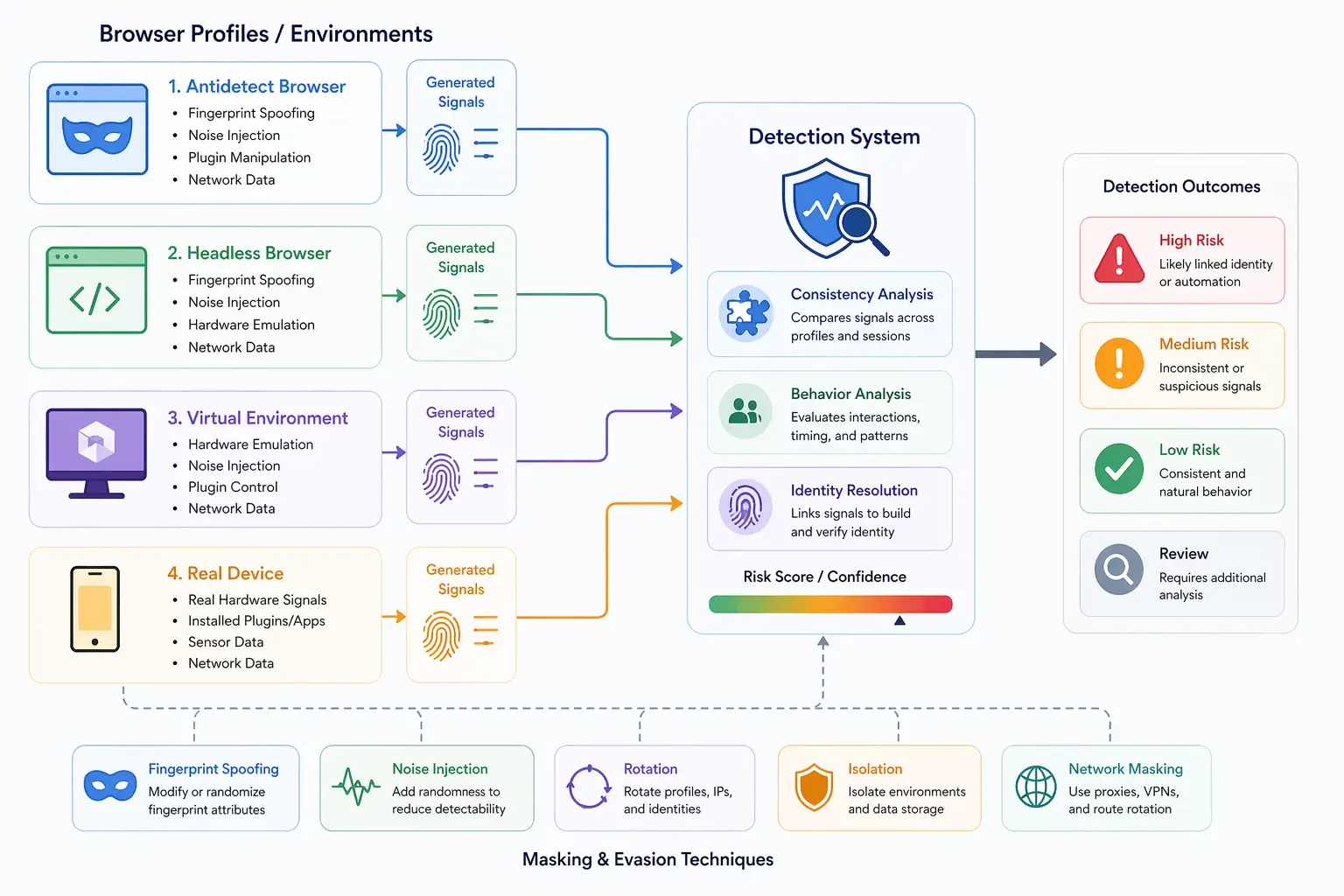
DevTools detection matters because it is often used as part of broader detection systems. While it may not be used alone, it contributes to identifying suspicious behavior.
In anti-bot systems, detecting DevTools usage can indicate automation or reverse engineering attempts. In content protection, it helps prevent users from inspecting or extracting sensitive information.
From a developer perspective, understanding these signals helps explain why certain actions may trigger restrictions.
Common Misconceptions About DevTools Detection
There are several misconceptions about DevTools detection that can lead to confusion.
One common belief is that DevTools detection is always used to block users, but in many cases it is just one signal among many.
Another misconception is that simply closing DevTools removes all detection risk. Some detection methods rely on behavior patterns that persist beyond a single action.
There is also a belief that DevTools detection is easy to bypass, but because it relies on behavioral signals, it can be difficult to avoid completely.
How to Reduce DevTools Detection Risk
Reducing DevTools detection risk involves minimizing the signals that indicate debugging activity.
One approach is to avoid keeping DevTools open for extended periods, especially in environments where detection is a concern. Short and controlled usage reduces exposure to detectable patterns.
Another approach is to use undocked DevTools windows, which can reduce changes in window dimensions. This helps avoid simple detection methods based on layout differences.
Maintaining consistent behavior is also important. Sudden changes in execution timing or interaction patterns can raise suspicion.
In automation workflows, environments that behave like real user devices reduce reliance on debugging tools. Tools like Appilot support this by running automation on real Android devices, where behavior aligns more closely with natural user interactions and reduces the need for constant inspection.
Limitations of Avoidance Techniques
While there are ways to reduce detection risk, it is difficult to eliminate it entirely.
Many detection techniques rely on subtle behavioral signals that are hard to control. Even small changes in timing or interaction can be detected.
Additionally, avoiding DevTools does not address other fingerprinting signals that may still reveal information about the environment.
This means that DevTools detection should be considered as part of a broader set of signals.
DevTools Detection in Modern Systems
In modern detection systems, DevTools detection is rarely used in isolation. It is combined with other signals such as fingerprinting, network behavior, and interaction patterns.
This layered approach increases accuracy and reduces false positives. Even if one signal is inconclusive, others can provide additional context.
Understanding this layered model helps explain why avoiding a single detection method is not enough.
When DevTools Detection Is Relevant
DevTools detection becomes relevant in scenarios where environments are being analyzed for authenticity or where sensitive content is protected.
It is commonly used in platforms that need to prevent automation, scraping, or reverse engineering.
For developers and testers, understanding these techniques helps avoid unintended triggers during normal workflows.
Frequently Asked Questions
Q: What is DevTools detection?
It is the process of identifying whether browser developer tools are open or being used.
Q: How do websites detect DevTools?
They analyze window size changes, execution timing, console interactions, and debugger behavior.
Q: Can you completely avoid DevTools detection?
No, you can reduce risk but not eliminate it entirely.
Q: Does closing DevTools stop detection?
It reduces active signals, but some behavioral patterns may still be analyzed.
Q: Why do websites use DevTools detection?
To detect debugging, prevent automation, and protect content.
Q: How do real-device environments compare?
Real-device environments like Appilot reduce reliance on debugging tools and produce more natural behavior, lowering detection signals.
Key Takeaways
DevTools detection is a technique used by websites to identify when browser developer tools are open by analyzing changes in behavior such as window dimensions, execution timing, and debugging activity. It is often used as part of broader detection systems rather than as a standalone mechanism. While it is possible to reduce detection risk by minimizing exposure and maintaining consistent behavior, it is difficult to eliminate these signals entirely. Understanding how DevTools detection works helps explain its role in modern tracking and detection systems and highlights the importance of considering multiple layers of analysis.