Dolphin Anty + Appilot for Crypto Airdrop Farming
Crypto airdrop farming can look simple from the outside, but once you start managing multiple wallets, browser sessions, task sequences, and platform interactions, the process becomes much harder to control manually. What begins as a few wallets and a few browser tabs can quickly turn into dozens of profiles, repeated daily tasks, proxy management, login tracking, and constant switching between accounts. That is usually the point where most people either become disorganized or start making mistakes that can affect their results.
This is where a more structured setup becomes useful. Dolphin Anty helps you separate browser identities by giving each profile its own fingerprint, cookies, timezone, proxy, and browsing environment. Appilot adds the workflow layer on top of that structure, allowing you to schedule repeated tasks, organize profile groups, and reduce the amount of manual work required every day. Instead of remembering what each wallet has done, which profile needs to be opened next, or which campaign still needs activity, you can build a cleaner system that is easier to manage over time.
If you are trying to make your crypto airdrop farming workflow more organized, more repeatable, and easier to scale without turning it into chaos, combining Dolphin Anty with Appilot can give you a much stronger operating setup.
Why Dolphin Anty and Appilot Make Sense for Airdrop Farming
Airdrop farming usually involves repeated interaction across multiple websites, wallets, campaigns, and browser environments. Many users need to connect wallets, complete platform tasks, revisit dashboards, check eligibility progress, sign transactions, interact with new ecosystems, and maintain activity over time. The challenge is not just doing the tasks once. The challenge is doing them repeatedly, across many accounts, without mixing identities or losing track of what has already been completed.
Dolphin Anty is useful here because it gives each farming account its own separate browser environment. That means one wallet setup can stay isolated from another, with separate cookies, browser fingerprints, and proxy settings. This becomes important when you want to avoid having all your activity appear as if it is coming from one identical environment.
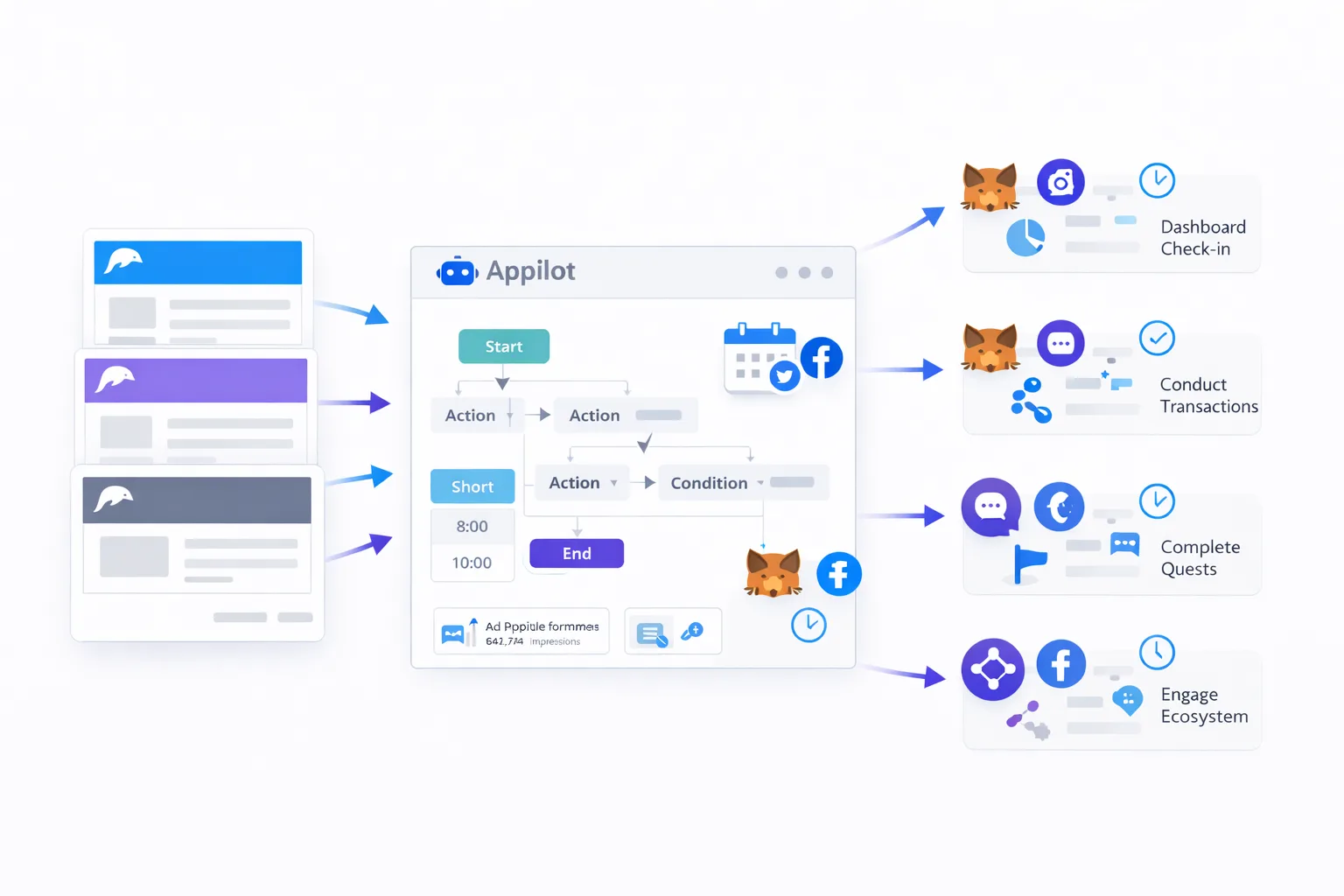
Appilot becomes useful because isolation alone is not enough. Once you have the profiles ready, you still need to manage the work. Appilot allows you to create routines around those profiles so that your farming process does not depend entirely on memory and manual repetition. You can organize profile groups, schedule routine check-ins, create recurring workflows, and reduce the chances of skipping important actions across different farming accounts.
How This Setup Helps You Stay Organized
One of the biggest problems in crypto airdrop farming is not technical difficulty but operational mess. People often lose track of which wallet interacted with which protocol, which profile already completed a campaign, which ecosystem still needs more activity, and which accounts are supposed to revisit a platform after several days. When everything is handled manually, it becomes easy to duplicate work on one profile while forgetting another completely.
A better setup starts with structure. In Dolphin Anty, you can separate your browser profiles based on wallet groups, ecosystem focus, campaign type, or strategy stage. For example, one group of profiles might be focused on testnet activity, another on social and quest platforms, and another on mainnet ecosystem interaction. Once these are separated properly, Appilot can help you turn that structure into a routine.
Instead of approaching airdrop farming as random daily browsing, you begin treating it like an organized workflow. Some profiles may need regular platform visits. Some may need repeated interactions spaced out across time. Some may only need periodic check-ins. The value of Appilot is that it helps turn this into a repeatable operating process rather than a loose collection of browser tabs and reminders.
Setting Up Dolphin Anty Profiles for Airdrop Farming
The first step is to build your browser profiles carefully. Each profile should represent one account environment and should stay consistent over time. That means keeping the same browsing identity, proxy logic, timezone alignment, and wallet context connected to that environment. The goal is not to make everything look identical. The goal is to make each profile feel like its own stable user session.
When people rush this part, they usually create problems later. If profiles are badly organized, mismatched, or reused in inconsistent ways, it becomes much harder to track activity and maintain a clean farming process. A better approach is to label profiles clearly, group them by campaign type or ecosystem, and make sure each one has a defined purpose.
After your profiles are ready, you connect Dolphin Anty with Appilot so the profiles can be brought into a more centralized workflow system. From there, you can decide which groups need daily attention, which ones need weekly activity, and which ones should only be touched when a new task becomes available. This is where the setup becomes practical, because you stop thinking in terms of random accounts and start thinking in terms of managed workflow groups.
Using Appilot to Schedule Repeated Farming Tasks
Airdrop farming often rewards consistency. It is not always about a single interaction. Many campaigns favor repeated use, continued presence, or broader ecosystem participation over time. That is why scheduling matters so much.
With Appilot, you can build routines around your profile groups so your work becomes more consistent. Some users may want morning check-ins for dashboards and campaign pages. Others may want separate schedules for ecosystem interaction, wallet reviews, or weekly follow-up tasks. The exact workflow depends on your strategy, but the big benefit is that Appilot helps you keep your activity organized instead of scattered.
This also reduces decision fatigue. One of the hidden problems in manual airdrop farming is that every day starts with the same question: what should I open first, what did I miss, and where do I need to go back. Once you build schedules and recurring routines, that mental load becomes much smaller. You spend less time figuring out what to do and more time executing a consistent process.
Common Crypto Airdrop Farming Workflows
Airdrop farming workflows can vary, but most of them follow a similar pattern. Some users need repeated ecosystem interaction across multiple protocols, where the main goal is to show continued activity over time. Others focus on task-based campaigns where the work involves checking dashboards, completing platform objectives, verifying wallet status, and returning later for additional actions. There are also users who combine wallet interaction with browser-based quests, community tasks, and periodic revisits to campaign pages.
In all of these cases, the operational problem is the same. The more accounts you manage, the harder it becomes to remember what has already been done and what still needs attention. Dolphin Anty helps keep the environments separated, while Appilot helps keep the activity cycle organized.
For example, one profile group may be assigned to ecosystem revisits on a timed schedule. Another group may be dedicated to farming opportunities that require repeated website interaction. Another may be used for platforms that need periodic dashboard checks or follow-up actions. The exact tasks differ, but the benefit of this setup is that you can organize them into a system instead of trying to handle everything manually.
Best Practices for a More Stable Setup
The most important habit is consistency. If a profile is meant to represent one farming account, then it should stay attached to that account rather than being used interchangeably. Stable environments are easier to manage and easier to track over time.
Another good practice is to avoid scaling too quickly. A common mistake is creating too many profiles at once before the workflow is actually stable. That usually leads to confusion, skipped tasks, poor tracking, and inconsistent account behavior. A much better approach is to start with a smaller number of profiles, build a clear routine, and only expand once the process feels controlled.
It is also important to keep your settings realistic and coherent. Proxy location, timezone, browser behavior, and session history should make sense together rather than looking like a random mix of settings. Even when users focus mainly on efficiency, operational consistency still matters.
You should also keep your farming groups separate by purpose. Mixing every campaign and every account into one large pool makes tracking much harder. Grouping profiles by ecosystem, campaign type, or activity pattern gives you a cleaner structure and makes Appilot schedules much easier to manage.
Common Problems and Why They Happen
One common problem is profile overload. When too many profiles are created too quickly, users often lose track of which wallet belongs to which browser environment and which campaigns were completed where. The issue is not just volume. The issue is losing operational clarity.
Another frequent problem is inconsistent session behavior. This can happen when profiles are opened irregularly, settings are changed too often, or the account environment does not remain stable over time. Even when the farming tasks are simple, inconsistency can make the overall process much harder to control.
Some users also run into scheduling confusion when they try to automate too much before defining a clear routine. Appilot works best when the workflow itself already makes sense. If the underlying strategy is disorganized, automation will only repeat the disorganization faster.
The solution in most cases is to simplify. Reduce the number of active profiles, rebuild your grouping logic, make sure each profile has a clear purpose, and then use Appilot to support that structure rather than replace it.
Frequently Asked Questions
Q1: Do I need coding skills to use Dolphin Anty and Appilot for crypto airdrop farming?
No. Most users can organize profiles, connect Dolphin Anty with Appilot, and manage repeatable workflows from the dashboard without needing to write code.
Q2: Can this setup help manage multiple farming accounts more efficiently?
Yes. That is one of the main benefits. Dolphin Anty helps separate account environments, while Appilot helps organize recurring tasks and profile schedules so the process becomes easier to manage.
Q3: Is Dolphin Anty alone enough for airdrop farming?
Dolphin Anty is very useful for profile separation and browser identity management, but once you start working across many profiles, you still need a way to organize repeated actions and schedules. That is the role Appilot helps fill.
Q4: Should I start with many profiles at once?
Usually no. It is safer and easier to begin with a smaller number of profiles, build a routine that works, and then expand gradually once your tracking and scheduling process is stable.
Q5: Can Appilot be useful even if my farming tasks are simple?
Yes. Even simple farming tasks become difficult when they need to be repeated across many profiles over time. Appilot is useful because it helps keep those repeated actions organized.
Conclusion
Crypto airdrop farming becomes much harder once you move beyond a few wallets and a few casual interactions. The real challenge is not only completing tasks but managing repetition, structure, and consistency across many account environments. Dolphin Anty helps by keeping those environments separated, and Appilot helps by turning them into a more organized operating workflow.
If you want a cleaner system for crypto airdrop farming, the best approach is to start small, organize your browser profiles carefully, build simple recurring routines, and only scale once the process is stable. That gives you a much better foundation than trying to manage everything manually from the start.