Facebook Pixel Not Tracking Conversions? Troubleshooting Guide
The Ads Are Running But The Conversions Are Missing
One of the most frustrating problems in Facebook advertising is when the campaigns are running, clicks are coming in, purchases or leads are happening, but Facebook still shows little or no conversion data. The business may clearly be getting results, but inside Ads Manager the campaign looks weak because the conversions are not being tracked properly.
This becomes especially dangerous because bad tracking leads to bad decisions. You may pause winning campaigns, increase spend on the wrong audience, or think the funnel is broken when the real issue is simply that Facebook is not seeing the conversions correctly.
The important thing to understand is that missing conversion data is usually not random. In most cases, the Facebook Pixel, event setup, browser environment, or attribution flow is broken somewhere along the path.
Why Facebook Pixel Stops Tracking Correctly
Most tracking problems happen because the Pixel was installed incorrectly, the conversion event is not firing, the browser leaves the funnel before the event loads, or the event is firing in the wrong place.
For example, if the purchase event only loads after a thank-you page but the page does not fully load before the user closes the tab, Facebook may never receive the conversion.
Another common problem is duplicate or conflicting Pixel setups. A website may have an old Pixel, a new Pixel, a plugin-based Pixel, and manual event code all running at the same time. That can create duplicate events, missing events, or inconsistent data.
There are also cases where the Pixel is simply attached to the wrong ad account or Business Manager, which means the events are firing but showing up in the wrong place.
The Biggest Mistake: Assuming The Pixel Is Working Because It Is Installed
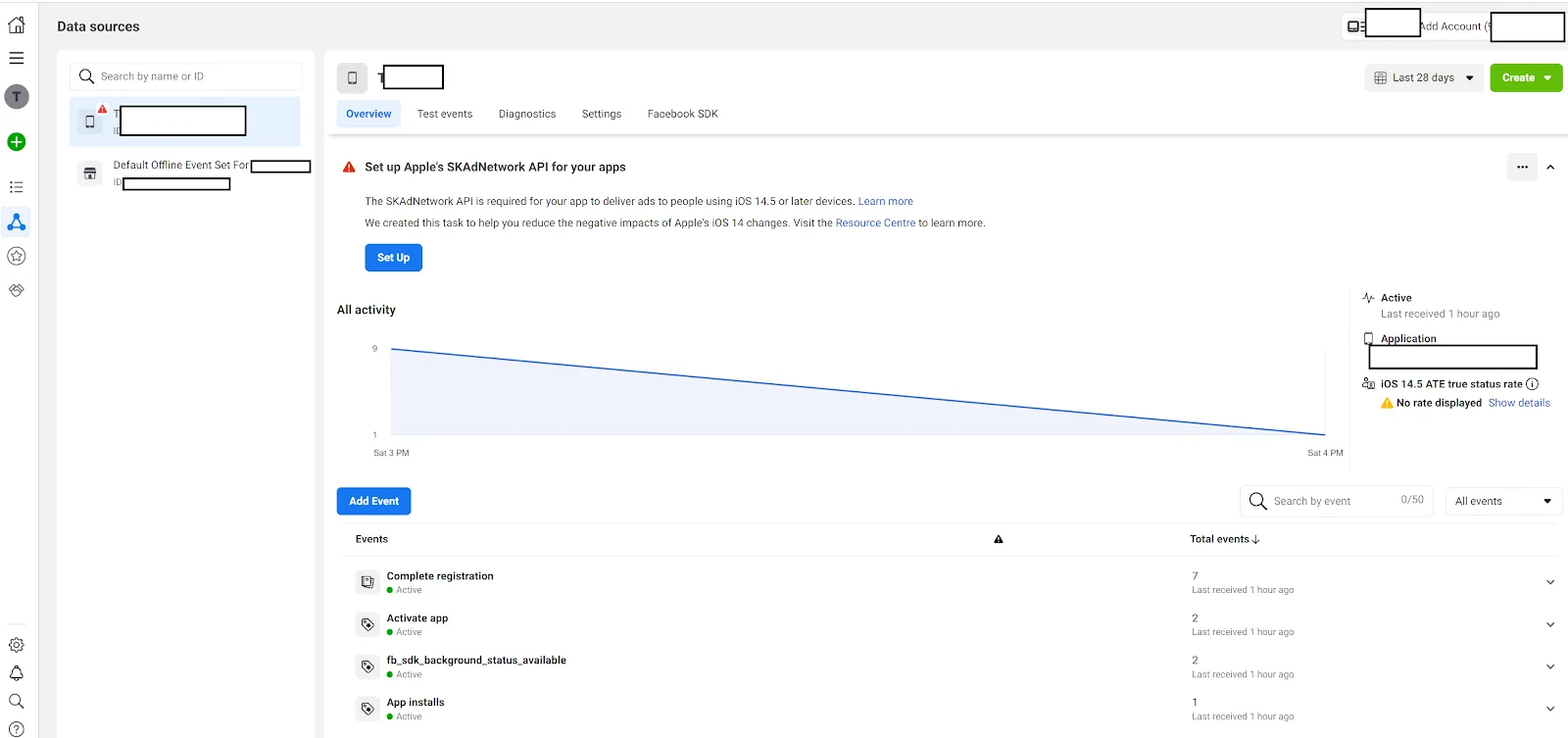
One of the biggest mistakes advertisers make is assuming that if the Pixel code exists on the website, then tracking must be working correctly.
That is not always true.
The Pixel may be installed, but the actual conversion event may never fire. The purchase event may trigger on the wrong page. The lead event may be missing. The thank-you page may not load properly. The browser may block the script. The event may fire twice. Or the event may be delayed too long.
A working Pixel is not just about installation. It is about confirming that the right event fires at the right time with the right data.
That is why testing matters.
You should always verify that Facebook receives the correct event, with the correct value, on the correct page.
Why Browser Privacy Changes Break Tracking
A lot of tracking problems happen because browsers are becoming more aggressive about blocking tracking scripts.
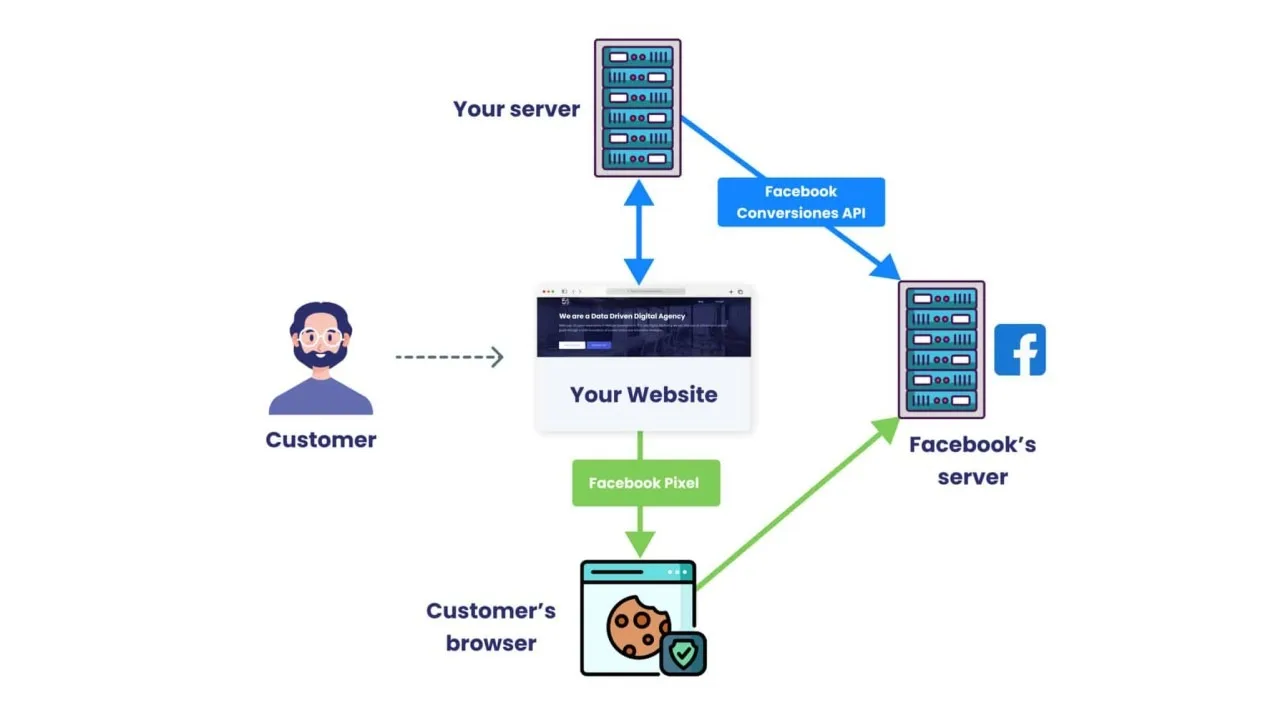
Safari, Firefox, ad blockers, privacy tools, cookie restrictions, and iOS tracking limitations can all reduce how many events Facebook receives.
This is especially common with mobile traffic because iOS privacy changes have made browser-based Pixel tracking much less reliable than before.
That does not mean the Pixel stopped working completely. It means Facebook may no longer see every conversion as clearly as it used to.
This is why server-side tracking, Conversions API, and stronger first-party data collection have become much more important.
Why Attribution Windows Cause Confusion
Sometimes the conversion is actually being tracked, but the reporting window makes it look like it is missing.
For example, if Facebook is using a 7-day click attribution window, a conversion may appear later than expected. Similarly, if a user clicks the ad on one device but converts on another, the conversion may not appear immediately or may not be attributed correctly.
This often creates confusion because the business sees the lead or sale in real life, but the Facebook dashboard does not show it the same way.
That is why it is important to compare Facebook data with CRM data, backend sales data, and website analytics instead of relying only on Ads Manager.
Why Better Tracking Systems Matter
Pixel tracking problems become much harder to diagnose when ad accounts, website changes, event code, landing pages, and analytics are spread across different systems. You may have one tool for the website, another for Pixel setup, another for ad management, and another for reporting. That makes it difficult to see where the conversion path is breaking.
This is one of the reasons Appilot becomes useful when advertising operations start scaling. Instead of keeping browser workflows, Android automations, landing page notes, event tracking, campaign history, and task logs spread across different systems, everything can stay visible from one dashboard. That makes it easier to monitor conversion paths, review event issues, compare tracking consistency, and spot missing data faster.
Conclusion: Missing Facebook Conversions Usually Mean The Tracking Path Is Broken Somewhere
If your Facebook Pixel is not tracking conversions correctly, the issue is usually not that the campaign itself is failing. The problem is that the Pixel, event setup, browser behavior, attribution window, or conversion path is breaking somewhere between the click and the final action.
Once you verify event firing, reduce duplicate tracking, improve browser-side reliability, and compare Facebook data with your own backend reporting, it becomes much easier to trust the numbers and optimize campaigns properly.