What Is Fingerprint Rotation? When to Change Your Identity

Most discussions about fingerprinting focus on maintaining consistency, but there are situations where changing identity becomes necessary. This process is known as fingerprint rotation. While it may seem simple to just switch fingerprints, doing it incorrectly can actually increase detection risk.
Understanding fingerprint rotation is important because it highlights the balance between consistency and change. Detection systems analyze both stability and transitions, which means timing and execution matter as much as the change itself. This guide explains what fingerprint rotation is, how it works, and when it should be used.
What Is Fingerprint Rotation?
Fingerprint rotation is the process of changing a browser or device fingerprint to appear as a different user. This involves modifying attributes such as user agent, screen resolution, timezone, language, and other signals that contribute to identity.
Unlike persistence, where the goal is to maintain a stable identity, rotation introduces a controlled change. The purpose is to avoid long-term linkage between sessions or accounts.
Fingerprint rotation is commonly used in workflows where multiple identities are required or where long-term tracking needs to be minimized.
The Core Principle Behind Fingerprint Rotation
The core principle behind fingerprint rotation is timing and realism. Real users do not change their device identity frequently, so rotation must mimic natural transitions.
Detection systems look for patterns in how identities change. Sudden or frequent changes can appear unnatural and may trigger flags.
This means that rotation is not just about changing values, but about doing so in a way that aligns with realistic behavior.
Why Fingerprint Rotation Matters
Fingerprint rotation matters because it helps break linkage between sessions. If the same fingerprint is used continuously, tracking systems can easily connect activities over time.
In scenarios where separation is required, rotation allows new sessions to appear as different users. This can reduce the risk of long-term tracking.
However, improper rotation can create inconsistencies. If a profile changes too quickly or in unrealistic ways, detection systems can identify the transition as suspicious.
For developers building automation systems, understanding when and how to rotate fingerprints is critical to maintaining realistic behavior.
How Fingerprint Rotation Works
Fingerprint rotation works by modifying identity signals and creating a new profile that represents a different user.
Changing Fingerprint Attributes
The first step in rotation is changing key fingerprinting signals such as user agent, screen resolution, timezone, and language. These changes create the appearance of a different device.
The challenge is ensuring that all attributes remain consistent with each other. A mismatch between signals can increase detection risk.
Resetting Session Data
In addition to changing fingerprint attributes, session data such as cookies and storage must be reset. This ensures that the new identity does not carry over data from the previous session.
Without this step, tracking systems can still link sessions based on shared data.
Assigning a New Network Identity
Fingerprint rotation is often combined with network changes, such as using a different IP address. This helps reinforce the separation between identities.
However, network changes must align with other signals, such as timezone and language, to maintain consistency.
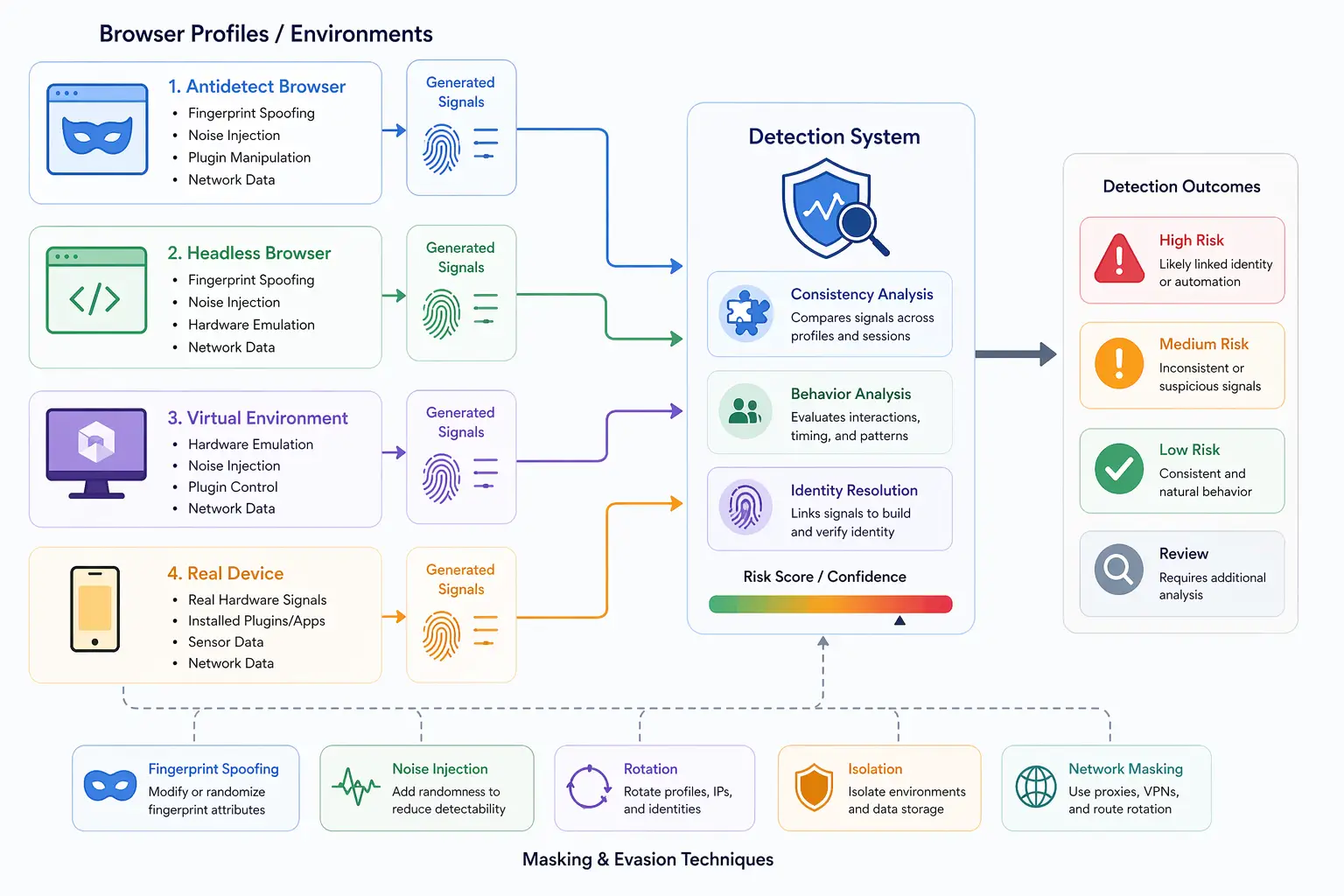
When to Rotate Your Fingerprint
Fingerprint rotation should not be done randomly. It should be based on specific conditions and use cases.
One situation where rotation is useful is when starting a completely new session that should not be linked to previous activity. This ensures a clean identity.
Another situation is when managing multiple accounts that must remain separate. Rotation helps prevent cross-linking between these accounts.
Rotation may also be necessary when a profile has been flagged or exposed. In such cases, continuing to use the same fingerprint can increase detection risk.
However, frequent or unnecessary rotation can be counterproductive. Maintaining stability is often more important than constantly changing identity.
Common Mistakes in Fingerprint Rotation
There are several common mistakes that can make fingerprint rotation ineffective.
One common mistake is rotating too frequently. Real users do not change devices often, so excessive rotation appears unnatural.
Another mistake is incomplete rotation, where some signals are changed while others remain the same. This creates inconsistencies that detection systems can identify.
There is also the issue of unrealistic combinations. Changing attributes without ensuring they align can result in profiles that do not exist in real-world scenarios.
These mistakes highlight the importance of careful configuration and planning.
Fingerprint Rotation vs Persistence
Fingerprint rotation and persistence are often seen as opposing strategies, but they serve different purposes.
Persistence focuses on maintaining a stable identity over time, while rotation introduces controlled changes when needed. Both approaches are important depending on the use case.
In many scenarios, a combination of persistence and occasional rotation provides the best balance between stability and flexibility.
Understanding when to apply each approach is key to avoiding detection.
Limitations of Fingerprint Rotation
Fingerprint rotation has limitations because it relies on modifying signals rather than changing underlying behavior.
Even if attributes are changed, deeper signals such as hardware behavior and rendering patterns may remain consistent. Detection systems can use these signals to identify similarities between profiles.
Another limitation is transition detection. Systems can analyze how identities change over time and flag unusual patterns.
This means that rotation must be implemented carefully to avoid creating detectable transitions.
Real-Device Approach vs Rotation
A key distinction in modern detection systems is the difference between rotating simulated identities and using real devices.
Fingerprint rotation modifies signals to simulate different users, but it does not change the underlying hardware. This can create subtle similarities across profiles.
In contrast, real-device approaches use actual hardware for each session, naturally producing different signals. Tools like Appilot follow this approach by running automation on real Android devices, reducing the need for artificial rotation and providing more realistic separation.
This approach aligns more closely with how real users behave.
When Fingerprint Rotation Makes Sense
Fingerprint rotation is most useful in scenarios where separation between sessions is required but maintaining a single identity is not necessary.
It is effective for managing multiple accounts, starting new sessions, and reducing long-term tracking.
However, it should be used strategically rather than continuously. Understanding when to rotate is more important than rotating frequently.
Frequently Asked Questions
Q: What is fingerprint rotation?
It is the process of changing fingerprinting signals to create a new identity.
Q: When should you rotate your fingerprint?
When starting a new session, managing multiple accounts, or when a profile has been flagged.
Q: Is frequent rotation better?
No, excessive rotation can appear unnatural and increase detection risk.
Q: Does rotation prevent tracking completely?
No, it reduces linkage but does not eliminate tracking, especially at deeper levels.
Q: What is the difference between rotation and persistence?
Rotation changes identity, while persistence maintains a stable identity over time.
Q: How do real-device solutions compare to rotation?
Real-device solutions like Appilot naturally produce different signals without relying on artificial rotation, making them more aligned with real-world behavior.
Key Takeaways
Fingerprint rotation is the process of changing identity signals to appear as a different user, and it plays an important role in managing session separation and reducing long-term tracking. It requires careful timing, consistent configuration, and alignment across all signals to be effective. While it can help break linkage between sessions, improper rotation can introduce inconsistencies that increase detection risk. Balancing rotation with persistence and understanding the limitations of signal-based changes are essential for maintaining realistic and effective environments.