Hardware Emulation in Antidetect Browsers Explained

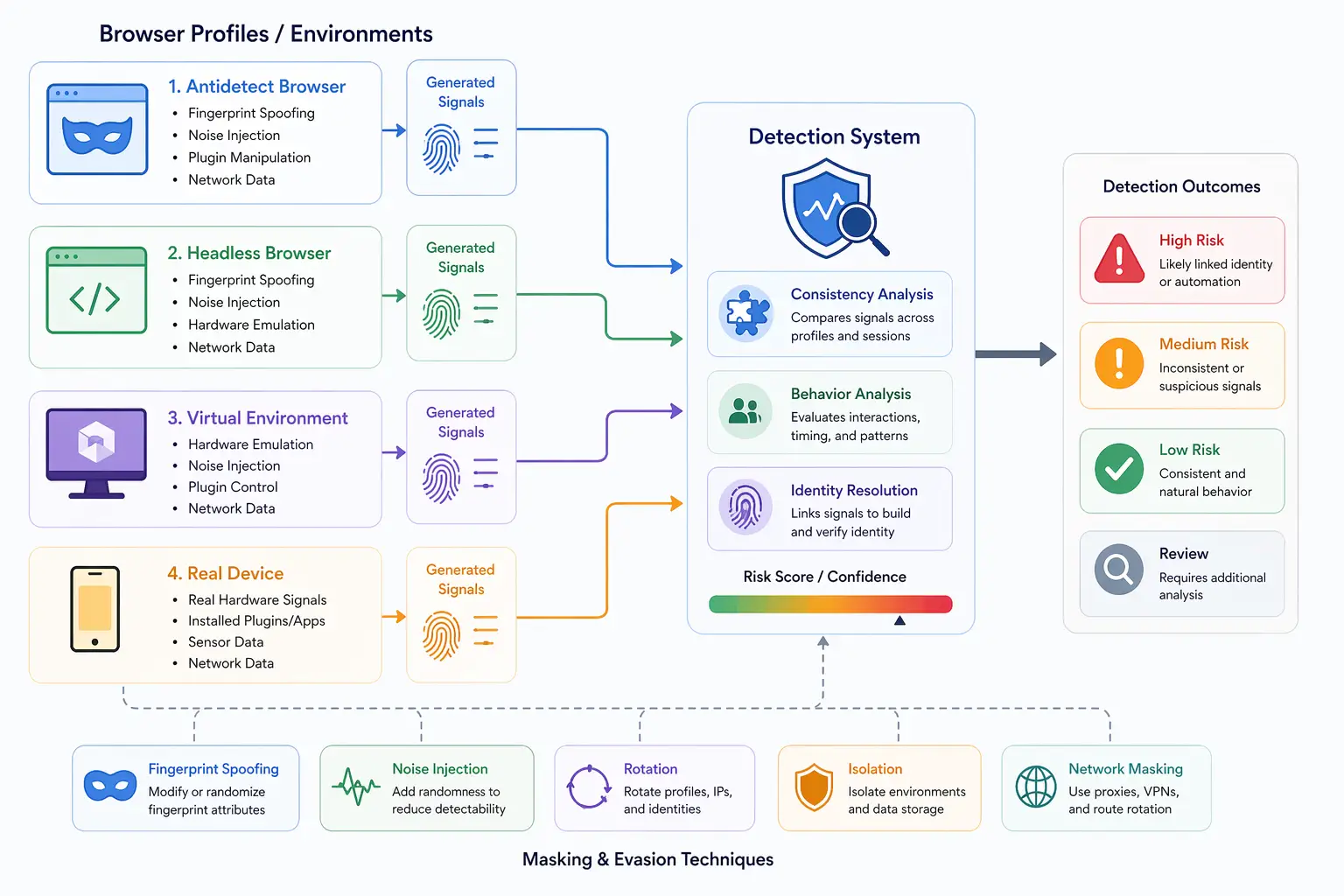
Most antidetect browser discussions focus on modifying browser-level signals, but modern tracking systems go much deeper by analyzing hardware behavior. This has led to the concept of hardware emulation, where environments attempt to simulate device-level characteristics. While this may sound like a complete solution, the reality is more complex.
Understanding hardware emulation is important because it reveals the gap between simulated environments and real devices. It also explains why some setups are still detectable despite extensive configuration. This guide explains how hardware emulation works, what it attempts to achieve, and where its limitations lie.
What Is Hardware Emulation?
Hardware emulation is the process of simulating the behavior of physical device components such as CPU, GPU, memory, and other system-level attributes. In antidetect browsers, this is used to make the browser appear as if it is running on a specific type of device.
Instead of directly using real hardware signals, the browser environment generates values that mimic how a device would behave. These values are then exposed through APIs and used in fingerprinting.
The goal is to create a believable hardware profile that aligns with the rest of the browser configuration.
The Core Principle Behind Hardware Emulation
The core principle behind hardware emulation is simulation. Detection systems rely on hardware-level signals because they are harder to spoof than browser attributes.
By emulating hardware behavior, antidetect browsers attempt to control these signals and create a consistent identity. However, simulating complex systems accurately is difficult.
Real devices produce signals that are influenced by multiple factors, including operating system behavior, drivers, and real-time performance. Emulated environments must approximate all of these elements.
How Hardware Emulation Works
Hardware emulation works by intercepting and modifying how hardware-related information is exposed to the browser.
CPU and Performance Simulation
Antidetect browsers can simulate CPU characteristics by controlling how performance-related APIs respond. This may include adjusting timing measurements or limiting reported capabilities.
These changes are intended to match the expected behavior of a specific device profile. However, real CPU performance varies dynamically, which can be difficult to replicate accurately.
GPU and Rendering Behavior
Graphics processing is a key component of fingerprinting, especially through WebGL and canvas rendering. Hardware emulation attempts to modify how these APIs behave to match a target device.
This can involve adjusting reported GPU information or modifying rendering outputs. While this helps align signals, it may not fully replicate the complexity of real GPU behavior.
Memory and Device Capabilities
Memory size, device capabilities, and other system-level attributes can also be emulated. These values are exposed through browser APIs and contribute to the overall fingerprint.
Ensuring that these attributes align with other signals is critical for maintaining consistency.
Why Hardware Emulation Matters
Hardware emulation matters because modern detection systems increasingly rely on hardware-level signals. These signals are considered more reliable because they are harder to manipulate.
By attempting to emulate hardware, antidetect browsers aim to reduce inconsistencies between browser-level attributes and deeper system behavior.
However, because hardware signals are complex and dynamic, emulation often introduces subtle patterns that can be detected.
Challenges in Hardware Emulation
Hardware emulation faces several technical challenges.
One major challenge is realism. Real devices exhibit variability in performance, rendering, and system behavior. Emulated environments often produce more predictable patterns.
Another challenge is alignment. Hardware signals must match browser-level attributes, network configuration, and overall system behavior. Any mismatch can be flagged.
There is also the issue of depth. Detection systems can analyze multiple layers simultaneously, making it difficult for emulation to cover all aspects accurately.
These challenges highlight why hardware emulation is not a complete solution.
Hardware Emulation vs Browser-Level Spoofing
Hardware emulation and browser-level spoofing are often used together but serve different purposes.
Browser-level spoofing focuses on modifying visible attributes such as user agent and screen resolution. Hardware emulation attempts to simulate deeper system behavior.
While spoofing is relatively straightforward, emulation is more complex and prone to inconsistencies. Combining both approaches requires careful alignment to avoid detection.
Hardware Emulation vs Virtualization
Hardware emulation is closely related to virtualization but is not the same.
Virtualization creates isolated environments that share underlying hardware, while emulation attempts to simulate hardware behavior entirely.
In many cases, virtual environments include elements of both. However, virtualization still relies on real hardware, while emulation generates simulated signals.
This distinction is important because detection systems can identify differences between real and emulated behavior.
Limitations of Hardware Emulation
Despite its benefits, hardware emulation has significant limitations.
One limitation is accuracy. Fully replicating real hardware behavior across all scenarios is extremely difficult.
Another limitation is performance overhead. Emulating hardware can consume resources and affect system performance.
There is also the risk of detection. Subtle inconsistencies in timing, rendering, and behavior can reveal that the environment is simulated.
These limitations make it challenging for hardware emulation to fully replace real-device behavior.
Real-Device Approach vs Emulation
A key distinction in modern detection systems is the difference between emulated environments and real devices.
Hardware emulation attempts to simulate device behavior, but it cannot fully replicate the complexity of real hardware. Real devices naturally produce consistent and dynamic signals.
Tools like Appilot take a real-device approach by running automation on actual Android devices. This ensures that hardware signals, rendering behavior, and system interactions align naturally without requiring emulation.
This approach reduces the need for simulation and provides a more realistic environment.
When Hardware Emulation Makes Sense
Hardware emulation is useful in scenarios where some level of control over hardware signals is required but perfect realism is not critical.
It can be effective in testing environments and controlled workflows where detection systems are less advanced.
However, in scenarios involving advanced detection, relying solely on emulation may not be sufficient.
Understanding when to use hardware emulation helps determine its role in a broader setup.
Frequently Asked Questions
Q: What is hardware emulation in antidetect browsers?
It is the simulation of hardware behavior to make a browser appear as a specific device.
Q: Why is hardware emulation important?
Because detection systems rely on hardware-level signals that are harder to spoof than browser attributes.
Q: Is hardware emulation accurate?
It can approximate real behavior but often introduces subtle inconsistencies.
Q: How is hardware emulation different from spoofing?
Spoofing modifies browser-level signals, while emulation simulates deeper system behavior.
Q: Can hardware emulation prevent detection?
It can reduce inconsistencies but does not eliminate detection risk.
Q: How do real-device solutions compare?
Real-device solutions like Appilot use actual hardware, producing natural signals without relying on simulation.
Key Takeaways
Hardware emulation in antidetect browsers is the process of simulating device-level signals such as CPU performance, GPU behavior, and memory characteristics. It aims to align deeper system signals with browser-level attributes to create a more realistic fingerprint. However, because real hardware behavior is complex and dynamic, emulation often introduces detectable patterns and inconsistencies. While it can improve realism compared to simple spoofing, it has limitations in accuracy and scalability, making it important to understand its role alongside other approaches.