Understanding Headless Browser Detection Methods

Headless browsers are widely used in automation, testing, and data extraction because they allow scripts to control browser behavior without a visible interface. However, modern websites are increasingly capable of detecting when a browser is running in headless mode.
Understanding headless browser detection is important because it explains why automation setups often fail even when basic configurations appear correct. Detection systems analyze multiple layers of behavior, making it difficult for headless environments to remain indistinguishable from real users. This guide explains how headless browser detection works and what signals are commonly used.
What Is a Headless Browser?
A headless browser is a browser that operates without a graphical user interface. It performs all the same functions as a standard browser, including rendering pages and executing JavaScript, but does not display them visually.
Headless browsers are commonly used in automation frameworks because they are faster and more resource-efficient. However, their behavior often differs slightly from regular browsers, which creates detectable signals.
The Core Principle Behind Detection
The core principle behind headless browser detection is identifying differences between automated and real user environments. Even small deviations in behavior, configuration, or output can reveal that a browser is running in headless mode.
Detection systems focus on these deviations rather than relying on a single indicator. This makes headless detection more robust and harder to bypass.
How Headless Browser Detection Works
Headless browser detection works by analyzing signals across multiple layers of the browser environment.
Checking Browser Properties
One of the simplest methods is checking properties that indicate headless mode. Some headless browsers expose specific values or flags that reveal their nature.
Detection scripts can query these properties and identify known patterns associated with automation.
Analyzing Rendering Differences
Headless browsers may render content differently compared to full browsers. This can affect canvas and WebGL outputs, which are commonly used in fingerprinting.
Even small differences in rendering can be used to identify headless environments.
Evaluating Feature Support
Headless browsers may lack certain features or behave differently when interacting with APIs. Detection systems can test for these differences to determine whether the environment is genuine.
Feature detection plays a key role in identifying inconsistencies.
Monitoring Timing and Performance
Automation environments often exhibit different timing characteristics compared to real users. Detection systems can analyze execution timing, event handling, and interaction delays.
These patterns can indicate whether actions are being performed programmatically.
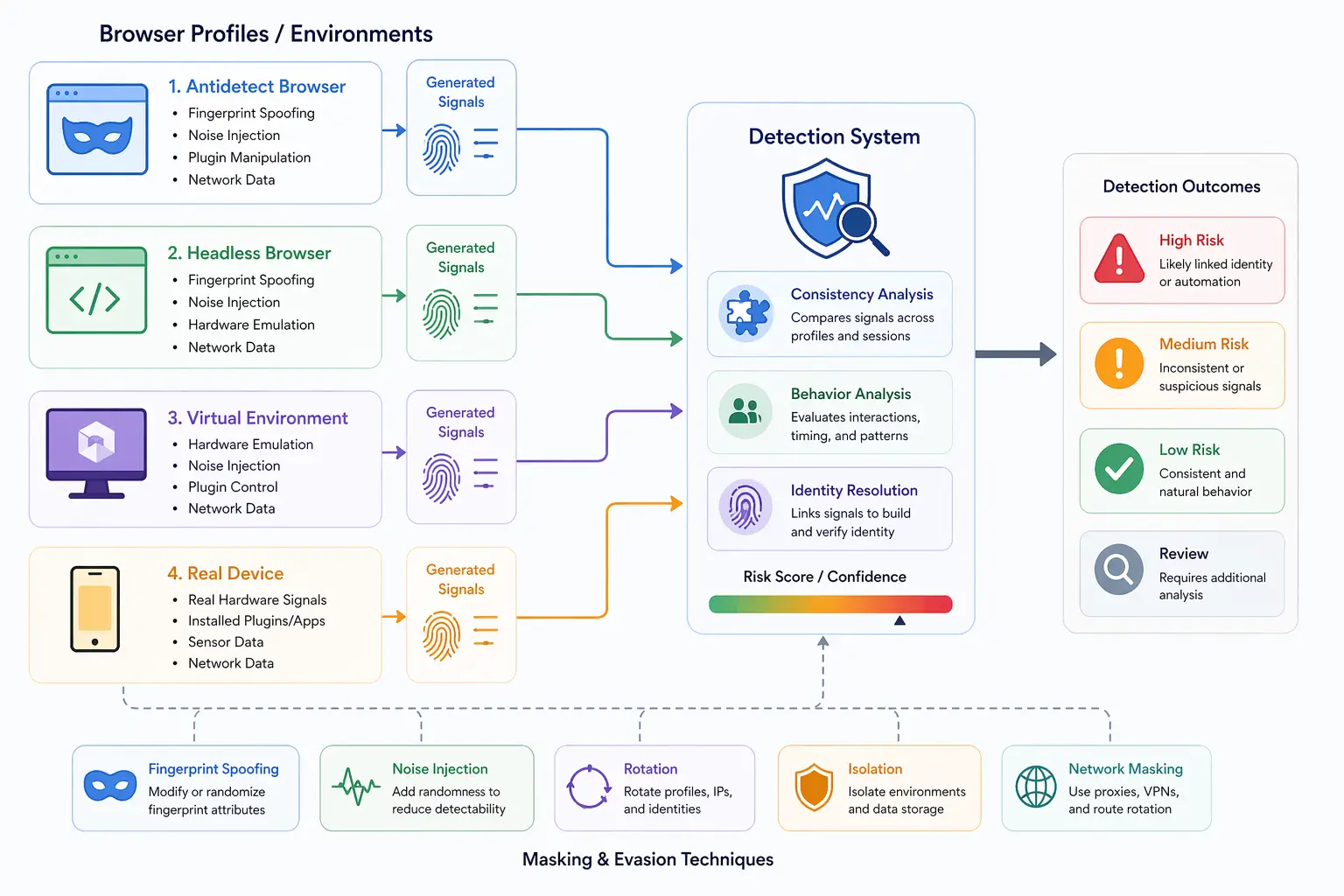
Common Headless Detection Signals
Headless browser detection relies on a combination of signals rather than a single factor.
One common signal is the presence of automation flags or missing properties that differ from standard browsers. Another signal is inconsistent rendering output, which can reveal differences in graphics processing.
Timing patterns are also important, as automated actions often occur faster or more consistently than human interactions. Feature support mismatches can further indicate that the environment is not genuine.
These signals are analyzed together to form a detection decision.
Why Headless Browsers Are Detectable
Headless browsers are detectable because they are optimized for automation rather than user interaction. This leads to differences in behavior, configuration, and performance.
Even when attempts are made to mask these differences, subtle inconsistencies can remain. Detection systems are designed to identify these inconsistencies across multiple layers.
This is why simply modifying a few attributes is often not enough to avoid detection.
Headless vs Headful Browsers
The key difference between headless and headful browsers is the presence of a graphical interface. Headful browsers operate as standard user environments, while headless browsers run without visual output.
This difference affects how certain features behave, including rendering and interaction handling. Detection systems use these differences to identify headless environments.
In some cases, running browsers in headful mode can reduce detection risk, but it does not eliminate it entirely.
Limitations of Headless Environments
Headless environments have inherent limitations when it comes to avoiding detection.
One limitation is incomplete feature support. Some APIs and features behave differently or are unavailable in headless mode.
Another limitation is behavioral consistency. Automated actions often lack the variability seen in human interactions.
There is also the challenge of maintaining alignment across all signals, including browser, hardware, and network layers.
These limitations make it difficult for headless environments to fully replicate real user behavior.
Headless Detection vs Stealth Plugins
Stealth plugins are often used to reduce headless detection by masking known signals. They can modify properties, adjust behavior, and patch differences between headless and headful modes.
While this improves realism, it does not address all detection methods. Deeper signals such as hardware behavior and timing patterns can still reveal automation.
This highlights the importance of understanding the limitations of masking techniques.
Headless Browsers vs Real-Device Environments
A key distinction in modern detection systems is the difference between headless environments and real devices.
Headless browsers simulate user behavior but often lack the complexity of real devices. Real devices produce signals naturally through actual hardware and system interactions.
Tools like Appilot take a real-device approach by running automation on actual Android devices, ensuring that browser behavior aligns with genuine user environments without relying on headless configurations.
This approach reduces many of the signals that detection systems rely on.
When Headless Browsers Are Suitable
Headless browsers are suitable for scenarios where speed and efficiency are more important than perfect realism.
They are widely used in testing, data extraction, and controlled automation workflows where detection risk is low.
However, in environments with advanced detection systems, additional measures may be required to achieve realistic behavior.
Understanding when to use headless browsers helps determine their role in a broader strategy.
Frequently Asked Questions
Q: What is a headless browser?
It is a browser that runs without a graphical interface and is commonly used for automation.
Q: How do websites detect headless browsers?
They analyze browser properties, rendering differences, feature support, and timing patterns.
Q: Can headless browsers avoid detection?
They can reduce detection risk but cannot completely eliminate it, especially in advanced systems.
Q: What are stealth plugins?
They are tools that modify browser behavior to hide automation signals.
Q: Is headful mode safer than headless?
Headful mode can reduce some detection signals but does not guarantee invisibility.
Q: How do real-device solutions compare?
Real-device solutions like Appilot use actual hardware, producing natural signals that are harder to detect compared to headless environments.
Key Takeaways
Headless browser detection works by identifying differences between automated environments and real user browsers across multiple layers, including properties, rendering, feature support, and timing behavior. While headless browsers are efficient and widely used in automation, they often exhibit detectable patterns that modern systems can identify. Techniques such as stealth plugins can reduce some signals, but they do not eliminate detection entirely. As detection systems become more advanced, understanding the limitations of headless environments and the importance of realistic behavior becomes critical.