Hit Your Computer’s Performance Limit? Here’s What to Do
You start your day with a few automation tasks running in the background, maybe a scraper, a few browser profiles, some scheduled workflows, and everything feels manageable at first, but as you add more tasks, open more sessions, and increase workload, your system begins to slow down in ways that feel unpredictable and frustrating.
Tabs start lagging, scripts take longer to execute, memory usage spikes, and eventually something crashes, sometimes quietly, sometimes catastrophically, leaving you with incomplete tasks, corrupted data, or broken workflows that you now have to fix manually.
This does not happen just once either, but repeatedly, and every time you try to push your system further, it pushes back harder, forcing you into a constant balancing act between performance and productivity, where you are always operating just below the breaking point.
What makes this even more frustrating is that you have already invested in decent hardware, maybe upgraded your RAM, optimized your setup, and even closed unnecessary applications, yet the problem persists, making you question whether your system is simply not capable of handling what you are trying to do.
You are not alone in this, and more importantly, this is not just a hardware problem, because most people hit performance limits not because their machines are weak, but because their workflows are not designed to scale efficiently on a single system.
The good news is that this problem is completely fixable once you understand what is actually causing the bottleneck, and in this guide, you will learn why your computer hits its limits, why typical fixes fail, and how to build a system that scales without crashing.
Why Your Computer Keeps Hitting Performance Limits
Most people assume performance issues are caused by insufficient hardware, but the real problem is usually how resources are being used, distributed, and managed under load.
Resource Saturation Happens Faster Than You Think
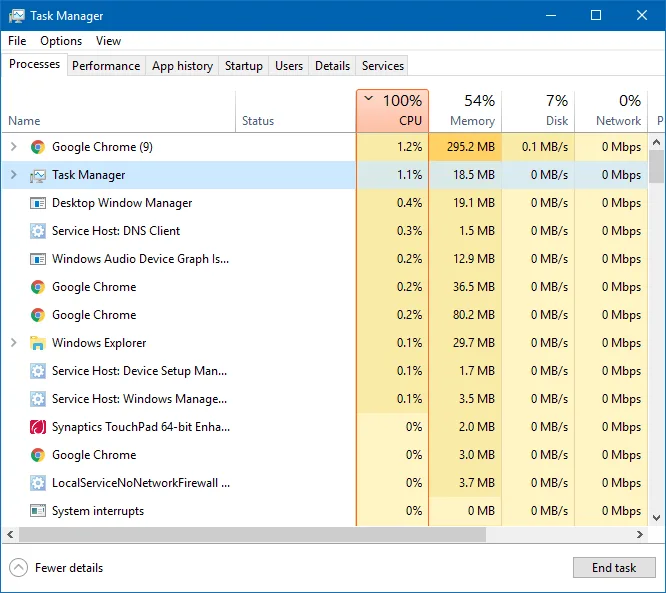
When you run automation tasks, especially browser-based workflows, each instance consumes CPU, RAM, and sometimes GPU resources, and while a single instance might seem lightweight, running multiple instances simultaneously creates exponential pressure on your system.
Browsers in particular are extremely resource-intensive, and running multiple profiles or tabs can quickly consume all available memory, forcing your system to rely on disk swapping, which drastically reduces performance.
Single-System Bottleneck
Running everything on one machine creates a central bottleneck, where all processes compete for the same resources, and once you reach the limit, performance does not degrade gradually but collapses rapidly.
Even if your CPU usage appears moderate, background processes, thread contention, and memory fragmentation can create hidden inefficiencies that slow everything down.
Lack of Workload Isolation
When multiple workflows share the same environment, they interfere with each other, causing unpredictable slowdowns, crashes, and inconsistent execution times.
One heavy task can affect all others, making your entire system unstable.
Inefficient Automation Design
Many automation setups are not optimized for performance, often running unnecessary processes, loading full web pages when only data is needed, or executing tasks sequentially instead of intelligently distributing them.
This inefficiency compounds over time, making even powerful systems struggle under load.
The Hidden Cost of Performance Limits
At first, performance issues seem like minor inconveniences, but over time they create significant losses that affect both productivity and scalability.
Every slowdown increases execution time, which means fewer tasks completed per day, while crashes force you to restart workflows, often losing progress and requiring manual intervention.
Financially, this translates into lost opportunities, delayed projects, and reduced capacity to handle more work, which directly limits your growth.
More importantly, it creates a psychological barrier, where you hesitate to scale because you know your system cannot handle it, effectively capping your potential regardless of demand.
The Complete Solution: How to Fix Performance Limits Permanently
Fixing performance issues is not about squeezing more power out of your current system, but about redesigning how your workloads are distributed and executed.
The first step is immediate stabilization, where you stop all non-essential processes and identify which tasks are consuming the most resources, allowing you to isolate the primary bottlenecks.
Once identified, you need to restructure your workflows so that they are not all running on a single machine, because no matter how powerful your system is, it will always have a limit.
The key shift here is moving from a centralized setup to a distributed one, where tasks are spread across multiple environments instead of competing for the same resources.
This is where mobile-based automation becomes particularly effective, because instead of running everything on your computer, you offload execution to real devices, each handling its own workload independently.
A practical way to implement this is by using a platform like Appilot, which allows you to run automation workflows directly on Android devices without relying on your computer’s resources, effectively removing the performance bottleneck entirely.
Instead of your computer struggling to handle dozens of tasks, it becomes a control center while the actual execution happens externally, which dramatically improves both performance and scalability.
Once your workloads are distributed, the next step is optimizing how tasks are executed, ensuring that they are not unnecessarily resource-heavy and that they run efficiently within their respective environments.
Monitoring becomes essential at this stage, allowing you to track performance across different nodes and identify any inefficiencies early.
How to Prevent Performance Limits From Ever Happening Again
Prevention starts with understanding that scaling is not about increasing load on a single system, but about distributing that load intelligently.
By maintaining separation between workflows and ensuring that each task operates within its own environment, you eliminate the risk of resource contention and system-wide slowdowns.
Regular monitoring helps you identify trends and adjust your setup before issues become critical, while continuous optimization ensures that your system evolves alongside your workload.
Common Mistakes That Make Performance Issues 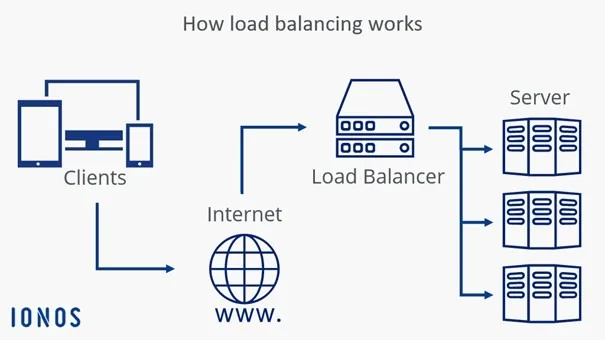
One of the most common mistakes is continuously upgrading hardware without addressing the underlying problem, which only delays the inevitable without solving it.
Another is trying to run more tasks on the same system by optimizing settings or closing applications, which might provide temporary relief but does not change the fundamental limitation.
There is also a tendency to ignore early warning signs such as minor slowdowns or increased resource usage, which often indicate that the system is approaching its limit.
Real Success Stories: Before and After
A developer running multiple scraping and automation workflows on a single machine found that their system would slow down significantly after a few hours of operation, eventually crashing under load and requiring frequent restarts.
After transitioning to a distributed setup using Appilot, they were able to offload execution to multiple devices, resulting in stable performance, faster execution times, and the ability to scale without worrying about hardware limitations.
Another case involved a marketing team managing multiple automation campaigns, where performance issues limited their ability to handle more clients, but after restructuring their system, they were able to increase capacity without additional hardware investment.
Frequently Asked Questions
One common question is whether upgrading hardware can solve performance issues, and while it can provide temporary improvement, it does not address the underlying problem of centralized workload management.
Another question is how many tasks a single system can handle, and the answer depends on the complexity of the tasks, but every system has a limit, and pushing beyond it will always result in performance degradation.
There is also the concern about whether distributed automation is difficult to set up, and while it requires an initial adjustment, platforms like Appilot simplify the process significantly by handling the infrastructure for you.
Conclusion: You Can Scale Without Limits
Hitting your computer’s performance limit can feel like a hard barrier, especially when it stops you from growing or forces you to constantly manage system stability instead of focusing on actual work, but the reality is that this limit is not a dead end, it is simply a signal that your system needs to evolve.
By shifting from a centralized approach to a distributed one, you not only eliminate performance bottlenecks but also create a system that can scale far beyond what a single machine could ever handle.
If your system is slowing down right now, the best step forward is not to push it harder, but to rethink how your workloads are structured, because once you do, performance stops being a limitation and becomes an advantage.