How Airbnb Hosts Use Social Media Automation to Fill Bookings
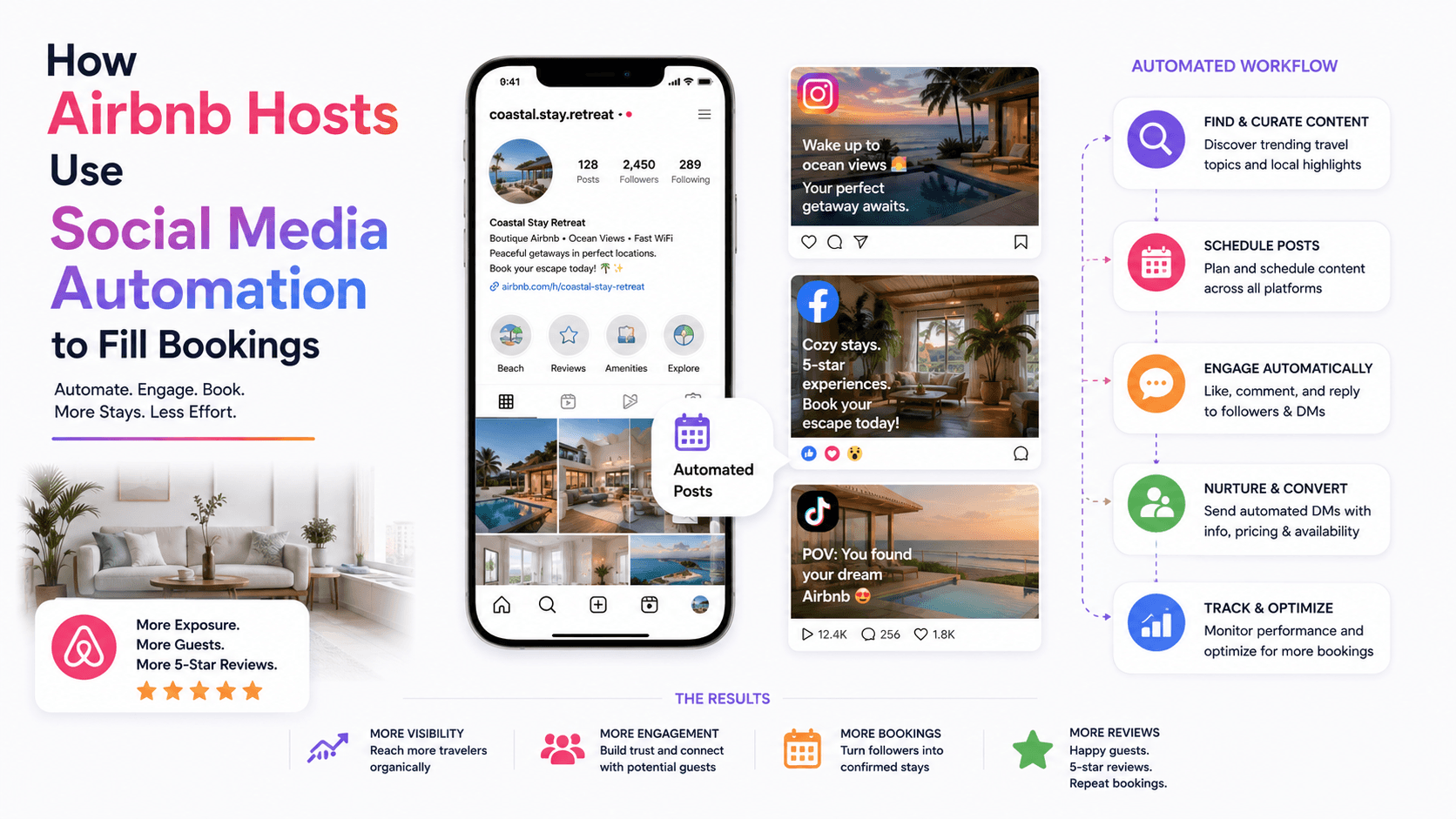
You check your Airbnb calendar on Monday morning and see the problem immediately. This weekend is booked, next weekend is booked, but the three weekdays in between are empty again.
The listing is good. The photos are clean. Guests leave nice reviews. But the calendar still has gaps that quietly eat into your monthly revenue.
Most Airbnb hosts rely almost entirely on the platform to bring them traffic. That works when demand is high, but it becomes risky during slow weeks, off-season months, local competition spikes, or when your listing stops ranking as well as it used to.
Social media gives hosts another way to create demand. But posting once in a while is not enough. You need visibility, local relevance, fast replies, and a repeatable way to stay in front of travelers before they book somewhere else.
That is where social media automation can help. Used correctly, it can promote your property, surface your listing to the right audience, and turn casual interest into real guest inquiries without forcing you to spend hours every day on Instagram, TikTok, Facebook, or LinkedIn.
Why Airbnb Hosts Struggle to Fill Booking Gaps
Short-term rental demand is uneven. A beach house may fill easily in summer and slow down in September. A city apartment may book well during conferences but sit empty midweek. A cabin may perform strongly in winter but struggle between peak travel seasons.
Most hosts know this pattern, but they do not always have a reliable marketing system outside Airbnb.
The usual approach is reactive. A date opens up, the host lowers the price, updates the listing, maybe posts a Story, and hopes someone books. That can help, but it does not create a steady audience of people who already know the property.
Manual social media marketing is also time-consuming. You have to post content, answer DMs, engage with local pages, comment on travel posts, reach nearby event audiences, and keep your property visible. For a host managing cleaning schedules, guest questions, repairs, pricing, reviews, and check-ins, that can feel like one more job.
What many hosts get wrong is treating social media like a photo album. Pretty property photos help, but they are not enough. Guests usually care about the experience around the stay: the neighborhood, restaurants, parking, walkability, nearby events, remote-work comfort, family-friendliness, and what makes the trip easier.
Social media automation works best when it supports that bigger story.
What Social Media Automation Means for Airbnb Hosts
Social media automation means using software to handle repetitive actions that help your property stay visible online. Depending on the platform, this can include profile visits, post engagement, Story views, follow workflows, DM organization, comment monitoring, and lead follow-up.
For Airbnb hosts, the goal is not to spam travelers. That is the fastest way to make your brand feel cheap. The better goal is to consistently reach people who are already interested in your location, travel style, event, or type of stay.
For example, a cabin host might target weekend travelers, hiking audiences, local tourism pages, wedding guests, or couples looking for quiet getaways. A city apartment host might focus on conference attendees, remote workers, relocation audiences, or people engaging with local event content.
A platform like Appilot is useful here because it runs automation through real Android devices or emulators and lets you manage workflows from a browser dashboard. Instead of relying on desktop scripts or keeping your laptop open all day, Appilot can help hosts run mobile-first social media workflows with controlled activity and safer session behavior.
The key is balance. Automation can help create visibility and organize interest, but your property, content, reviews, pricing, and guest communication still decide whether someone books.
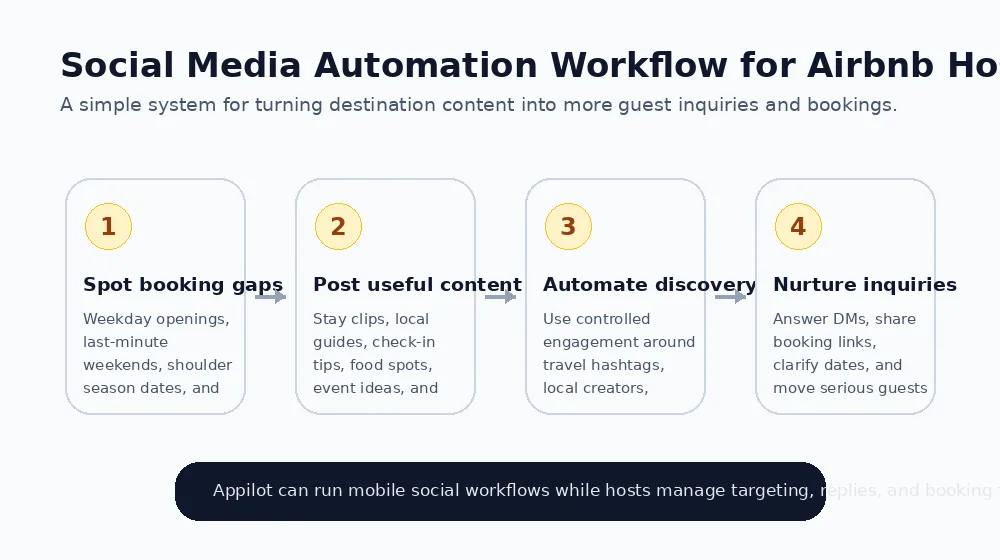
How Airbnb Hosts Use Social Media Automation in Practice
The first practical use case is promoting calendar gaps. If you have a few empty weekdays, a last-minute cancellation, or a slow weekend coming up, social media can help create demand outside the Airbnb search results.
Manually, you might post an Instagram Story, share a TikTok video, message past guests, or comment on local event pages. Automation can help make that process more consistent by engaging with nearby travel audiences, local event content, and users who already show interest in the destination.
Appilot’s social automation workflows can support this by running controlled engagement through mobile device sessions while the host manages targeting from a dashboard. For a host who wants to promote available dates without spending every evening searching hashtags, that can save serious time.
The second use case is local discovery. Many guests do not start by searching for a specific property. They search for a city, event, neighborhood, beach, hiking trail, festival, or weekend idea. Your content should meet them there.
A host in Nashville might post about weekend itineraries, live music areas, parking tips, and walkable neighborhoods. A mountain cabin host might post about hiking routes, fireplaces, hot tubs, fall colors, and quiet work-from-cabin weeks. Automation helps more relevant people encounter that content.
The third use case is DM inquiry nurturing. Guests often ask simple questions before booking. Is parking included? Can I bring a pet? How far is it from downtown? Is the Wi-Fi good enough for remote work? Is early check-in possible?
Automation can acknowledge these messages quickly, organize common questions, and help route serious inquiries into a booking flow. The host should still personally handle specific questions, pricing exceptions, guest fit, and anything that affects the stay.
The fourth use case is repeat guest and referral engagement. Past guests who had a good stay are valuable. Social media automation can help keep your property visible to them through light engagement and content reminders, especially before holidays, local events, or seasonal travel windows.
The fifth use case is multi-property promotion. Hosts or property managers with several listings often struggle to market each stay consistently. Automation can help maintain activity across accounts or campaigns, while the team focuses on guest experience and operations.
What Results Should Hosts Realistically Expect?
Social media automation will not magically fill every empty night. Bookings still depend on location, price, reviews, photos, amenities, seasonality, and competition.
A realistic goal is more visibility, more profile visits, more DMs, and better conversion from people already interested in your destination. If your property has slow weekdays, automation can help promote those openings to more relevant audiences, but it cannot fix an overpriced listing or poor guest experience.
The first two to four weeks are usually about testing. You are learning which content gets saves, which audiences ask questions, which platforms drive inquiries, and which dates need extra promotion.
For many hosts, the biggest improvement comes from faster response time. A guest who asks a question is often comparing multiple properties. If you reply quickly and clearly, you have a better chance of winning the booking.
Automation helps with consistency. The actual booking still comes from trust.
Setting Up Social Media Automation for an Airbnb Property
Start by making your social profiles useful. A guest should immediately understand where the property is, who it is for, what makes it different, and how to book. Your bio should include the city or area, the type of stay, and a clear link.
Then build content around the guest experience. Instead of posting only room photos, show what someone can do during the stay. Talk about nearby cafes, parking tips, best photo spots, family-friendly activities, remote work setup, rainy-day ideas, pet policies, and local events.
Next, define your target audience. This could be couples planning weekend trips, families visiting relatives, wedding guests, conference attendees, remote workers, festival visitors, or travelers interested in a specific neighborhood. Better targeting creates better conversations.
One reason Airbnb hosts may prefer Appilot is the setup simplicity. The dashboard is browser-based, and workflows can run on real Android devices or emulators without custom scripts, ADB setup, or complex technical work. For hosts who want more booking inquiries without becoming automation engineers, that matters.
Start with conservative limits. Avoid aggressive following, repetitive comments, or generic DMs. Social media platforms can detect unnatural activity, and travelers can sense spam quickly.
Finally, track what matters. Do not only count followers. Track profile clicks, DMs, booking link visits, inquiries, repeat guests, and which posts lead to real conversations.
Common Mistakes Airbnb Hosts Should Avoid
Posting Only Property Photos
Nice photos are useful, but guests want to imagine the full trip. If your content only shows bedrooms and kitchens, it may not answer the questions that actually drive bookings.
Show the stay experience, the neighborhood, nearby activities, and practical travel details.
Targeting Random Travel Audiences
A traveler interested in luxury hotels in Paris may not care about your cabin in Tennessee or your beach condo in Florida.
Target people connected to your location, event calendar, travel style, or guest type.
Sending Generic Booking Messages
Cold messages like “Book my Airbnb” usually feel spammy. They can damage trust before a guest even sees the listing.
Use automation for visibility and quick responses, then keep booking conversations helpful and specific.
Ignoring Response Speed
Guests often ask the same question to multiple hosts. The first clear, friendly reply has an advantage.
Automation can help acknowledge messages quickly, but you still need to step in when the guest is serious.
Forgetting Platform Rules
Social media platforms and booking platforms both have rules. Avoid misleading claims, fake urgency, copied content, or anything that creates a poor guest experience.
Automation should support honest marketing, not shortcuts.
Is Social Media Automation Right for Airbnb Hosts?
Social media automation can be a good fit if your property already has strong photos, decent reviews, and a clear guest experience, but you struggle to stay visible outside Airbnb.
It is especially useful for hosts with seasonal gaps, midweek vacancies, destination properties, event-driven markets, or multiple listings. It can also help hosts who get social media inquiries but respond inconsistently.
It may not be right if your listing has poor reviews, weak photos, unclear pricing, or operational problems that need fixing first. Automation can bring more attention, but it will not solve a bad stay.
The best use is simple: create more consistent visibility, then convert interested travelers with fast, helpful communication.
Final Thoughts
Airbnb hosts cannot rely only on platform search forever. Competition changes, demand shifts, and booking gaps happen.
Social media gives hosts a way to build their own audience and create demand before travelers ever open Airbnb. Automation makes that process more consistent, especially when it supports useful content, local targeting, and fast guest follow-up.
If you are tired of posting randomly and hoping your empty dates fill, Appilot is worth exploring. It offers ready-to-use bots for Instagram, TikTok, LinkedIn, and other platforms through a web dashboard, with no coding required. You can check it out at appilot.app.
FAQs
Q1: Can Airbnb hosts use social media automation safely?
Yes, if activity is controlled, relevant, and not spammy. Hosts should use conservative limits and avoid generic booking messages.
Q2: Which platforms work best for Airbnb marketing?
Instagram and TikTok work well for visual stays, while Facebook can help with local groups, events, and community-driven travel interest.
Q3: Can automation help fill last-minute booking gaps?
It can help promote open dates to relevant audiences, but pricing, location, reviews, and response speed still affect whether someone books.
Q4: Do Airbnb hosts need coding skills to automate social media?
No. Tools like Appilot provide dashboard-based automation workflows, so hosts can manage activity without writing code.
Q5: What should Airbnb hosts post on social media?
Post the stay experience, local guides, nearby attractions, guest FAQs, seasonal ideas, event tips, and practical details that help travelers choose.