How Android Accessibility Services Power Modern Automation
Many people assume Android automation depends on hacks, root access, or fragile screen scraping. In reality, some of the most powerful and reliable mobile automation available today is built on a legitimate Android system feature called Android Accessibility Services.
Originally designed for assistive technology, accessibility services now quietly power mobile testing frameworks, workflow automation tools, productivity utilities, and large-scale mobile systems.
For this guide, I’ll use Appilot as an example of how modern mobile automation platforms use accessibility services in practice. Appilot runs automation on real Android devices without requiring root access, emulator hacks, or constant ADB connections. Similar workflows can be built with Appium or UI Automator, but managed platforms make it much easier to maintain stable, scalable automation across multiple devices.
Understanding how Android Accessibility Services work explains why modern automation can interact with apps so accurately and why some approaches are much more stable than others.
Understanding Android Accessibility Services
Android Accessibility Services are system-level services that allow apps to observe UI changes in other apps, read UI element structures, and perform actions like tapping, swiping, scrolling, and entering text.
They were originally created to support screen readers, voice navigation, and switch access tools. However, the same underlying capability of structured UI access also makes them extremely powerful for automation.
Because accessibility services operate at the operating-system level, they work across most Android apps, do not require app modification, do not require root access, and interact in a way that closely resembles a real user.
At their core, accessibility services act as a trusted bridge between Android’s UI layer and automation logic.
The Core Principle Behind Accessibility-Based Automation
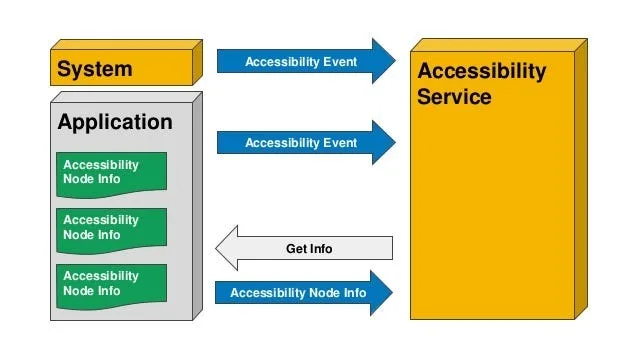
The model behind accessibility automation is event-driven.
When something changes on screen, such as a button appearing, text updating, or a screen transition occurring, Android emits an accessibility event.
The service then receives the event, analyses the UI hierarchy, and decides what action to perform.
When a UI event occurs, automation reacts in a deterministic way. This event-driven loop is what makes accessibility automation more stable than pixel-based or timing-based methods.
How Accessibility Services Differ from Traditional UI Automation APIs
This distinction is important.
Traditional UI automation frameworks often require test builds, depend on app instrumentation, and may only work with specific applications.
Accessibility Services work system-wide, require no developer integration, interact through the visible UI, and simulate real user actions.
You can think of it like this: traditional UI testing APIs provide backstage access, while Accessibility Services act like a highly skilled assistant using the phone exactly the way a human would.
That difference matters for both reliability and scale.
Why Android Accessibility Services Matter
1. Reliable Mobile Automation
Accessibility automation targets UI elements using text labels, content descriptions, roles, and clickable states rather than relying on screen coordinates.
That means layout shifts do not break automation, different screen sizes still work correctly, and changes in resolution do not matter.
For workflows involving social apps, repetitive tasks, or multi-app automation, this kind of structural targeting is critical.
2. Assistive Technology & Compliance
Accessibility services power screen readers, voice assistants, and switch navigation tools.
Well-structured apps benefit both users with disabilities and automation systems because both depend on clean UI semantics.
3. Strategic Automation Design
Teams that understand accessibility services design automation that reacts to events, traverses UI trees, and executes actions semantically.
Instead of guessing coordinates, hard-coding delays, or constantly fighting platform restrictions, they align their automation with how Android is designed to work.
This reduces maintenance and improves long-term stability.
How Android Accessibility Services Work in Practice
Accessibility-based automation follows a simple loop of Event, Analysis, and Action.
Stage 1 – UI Event Detection
When an app opens, a button appears, or text changes, Android emits an accessibility event.
This is different from screen scraping because it reacts to structured events rather than pixels.
For example, when a “Post” button becomes enabled, the accessibility service is notified immediately.
Stage 2 – UI Tree Analysis
Accessibility services receive a structured UI node tree.
Each node includes text content, content descriptions, a role such as button or input field, and a clickable or editable state.
Automation traverses this tree semantically by looking for concepts like “find the submit button” rather than trying to click at fixed screen coordinates.
This dramatically improves stability.
Stage 3 – Action Execution
Once the correct node is found, the service can click, long-press, scroll, type, or perform gestures.
These interactions flow through Android’s native input system, which means the app sees behaviour that looks like it came from a real user.
This is one reason why accessibility-based automation is more resilient than emulator-only approaches and harder to detect than injected scripting.
Common Misconceptions About Accessibility Automation
Misconception #1: “It’s Only for Disabled Users”
Accessibility was the original purpose of these services, but Android explicitly allows broader use cases such as automation, testing, and productivity tools.
It is not a loophole. It is a legitimate operating-system feature.
Misconception #2: “It’s Illegal or Against Policy”
Accessibility services are allowed when users explicitly enable them, when usage is transparent, and when no deceptive behaviour is involved.
The risk comes from abuse rather than the mechanism itself.
Misconception #3: “Apps Can Always Detect It”
Detection is possible in limited situations.
However, accessibility services operate at the operating-system level, use official APIs, and simulate real user interaction.
They are far less obvious than emulators, injected frameworks, or modified app builds.
Questions such as “can apps detect accessibility automation?” usually oversimplify a much more nuanced reality.
Real-World Examples
Mobile App Testing
QA teams use accessibility-based automation to simulate real user flows.
Because the interaction is UI-based, tests remain stable across updates and flaky coordinate-based tests are avoided.
Large-Scale Mobile Workflows
Automation platforms use accessibility services to manage app interactions, handle repetitive tasks, and maintain real-device execution.
This is where Appilot becomes especially useful. Rather than manually managing raw accessibility logic across many Android devices, Appilot provides a web dashboard that makes it easier to coordinate automation workflows while still relying on accessibility services in the background.
This reduces complexity and makes large-scale mobile automation more manageable.
Assistive & Productivity Tools
Voice assistants, screen readers, and automation helpers all rely on accessibility services.
The same capability powers both accessibility tools and automation systems.
The Technical Layer
Accessibility services are background services with special permissions.
Accessibility Events
Events describe what changed, where it changed, and what type of interaction occurred.
Accessibility Nodes
Nodes represent UI elements in a hierarchical tree.
Automation logic listens for event types, traverses nodes, and performs actions.
User Control & Permissions
Users must manually enable accessibility services.
Android displays clear warnings because these services can observe UI content.
This ensures explicit consent, controlled usage, and operating-system-level oversight.
When Accessibility Services Are the Right Tool
Scenario 1 – App-Agnostic Automation
When you need to automate third-party apps without SDK access, accessibility services are often the best choice.
Scenario 2 – Human-Like Interaction
When behaviour needs to mirror real user input, accessibility-based automation is much more effective than coordinate-based methods.
Scenario 3 – Multi-Device Stability
When automation needs to run across different screen sizes, Android versions, and device models, accessibility-based approaches adapt much better than fixed-coordinate systems.
Tools That Help With Accessibility-Based Automation
There are several ways to implement accessibility-based mobile automation.
Appium is useful if you want an open-source framework and do not mind handling your own device infrastructure.
UI Automator works well when you need native Android automation with direct control over UI interactions.
Appilot is useful when you want a managed mobile automation platform with a web dashboard, real-device execution, accessibility-based interaction, and easier workflow management without requiring constant manual setup.
The best choice depends on whether you want maximum flexibility, lower cost, or simpler long-term management.
Key Takeaways
Android Accessibility Services are foundational to modern mobile automation.
They enable automation without modifying apps, operate at the operating-system level, provide event-driven stability, scale across devices and layouts, and power both assistive technology and automation systems.
Understanding accessibility services means designing automation that works with Android rather than against it.
If you are running automation across multiple Android devices, Appilot can make that process much easier by handling device management, session stability, and accessibility-based workflows through a single dashboard.
Frequently Asked Questions
Q: What are Android Accessibility Services used for?
They are used for assistive tools like screen readers as well as testing, automation, and productivity workflows.
Q: How do they work internally?
They listen for UI events, analyse a structured node tree, and perform user-like actions.
Q: Can apps detect accessibility automation?
Detection is possible in limited cases, but accessibility services operate at the operating-system level and are harder to identify than emulators or injected code.
Q: Are accessibility services safe?
Yes, when they are enabled transparently and used responsibly. Android requires explicit user consent.
Q: How do they compare to UI automation frameworks?
Traditional UI automation often requires app-specific hooks, while accessibility services work system-wide and interact much more like a real user.