How to Assign Different Proxies to Different Browser Profiles
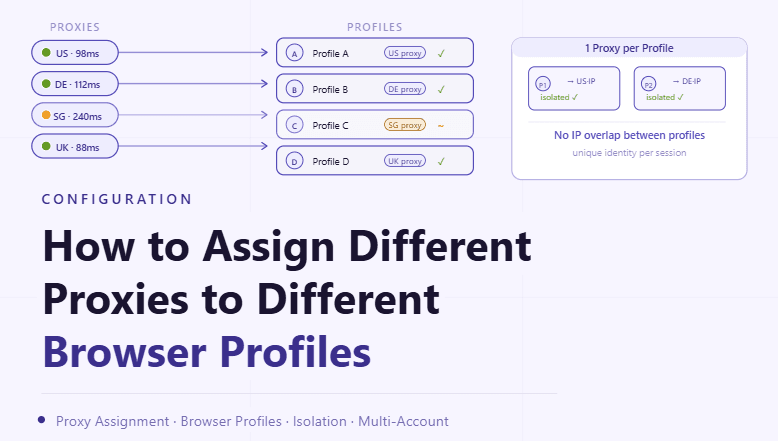
By the end of this tutorial, you will understand how to map proxies to browser profiles in a structured way so each profile operates independently with its own network identity. Assigning proxies randomly or sharing them across profiles often leads to instability and confusing behavior.
To follow along, you only need a basic understanding of browser profiles and how proxies route traffic. The focus here is on building a clean assignment system rather than writing code.
This setup typically takes about an hour to design properly, but it greatly improves organization and reliability. If you manage many profiles, Appilot can help orchestrate execution while your proxy assignment system ensures consistent behavior.
You will build a system that links each profile to a specific proxy, maintains consistency, and avoids common configuration issues.
Why One-to-One Proxy Assignment Matters
When multiple profiles share the same proxy, their network behavior becomes linked. This can create confusion in workflows and reduce clarity when troubleshooting issues.
Assigning one proxy per profile ensures that each environment remains independent. This improves stability and makes it easier to manage and monitor each profile.
Understanding the Relationship Between Profiles and Proxies
A browser profile represents an isolated environment, while a proxy defines how that environment connects to the internet. When these two are paired correctly, the profile behaves consistently with a stable network identity.
Maintaining this relationship is key to predictable performance.
Creating a Clear Mapping System
A structured mapping system defines which proxy belongs to which profile. This can be maintained through a simple list, spreadsheet, or internal configuration.
Clear mapping prevents accidental reuse and ensures that assignments remain consistent over time.
Avoiding Shared Proxy Usage
Sharing proxies across profiles may seem efficient, but it often leads to overlapping behavior and inconsistent results. This can make it difficult to diagnose issues or maintain clean separation between profiles.
Keeping proxies dedicated to individual profiles avoids these problems.
Organizing Proxies Into Manageable Pools
When working with many profiles, proxies can be grouped into pools for easier management. Each pool can then be assigned to a set of profiles without overlap.
This structure helps maintain order and prevents confusion as the system scales.
Maintaining Consistency Over Time
Once a proxy is assigned to a profile, it should remain consistent unless there is a clear reason to change it. Frequent reassignment can disrupt workflows and create instability.
Consistency ensures that profiles behave predictably.
Handling Proxy Replacement When Needed
Sometimes a proxy may become slow or unreliable. In such cases, it should be replaced carefully rather than swapped randomly.
A controlled replacement process ensures that the profile continues to function smoothly.
Tracking Proxy Usage Across Profiles
Monitoring which proxies are assigned to which profiles helps maintain visibility. This makes it easier to identify issues and ensures that no proxy is overused.
Tracking also supports better decision-making when adjustments are needed.
Avoiding Assignment Conflicts
Without a clear system, it is easy to accidentally assign the same proxy to multiple profiles. This can create unexpected behavior and reduce clarity.
A structured assignment process prevents such conflicts.
Integrating Proxy Assignment Into Profile Management
Proxy assignment should be part of your overall profile management system. Instead of treating it as a separate step, it should be integrated into how profiles are created and maintained.
This ensures consistency across all workflows.
Scaling Proxy Assignment with Appilot
At this stage, your proxy assignment system works locally and ensures that each profile has a dedicated connection. As the number of profiles and workflows increases, managing assignments manually becomes more complex.
This is where Appilot becomes useful because it helps orchestrate workflows while your proxy system maintains consistent network mapping.
FAQ
Q1: Why assign one proxy per profile?
To maintain independence and avoid shared behavior across profiles.
Q2: Can I share proxies between profiles?
It is possible, but it can lead to instability and is generally not recommended.
Q3: What should I do if a proxy stops working?
Replace it carefully while maintaining consistency for the profile.
Q4: How do I track proxy assignments?
Using a structured mapping system such as a list or spreadsheet.
Q5: Do I need Appilot for proxy assignment?
No, you can manage it locally. Appilot becomes useful when scaling workflows.
Conclusion
Assigning different proxies to different browser profiles is essential for maintaining a clean and reliable system. By creating a structured mapping, maintaining consistency, and monitoring usage, you can ensure that each profile operates independently.
Start by defining a clear assignment system, avoid sharing proxies, and integrate this process into your profile management workflow. Once this system is in place, your automation becomes more stable and easier to manage.