How to Automate Instagram Comment Replies for Your Online Store
You post a product reel, and it finally starts getting attention. People are commenting “link,” “price,” “available?” and “does it come in black?” while the post is still moving through the feed.
That should be a good thing.
But if you are busy packing orders, answering emails, checking inventory, or running ads, those comments can sit unanswered for hours. By the time you reply, the buyer may have lost interest, found another product, or simply forgotten why they asked.
For online stores, Instagram comments are not just engagement. They are buying signals. When someone asks for the link, price, size, delivery time, or product details, they are already closer to purchase than a casual viewer.
Instagram comment reply automation helps you respond while that intent is still fresh. Done properly, it makes your store feel faster and more organized without turning your comment section into robotic spam.
Why Online Stores Struggle With Instagram Comment Replies
Most online stores start by replying manually, and that works when the account is small.
Then a reel performs well, a product drop gets attention, or an influencer sends traffic to your page. Suddenly, the same questions appear again and again. “Link?” “How much?” “Is this available?” “Do you ship to Canada?” “What size is this?” “Can I order now?”
The comments are simple, but they stack up quickly.
A small store owner can easily spend 30 to 60 minutes a day replying to basic Instagram comments. During launches, sales, or viral posts, that can become even harder to manage.
The mistake many stores make is treating comments like public reactions only. In reality, comments are often the first step of a purchase conversation. If you answer quickly and clearly, you can move the customer toward a product page, DM, checkout link, size chart, or support reply.
If you answer late, the moment cools down.
What Instagram Comment Reply Automation Actually Does
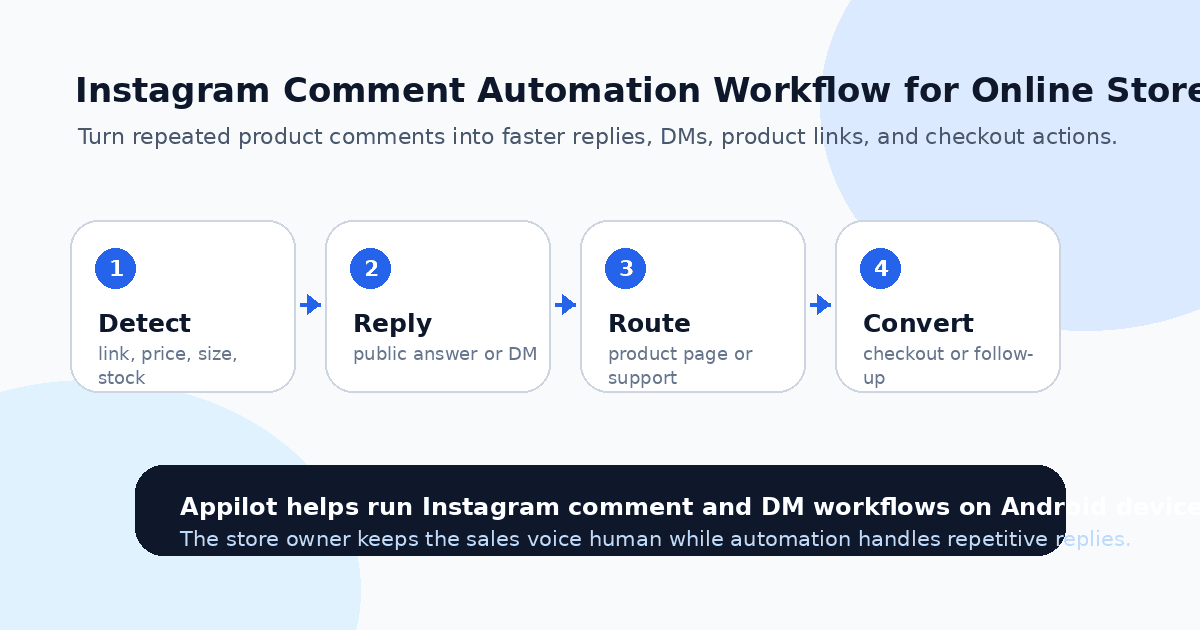
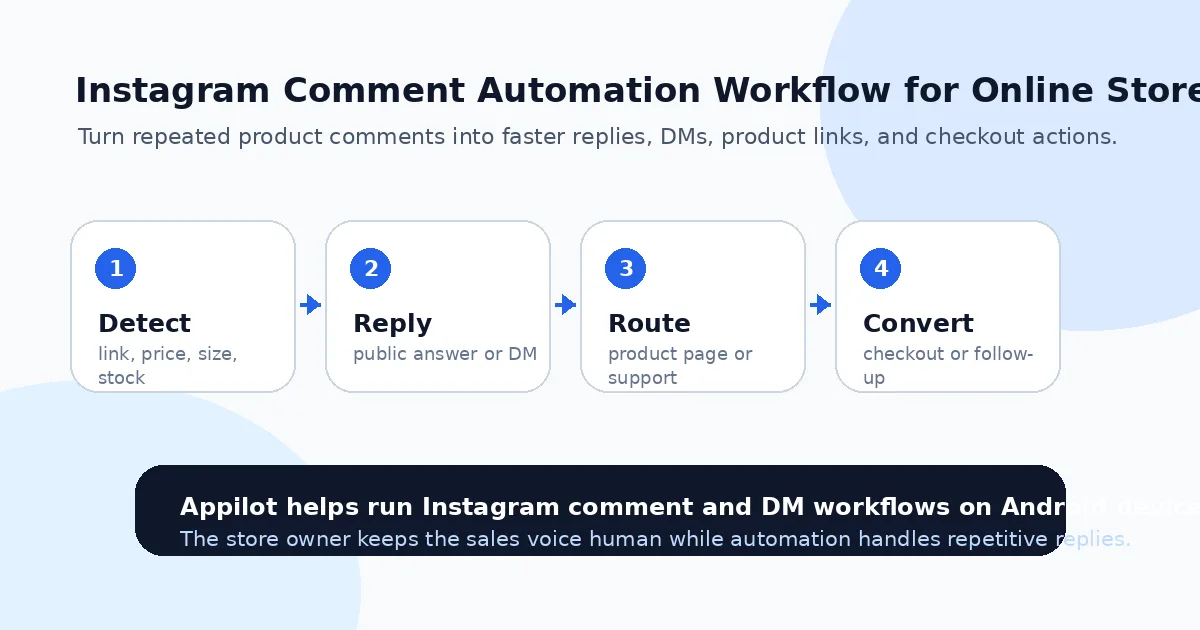
Instagram comment reply automation uses software to detect certain comments and respond based on rules you set. The rules might be based on keywords like “link,” “price,” “size,” “shipping,” “discount,” “available,” or the name of a product.
For example, if someone comments “link please,” the automation can reply publicly and send a DM with the product link. If someone comments “price?” it can share the current offer or direct them to the product page. If someone asks “size?” it can send the size guide or ask which product they mean.
The safest approach is usually real-device automation, where actions run through the actual Instagram app on an Android device or emulator. That looks more like real mobile behavior than basic desktop scripts or fragile API-based tools.
A platform like Appilot is built around this type of workflow. It runs automation on real Android devices or emulators and lets you manage the process from a web dashboard, without ADB setup, coding, or keeping a laptop connected all day. For online store owners, that means repetitive Instagram comment replies can be handled faster while the brand still controls the message.
The point is not to automate every conversation. The point is to automate the repeated questions that slow sales down.
Step 1: Identify the Comments That Lead to Sales
Before setting up automation, review your recent Instagram posts and reels.
Look for the comments that appear again and again. Most online stores will see patterns around product links, price, size, color, availability, shipping, discounts, restocks, bundles, and returns.
These are the comments worth automating first because they usually come from people who are already interested.
A clothing store might automate replies for “size,” “link,” “black,” “restock,” and “shipping.” A skincare store might focus on “ingredients,” “skin type,” “routine,” “price,” and “bundle.” A gadget store might focus on “compatible,” “iPhone,” “Android,” “battery,” and “delivery.”
Do not start with too many triggers. Begin with the top three to five questions that directly affect buying decisions. Once those work smoothly, you can expand.
Automation works best when it solves a real pattern, not when it tries to guess everything.
Step 2: Decide Between Public Replies and DM Replies
Not every comment should get the same type of reply.
Some answers should stay public because they help other shoppers too. If someone asks, “Do you ship worldwide?” and the answer is yes, a public reply can reduce repeated questions. If someone asks about a general sale deadline, a public answer makes sense.
Other answers are better handled in DMs. Product links, discount codes, order support, size help, and personalized recommendations often work better privately. A DM also gives the buyer a clearer path to click, ask follow-up questions, or move toward checkout.
A useful setup often uses both. The public reply confirms that you answered, while the DM gives the detailed link or next step.
For example, you might reply publicly, “Just sent it to your DM,” and then send the product link privately. That keeps the comment section active while moving the buyer into a direct conversation.
This is where Appilot’s Instagram automation can fit naturally. You can build workflows around comment keywords, replies, and DMs while actions run through Android devices or emulators instead of manually handling every response yourself.
Step 3: Write Replies That Sound Like Your Brand
Automated replies should not sound like templates from a support manual.
Your reply should match how your brand normally speaks. If your store is casual, keep it casual. If your product is premium, keep it polished. If your audience is young and trend-driven, the tone can be lighter, but still clear.
A bad reply says, “Thank you for your inquiry. Please visit our website for further information.”
A better reply says, “Yes, it’s available. I just sent you the product link in DM.”
That feels more natural.
Keep replies short because Instagram comments move quickly. Customers do not want a long explanation when they ask for a link or price. They want the next step.
Also, avoid overusing the exact same phrase. If every reply says the same thing, your comment section starts to look automated. Create a few variations for common triggers so the account feels more human.
Step 4: Connect Replies to the Right Product Pages
One of the biggest mistakes online stores make is sending everyone to the homepage.
If someone comments under a reel about a specific product, send them to that product. If the post is about a bundle, send the bundle page. If the comment is about sizing, send the size guide or the correct product variant page.
Every extra click creates friction.
This matters even more during launches, seasonal sales, influencer campaigns, and viral reels. When a product post gets momentum, buyers want the shortest route from interest to checkout.
You can also use tracked links where possible to see which posts and reply flows create traffic. This helps you learn whether your comment automation is actually driving product visits, not just creating replies.
Automation should make the buying path easier. If it sends people to the wrong place, it creates confusion instead of sales.
Step 5: Set Safe Limits and Avoid Spam Behavior
Instagram comment automation needs restraint.
Do not reply aggressively to every single comment. Do not send sales DMs to people who only left a casual reaction. Do not use the same exact comment over and over under every post. That can make your store look spammy.
Start with buyer-intent triggers. Words like “link,” “price,” “available,” “size,” “shipping,” “discount,” and “restock” are usually safer and more useful than broad triggers like “nice” or “love.”
One reason online stores use Appilot for this workflow is that it lets them control Instagram automation from a dashboard while running actions through Android environments. That makes setup easier for store owners who do not want to deal with scripts, command lines, or ADB tools.
Still, the strategy matters. Even a good tool can create bad results if the replies are too pushy.
A simple rule works well: only automate replies that a real store assistant would naturally send.
Step 6: Monitor Conversations and Improve the Flow
Automation is not something you should set once and ignore.
Check your comment sections and DMs regularly. Look for wrong replies, missed keywords, repeated questions, confused customers, or comments that should have been handled manually.
For example, if people keep asking whether a product works for a certain use case, add that answer to your product page and reply flow. If people ask about delivery time after receiving the link, add shipping information earlier. If the keyword “size” triggers too many unclear replies, make the response ask which item they mean.
The best comment automation gets smarter over time because it is based on real customer behavior.
This is also where your store can improve beyond Instagram. Comments tell you what buyers do not understand. Use those questions to improve product pages, FAQs, ads, captions, and story content.
Common Mistakes to Avoid
Replying to Every Comment Like It Is a Sales Lead
Not every comment needs a DM. Some people are just reacting to the content. Focus automation on comments that show real buying intent.
Sending Generic Product Links
A link is only useful if it takes the customer to the right page. Sending everyone to the homepage adds friction and lowers conversion.
Making Replies Too Long
Instagram comment replies should be quick and easy to read. Long replies can feel unnatural and may distract from the next step.
Ignoring Manual Takeover
Some comments need a human response, especially complaints, order issues, influencer requests, bulk orders, and detailed product questions.
Automating Before Your Store Is Ready
If your product pages are unclear, your prices are confusing, or your checkout flow is weak, automation will only expose those problems faster.
Is Instagram Comment Reply Automation Right for Your Store?
Instagram comment automation is a good fit if your store already gets repeated product questions, link requests, price questions, restock comments, or size-related replies. It works especially well for Shopify stores, dropshipping brands, fashion stores, beauty brands, gadget shops, fitness products, and flash sale campaigns.
It may not be right if your Instagram account has no engagement yet or your product pages are not ready to convert. Automation can speed up replies, but it cannot create demand or fix a weak offer.
The best time to set it up is when manual replies are starting to slow down real buyers.
Final Thoughts
Instagram comments can turn into sales when you treat them like buying signals instead of casual engagement.
Automation helps your online store reply faster, send the right links, answer repeated questions, and move interested shoppers toward checkout while their intent is still fresh. The key is to keep replies relevant, short, and human.
If you want to automate Instagram comment replies without coding, ADB setup, or manual device management, Appilot gives online stores a browser-based way to run Instagram workflows on Android devices and emulators. You can check it out at appilot.app.
FAQs
Q1: Can I automate Instagram comment replies for my online store?
Yes, you can automate replies for common comments like “link,” “price,” “size,” “available,” “shipping,” and “discount” to respond faster.
Q2: Should automated replies be public or sent by DM?
Use public replies for general answers and DMs for product links, discount codes, size help, or more personal buying questions.
Q3: Is Instagram comment automation safe?
It is safer when replies are triggered by real buyer comments, limits are conservative, and the automation avoids spam-style behavior.
Q4: Can Appilot help automate Instagram comment replies?
Yes, Appilot can run Instagram comment and DM workflows on Android devices or emulators from a web dashboard without coding.
Q5: Does comment reply automation increase sales?
It can help by replying faster and sending buyers to the right product pages, but your offer, product page, and checkout still need to convert.