How to Automatically Clean and Validate Scraped Data
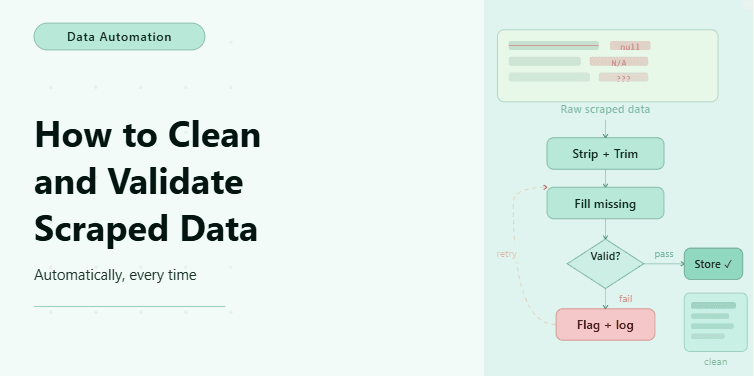
By the end of this tutorial, you will have a workflow that not only extracts data from websites but also cleans and validates it automatically before using or storing it. This is a critical step in any real automation system because raw scraped data is rarely perfect. It often contains extra spaces, missing values, inconsistent formats, duplicates, or even incorrect entries that can break downstream processes.
To follow along, you need Python 3.9 or higher and a basic understanding of how scraped data is structured, usually as lists or dictionaries. You do not need advanced data processing knowledge, because the focus here is on building a simple and reliable cleaning and validation pattern.
This setup typically takes about one hour to build for simple use cases. Once it is in place, it becomes a reusable layer that can sit between your scraping logic and your output, ensuring that everything you store or process is accurate and consistent. If you later run multiple scraping workflows across different sources, Appilot can help manage execution while this cleaning logic remains unchanged.
You will build a system that takes raw scraped data, removes inconsistencies, validates values, and produces a clean dataset ready for reporting or automation.
What This Tutorial Builds — And Why This Approach
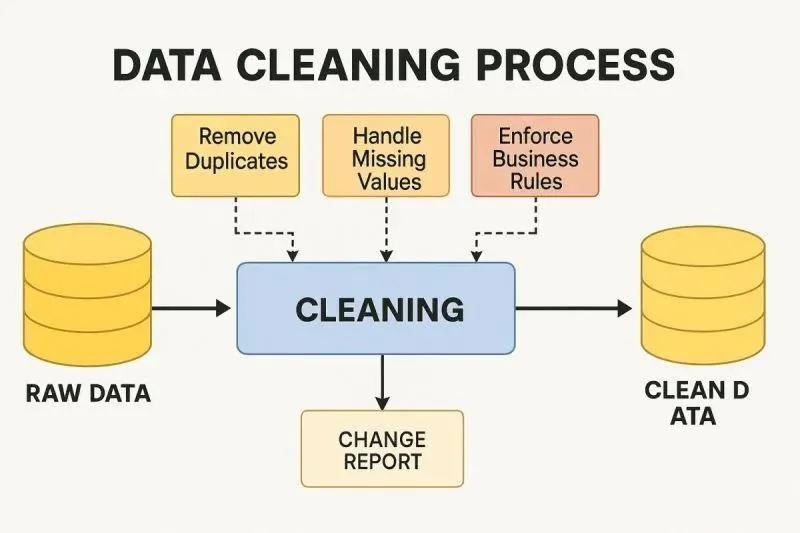
This tutorial builds a cleaning and validation layer that sits between data extraction and final output. Instead of trusting raw scraped data, the workflow processes each record to ensure it meets defined quality rules. This includes removing unnecessary formatting, standardizing values, checking for required fields, and filtering out invalid entries.
This approach is important because even small data issues can create large problems later. A missing value might break a report, an incorrect format might cause a calculation error, and duplicate entries might distort results. By cleaning and validating data immediately after scraping, you prevent these issues from spreading into the rest of your system.
At a small scale, this can run locally as part of your scraping script. At a larger scale, where multiple data pipelines run regularly, Appilot becomes useful for managing execution and monitoring, while the cleaning logic continues to operate as a consistent layer.
How the System Works — Architecture Overview
At a high level, the workflow takes raw scraped data, applies cleaning rules to standardize it, then applies validation rules to ensure it meets quality requirements. Only data that passes validation is included in the final dataset.
This structure separates two responsibilities clearly. Cleaning transforms data into a consistent format, while validation checks whether the data is acceptable. Keeping these steps separate makes the workflow easier to maintain and extend.
Part 1 — Understanding Raw Scraped Data
Step 1 — Identify Common Data Issues
Scraped data often includes extra whitespace, inconsistent capitalization, missing fields, or duplicate records. It may also contain values in the wrong format, such as numbers stored as strings or dates stored inconsistently.
Understanding these issues helps you design rules that fix them automatically instead of handling them manually later.
Step 2 — Define Expected Data Structure
Before cleaning and validating, you should define what a correct record looks like. For example, a record might require a name, a price, and a date. If any of these fields are missing or invalid, the record should be corrected or removed.
This step ensures that your workflow has a clear standard for what counts as valid data.
Part 2 — Cleaning the Data
Step 3 — Remove Unnecessary Formatting
The first step in cleaning is removing extra spaces and normalizing text so that values are consistent.
def clean_text(value):

    return value.strip()
This simple step ensures that values do not contain hidden formatting issues.
Step 4 — Standardize Data Formats
Different sources may represent the same type of data differently. For example, prices may include currency symbols, or dates may use different formats. Standardizing these values ensures consistency.
def clean_price(value):

    return float(value.replace("$", "").strip())
This converts prices into a consistent numeric format.
Step 5 — Remove Duplicates
Duplicate records are common in scraped data, especially when dealing with pagination or dynamic content. Removing duplicates ensures that your dataset remains accurate.
unique_data = list({item["id"]: item for item in data}.values())This keeps only one record per unique identifier.
Part 3 — Validating the Data
Step 6 — Check Required Fields
Validation ensures that each record contains the necessary fields before it is used.
def is_valid(record):

    return record.get("name") and record.get("price")
This filters out incomplete records.
Step 7 — Validate Value Ranges
Some fields need to fall within a valid range. For example, a price should not be negative.
def valid_price(record):

    return record["price"] > 0
This ensures that only logical values are kept.
Step 8 — Combine Validation Rules
In most workflows, multiple validation rules are applied together to ensure data quality.
def validate_record(record):

    return is_valid(record) and valid_price(record)
This creates a clear standard for acceptable data.
Part 4 — Building the Cleaning and Validation Pipeline
Step 9 — Apply Cleaning and Validation Together
Now the workflow can process each record by cleaning it first and then validating it before adding it to the final dataset.
cleaned_data = []


for item in data:

    item["name"] = clean_text(item["name"])

    item["price"] = clean_price(item["price"])


    if validate_record(item):

        cleaned_data.append(item)
This ensures that only clean and valid records are included.
Step 10 — Keep Invalid Data for Debugging
Instead of discarding invalid records completely, it can be useful to store them separately for debugging. This helps identify recurring issues in your scraping logic.
Part 5 — Real-World Considerations
Step 11 — Handle Missing Values Gracefully
In some cases, missing values should not lead to removal but instead be replaced with defaults. This depends on the use case and how critical the missing data is.
Step 12 — Adapt to Changing Data Structures
Websites may change their structure over time, which can affect the format of scraped data. Keeping cleaning and validation rules flexible helps reduce maintenance effort.
Step 13 — Integrate with Other Workflows
Cleaned data is often used as input for other automation steps such as reporting, alerts, or further processing. Ensuring data quality at this stage improves the reliability of the entire pipeline.
Step 14 — Scaling with Appilot
At this stage, the workflow works locally and ensures data quality effectively. As you scale to multiple scraping pipelines or frequent runs, managing execution becomes more complex.
This is where Appilot becomes useful because it helps run and monitor these workflows at scale while keeping your cleaning and validation logic consistent.
FAQ
Q1: What is data cleaning in scraping?
It is the process of removing inconsistencies and formatting issues from raw scraped data.
Q2: What is data validation?
It is the process of checking whether data meets defined quality rules before being used.
Q3: Why is cleaning and validation important?
Because raw data often contains errors that can break automation workflows or produce incorrect results.
Q4: Can I automate this process?
Yes, cleaning and validation can be built into your workflow so that it happens automatically after scraping.
Q5: Do I need Appilot for this workflow?
No, you can run it locally. Appilot becomes useful when managing multiple workflows at scale.
Conclusion
Automatically cleaning and validating scraped data is essential for building reliable automation systems. Without this step, even a perfectly working scraper can produce unusable results. The key is to define clear rules, apply them consistently, and ensure that only high-quality data moves forward in your workflow.
Start with simple cleaning and validation rules, test them carefully, and expand as needed. Once this layer is stable, it becomes a strong foundation for any data-driven automation.