How to Build Cron-Style Schedules for Complex Patterns
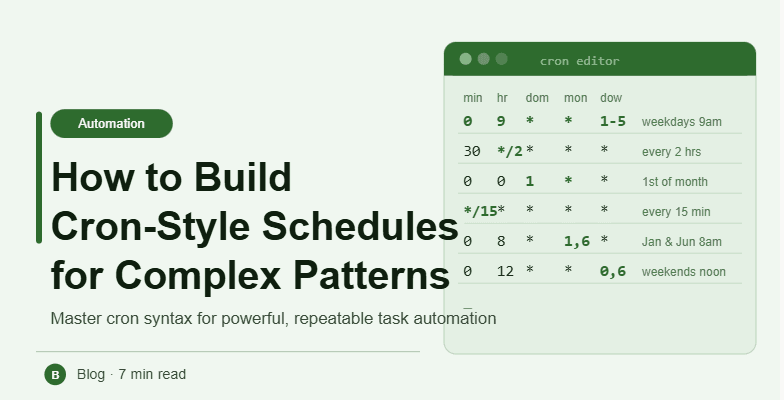
By the end of this tutorial, you will understand how to design cron-style schedules that handle complex timing patterns without becoming confusing or hard to manage. Cron-based scheduling is powerful because it allows precise control over when tasks run, but as patterns become more advanced, structure and clarity become essential. To follow along, you only need a basic understanding of scheduled tasks. The focus here is on designing clear and scalable scheduling logic rather than writing heavy code. This setup typically takes less than an hour to plan, but it significantly improves workflow control. If you manage multiple workflows, Appilot can help orchestrate execution while your cron system ensures accurate and predictable timing. You will build a system that handles complex schedules, avoids conflicts, and remains easy to maintain.
Understanding the Structure of Cron Scheduling
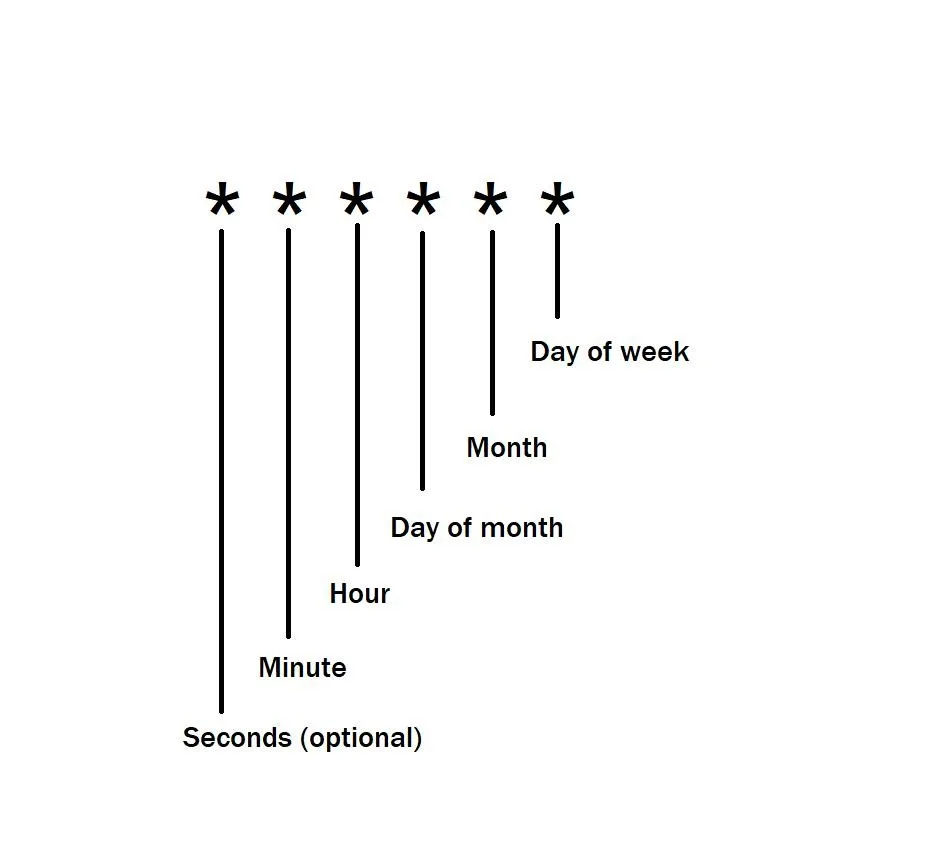
Cron schedules are built using a structured format that defines minute, hour, day, month, and weekday. Each field controls a specific part of the schedule, allowing tasks to run at precise times. Understanding this structure is key to building complex patterns.
Breaking Down Complex Requirements
Before creating a cron schedule, clearly define what you want the task to do. For example, running a task on specific days, at certain hours, or at multiple intervals. Breaking requirements into smaller parts makes them easier to implement.
Combining Multiple Conditions
Complex schedules often require combining conditions, such as running tasks on weekdays at specific times. Cron allows you to define multiple values within each field, enabling flexible patterns.
Using Step Values for Intervals
Step values allow tasks to run at regular intervals within a defined range. This is useful for repeating actions without listing every individual time manually.
Handling Multiple Time Windows
If a task needs to run during different periods of the day, separate conditions can be defined within the schedule. This allows precise control over execution windows.
Avoiding Overlapping Schedules
When multiple cron rules are used, overlaps can occur. Ensuring that schedules are spaced properly prevents conflicts and keeps workflows stable.
Keeping Schedules Readable
Complex cron expressions can become difficult to understand. Keeping them well-structured and documented ensures that they remain maintainable over time.
Testing Cron Patterns Before Deployment
Before applying a schedule, test it to ensure it behaves as expected. Testing helps identify errors and prevents unintended execution patterns.
Monitoring Execution Results
After deployment, monitor task execution to confirm that schedules are working correctly. Observing behavior helps refine timing and improve reliability.
Adjusting Schedules as Needs Change
Workflow requirements may evolve over time. A flexible cron system allows you to update schedules without disrupting overall operations.
Integrating Cron Scheduling into Workflow Systems
Cron logic should be part of your overall workflow design. Integrating it ensures that all tasks follow consistent timing rules and operate smoothly.
Scaling Scheduling Systems with Appilot
At this stage, your cron scheduling system works locally and handles complex patterns effectively. As workflows grow, managing multiple schedules manually becomes more complex. This is where Appilot becomes useful because it helps orchestrate execution while your system ensures consistent and reliable scheduling.
FAQ
Q1: What is a cron schedule?
It is a way to define when tasks should run using a structured time-based format.
Q2: Why use cron for complex patterns?
Because it allows precise control over timing and repetition.
Q3: Can cron handle multiple conditions?
Yes, it can combine different values to create flexible schedules.
Q4: How do I avoid errors in cron expressions?
By testing and documenting them clearly.
Q5: Do I need Appilot for this setup?
No, you can manage it locally. Appilot becomes useful when scaling workflows.
Conclusion
Building cron-style schedules for complex patterns requires a structured and thoughtful approach. By understanding the format, breaking down requirements, and testing thoroughly, you can create reliable and flexible scheduling systems. Start with simple patterns, expand as needed, and refine over time. Once this system is in place, your workflows become more controlled and predictable.