How to Build Fallback Workflows When Primary Tasks Fail
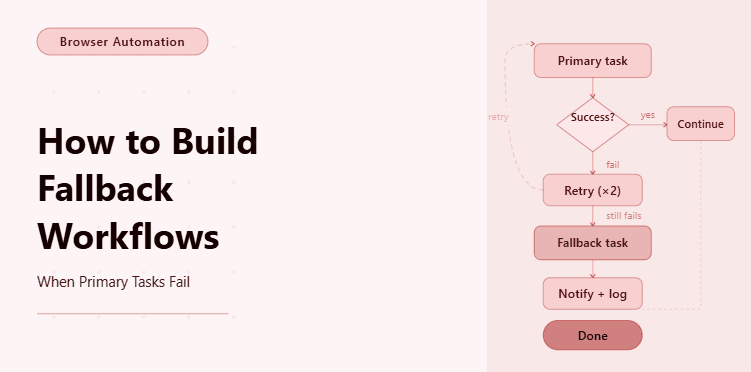
By the end of this tutorial, you will have a working automation structure that does not stop the moment a primary task fails, but instead detects the failure, chooses a backup path, and continues execution in a controlled way. That is one of the biggest differences between a fragile automation and a production-ready one, because real systems do not fail in clean or predictable ways. APIs time out, pages load differently, selectors break, files arrive late, and external services return incomplete results. If your workflow has no fallback path, then one failure can stop the entire process.
To follow along, you will need Python 3.9 or higher, a basic understanding of functions, conditions, and exception handling, and some familiarity with running Python scripts from the terminal. If you are using browser automation, Playwright is a good fit because it allows you to detect failures at the page level and shift execution into a backup path when the primary path no longer works.
This type of setup usually takes one to two hours to build and test for the first time, depending on how many fallback conditions you want to support. Once it is working, it becomes a reusable pattern you can apply to scraping workflows, posting flows, monitoring systems, scheduled jobs, and task pipelines where reliability matters more than ideal-case performance.
For this tutorial, I will show the logic using a standard Python setup, but if you later need to run many workflows across multiple accounts or environments, Appilot can serve as the execution layer that helps you manage scheduling, monitoring, and operational scale without changing the core fallback logic you build here.
You will be building a workflow that attempts a primary task first, checks whether it succeeded, and automatically switches to a secondary path if needed so that the automation remains useful even when the original plan breaks.

What This Tutorial Builds — And Why This Approach
This tutorial builds an automation workflow with a primary execution path and one or more fallback paths that activate when the primary step fails or returns an unusable result. Instead of treating failure as the end of the workflow, the system treats it as a decision point. That is the central idea behind fallback design. The goal is not to pretend failures will not happen, but to design the workflow so it still produces a useful outcome when they do.
This approach is important because many automations fail for reasons that are temporary or narrow rather than total. A browser selector may change, but the same data might still be available through a different page path. A direct API call may fail, but a cached file or alternate endpoint may still work. A login step may not succeed with saved session state, but a fresh authentication flow may recover it. In all of those cases, stopping the workflow immediately is often the wrong decision.
A fallback workflow gives the system resilience. It allows you to preserve progress, reduce downtime, and make automation more trustworthy in real operating conditions. At small scale, you can run this locally with Python. At larger scale, where many workflows and failure cases must be monitored, Appilot becomes useful because it helps manage execution visibility and operational reliability while your fallback logic remains the same.
How the System Works — Architecture Overview
At a high level, the workflow begins by attempting the preferred or primary task. Once that task finishes, the system checks whether the result is valid. If the result is successful, the workflow continues normally. If the result fails, times out, or produces unusable output, the system shifts into a fallback branch that attempts an alternate action. That backup path may try a simpler method, a different source, a recovery step, or a reduced version of the original objective.
This structure works because it separates task execution from task evaluation. One part of the workflow performs the action, while another part decides whether the output is good enough to accept or whether recovery logic should begin. That separation makes the workflow easier to debug and much easier to scale as more fallback paths are added.
Part 1 — Environment Setup
Step 1 — Install Dependencies
The first step is to install the core tools needed for running automation logic. If your workflow includes browser steps, Playwright gives you the control needed to detect page-level failures and trigger backup flows without rebuilding the whole project later.
pip install playwright
playwright install chromium
Once the installation is complete, you should verify that Playwright is available so you know your environment is ready before building the workflow itself.
playwright --versionStep 2 — Create the Project Structure
A clean project structure matters because fallback logic can become messy quickly when failure detection, backup handlers, and recovery actions are all mixed together in one file. Separating the core workflow, fallback rules, and result handling makes the system far easier to maintain.
mkdir fallback-workflow && cd fallback-workflow
mkdir scripts logs data
touch main.py scripts/workflow.py scripts/fallbacks.py scripts/validators.py
This structure keeps task execution separate from validation and fallback handling, which is one of the most important design choices in a recovery-oriented workflow.
Part 2 — Designing the Primary and Fallback Logic
Step 3 — Define What Counts as Failure
Before building a fallback path, you need to define what failure actually means for your workflow. That sounds obvious, but many automations fail because they only detect technical errors and ignore invalid outcomes. A task can complete without throwing an exception and still be a failure if the returned data is empty, the expected element is missing, or the output cannot be used by the next step.
A simple validation function might look like this:
def is_valid_result(result: dict) -> bool:
    return bool(result) and result.get("status") == "success" and result.get("data") is not None
This function does not care only about whether the code ran. It checks whether the output is usable. That is critical because fallback workflows should activate based on outcome quality, not just crashes.
Step 4 — Build the Primary Task
The primary task is the preferred method your workflow should always try first. In a real system, this might be a direct API request, a browser scrape, a content posting action, or a scheduled report generation step. For this tutorial, the main goal is to show the structure.
async def run_primary_task():
    return {
        "status": "success",
        "data": {"message": "Primary task completed"}
    }
This version succeeds, but in production the primary task could fail because of a timeout, a page change, a blocked request, or an unavailable service. That is why we need the next layer.
Step 5 — Build the Fallback Task
The fallback task is the alternate route the workflow takes when the primary path does not produce a valid result. This fallback should not always be identical in behavior. Often it is deliberately simpler, slower, or less complete, but still useful. The point is not to perfectly replace the primary path every time. The point is to preserve continuity when the main method breaks.
async def run_fallback_task():
    return {
        "status": "success",
        "data": {"message": "Fallback task completed"}
    }
In real use, a fallback could mean loading a simpler page version, switching to another endpoint, using cached data, retrying with a fresh session, or triggering a manual review step. The exact fallback depends on the workflow, but the structural pattern remains the same.
Step 6 — Route Execution Based on Validation
Now we connect the primary task and fallback task into one decision flow. This is the part that makes the workflow resilient instead of linear.
async def execute_with_fallback():
    primary_result = await run_primary_task()
    if is_valid_result(primary_result):
        return {
            "path": "primary",
            "result": primary_result
        }
    fallback_result = await run_fallback_task()
    return {
        "path": "fallback",
        "result": fallback_result
    }
This pattern is simple but powerful. The workflow attempts the preferred path first, checks the output, and only activates the fallback when the result does not pass validation. That means failure becomes part of the design rather than an uncontrolled interruption.
Part 3 — Handling Exceptions and Recovery Conditions
Step 7 — Catch Technical Failures Cleanly
Not every failure appears as a bad result. Some failures appear as exceptions, such as request timeouts, missing selectors, connection errors, or parsing issues. That means the workflow should be able to shift into fallback mode not only when a result is invalid, but also when the primary task fails at the technical level.
async def execute_with_error_handling():
    try:
        primary_result = await run_primary_task()
        if is_valid_result(primary_result):
            return {
                "path": "primary",
                "result": primary_result
            }
    except Exception as e:
        print(f"Primary task failed with error: {e}")
    fallback_result = await run_fallback_task()
    return {
        "path": "fallback",
        "result": fallback_result
    }
This pattern is useful because it supports both logical failure and technical failure. If the primary task crashes, the workflow still has a path forward. If the primary task runs but returns unusable output, the fallback still activates.
Step 8 — Add a Secondary Validation Layer
A mature fallback workflow should not assume the fallback always succeeds either. It should validate the backup result as well. If the fallback also fails, the workflow should return a clear failure state instead of pretending recovery worked when it did not.
This is a much stronger pattern because it makes the recovery path observable and honest. The workflow clearly reports whether it completed via the primary path, completed via the fallback path, or failed completely.
Part 4 — Applying Fallback Logic to Browser Automation
Step 9 — Use Fallback Paths in a Browser Workflow
Fallback design becomes especially useful in browser automation, where page state changes constantly. A primary selector may disappear, but the content might still be available through another route. A saved session may fail, but a fresh login may work. A dashboard page may not load fully, but a report export page may still be reachable.
Here is a simplified example of how browser fallback logic might work with Playwright:
from playwright.async_api import async_playwright
async def run_browser_primary():
    async with async_playwright() as p:
        browser = await p.chromium.launch(headless=False)
        page = await browser.new_page()
        await page.goto("https://example.com/dashboard")
        if await page.locator(".main-report").count() > 0:
            data = await page.locator(".main-report").inner_text()
            await browser.close()
            return {"status": "success", "data": data}
        await browser.close()
        return {"status": "failed", "data": None}
If that primary browser flow fails because the main report does not load, the fallback can try another page or a different selector.
async def run_browser_fallback():
    async with async_playwright() as p:
        browser = await p.chromium.launch(headless=False)
        page = await browser.new_page()
        await page.goto("https://example.com/backup-report")
        if await page.locator(".backup-report").count() > 0:
            data = await page.locator(".backup-report").inner_text()
            await browser.close()
            return {"status": "success", "data": data}
        await browser.close()
        return {"status": "failed", "data": None}
The important lesson is not the exact selector choice. It is the design principle that the workflow should not rely on only one path when a meaningful alternate route exists.
Part 5 — Running the Complete Workflow
Step 10 — Build the Main Script
Now we can wire everything together so the workflow attempts the primary path, checks whether it succeeded, and automatically moves into the fallback path if needed.
import asyncio
async def main():
    result = await execute_resilient_workflow()
    print("Workflow result:", result)
asyncio.run(main())
This entry point is intentionally simple because the fallback logic should remain easy to trace. When you run the script, you should be able to see whether the workflow completed through the main path or through recovery logic.
Step 11 — Scaling Execution with Appilot
At this point, the fallback logic works locally, and the core pattern is already useful because your workflow can recover from failure instead of breaking immediately. But once you need to run many workflows across different accounts, environments, or schedules, execution complexity becomes the real challenge. You need visibility into which path was used, how often fallbacks are activating, and which failures are increasing over time.
That is where Appilot fits naturally into this kind of system. You do not need to change the fallback logic itself. Instead, Appilot can serve as the execution layer that helps you run, monitor, and manage these workflows more reliably at scale. The smart part remains your recovery design, while the platform helps reduce the operational burden of running it repeatedly in production.
FAQ
Q1: What is a fallback workflow in automation?
A fallback workflow is a backup execution path that runs when the primary task fails, returns an invalid result, or cannot continue normally.
Q2: Should fallback logic only handle exceptions?
No. It should also handle cases where the code technically runs but the result is still unusable, such as empty output, missing data, or incomplete page content.
Q3: Can a fallback workflow have more than one backup path?
Yes. In larger systems, you may have multiple recovery levels, such as retrying first, then using a backup source, and finally escalating to manual review if all automated options fail.
Q4: Is the fallback path supposed to do exactly the same thing as the primary path?
Not always. In many cases, the fallback path is a simpler or less complete alternative that still produces a useful outcome when the main method is unavailable.
Q5: Do I need Appilot to build this?
No. You can build and test fallback workflows locally with Python. Appilot becomes useful when you want to run and monitor these workflows more reliably at scale.
Conclusion
Fallback workflows make automation more realistic because they accept that primary tasks will fail sometimes and design around that fact instead of ignoring it. That shift in mindset is what turns a basic script into a more dependable system. The real goal is not perfection in the primary path. The goal is continuity when things go wrong.
Start by defining failure clearly, validate results instead of assuming success, and design one backup route that can preserve useful output when the preferred method breaks. Once that pattern is working, you can expand it into layered recovery paths, browser-specific backups, and more advanced monitoring. That is how reliable automation is built in practice.