How to Build Graceful Degradation into Automation Workflows
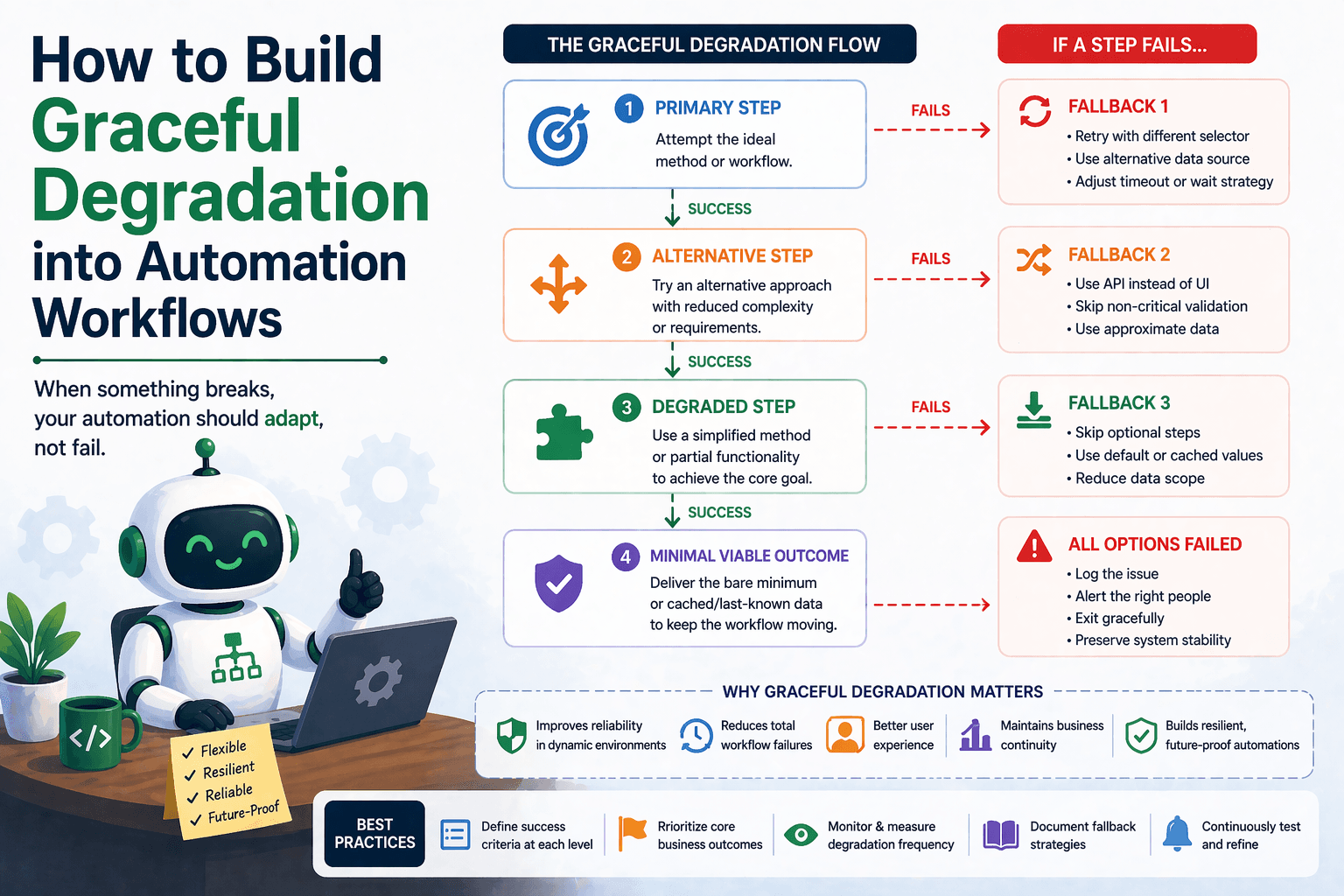
By the end of this tutorial, you will understand how to design automation workflows that continue to operate even when certain components fail, instead of stopping completely. This concept, known as graceful degradation, is essential for real-world systems where perfect conditions cannot be guaranteed.
To follow along, you only need a basic understanding of how automation workflows function, whether they involve browser actions, data pipelines, or scheduled tasks. The focus here is not on writing code, but on structuring your workflow so it can reduce functionality intelligently instead of breaking entirely.
This setup typically takes a bit of planning, but once implemented, it makes your automation significantly more reliable. If you later run multiple workflows across environments or profiles, Appilot can help manage execution while your degradation logic continues to operate independently.
You will build a system that prioritizes core functionality, handles failures selectively, and continues delivering partial but useful results instead of failing completely.
What This Tutorial Builds — And Why This Approach
This tutorial builds a workflow that does not treat failure as a binary outcome. Instead of either succeeding fully or failing completely, the system can operate at reduced capability when certain steps fail. For example, if a secondary data source is unavailable, the workflow may still generate a report using available data instead of stopping entirely.
This approach is important because many workflows involve multiple steps, and not all steps are equally critical. If a non-essential step fails, it should not prevent the entire workflow from completing. Graceful degradation ensures that the system still delivers value even under imperfect conditions.
At a small scale, this can be implemented within local automation scripts. At a larger scale, Appilot becomes useful because it helps monitor which parts of workflows degrade and how often, while your core logic remains unchanged.
How the System Works — Architecture Overview
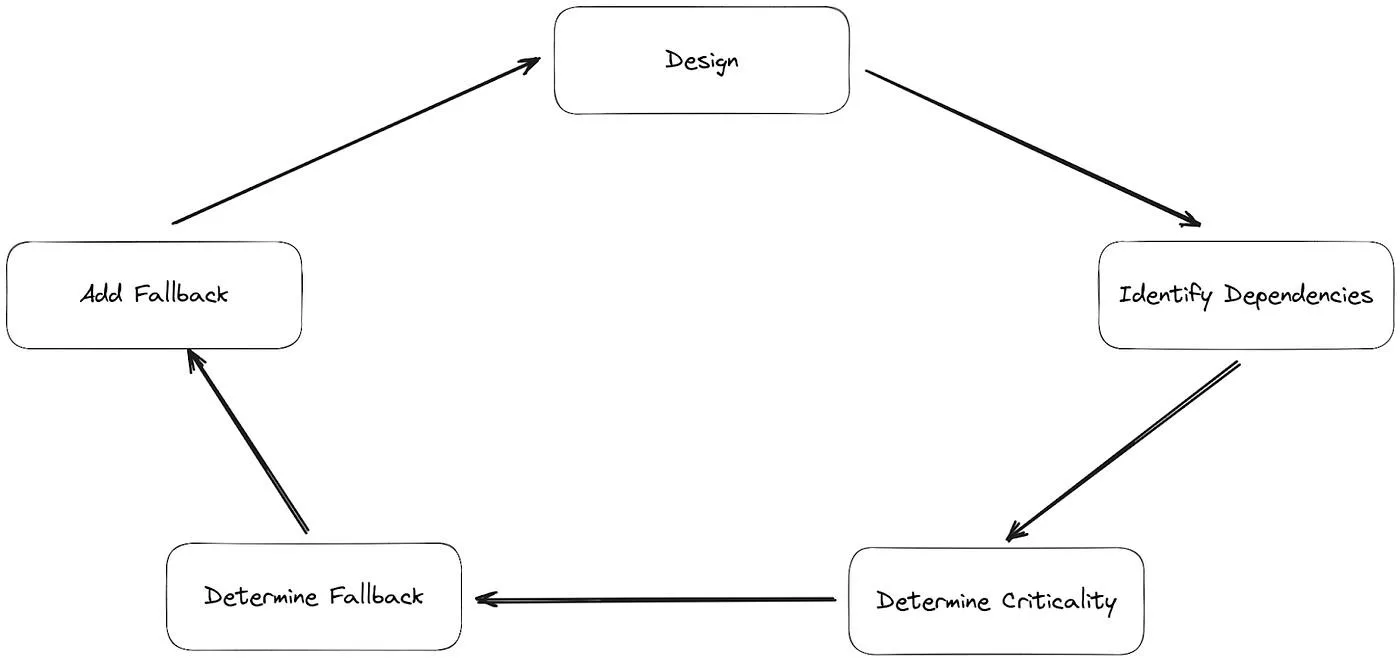
At a high level, the workflow identifies critical and non-critical components. Critical components must succeed for the workflow to be useful, while non-critical components can fail without stopping the entire process. When a failure occurs, the system decides whether to continue with reduced functionality or stop entirely.
This structure separates core functionality from optional features. By doing so, the workflow becomes more flexible and resilient.
Part 1 — Identifying Core and Optional Components
Step 1 — Define Core Functionality
The first step is identifying what the workflow must achieve to be considered successful. This core functionality represents the minimum acceptable outcome.
For example, in a data pipeline, the core may be collecting and storing essential data, while additional enrichment or formatting steps may be optional.
Step 2 — Identify Non-Critical Steps
Once the core is defined, identify steps that add value but are not essential. These steps can fail without making the entire workflow useless.
Separating these steps allows the system to continue operating even when optional components fail.
Part 2 — Designing Degradation Paths
Step 3 — Define Reduced Functionality Modes
When a non-critical step fails, the workflow should switch to a reduced functionality mode. This means continuing execution with available data or skipping certain enhancements.
For example, if a formatting step fails, the workflow may output raw data instead of stopping completely.
Step 4 — Ensure Output Remains Useful
Even in degraded mode, the output should still provide value. This means designing fallback outputs that are simpler but still usable.
This ensures that the workflow remains productive even under failure conditions.
Part 3 — Detecting and Handling Failures
Step 5 — Validate Each Step
After each step, the workflow should check whether it succeeded. If a non-critical step fails, the system should log the issue and continue with the next step.
This prevents minor issues from escalating into full failures.
Step 6 — Decide When to Stop
If a critical component fails, the workflow should stop safely instead of producing incomplete or misleading results. This ensures that degradation does not compromise the integrity of the output.
Part 4 — Building the Degradation Workflow
Step 7 — Add Conditional Execution
The workflow should include conditions that determine whether to execute or skip certain steps based on their success or failure.
This creates flexibility and allows the system to adapt dynamically.
Step 8 — Track Degraded Runs
It is important to track when workflows run in degraded mode. This helps identify recurring issues and improve reliability over time.
Tracking also ensures transparency, so users know when outputs are partial.
Part 5 — Real-World Considerations
Step 9 — Avoid Over-Degrading
While graceful degradation is useful, too much degradation can reduce the value of the workflow. It is important to maintain a balance where outputs remain meaningful.
Step 10 — Communicate Degraded Outputs
When a workflow runs in degraded mode, it should communicate this clearly. This prevents confusion and ensures users understand the limitations of the output.
Step 11 — Combine with Other Resilience Strategies
Graceful degradation works best when combined with retry logic, fallback paths, and error handling. Together, these strategies create a robust system that can handle a wide range of failures.
Step 12 — Scaling with Appilot
At this stage, the workflow can degrade gracefully and continue operating locally. As workflows scale, monitoring degraded runs becomes more important.
This is where Appilot becomes useful because it helps track performance, identify patterns, and manage execution across multiple workflows without changing the core logic.
FAQ
Q1: What is graceful degradation in automation?
It is the ability of a system to continue operating with reduced functionality when some components fail.
Q2: Why is graceful degradation important?
Because it prevents entire workflows from failing due to non-critical issues.
Q3: How do I decide what is critical?
By identifying the minimum outcome required for the workflow to be useful.
Q4: Can all workflows use graceful degradation?
Most workflows can benefit from it, but critical systems may require strict failure handling.
Q5: Do I need Appilot for this workflow?
No, you can implement it locally. Appilot becomes useful when managing workflows at scale.
Conclusion
Graceful degradation transforms automation workflows from fragile systems into resilient ones that can handle real-world conditions. By identifying core functionality, designing reduced modes, and handling failures intelligently, you can ensure that your workflows continue to deliver value even when things go wrong.
Start by defining what must succeed, separate optional steps, and build conditional logic that allows the system to adapt. Once this structure is in place, your automation becomes far more reliable and effective.