How to Build Reliable, Compliant Workflows for Amazon
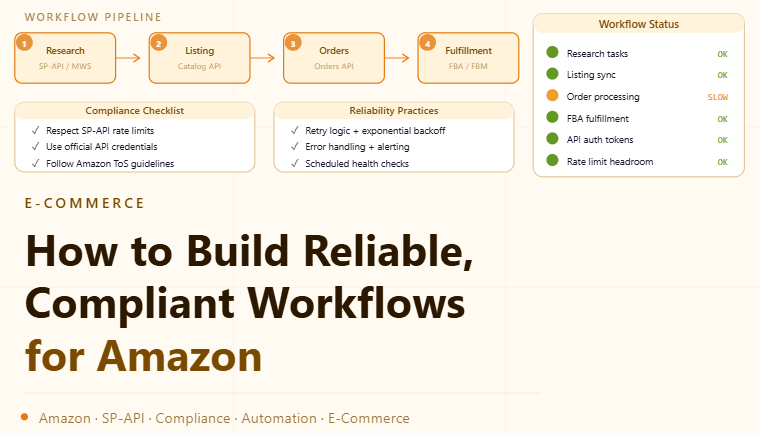
By the end of this tutorial, you will understand how to design workflows that operate smoothly on Amazon without triggering unnecessary friction. Systems that emphasize consistency, quality data, and official integrations tend to be far more reliable than those that rely on shortcuts. To follow along, you only need a basic understanding of how your workflow interacts with Amazon pages or services. The focus here is on building a sustainable process rather than technical tricks. This setup typically takes less than an hour to outline, but it has a major impact on long-term stability. If you manage multiple workflows, Appilot can help orchestrate execution while your system ensures consistent and responsible usage. You will build a system that prioritizes official access methods, steady pacing, and continuous monitoring.

Why Stability Matters More Than Speed
Aggressive or inconsistent workflows often lead to interruptions, errors, or degraded performance. A stable system focuses on predictable execution, controlled pacing, and reliable data handling, which leads to better outcomes over time.
Use Official APIs and Integrations
Amazon provides official APIs and partner tools for tasks such as product data access, pricing updates, and order management. Using these channels ensures compatibility, reduces errors, and keeps your workflows aligned with platform expectations.
Design Workflows Around Clear Use Cases
Instead of trying to automate everything, define exactly what your workflow needs to accomplish, such as inventory updates, price monitoring, or reporting. Focused workflows are easier to manage and less likely to encounter issues.
Maintain Consistent Request Patterns
Systems should operate at a steady pace rather than sending bursts of activity. Consistent timing and predictable execution help maintain reliability and reduce the chance of disruptions.
Prioritize Data Quality Over Volume
Collecting large amounts of data quickly can create inconsistencies. A better approach is to focus on accurate, structured data that supports your goals. Quality data leads to better decision-making and smoother workflows.
Implement Monitoring and Alerts
Tracking performance metrics such as response times, success rates, and errors helps you detect issues early. Alerts allow you to respond quickly before problems affect your workflow.
Handle Errors Gracefully
Even well-designed systems encounter occasional failures. Building retry logic, fallback strategies, and clear error handling ensures that workflows continue operating smoothly without interruption.
Keep Configurations Simple and Clear
Overly complex systems are harder to maintain and more prone to failure. Keeping configurations straightforward improves reliability and makes troubleshooting easier.
Align Workflows with Platform Policies
Understanding and following Amazon’s terms of service ensures that your workflows remain compliant. This reduces risk and helps maintain long-term access and stability.
Test Changes Before Full Deployment
Any updates to your workflow should be tested in a controlled environment before being applied broadly. Testing helps prevent unintended issues and ensures smooth operation.
Scaling Workflow Management with Appilot
At this stage, your system works locally and provides stable execution. As workflows grow, coordinating tasks and monitoring performance manually becomes more complex. This is where Appilot becomes useful because it helps orchestrate workflows while your system maintains consistency and reliability.
FAQ
Q1: Can I automate tasks on Amazon?
Yes, but it should be done using official APIs and within platform policies.
Q2: Why avoid aggressive automation?
Because it can lead to instability, errors, and interruptions.
Q3: What is the safest way to build workflows?
By using official tools, maintaining steady execution, and monitoring performance.
Q4: How do I handle errors in workflows?
By implementing retries, fallbacks, and proper monitoring.
Q5: Do I need Appilot for this setup?
No, you can manage it locally. Appilot becomes useful when scaling workflows.
Conclusion
Building reliable workflows for Amazon is about consistency, compliance, and careful design. By using official integrations, maintaining steady execution, and focusing on data quality, you can create systems that operate smoothly over time. Start by defining clear use cases, implement monitoring, and refine your approach as your needs grow. Once this system is in place, your workflows become more stable and easier to scale.