How to Clone Browser Profiles for Testing vs Production
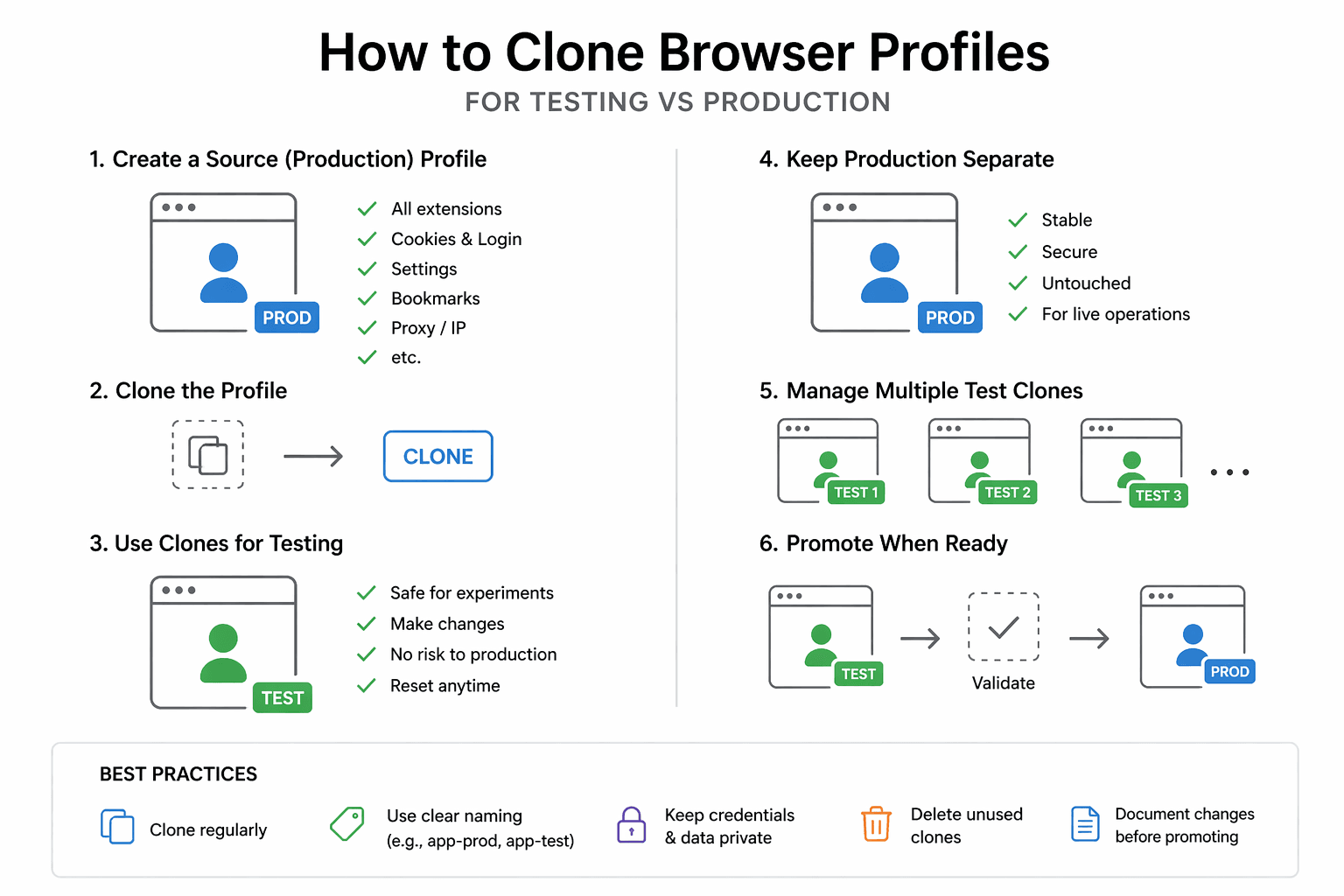
By the end of this tutorial, you will understand how to clone browser profiles in a way that allows you to test changes safely without affecting your live production environments. This is a critical practice in automation because experimenting directly on production profiles can lead to broken sessions, lost data, or unintended behavior.
To follow along, you only need a basic understanding of browser profiles and how they store sessions, cookies, and environment-specific data. The focus here is not on code, but on designing a cloning system that separates testing from production clearly.
This setup usually takes less than an hour to define properly, but it protects your workflows from risky changes. If you later run automation across multiple environments, Appilot can help manage execution while your cloning system keeps testing and production isolated.
You will build a system that duplicates profiles safely, separates environments, and allows controlled testing without impacting live operations.
What This Tutorial Builds — And Why This Approach
This tutorial builds a profile cloning system that creates safe copies of existing profiles for testing purposes. Instead of modifying production profiles directly, you work with clones that mirror the original state but exist in a separate environment.
This approach is important because production profiles often contain critical data such as active sessions, authentication states, and workflow history. Any mistake during testing can disrupt live operations. Cloning allows you to experiment freely while keeping production stable.
At a small scale, cloning can be done manually. At a larger scale, where multiple profiles and environments are involved, Appilot becomes useful for managing workflows while your cloning system ensures clear separation.
How the System Works — Architecture Overview
At a high level, the system takes an existing production profile, creates an exact copy, and assigns it to a testing environment. The cloned profile retains all necessary data but operates independently from the original.
This structure separates production and testing environments completely. Changes made in testing do not affect production, and production remains stable regardless of experimentation.
Part 1 — Understanding Profile Cloning
Step 1 — Know What Gets Cloned
A browser profile includes cookies, local storage, session data, and configuration settings. Cloning means copying all of this data so the new profile behaves similarly to the original.
Understanding what is included ensures that the cloned profile functions correctly in testing.
Step 2 — Maintain Isolation Between Environments
The most important rule in cloning is isolation. The cloned profile should not share state with the original after duplication. Any changes in the test environment must remain separate.
This prevents unintended side effects.
Part 2 — Designing the Cloning System
Step 3 — Define Testing and Production Environments
Clearly separate profiles into testing and production categories. This distinction should be visible in your naming system, tags, or folder structure.
A clear separation reduces the risk of confusion.
Step 4 — Use Consistent Naming for Clones
Cloned profiles should follow a naming pattern that identifies them as test versions of production profiles. This makes it easy to track relationships between original and cloned profiles.
Consistency helps maintain clarity at scale.
Part 3 — Cloning Profiles Safely
Step 5 — Duplicate Profile Data
Cloning involves copying all profile data into a new profile instance. This ensures that the test profile starts with the same state as production.
The duplication process should be complete to avoid missing dependencies.
Step 6 — Remove Sensitive or Risky Elements
In some cases, you may want to modify the cloned profile to remove sensitive data or limit actions. For example, disabling certain features or restricting access can make testing safer.
This adds an extra layer of protection.
Part 4 — Using Cloned Profiles for Testing
Step 7 — Run Tests in Isolation
All testing should be performed on cloned profiles. This allows you to experiment with changes, test workflows, and debug issues without affecting production.
Isolation ensures that mistakes remain contained.
Step 8 — Validate Before Moving to Production
Once testing is complete, changes can be applied to production profiles with confidence. This reduces the risk of introducing errors into live workflows.
Validation is a key step in maintaining stability.
Part 5 — Managing Cloned Profiles
Step 9 — Avoid Accumulating Unused Clones
Over time, cloned profiles can accumulate and create clutter. Regular cleanup ensures that only relevant test profiles are maintained.
This keeps the system organized.
Step 10 — Track Relationships Between Profiles
Maintaining a link between production profiles and their clones helps with tracking and debugging. This can be done through naming conventions or metadata.
Clear relationships improve manageability.
Part 6 — Real-World Considerations
Step 11 — Handle Session Expiry in Clones
Cloned profiles may have sessions that expire over time. Testing workflows should account for this and handle re-authentication if needed.
Step 12 — Prevent Cross-Environment Confusion
Accidentally using a test profile in production can cause issues. Clear labeling and separation help prevent this mistake.
Step 13 — Integrate with Workflow Systems
Cloned profiles should be part of your overall workflow strategy. Testing, validation, and deployment should follow a consistent process.
Step 14 — Scaling with Appilot
At this stage, your cloning system works locally and keeps testing and production separate. As the number of profiles and workflows grows, managing environments becomes more complex.
This is where Appilot becomes useful because it helps run and monitor workflows across environments while your cloning system ensures safe testing practices.
FAQ
Q1: What is profile cloning?
It is the process of creating a duplicate of a browser profile with the same data and settings.
Q2: Why should I clone profiles for testing?
To avoid affecting production data and ensure safe experimentation.
Q3: Do cloned profiles share data with the original?
No, they should be completely independent after cloning.
Q4: How do I manage multiple clones?
Using consistent naming, tags, and cleanup practices.
Q5: Do I need Appilot for cloning?
No, you can manage it locally. Appilot becomes useful when managing workflows at scale.
Conclusion
Cloning browser profiles for testing versus production is a fundamental practice for building reliable automation systems. By separating environments and working with safe copies, you can experiment freely without risking live operations.
Start by defining clear environments, create consistent cloning processes, and maintain isolation between profiles. Once this system is in place, testing becomes safer, and production remains stable as your automation scales.