How to Configure Firewall Rules for Browser Automation
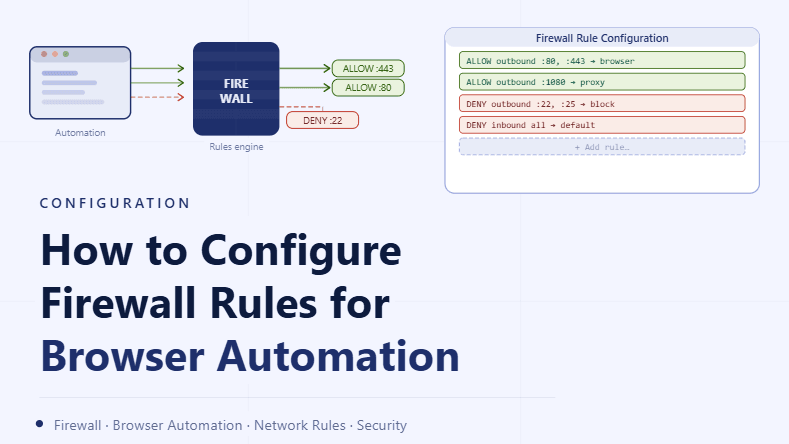
By the end of this tutorial, you will understand how to use firewall rules to control which connections your browser automation setup can make, ensuring that only intended traffic is allowed while unnecessary or risky connections are blocked. Firewalls are often overlooked in automation setups, but they play a critical role in maintaining stability and preventing unexpected behavior. To follow along, you only need a basic understanding of how network traffic flows between applications and external services. The focus here is on designing a clean and controlled rule system rather than writing code. This setup typically takes less than an hour to define, but it significantly improves reliability and security. If you manage multiple workflows, Appilot can help orchestrate execution while your firewall configuration ensures that all connections remain controlled and predictable. You will build a system that filters traffic, enforces routing rules, and maintains a stable environment.
Why Firewall Rules Matter in Automation
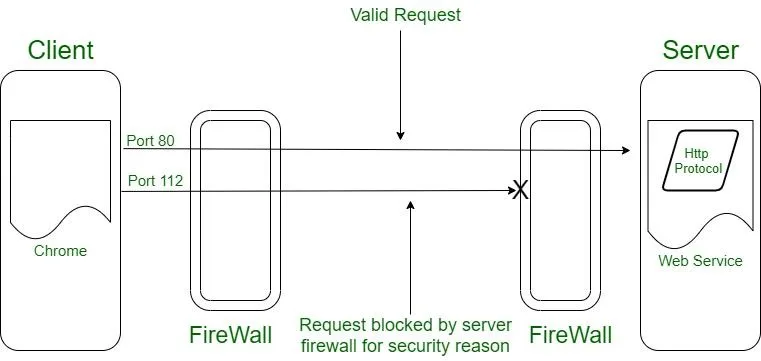
Browser automation relies on consistent and predictable network behavior, and without proper control, applications may make unexpected connections that affect performance or stability. Firewall rules allow you to define exactly what traffic is allowed, ensuring that your system behaves as intended and reducing unnecessary variability.
Understanding Inbound vs Outbound Traffic
Firewall rules typically distinguish between inbound and outbound traffic, where inbound refers to incoming connections and outbound refers to requests made by your system. For browser automation, controlling outbound traffic is usually the priority because it determines how your profiles interact with external services.
Allowing Only Required Connections
A well-configured firewall should permit only the connections necessary for your workflows to function. By limiting access to specific destinations or services, you reduce noise and improve consistency in how your system operates.
Blocking Unnecessary or Unwanted Traffic
Applications may attempt to connect to services that are not relevant to your workflows, such as background updates or telemetry endpoints. Blocking these connections helps maintain a clean environment and prevents unexpected behavior.
Aligning Firewall Rules with Proxy and Network Setup
Firewall rules should complement your proxy and network configuration. Ensuring that allowed traffic flows through the intended routes prevents conflicts and maintains consistent behavior across all profiles.
Preventing Unexpected External Connections
Without proper rules, applications can create additional network paths that bypass your intended setup. Firewall controls ensure that all connections follow the defined routing strategy and do not introduce inconsistencies.
Testing Rules Before Full Deployment
After creating firewall rules, it is important to test them in a controlled environment to ensure that essential connections are not blocked. Testing helps confirm that workflows continue to function correctly while unwanted traffic is restricted.
Monitoring Traffic After Configuration
Once rules are in place, monitoring network activity helps verify that the system behaves as expected. Observing traffic patterns ensures that rules are effective and highlights any adjustments that may be needed.
Avoiding Overly Restrictive Configurations
While limiting traffic is important, overly strict rules can block necessary connections and disrupt workflows. A balanced approach ensures that essential functionality is preserved while unnecessary traffic is filtered out.
Maintaining and Updating Rules Over Time
As workflows evolve, firewall rules may need to be updated to reflect new requirements. Regular reviews ensure that the configuration remains aligned with your system and continues to support stable operation.
Integrating Firewall Control into Workflow Systems
Firewall configuration should be part of your overall automation setup rather than a separate layer. Integrating it into your workflow ensures that all components operate within the same controlled environment.
Scaling Network Control with Appilot
At this stage, your firewall configuration works locally and ensures controlled traffic flow. As the number of profiles and workflows increases, managing rules manually becomes more complex. This is where Appilot becomes useful because it helps orchestrate workflows while your firewall system ensures that all connections remain consistent and secure.
FAQ
Q1: What is a firewall in this context?
It is a system that controls which network connections are allowed or blocked.
Q2: Why is outbound traffic important?
Because it determines how your automation interacts with external services.
Q3: Can firewall rules affect performance?
Yes, properly configured rules can improve stability and reduce unnecessary traffic.
Q4: Should I block all unknown connections?
It is better to allow only necessary connections and review others carefully.
Q5: Do I need Appilot for firewall setup?
No, you can configure it locally. Appilot becomes useful when scaling workflows.
Conclusion
Configuring firewall rules for browser automation is an essential step in creating a stable and predictable environment. By controlling traffic, aligning rules with your network setup, and monitoring behavior, you can ensure that your system operates consistently. Start by defining necessary connections, block unnecessary traffic, and refine your rules over time. Once this system is in place, your automation becomes more reliable and easier to manage.