How to Create Automated Workflows That Adapt Based on Results
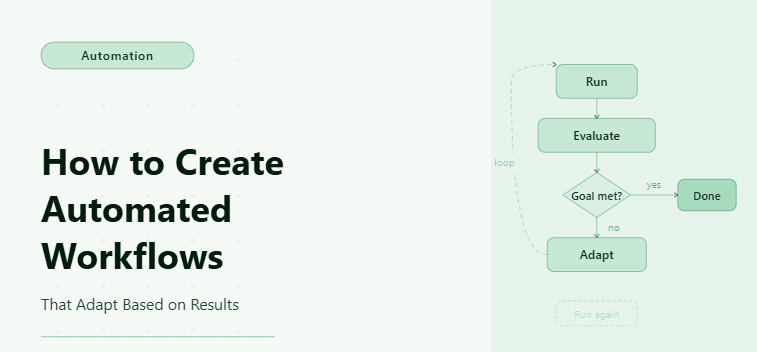
By the end of this tutorial, you will have a working automation system that does not just execute predefined steps but continuously adapts based on the results it generates, allowing it to make smarter decisions, avoid repeated failures, and optimize outcomes over time. This type of workflow moves beyond basic automation and starts behaving more like a decision engine that evolves as it runs.
To follow along, you will need Python 3.9 or higher, a basic understanding of scripting, and familiarity with automation concepts such as loops and conditionals, although everything will be explained in a practical and structured way. The setup process typically takes a couple of hours, but once completed, the workflow can run repeatedly with minimal intervention.
For this guide, the implementation will be shown using a standard Python-based workflow, but if you are operating at scale or managing multiple workflows simultaneously, platforms like Appilot can later be used to handle execution, scheduling, and monitoring without requiring you to build additional infrastructure.
The system you will build processes input data, evaluates outcomes at each step, and adjusts its behavior accordingly, allowing it to retry failed actions, skip unnecessary steps, or take alternative paths based on real-time results.
What This Tutorial Builds — And Why This Approach
This tutorial builds an adaptive automation workflow that evaluates results after every step and uses those results to determine the next action, which makes it far more resilient and efficient than traditional linear automation scripts. Instead of assuming success and moving forward blindly, the system continuously checks outcomes and adjusts its behavior in response.
The workflow is designed to handle multiple scenarios such as successful execution, partial success, failure, and unexpected conditions, and it responds differently to each of these cases. This approach reduces wasted operations, improves reliability, and makes the system more aligned with real-world automation needs where inputs and outcomes are rarely predictable.
While the workflow can run locally for smaller use cases, scaling it introduces challenges such as managing multiple runs, tracking performance, and handling failures in real time, which is where an execution layer like Appilot becomes useful since it allows you to run adaptive workflows across multiple accounts or environments without manually managing infrastructure.
How the System Works — Architecture Overview
At a high level, the workflow processes input data through a sequence of steps where each step produces a result, and that result is immediately evaluated before determining the next action. Instead of following a fixed path, the workflow branches dynamically based on whether the result indicates success, failure, or a condition that requires an alternative approach.
Each step acts as both an action and a checkpoint, which means that the workflow is constantly validating itself as it runs, preventing errors from propagating and ensuring that the system can recover gracefully when something goes wrong.
Part 1 — Environment Setup
Step 1 — Install Dependencies
The first step is to install the required dependencies, which include Playwright for browser automation and standard Python libraries for handling data and execution logic, as these tools provide the foundation for building and running adaptive workflows.
pip install playwright
playwright install chromium
After installation, you should verify that everything is working correctly by checking the version, which ensures that your environment is properly configured before moving forward.
playwright --versionStep 2 — Project Structure
Organizing your project correctly is essential for maintaining clarity as the workflow grows in complexity, and separating different components such as workflow logic, data storage, and execution scripts makes it easier to extend and debug the system later.
mkdir adaptive-workflow && cd adaptive-workflow
mkdir scripts data logs
touch main.py scripts/workflow.py scripts/storage.py scripts/logic.py
This structure ensures that each part of the workflow has a clear role and that changes can be made without affecting unrelated components.
Part 2 — Building Adaptive Logic
Step 3 — Evaluating Results Dynamically
The core of an adaptive workflow is its ability to evaluate results and decide what to do next, which requires defining logic that interprets outcomes and maps them to actions.
def evaluate_result(result):
    if result["status"] == "success":
        return "continue"
    elif result["status"] == "retry":
        return "retry"
    elif result["status"] == "fail":
        return "alternate"
    else:
        return "stop"
This function acts as the decision layer that determines how the workflow adapts based on results.
Step 4 — Workflow Executor with Adaptive Behavior
The workflow executor processes items and adapts its behavior after each step by evaluating the result and deciding the next action.
class AdaptiveWorkflow:

    def __init__(self):

        self.results = {"success": [], "failed": [], "retried": []}


    async def run(self, items):
        for item in items:
            try:
                result = await self.process_item(item)
                decision = evaluate_result(result)
                if decision == "continue":
                    self.results["success"].append(result)
                elif decision == "retry":
                    retry_result = await self.retry(item)
                    self.results["retried"].append(retry_result)
                elif decision == "alternate":
                    alt_result = await self.alternate_flow(item)
                    self.results["success"].append(alt_result)
                else:
                    break
            except Exception as e:
                self.results["failed"].append({"item": item, "error": str(e)})
        return self.results
This structure allows the workflow to adapt dynamically instead of following a rigid sequence.
Step 5 — Implementing Adaptive Actions
Each action in the workflow must return a structured result so that the system can evaluate it and decide what to do next, which is what enables adaptability.
async def process_item(self, item):
    if item["value"] > 100:
        return {"status": "success", "data": item}
    elif item["value"] > 50:
        return {"status": "retry", "data": item}
    else:
        return {"status": "fail", "data": item}
This approach ensures that every action produces a consistent output that can be used for decision-making.
Step 6 — Retry and Alternate Flows
Handling retries and alternate flows is essential for making the workflow robust and capable of recovering from failures or suboptimal outcomes.
async def retry(self, item):
    print(f"Retrying item: {item}")
    return {"status": "success", "data": item}
async def alternate_flow(self, item):
    print(f"Running alternate flow for: {item}")
    return {"status": "success", "data": item}
These functions allow the workflow to adapt instead of failing outright when issues occur.
Step 7 — Storing Results
Saving results ensures that you can track workflow performance and analyze outcomes over time, which is critical for improving and optimizing adaptive systems.
import json
def save_results(results):
    with open("data/results.json", "w") as f:
        json.dump(results, f, indent=2)
Part 3 — Running the Workflow
Step 8 — Main Execution Script
The main script connects all components and runs the workflow from start to finish, processing input data and adapting based on results.
import asyncio
from scripts.workflow import AdaptiveWorkflow
items = [
    {"id": 1, "value": 120},
    {"id": 2, "value": 70},
    {"id": 3, "value": 30}
]
async def main():
    workflow = AdaptiveWorkflow()
    results = await workflow.run(items)
    save_results(results)
asyncio.run(main())
This script executes the adaptive workflow and produces structured output.
Step 9 — Scaling Adaptive Workflows with Appilot
Once your workflow is capable of adapting based on results, the next challenge is running it reliably at scale, especially when dealing with multiple workflows, accounts, or environments. Running adaptive systems locally works well for testing and small-scale use, but it becomes difficult to manage execution, scheduling, and monitoring as complexity increases.
This is where Appilot fits naturally into the system as an execution layer that allows you to run adaptive workflows across multiple environments without changing your logic. Instead of focusing on infrastructure, you can focus on improving the decision-making capabilities of your workflow while the platform handles execution, monitoring, and scaling.
Part 4 — Production Hardening
Step 10 — Common Issues and Fixes
One common issue in adaptive workflows is incorrect result classification, which leads to the wrong decisions being made and causes the workflow to behave unpredictably, so it is important to ensure that result statuses are clearly defined and consistently used across all steps.
Another issue occurs when retry logic is too aggressive, which can lead to unnecessary processing and wasted resources, so retries should be limited and based on meaningful conditions rather than applied universally.
Inconsistent outputs can also arise when input data is not validated, which highlights the importance of preprocessing data before it enters the workflow so that decisions are based on reliable information.
Step 11 — Optimization Strategies
Optimizing adaptive workflows involves reducing unnecessary processing, ensuring that decision logic is efficient, and minimizing delays between steps while still maintaining realistic execution patterns. Logging decision points and results is also essential for identifying bottlenecks and improving performance over time.
FAQ
Q1: How is an adaptive workflow different from a regular automation script?
An adaptive workflow evaluates the result of each step and decides what to do next, while a regular automation script simply follows a fixed sequence of actions without considering outcomes. This makes adaptive workflows more resilient because they can handle failures, retries, and alternative paths instead of breaking when something unexpected happens.
Q2: When should I use adaptive workflows instead of simple automation?
You should use adaptive workflows when your process involves uncertainty, conditional outcomes, or multiple possible paths, such as scraping data that may or may not exist, handling login states, or reacting to changing inputs. Simple automation works for predictable tasks, but adaptive workflows are better suited for real-world scenarios where outcomes vary.
Q3: Can adaptive workflows be used for browser automation tasks?
Yes, adaptive workflows are especially useful in browser automation because websites often behave differently based on user state, timing, or data availability. By evaluating results after each step, the workflow can adjust navigation, retry failed actions, or switch to alternative flows instead of failing completely.
Q4: How do I prevent infinite retries in an adaptive workflow?
You prevent infinite retries by setting a maximum retry limit and ensuring that retry logic is only triggered for specific conditions rather than applied universally. It is also important to log retry attempts so you can identify patterns where the workflow is repeatedly failing.
Q5: What kind of data should each step return in an adaptive workflow?
Each step should return a structured result that includes a status field such as success, retry, or fail, along with any relevant data. This consistency allows the decision logic to interpret outcomes correctly and determine the next action without ambiguity.
Conclusion
Adaptive automation workflows represent a fundamental shift from static scripts to intelligent systems that can respond to real-world conditions and continuously improve their behavior based on results. Instead of executing tasks blindly, these workflows evaluate outcomes at every step and make decisions that optimize performance and reliability.
The most important takeaway is that adaptability is what makes automation scalable, because real-world systems are unpredictable and require workflows that can handle variation without breaking. By building workflows that evaluate results and adjust their behavior, you create systems that are not only more efficient but also more resilient.
Start with simple adaptive logic, test thoroughly, and gradually introduce more complex decision-making as your workflow evolves. Once the logic is stable, focus on execution and scaling so that your system can operate reliably in production environments.